Other Parts Discussed in Thread: MAX232, ENERGIA
Hi Everyone,
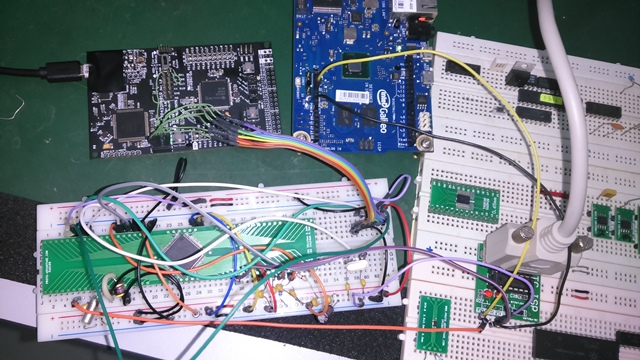
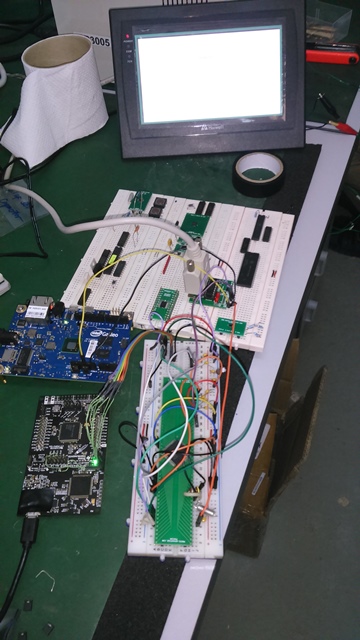
I'm currently working with a MSP432 launchpad driving a HMI display using modbus RTU protocol via RS232.
The problem I encountered the past few days:
- the built in DC to DC converter of the XDS110 gets burning hot from time that it is powered on.
-
Unusual hangups also encountered.


-
I used a MAX232 on P3.2 and P3.3 on these pins to convert the UART to RS232 level. The problem is I'm not getting the same echoed message expected. But the amazing thing, I have (2) subroutine that consist of reading the bit switch on the HMI panel and one is displaying the floating point number. If I use only one of them, things works fine but if im going to read the switch status and display a floating point number. both will not work.
- The same code I used to Intel Galileo and it works fine even if the (2) subroutines are in place. That's why I am able to identify it is not with the coding. below is the copy of my tested code.
byte y = 0;
int val;
byte lowCRC; //Low byte of CRC
byte highCRC;
byte valH; //final CRC value
byte valL;

byte slaveID = 0x01;
byte Func_Code;
byte StartAddrH;
byte StartAddrL;
byte numofPointsH;
byte numofPointsL;
byte storage[13];
byte storage1[6];
byte numofBytes;
byte LowbyteH;
byte LowbyteL;
byte HighbyteH;
byte HighbyteL;
byte a;
byte b;
byte c;
byte d;
byte data;
byte ByteCount;
float z = random(65535.00);
int LED = 13;

int x;

int addr = 0x23;
byte HIGH_BYTE = 0;
byte LOW_BYTE = 0;
void setup()
{
pinMode(LED,OUTPUT);
Serial.begin(9600);
Serial1.begin(9600); //port used to MAX232, P3.2 and P3.3

}

void loop(){
ModRTU_switch(); //function to read the bit switch
y = storage1[3]; //status of the bit switch
Serial.println(z,3); //value of the float
SerialPrintFloatIeee754(z); //get the binary representation of float
delay(500);

switch(y){

      case 0x01:                               //if bit switch is ON, send random floating number on the numerical input display
            z = random(0.000,65535.000);

            ModRTU_Read_PWM();                 //subroutine for writing to the numerical input display
            digitalWrite(LED,HIGH);            //turn on LED
            delay(500);
            break;


      default:                                //if bit switch is zero, turn off LED
          // z = 0.000;
        //   ModRTU_Read_PWM();
           digitalWrite(LED,LOW);
           delay(500);
           break;
}
  Serial1.flush();
}

void ModRTU_switch(){

slaveID = 0x01;
Func_Code = 0x01;
StartAddrH = 0x00;
StartAddrL = 0x00;
numofPointsH = 0x00;
numofPointsL = 0x01;

byte buffer[] = { slaveID, Func_Code, StartAddrH, StartAddrL, numofPointsH, numofPointsL};
int size = sizeof(buffer);
ModRTU_CRC(buffer, size);
byte buffer_w_checksum[] = { slaveID, Func_Code, StartAddrH, StartAddrL, numofPointsH, numofPointsL, lowCRC, highCRC};

Serial1.write(buffer_w_checksum,8);
if(Serial1.available() > 0){
while(Serial1.available()){
for(int i = 0; i < 6; i++){
storage1[i] = Serial1.read();
}
}
}

Serial.print("Slave ID is "); //print out of the echoed data from Modbus HMI master
Serial.println(storage1[0],HEX); //
Serial.print("Function Code is "); //
Serial.println(storage1[1],HEX); //
Serial.print("No. of points is "); //
Serial.println(storage1[2],HEX); //
Serial.print("Data is "); //
Serial.println(storage1[3],HEX); // status of the bit switch
Serial.print("Low CRC is "); //
Serial.println(storage1[4],HEX); //
Serial.print("High CRC is "); //
Serial.println(storage1[5],HEX); //

}

void ModRTU_Read_PWM(){

slaveID = 0x01;
Func_Code = 0x10;
StartAddrH = 0x00;
StartAddrL = 0x00;
numofPointsH = 0x00;
numofPointsL = 0x02;
numofBytes = 0x04;
LowbyteH = b;
LowbyteL = a;
HighbyteH = d;
HighbyteL = c;

byte buffer[] = { slaveID, Func_Code, StartAddrH, StartAddrL, numofPointsH, numofPointsL, numofBytes, LowbyteH, LowbyteL, HighbyteH, HighbyteL /*, highCRC, lowCRC*/};
int size = sizeof(buffer);
ModRTU_CRC(buffer, size);
byte buffer_w_checksum[] = { slaveID, Func_Code, StartAddrH, StartAddrL, numofPointsH, numofPointsL, numofBytes, LowbyteH, LowbyteL, HighbyteH, HighbyteL, lowCRC, highCRC};
Serial1.write(buffer_w_checksum,13);
if(Serial1.available() > 0){
while(Serial1.available()){
for(int i = 0; i < 13; i++){
storage[i] = Serial1.read();
}
}
}

Serial.print(storage[0]); //printout of the echoed data from modbus HMI master
Serial.print(storage[1]);
Serial.print(storage[2]);
Serial.print(storage[3]);
Serial.print(storage[4]);
Serial.print(storage[5]);
Serial.print(storage[6]);
Serial.print(storage[7]);
Serial.print(storage[8]);
Serial.print(storage[9]);
Serial.print(storage[10]);
Serial.print(storage[11]);
Serial.println(storage[12]);

Serial1.flush();
}

void ModRTU_CRC(byte buf[], int len)
{

uint16_t crc = 0xFFFF;
for (int pos = 0; pos < len; pos++) {
crc ^= (uint16_t)buf[pos]; // XOR byte into least sig. byte of crc
for (int i = 8; i != 0; i--) { // Loop over each bit
if ((crc & 0x0001) != 0) { // If the LSB is set
crc >>= 1; // Shift right and XOR 0xA001
crc ^= 0xA001;
}
else // Else LSB is not set
crc >>= 1; // Just shift right
}
}
valH = crc >> 8;
valL = crc & 0x00FF;
highCRC = valH;
lowCRC = valL;
val = crc;
// Note, this number has low and high bytes swapped, so use it accordingly (or swap bytes)

}

void SerialPrintFloatIeee754(float RealNumber)
{
byte* ArrayOfFourBytes;
ArrayOfFourBytes = (byte*) &RealNumber;

if (ArrayOfFourBytes[3]>=128){
Serial.print("1");
}
else{
Serial.print("0");
}

Serial.print((ArrayOfFourBytes[3]/64)%2, BIN);
Serial.print((ArrayOfFourBytes[3]/32)%2, BIN);
Serial.print((ArrayOfFourBytes[3]/16)%2, BIN);
Serial.print((ArrayOfFourBytes[3]/8)%2, BIN);
Serial.print((ArrayOfFourBytes[3]/4)%2, BIN);
Serial.print((ArrayOfFourBytes[3]/2)%2, BIN);
Serial.print( ArrayOfFourBytes[3]%2, BIN);
Serial.print((ArrayOfFourBytes[2]/128)%2, BIN);
////Serial.print(" ");
Serial.print((ArrayOfFourBytes[2]/64)%2, BIN);
Serial.print((ArrayOfFourBytes[2]/32)%2, BIN);
Serial.print((ArrayOfFourBytes[2]/16)%2, BIN);
Serial.print((ArrayOfFourBytes[2]/8)%2, BIN);
Serial.print((ArrayOfFourBytes[2]/4)%2, BIN);
Serial.print((ArrayOfFourBytes[2]/2)%2, BIN);
Serial.print( ArrayOfFourBytes[2]%2, BIN);
Serial.print((ArrayOfFourBytes[1]/128)%2, BIN);
Serial.print((ArrayOfFourBytes[1]/64)%2, BIN);
Serial.print((ArrayOfFourBytes[1]/32)%2, BIN);
Serial.print((ArrayOfFourBytes[1]/16)%2, BIN);
Serial.print((ArrayOfFourBytes[1]/8)%2, BIN);
Serial.print((ArrayOfFourBytes[1]/4)%2, BIN);
Serial.print((ArrayOfFourBytes[1]/2)%2, BIN);
Serial.print( ArrayOfFourBytes[1]%2, BIN);
Serial.print((ArrayOfFourBytes[0]/128)%2, BIN);
Serial.print((ArrayOfFourBytes[0]/64)%2, BIN);
Serial.print((ArrayOfFourBytes[0]/32)%2, BIN);
Serial.print((ArrayOfFourBytes[0]/16)%2, BIN);
Serial.print((ArrayOfFourBytes[0]/8)%2, BIN);
Serial.print((ArrayOfFourBytes[0]/4)%2, BIN);
Serial.print((ArrayOfFourBytes[0]/2)%2, BIN);
Serial.println( ArrayOfFourBytes[0]%2, BIN);

Serial.flush();

d = ArrayOfFourBytes[3];
c = ArrayOfFourBytes[2];
b = ArrayOfFourBytes[1];
a = ArrayOfFourBytes[0];

return;
}
Thanks,
Leo