


Other Parts Discussed in Thread: MSP430G2553, MSP430WARE
Hey everyone,
I'm working on a project that simulates a heart rate signal using the MSP430G2553, which is right now on the Launchpad. I'll try to explain everything I've done and what problems I'm having so I can get any help from you all.
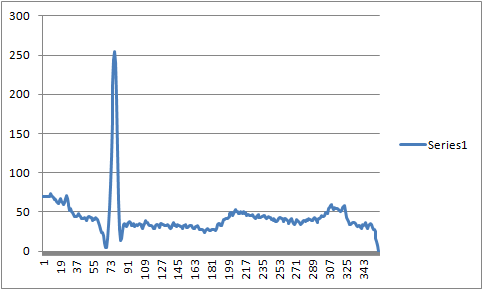
I am using previous patients data that is available online from an MIT-BIH database. Because of the limited flash on the MSP430, I'm trying to just repeat a 1 second signal which has 360 data points. These values range from -0.535mV to 0.84mV. I don't actually need to output that small of data, since my output signal will later be going through an Analog Front End to with filters and opamps to make it the desired amplitude. I just need the shape of the signal to match the data. So, I am scaling the data. The scaling factor is using this equation S = (2^n - 1)/(Max - Min), where n = 8 and that is used to scale each data point using this equation newValue = S*(data - Min). Then I just round the data to get rid of the decimal and end up with data between 0 and 256. So that's the data. When I graph these points in Excel, it looks correct, as shown here.
After I output the signal from P1.0, it goes through a filter
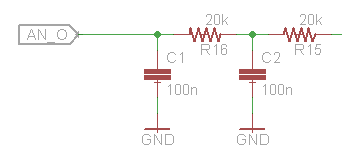
to see the analog output from the PWM signal. That is just an excerpt of the signal, but that's where I'm measuring it from right now. On an oscilloscope, this then gets distorted to look like this. The main issue I'm having is how large those two used to be small humps have become. I understand the chop in the signal since the repeating part doesn't match up nicely.

The program I am using was modified from the popular Simple DAC using PWM method found online. I'll paste the code.
I know this is a lot of information and a long post, but if anybody is able to just look through it, I would be very grateful. The main questions I have are
1) Does anybody have any insight into why those two bumps are so much larger than the excel graph or maybe why the peak isn't as large in comparison?
2) Also, since I'm using 256 PWM widths, my frequency is very fast. To make it more realistic, how would I go about increasing the frequency of the initial timer to output a much higher frequency signal without changing the shape of the signal.
Thank you all very much.
#include <msp430g2553.h>

unsigned char counter;				// Current location in wave array

unsigned char wave[360] = {
		69,
		69,
		69,
		69,
		69,
		69,
		69,
		69,
		74,
		71,
		69,
		.
		.
		. //keeps going
};

unsigned int i;						// Used for 'for' loops.

void main(void)
{
	WDTCTL = WDTPW + WDTHOLD;					// Stop WDT

	P1DIR |= BIT0;								// P1.0 output
	counter = 0;								// Reset counter

	// Initialize Timer
	CCTL0 = CCIE;								// CCR0 interrupt enabled
	CCTL1 = CCIE;								// CCR1 interrupt enabled
	CCR0 = 256;									// Set PWM period to 256 clock ticks
	CCR1 = wave[counter];						// Set first duty cycle value
	TACTL = TASSEL_2 + MC_1 + TAIE + TACLR;		// SMCLK, upmode, enable interrupt, clear TA1R

	_BIS_SR(LPM0_bits + GIE);					// Enter LPM0 w/ interrupt
}

/**
 * TimerA0 interrupt service routine
 **/
#pragma vector=TIMER0_A0_VECTOR
__interrupt void TIMER0_ISR(void)
{
	P1OUT |= BIT0;				// Set P1.0

	CCR1 = wave[counter];		// Set next duty cycle value
	counter += 1;				// Add Offset to CCR0
	if ( counter == 360)			// If counter is at the end of the array
	{
		counter = 0;			// Reset counter
	}
}

/**
 * TimerA1 Interrupt Vector (TAIV) handler
 **/
#pragma vector=TIMER0_A1_VECTOR
__interrupt void TIMER1_ISR(void)
{
	switch( TAIV )
	{
		case  2:				// CCR1 interrupt
			P1OUT &= ~BIT0;		// Clear P1.0 to determine duty cycle.
			break;
		default:
			break;
	}
}


