This thread has been locked.

If you have a related question, please click the "Ask a related question" button in the top right corner. The newly created question will be automatically linked to this question.

BQ34Z100: BQSTUDIO error code 1721 Chem Programming Failed

Part Number: BQ34Z100
Other Parts Discussed in Thread: , BQSTUDIO,

I also have this issue after replacing the BQ34Z100 device on the BQ34Z100EVM board.
The replacement device purchased recently from Digi-Key was not the -G version, but the issue occurs after the firmware update.
I downloaded and installed BQSTUDIO, ChemUpdate978, and sluc580.zip on my Vista 32bit computer with EV2300 ver 3.1r.

On BQSTUDIO start, the device detected is 0100_0_06 but BQ34Z100 does not appear in the target list.
When choosing BQ34Z100-G1 the follow warning is given:
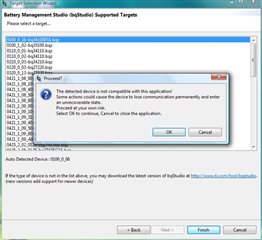
Should BQ34Z100 appear?

When I proceed,with the BQ34Z100-G1 target, BQSTUDIO opens fine.

The 1721 error comes when attempting to program a CHEMID selected from the Chemistry list.

  • I forgot to program the firmware.
    After doing so I get the following.

    How do I update the target bqz container?

  • Hi Rom,

    The list of all .bqz containers is from whenever you initially downloaded BQStudio. The reason that BQStudio is detecting device 0100_0_06 is that it know the firmware that is currently on the IC but that number does not specifically match a .bqz that you have from when you initially downloaded BQStudio. This shouldn't be a huge issue after programming in the correct firmware. The best way to update and get all of the newest .bqz containers is to get the newest version of BQStudio. But again, I don't see any big issue in your current application since the chemistry was successfully programmed.

    Best Regards,

    Jackson

  • Hi Jackson,

    FYI, my software is current.

    I downloaded and installed BQSTUDIO, the chem updater, and the firmware files yesterday.
    But BQSTUDIO didn't it contain BQ34Z100 in the target list.

    Does the firmware upgrade from V6 to V16 make the part BQ34Z100-G1 as far as BQSTUDIO is concerned?
    Then all should be fine going forward?

    Best Regards,

    Rom

  • I noticed that the BQ34Z100EVM product page

    https://www.ti.com/tool/BQ34Z100EVM

    lists the support software as

    bq34z100 Evaluation Software (Rev. A) — SLUC366A.ZIP (54775KB)
    Does this need be installed in addition to BQSTUDIO?
  • Hi Rom,

    The BQ34Z100 Evaluation Software contains an older GUI that was used in the past in place of BQStudio. It is not necessary to install this.

    The .bqz issue is almost certainly just a mismatch from .srec version (the firmware you have programmed) to .bqz version (the register map the BQStudio uses to display everything correctly). Since all of your files are current in BQStudio, I would recommend downloading the bq34z100 device firmware from the BQ34Z100-G1 product page on ti.com. This will ensure that the firmware on the device is the G1 version. You should be able to upload this firmware to the device through the programming plugin within BQStudio. If you have already done this step and BQStudio does not autodetect upon launching, I can find the appropriate .bqz file and send it your way.

    Let me know is this helps or if you need the BQ34Z100-G1 .bqz.

    Thanks,

    Jackson

  • Hi Jackson,

    I thought that might be the case with the older GUI.


    The confusion comes from it's placement on https://www.ti.com/tool/BQ34Z100EVM as the primary download software, with the newer BQSTUDIO  mentioned at the bottom as a related resource.

    No issues opening BQSTUDIO since updating the device firmware.

    Thank you,

    Rom