This thread has been locked.

If you have a related question, please click the "Ask a related question" button in the top right corner. The newly created question will be automatically linked to this question.

CCSTUDIO: Debugger runtime source / symbols resolve won't select right source with excluded folders ...

Expert 2105 points

Part Number: CCSTUDIO

Not a critical one

If I have 2 folders with identically named sources, and in my CCS project settings I have multiple Build configurations which enable, disable specific target sub-folders, it seems the CCS debugger Source loop up does not care for this, and includes all available sub-folders (in my case multiple targets socs).

The built sources are correct , as checked.

At runtime, this gets confusing as debug /break points trigger opening wrong source files while stepping through the code, as the CCS /debugger navigation can be opening wrong file, from another sub-folder / not used.

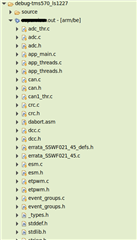
E.g;

So in the above, while I debug on 1227, it wrongly opens for me files from 0714 target, even though that's disabled.  

Of course, I should be able to change the debug configuration and prob remove the default / auto inserted Source Look Up path and re-insert all manually, but this is very cumber some if I have many configurations.

Don't see anything better besides removing entirely the excluded folders, which I also don't want to do (Removing entirely means they disappear from all configurations).

  • Hello,

    The exclusion of file/folders in the Project Explorer only apply to project builds. It has no impact on debugging (source lookup). Source lookup works in multiple ways. The default is to use the relative path information found in the debug symbols.

    For example, in the simple example below, My project has one source file "blink.c" in the root directory of the project folder. The *.out file is built in a "Debug" subdirectory. The symbols in the outfile has a reference to blink.c via relative path from the original location of the outfile:

    You can use the Modules view to see what the relative path lookup is for the source file and how it is resolving to the source file it opens in the editor.

    If the source file cannot be found using the relative path in the symbols, then it will look in specified debug source search paths and the active project (the files in the active project are automatically added to the source look up).

    Hope this helps

    ki

  • I understand about the relative paths, and that debugging uses different look up - and I think my point was it would be nice if it did care about which folders at build time were excluded , and thus should not be looked into.   Isn't nice?

    On the other hand, I tried the Modules view , and I have nothing : the window is empty.  Should I trigger this somehow?

    If I expand the target build (the *.out  which is actually elf file), then under Project explorer , that elf would expand and list all the sources files that went into building it.  And at THAT view, everything is correct, and excluded folders work - which is what I was suggesting in OP.

    However, debugger ,  just looks in __ALL__ sources , and , if seems / appears to me, that say, if it finds source file "can.c"  in the first sub-folder which just happens to be alphabetically first, then it will use that "can.c" as the file currently debugged - which will be WRONG because it is not the one that was built.  So this source look up doesn't work properly  if you use CCS defaults where it  looks into sources _relative_ to  project as I understand it : there is a project folder right at the top at the Source Lookup Path.

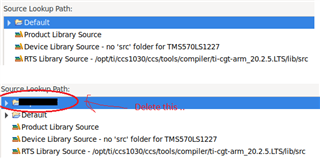
    Actually deleting that "project" folder  from the source look up, and leaving only "Default" , seems remedies this issue with my ccs debug configuration - BUT I have to do this everytime debug configuration gets created.

  • I think my point was it would be nice if it did care about which folders at build time were excluded , and thus should not be looked into.   Isn't nice?

    Yes that would certainly make things more configurable

    On the other hand, I tried the Modules view , and I have nothing : the window is empty.  Should I trigger this somehow?

    You need to be in a debug session and have the symbols loaded. Please see the below video for more information on the Modules view:

    https://dev.ti.com/tirex/explore/node?node=APVIzRhtpuf-7AMAb9iu3w__FUz-xrs__LATEST

    If I expand the target build (the *.out  which is actually elf file), then under Project explorer , that elf would expand and list all the sources files that went into building it.  And at THAT view, everything is correct, and excluded folders work - which is what I was suggesting in OP.

    Can you provide a screenshot of what you mean? I don't think i see what you are referring to.

    So this source look up doesn't work properly  if you use CCS defaults where it  looks into sources _relative_ to  project as I understand it : there is a project folder right at the top at the Source Lookup Path.

    it will be relative to the path where the *.out file was generated.

    Can you provide the *.out file so that I can take a look? It will help me understand and explain better. You can start a private E2E conversation with me if you wish to share privately.

    Thanks

    ki

  • Can you provide a screenshot of what you mean? I don't think i see what you are referring to.

    That part actually not dissimilar in what Modules displays - now I got that going:

    .. And , in both cases this would have correct full path to the can.c file .  BUT,  only with the following change in Source look up - i'm deleting project's top path as highlighted 

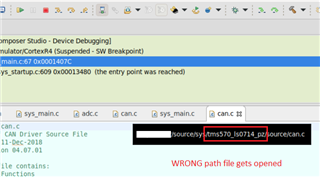
    .. only then it resolves to correct path - the 1227 variant, and not to other, as below : ( shows wrong file gets popped open):

    Hope my snapshots explain what I meant.

  • What exact CCS version are you using?

    Which compiler are you using (vendor and version)?

    Which host OS are you using? Is it Fedora 33?