This thread has been locked.

If you have a related question, please click the "Ask a related question" button in the top right corner. The newly created question will be automatically linked to this question.

OMAPL138B-EP: Uart_printf garbled

Part Number: OMAPL138B-EP
Other Parts Discussed in Thread: OMAPL138

Hi,

SDK: ti-processor-sdk-rtos-omapl138-lcdk-06.03.00.106-Windows

board: LCDKOMAPL138

GEL: ccsv8\ccs_base\emulation\boards\lcdkomapl138\gel

When testing NIMU_emacExampleClient_lcdkOMAPL138ARMBiosExampleProject on ARM9, uart_printf outputs garbled characters. I can receive BOOTME correctly. Please help check.

  • Hi Nancy,

    My name is Andrew, and I would be more than happy to assist you with this question.  Thank you for the information that you have provided. I am consulting with my colleagues on this now and we will try to have an answer/followup for you within the next 24-48 hours.

    Best regards,

    Andrew

  • Hi Nancy,

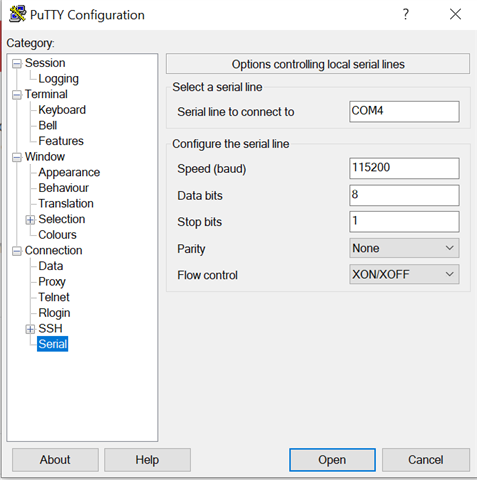
    I have a couple follow up questions: 1) how did you determine which com port, of those the evm provided, to connect to on your PC?, 2) could you post a screenshot of your full serial settings in putty (the last tab on the bottom left of the putty interface)?

    Thanks,

    Andrew

  • Hi,

    I checked device manager-> ports

  • The BOOTME and runtime application are not using the same clocks. The BOOTME is printed by the device boot ROM, with the PLL clocks in bypass mode The UART logs that you are printing from the application are using UART driver and will setup the UART clocks based on PLL0_SYSCLK2 values configured.

    Are you seeing this issue with TI LCDK platform? What is the GEL file you are running? Can you first run the UART examples before testing NIMU examples. The BOOTME definitely helps sanity test that the UART HW pins are connected correctly. The garbled messages are most likely due to clocking issues so we need to understand that the value set in your GEL file for SYSCLK2, matches with the UART module clock used in UART_soc.c file

    Regards,

    Rahul

  • Hi,

    Yes, i tested on TI LCDK platform, and i have test UART_BasicExample_lcdkOMAPL138_armExampleProject as well, it's also garbled.

    I used GEL: ccsv8\ccs_base\emulation\boards\lcdkomapl138\gel

    ARM9_0: Output: PLL0 init done for Core:300MHz, EMIFA:25MHz
    ARM9_0: Output: DDR initialization is in progress....
    ARM9_0: Output: PLL1 init done for DDR:150MHz
    ARM9_0: Output: Using DDR2 settings
    ARM9_0: Output: DDR2 init for 150 MHz is done

    So PLL0_SYSCLK2 = 150MHz

    Where is UART module clock defined in UART_soc.c?

  • The UART module clock in UART_soc.c found in the folder pdk_omapl138_1_0_10\packages\ti\drv\uart\soc\omapl138 and it is set to 150 MHz. 

    I am not sure if this is related to a HW issue that the output appears to be garbled. The base UART Example is system tested so we don`t expect the base example to have any issues.