This thread has been locked.

If you have a related question, please click the "Ask a related question" button in the top right corner. The newly created question will be automatically linked to this question.

AM6548: How to extend ramdisk size?

Part Number: AM6548

Hi Ti,

We tried to test ramdisk on AM6548 EVM board.

We have mount /dev/ram0 to my folder, and found the size is only 2.x M. It's too small for us.
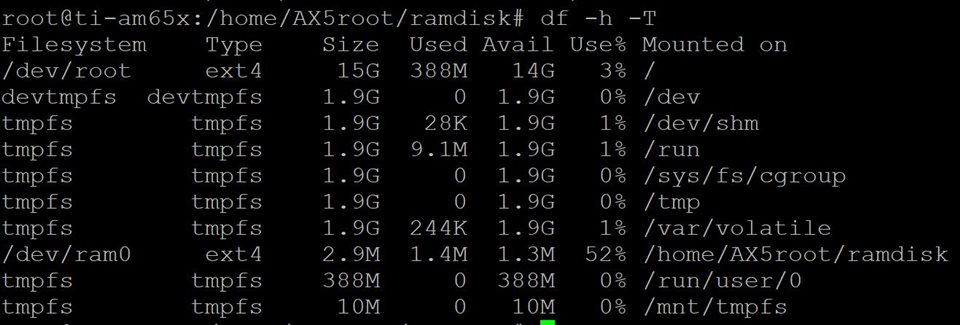
We want to know how can we extend the size more bigger?

  • Hi Eric,

    -------------------------------------Creating a RAMDISK FS image------------------------------------------------

    dd if=/dev/zero of=test bs=1M count=10
    mkfs.ext2 test


    this creates an empty file named test of size 10MB....

    create an empty directory dir & mount that using:

    sudo mount -o loop test dir
    

    copy all the contents to dir directpry then unmount using:

    sudo umount dir

    This should create a ramdisk image test for 10MB.

    Best Regards,
    Keerthy

  • Hi ,

    I have seen the solution you provide and will try it later.

    But I have some questions.

    1.There are ram0~15 under /dev/, if all of them for ramdisk use case? Because it seems you use dd, but not use /dev/ram* directly?

    2.If /dev/ram* are for ramdisk use case, can we disable it? If we cannot disable it, it means linux default will need at least 2MB*16, right?

    Thanks.

    Eric

  • Hi ,

    I have tried it. My command is as below:


    dd if=/dev/zero of=/dev/ram0 bs=1M count=10
    mkfs.ext2 /dev/ram0
    mount -o loop /dev/ram0 /home/AX5root/ramdisk
    chmod 777 /home/AX5root/ramdisk

    After that, I tried to look the size of it. The size is not correct.

    /dev/loop0 ext2 3.9M 1.4M 2.4M 37% /home/AX5root/ramdisk

    It looks like the size only 4M. Anything mistake?

    Thanks.

    Eric

  • Eric,

    I am not sure why you want to create under /dev?

    Just create it in a temporary folder. You eventually want to use it in target right?

    In your home folder do:

    dd if=/dev/zero of=ramdisk bs=1M count=10

    Output:

    10+0 records in
    10+0 records out
    10485760 bytes (10 MB, 10 MiB) copied, 0.00424803 s, 2.5 GB/s


    mkfs.ext2 ramdisk

    mke2fs 1.44.1 (24-Mar-2018)
    Discarding device blocks: done
    Creating filesystem with 10240 1k blocks and 2560 inodes
    Filesystem UUID: 55268c00-aa14-4b10-851e-05d39c0399d7
    Superblock backups stored on blocks:
    8193

    Allocating group tables: done
    Writing inode tables: done
    Writing superblocks and filesystem accounting information: done

    sudo mount -o loop ramdisk dir

    Copy something to dir


    sudo umount dir
    a0393675@a0393675ula:~$ ls -l ramdisk
    -rw-rw-r-- 1 a0393675 a0393675 10485760 May 21 12:54 ramdisk

    I can see that the size is 10MB. You can accommodate files up to 10MB.

    Best Regards,
    Kerthy

  • Hi ,

    I did twice as you said.

    1.dd if=/dev/zero of=ramdisk bs=1M count=10

    /dev/loop0    ext4    8.7M  172K  7.9M   3% /home/AX5root/ramdisk

    The size is correct. And when I tried to write a file to ramdisk, the speed is like the result of writing to emmc.

    For example, test writing 1MB file for 10000 times with 3rd Application.

    Tmax=335539, Tmin=50648, Tavg=62827us

    2.dd if=/dev/zero of=/dev/ram0 bs=1M count=10

    /dev/loop0 ext4 2.9M 1.9M 774K 71% /home/AX5root/ramdisk

    The size is not correct. But the writing speed is much faster than testing with (1).

    Tmax=50975, Tmin=30626, Tavg=30965us.

    So, I want to double check if there is different between the 2 cases?

    Thanks.

    Eric

  • Eric,


    The size is correct. And when I tried to write a file to ramdisk, the speed is like the result of writing to emmc.

    For example, test writing 1MB file for 10000 times with 3rd Application.

    Tmax=335539, Tmin=50648, Tavg=62827us

    So where is your file system? eMMC or SD?

    .dd if=/dev/zero of=/dev/ram0 bs=1M count=10

    /dev/loop0 ext4 2.9M 1.9M 774K 71% /home/AX5root/ramdisk

    The size is not correct. But the writing speed is much faster than testing with (1).

    Tmax=50975, Tmin=30626, Tavg=30965us.

    So, I want to double check if there is different between the 2 cases?

    /dev/ram0?

    This is on your target AM65 device or Linux host PC?

    Also https://e2e.ti.com/support/processors-group/processors/f/791/t/1003526 is this related thread?

    - Keerthy

  • Hi ,

    My file system is on eMMC, and all the experiments are on Ti AM6548 EVM board.

    So, /dev/ram0 is on AM6548 EVM also.


    Also e2e.ti.com/.../1003526 is this related thread?

    --> yes, it's related. Because we are trying to figure out the capacity of capacitance we need to save our data when power of. Our data size maybe 1MB or 2MB. Or, we need other solution to do this.

    Thanks.

    Eric

  • Eric,

    I am not sure why you are particular about creating files under /dev directory. It is a special directory.

    https://tldp.org/LDP/Linux-Filesystem-Hierarchy/html/dev.html#:~:text=%2Fdev%20is%20the%20location%20of,a%20file%20or%20a%20directory.&text=This%20file%20represents%20your%20speaker,re%2Ddirected%20to%20your%20speaker.

    Try any othe folder. /dev/ files are not persistent. You can try with SD card. Once Linux boots all the device files are enumerated under
    /dev but once you plug your SD card out from EVM and insert into a PC & examine ./dev directory you will not see the files.

    So that will not be a true test for getting the eMMC efficiency.

    Best Regards,
    Keerthy

  • Hi ,

    Ok, I don't have further question.

    Please help on another emmc thread.

    Close this thread.

    Thanks.

    Eric