This thread has been locked.

If you have a related question, please click the "Ask a related question" button in the top right corner. The newly created question will be automatically linked to this question.

TMDSLCDK6748: C6748 LCDK Debugging Issue

Part Number: TMDSLCDK6748
Other Parts Discussed in Thread: OMAP-L138, OMAPL138, CCSTUDIO

Hello,

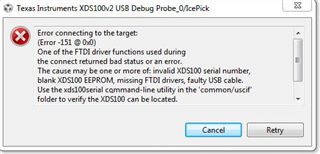
I am new to EVM C6748. When i run my C6748 LCDK in debugging mode, an error appears. I am using CCS v6.1.3.
For target configurations, i am using XDS100v2 USB Debug Probe in target configuration file.
I don't have any JTAG Emulator Debugger. For Debugging, i am using USB Debugging
Probe that come with LCDK.
I have searched a lot to find solution of this problem. But could'nt find any.
Please help me, how to solve this problem.
Error is:
  • Hi,

    The C6748 LCDK does not have onboard emulator, as mentioned in the User's Guide, section 1.1 Features:

    • 14-pin JTAG header (No onboard emulator; external emulator is required)

    Regards,

    Jianzhong

  • I want to make an audio in and audio out sample code. Just like this example code designed for OMAP-L138 Experimenter Kit present in "Digital Signal Processing Application on the Texas Instrument C6748 Processor" Book. 

    #include "L138_aic3106_init.h"

     interrupt void interrupt4(void) {
     uint32_t sample ;
     sample = input_sample ( ) ;
     output_sample ( sample ) ;
     return ;
     }

     void main ( void) {
     L138_initialise_intr(FS_48000_HZ , ADC_GAIN_0DB, DAC_ATTEN_0DB) ;
     while ( 1 ) ;
     }

    But for C6748LCDK or OMAP L138 LCDK, there is no such header file like "L138_aic3106_init.h" that can be included. If this header file is for EVM, then for LCDK, which header file for CODEC initialization could be used. 

    Meanwhile, I have added following files:

    In include options, I have added:

    "C:\ti\C6748_Files\pdk_C6748_2_0_0_0\C6748_StarterWare_1_20_03_03\include\c674x\c6748"
    "C:\Program Files (x86)\Texas Instruments\C6000 Code Generation Tools 7.3.1\include"

    And in File search path, I have added following files:

    "C:\ti\C6748_Files\pdk_C6748_2_0_0_0\C6748_StarterWare_1_20_03_03\binary\c674x\cgt_ccs\c6748\lcdkC6748\platform\Debug\platform.lib"
    "C:\ti\C6748_Files\pdk_C6748_2_0_0_0\C6748_StarterWare_1_20_03_03\binary\c674x\cgt_ccs\c6748\drivers\Debug\drivers.lib"

    Are these files enough or should I add some more files? Also i could'nt find any audio example running on LCDK. Could you please refer me, If any.

  • Hi,

    Processor-SDK for OMAP-L137 has a demo of audio-preprocessing which should be portable to OMAP-L138. After you download and install the SDK, the demo is located at processor_sdk_rtos_omapl137_6_03_00_106\demos\audio-preprocessing.

    Regards,

    Jianzhong 

  • okay, I have downloaded and installed SDK that you recommended. In audio-preprocessing folder, I found some examples but that are bios based. I am very new of OMAP-L138 LCDK and C6748 LCDK. So, I am in learning and exploring phase. Please guide me about implementation of audio processing examples that are not bios based. I will be very grateful to you.

    Thanks!!!

  • Hi,

    The Processor SDK includes an audio benchmark starterkit which has a few basic signal processing examples. This may be a starting point for you. Please use commands below to create the CCS projects:

    C:\ti\processor_sdk_rtos_omapl138_6_03_00_106>setupenv.bat
    C:\ti\processor_sdk_rtos_omapl138_6_03_00_106>cd demos\audio-benchmark-starterkit
    C:\ti\processor_sdk_rtos_omapl138_6_03_00_106\demos\audio-benchmark-starterkit>BenchmarkProjectCreate.bat OMAPL138 all
    

    Then you'll find the created CCS projects in processor_sdk_rtos_omapl138_6_03_00_106\demos\audio-benchmark-starterkit\BenchmarkProjects.

    Regards,

    Jianzhong

  • Thank you for providing me the starting point. I'll run these projects as you recommended. 

  • Hi,

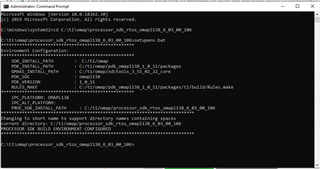
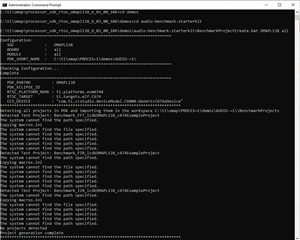
    I have run these commands that you mentioned. But I am facing an error. Please help me and provide the solution.

  • Also, I have tried by adding environment path variables found by running setupenv.bat command, in system environment variables. But still the error is not solved. 

    The variables the I have added are:

    SDK_INSTALL_PATH : C:/ti/omap
    PDK_INSTALL_PATH : C:/ti/omap/pdk_omapl138_1_0_11/packages

  • Hi,

    Please try to install the SDK to C:\ti instead of C:\ti\omap. Due to Windows limitation, directory path may be over the limit if you install the SDK to C:\ti\omap.

    Regards,

    Jianzhong

  • Hi, 

    I have tried by installing the OMAP SDK in the path that you mentioned, i.e C:\ti. But still the error remains same. 

    The output of the commands is given below. Please suggest me what to do now. Thanks!!!

    ############################################################################

    Microsoft Windows [Version 10.0.18362.30]
    (c) 2019 Microsoft Corporation. All rights reserved.

    C:\Windows\system32>cd C:/

    C:\>cd processor_sdk_rtos_omapl138_6_03_00_106
    The system cannot find the path specified.

    C:\>cd ti/processor_sdk_rtos_omapl138_6_03_00_106

    C:\ti\processor_sdk_rtos_omapl138_6_03_00_106>setupenv.bat
    'findstr' is not recognized as an internal or external command,
    operable program or batch file.
    ***************************************************
    Environment Configuration:
    ***************************************************
    SDK_INSTALL_PATH : C:/ti
    PDK_INSTALL_PATH : C:/ti/pdk_omapl138_1_0_11/packages
    GMAKE_INSTALL_PATH : C:/ti/xdctools_
    PDK_SOC : omapl138
    PDK_VERSION : 1_0_11
    RULES_MAKE : C:/ti/pdk_omapl138_1_0_11/packages/ti/build/Rules.make
    ***************************************************
    IPC_PLATFORM: OMAPL138
    IPC_ALT_PLATFORM:
    PROC_SDK_INSTALL_PATH : C:/ti/processor_sdk_rtos_omapl138_6_03_00_106
    **************************************************************************
    Changing to short name to support directory names containing spaces
    current directory: C:/ti/processor_sdk_rtos_omapl138_6_03_00_106
    PROCESSOR SDK BUILD ENVIRONMENT CONFIGURED
    **************************************************************************

    C:\ti\processor_sdk_rtos_omapl138_6_03_00_106>cd demos/audio-benchmark-starterkit

    C:\ti\processor_sdk_rtos_omapl138_6_03_00_106\demos\audio-benchmark-starterkit>BenchmarkProjectCreate.bat OMAPL138 all
    =========================================================================
    Configuration:
    SOC : OMAPL138
    BOARD : all
    MODULE : all
    PDK_SHORT_NAME : C:\ti\PROCES~1\demos\AUDIO-~1\
    =========================================================================
    Checking Configuration...
    Complete
    =========================================================================
    PDK_PARTNO : OMAPL138
    PDK_ECLIPSE_ID :
    RTSC_PLATFORM_NAME : ti.platforms.evm6748
    RTSC_TARGET : ti.targets.elf.C674
    CCS_DEVICE : "com.ti.ccstudio.deviceModel.C6000.GenericC674xDevice"
    *****************************************************************************
    Detecting all projects in PDK and importing them in the workspace C:\ti\PROCES~1\demos\AUDIO-~1\\BenchmarkProjects
    Detected Test Project: Benchmark_FFT_lcdkOMAPL138_c674ExampleProject
    The system cannot find the path specified.
    Copying macros.ini
    The system cannot find the file specified.
    The system cannot find the path specified.
    The system cannot find the path specified.
    The system cannot find the path specified.
    The system cannot find the path specified.
    Detected Test Project: Benchmark_FIR_lcdkOMAPL138_c674ExampleProject
    The system cannot find the path specified.
    Copying macros.ini
    The system cannot find the file specified.
    The system cannot find the path specified.
    The system cannot find the path specified.
    The system cannot find the path specified.
    The system cannot find the path specified.
    Detected Test Project: Benchmark_IIR_lcdkOMAPL138_c674ExampleProject
    The system cannot find the path specified.
    Copying macros.ini
    The system cannot find the file specified.
    The system cannot find the path specified.
    The system cannot find the path specified.
    The system cannot find the path specified.
    The system cannot find the path specified.
    No projects detected
    Project generation complete
    *****************************************************************************

  • You need to use CCS 9.3 as mentioned in the Processor-SDK download page: https://www.ti.com/tool/download/PROCESSOR-SDK-RTOS-OMAPL138#downloads. Please download and install CCS 9.3 and try again.

    Thanks and regards,

    Jianzhong

    P.S. I'll be off till Friday June 18. I'll continue to help you after I'm back to work in the following week.

  • Okay, Thank you for info.

    Okay, I will try with CCS 9.3 and then let you know the result.

    Regards