This thread has been locked.

If you have a related question, please click the "Ask a related question" button in the top right corner. The newly created question will be automatically linked to this question.

TDA4VM: TDA4 udp

Part Number: TDA4VM

hi expert

sdk7.3 qnx+rtos 

When I use SGMII MAC2MAC driven by cpsw9g,and test communication using iperf3 udp,i have some problems

problem 1:

SOC1 COMMAND:

io-pkt-v6-hc -d cpsw9g tx_descriptor_cnt=256,rx_descriptor_cnt=256

ifconfig an0 192.168.0.100

iperf3 -s

SOC2 COMMAND:

io-pkt-v6-hc -d cpsw9g tx_descriptor_cnt=256,rx_descriptor_cnt=256

ifconfig an0 192.168.0.101

iperf3 -c 192.168.0.100 -u -p 5201  -t 10 -i 1 -w 200k

then i run the soc2 command four seconds later ,SOC2 No response from terminal ,SOC1  running log is next

Server listening on 5201
-----------------------------------------------------------
Accepted connection from 192.168.0.101, port 65533
[  5] local 192.168.0.100 port 5201 connected to 192.168.0.101 port 65535
[ ID] Interval           Transfer     Bitrate         Jitter    Lost/Total Datagrams
[  5]   0.00-1.00   sec   104 KBytes   853 Kbits/sec  0.128 ms  0/73 (0%)
[  5]   1.00-2.00   sec   128 KBytes  1.05 Mbits/sec  0.000 ms  0/90 (0%)
[  5]   2.00-3.00   sec  28.5 KBytes   234 Kbits/sec  0.000 ms  0/20 (0%)
[  5]   3.00-4.00   sec  0.00 Bytes  0.00 bits/sec  0.000 ms  0/0 (0%)
[  5]   4.00-5.00   sec  0.00 Bytes  0.00 bits/sec  0.000 ms  0/0 (0%)
[  5]   5.00-6.00   sec  0.00 Bytes  0.00 bits/sec  0.000 ms  0/0 (0%)
[  5]   6.00-7.00   sec  0.00 Bytes  0.00 bits/sec  0.000 ms  0/0 (0%)
[  5]   7.00-8.00   sec  0.00 Bytes  0.00 bits/sec  0.000 ms  0/0 (0%)
[  5]   8.00-9.00   sec  0.00 Bytes  0.00 bits/sec  0.000 ms  0/0 (0%)
[  5]   9.00-10.00  sec  0.00 Bytes  0.00 bits/sec  0.000 ms  0/0 (0%)
[  5]  10.00-11.00  sec  0.00 Bytes  0.00 bits/sec  0.000 ms  0/0 (0%)
[  5]  11.00-12.00  sec  0.00 Bytes  0.00 bits/sec  0.000 ms  0/0 (0%)
[  5]  12.00-13.00  sec  0.00 Bytes  0.00 bits/sec  0.000 ms  0/0 (0%)
[  5]  13.00-14.00  sec  0.00 Bytes  0.00 bits/sec  0.000 ms  0/0 (0%)
[  5]  14.00-15.00  sec  0.00 Bytes  0.00 bits/sec  0.000 ms  0/0 (0%)
[  5]  15.00-16.00  sec  0.00 Bytes  0.00 bits/sec  0.000 ms  0/0 (0%)
[  5]  16.00-17.00  sec  0.00 Bytes  0.00 bits/sec  0.000 ms  0/0 (0%)
[  5]  17.00-18.00  sec  0.00 Bytes  0.00 bits/sec  0.000 ms  0/0 (0%)
[  5]  18.00-19.00  sec  0.00 Bytes  0.00 bits/sec  0.000 ms  0/0 (0%)
[  5]  19.00-20.00  sec  0.00 Bytes  0.00 bits/sec  0.000 ms  0/0 (0%)

if i test communication using iperf3 with iperf3 -c 192.168.0.100 -p 5201  -t 10 -i 1 -w 200k , do not use udp it is ok

Does mac2mac not support UDP transmission?

What problem caused this ?

how can i fix this?

problem 2:

at the some board sdk7.3 qnx+rtos 

i use RGMII + PHY drived by cpsw9g 

i test communication tda4 and pc,

pc command is iperf3 -s -d 

tda4 use the same command  “iperf3 -c 192.168.0.100 -u -p 5201  -t 10 -i 1 -w 200k” 

it runs ok but thepacket loss rate is too high ,The packet loss rate is as high as 75%,CPU utilization is basically 0.01%

What problem caused this ?

how can i fix this?

  • hi expert

    problem 2 Has been resolved

    but problem 1 ,TWO pcs TDA4 SGMII3 MAC2MAC  communication  test uesing iperf3 -c  -u Still exist

  • Hi,

    but problem 1 ,TWO pcs TDA4 SGMII3 MAC2MAC  communication  test uesing iperf3 -c  -u Still exist

    MAC2MAC has nothing to do with UDP or TCP/IP. It's likely that there is a basic issue with the connection. How have you verified SGMII MAC 2 MAC ? Do you have any Hardware statistics ?

    Can you run the GEL files located in pdk/packages/ti/drv/enet/tools/debug_gels/ and get the statistics dump ?

    Regards

    Vineet

  • hi vineet

    thanks for your replay

    Maybe you don't understand my description ,i use sdk 7.3 QNX + RTOS

    I use two tda4. They communicate with sgmii4. At this time, only sgmii4 is working normally between the two tda4 I think The connection has been successfully .

    the log is 

    MCU2_0]      4.155380 s: ETHFW: Init ... !!!
    [MCU2_0]      4.191307 s: CPSW_9G Test on MAIN NAVSS
    [MCU2_0]      4.227813 s: EnetPhy_setNextState: PHY 12: 0 -> 0
    [MCU2_0]      4.292763 s: CpswMacPort_configSgmii: MAC 3: Configure SGMII in SGMII_FORCEDLINK mode
    [MCU2_0]      4.317759 s: CpswMacPort_configSgmii: MAC 4: Configure SGMII in SGMII_AUTONEG_SLAVE mode
    [MCU2_0]      4.474032 s: CpswMacPort_checkSgmiiStatus: MAC 4: SGMII link parter config port: link up: 1-Gbps Full-Duplex
    [MCU2_0]      4.498791 s: EnetPhy_setNextState: PHY 15: 0 -> 0
    [MCU2_0]      4.498848 s: PHY 1 is alive
    [MCU2_0]      4.500581 s: ETHFW: Version   : 0.01.01
    [MCU2_0]      4.500632 s: ETHFW: Build Date: Sep  6, 2021
    [MCU2_0]      4.500658 s: ETHFW: Build Time: 14:37:36
    [MCU2_0]      4.500677 s: ETHFW: Commit SHA: ff9309f1
    [MCU2_0]      4.500720 s: ETHFW: Init ... DONE !!!
    [MCU2_0]      4.500749 s: ETHFW: Remove server Init ... !!!
    [MCU2_0]      4.501989 s: Remote demo device (core : mcu2_0) .....
    [MCU2_0]      4.502050 s: ETHFW: Remove server Init ... DONE !!!
    [MCU2_0]      4.507758 s: Host MAC address: 70:ff:76:1d:92:b2
    
    
    [MCU2_0]      4.202036 s: ETHFW: Init ... !!!
    [MCU2_0]      4.238128 s: CPSW_9G Test on MAIN NAVSS
    [MCU2_0]      4.274709 s: EnetPhy_setNextState: PHY 12: 0 -> 0
    [MCU2_0]      4.339576 s: CpswMacPort_configSgmii: MAC 3: Configure SGMII in SGMII_FORCEDLINK mode
    [MCU2_0]      4.369384 s: CpswMacPort_checkSgmiiStatus: MAC 4: SGMII link parter config port: link up: 1-Gbps Full-Duplex
    [MCU2_0]      4.393600 s: EnetPhy_setNextState: PHY 15: 0 -> 0
    [MCU2_0]      4.393649 s: PHY 1 is alive
    [MCU2_0]      4.395380 s: ETHFW: Version   : 0.01.01
    [MCU2_0]      4.395430 s: ETHFW: Build Date: Aug 18, 2021
    [MCU2_0]      4.395453 s: ETHFW: Build Time: 16:22:29
    [MCU2_0]      4.395474 s: ETHFW: Commit SHA: 564830f6
    [MCU2_0]      4.395498 s: ETHFW: Init ... DONE !!!
    [MCU2_0]      4.395545 s: ETHFW: Remove server Init ... !!!
    [MCU2_0]      4.396736 s: Remote demo device (core : mcu2_0) .....
    [MCU2_0]      4.396790 s: ETHFW: Remove server Init ... DONE !!!
    [MCU2_0]      4.402453 s: Host MAC address: 70:ff:76:1d:92:c2
    

    then i  use command on one of sgmii4 like

    ifconfig an0 192.168.0.100

    iperf3 -s

    another tda4 use next command

    ifconfig an0 192.168.0.101

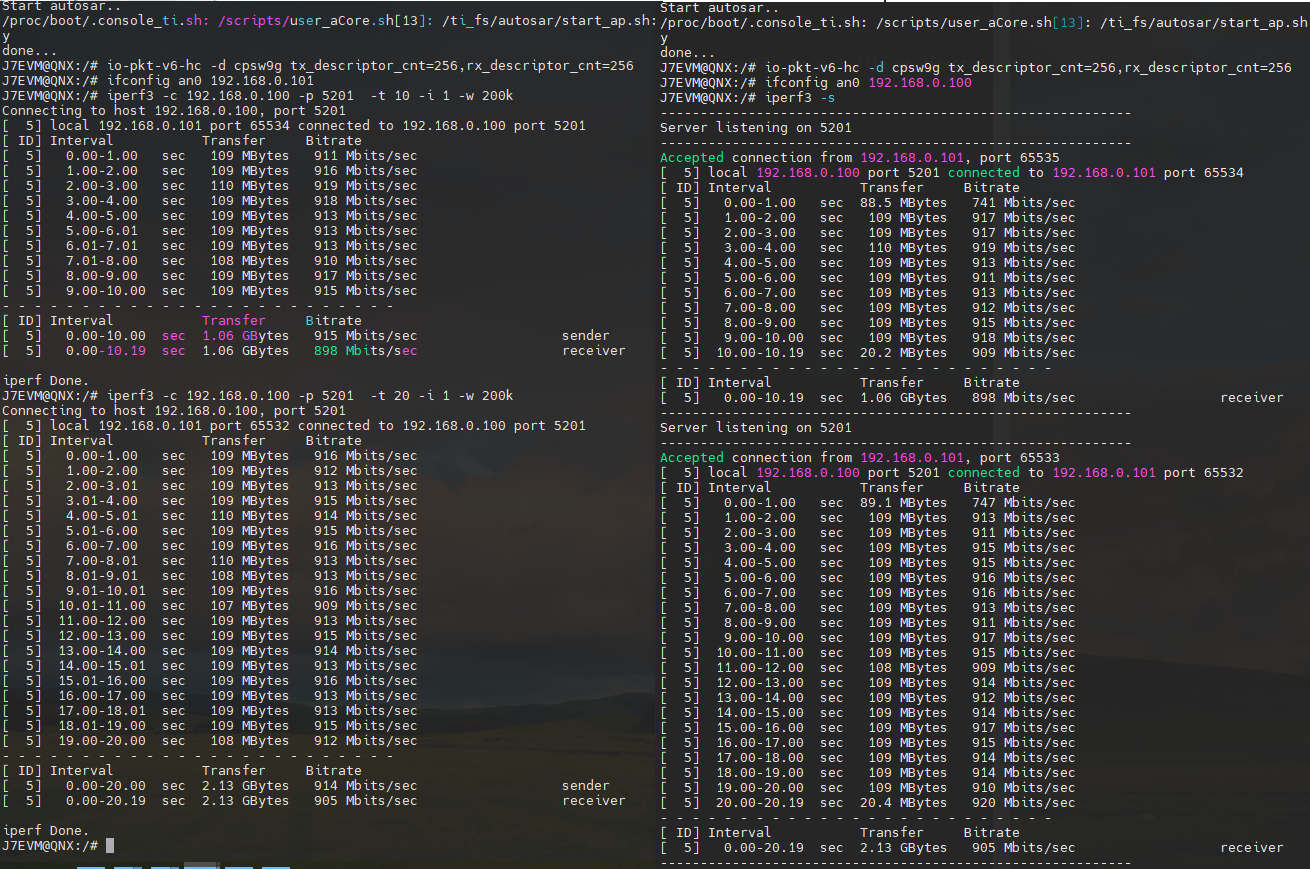
    iperf3 -c 192.168.0.100 -p 5201  -t 10 -i 1 -w 200k 

    the communicate is ok the log is                     

    but if i use 

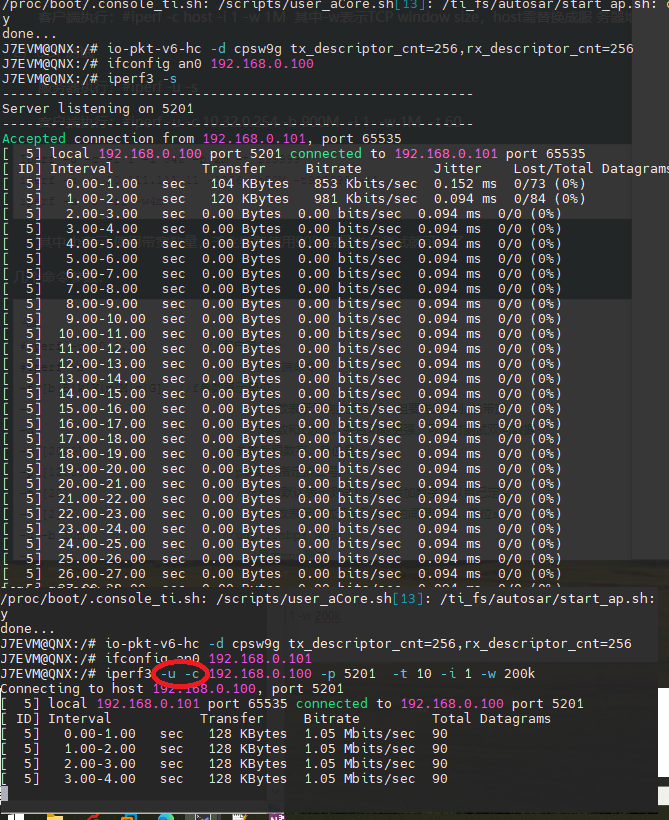
    iperf3 -u -c 192.168.0.100 -p 5201  -t 10 -i 1 -w 200k 

    the iperf server is still running but the iperf3 client no respon

     the log is 

    so i mean if is use iperf 3 -c, test the communication it is ok

    if i use iperf 3 -u -c ,the clinet no repsone and i cannot input anything with terminal

    and i found if reduce the  parameter  -w 200K to 20K which is iperf3 the client Normal operation for two seconds


  • hi vineet 

    the case has any progress?