This thread has been locked.

If you have a related question, please click the "Ask a related question" button in the top right corner. The newly created question will be automatically linked to this question.

TMDS64GPEVM: Cannot cross compile the rpmsg-char-simple example

Part Number: TMDS64GPEVM

Hello everyone , 

I am trying to cross-compile the source code of "rpmsg-char-simple", but I am getting error "autom4te not found" due to which i cannot generate the MakeFile . i have followed the instructions given on the following link : 

Please Note that i am cross-compiling on Ubuntu 20.04 machine and  using the latest SDK 8.0 . 

it would be really helpful if we could use IDES like Eclipse and Qt creator to do the cross-compilation using the SDK instead of using the autotools .  
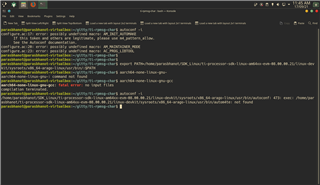


  • Have you installed the cross compile utilities with:

    sudo apt-get install build-essential autoconf automake bison flex libssl-dev bc u-boot-tools

    We are working on a Linux Academy to help document this better but https://software-dl.ti.com/processor-sdk-linux/esd/docs/08_00_00_21/linux/Overview/Top_Level_Makefile.html currently has further documentation on the build process.

      Pekka

  • yes , everything is already installed . if you analyse my screenshot you will realise that in the first command "autoconf -i" is throwing an error . But when i export the SDK path as given the about/Readme of git repository  bash is throwing "autoconf" is not found error.  

  • Hello Paras,

    Note that Pekka's utilities list does not include GNU libtool, (listed in https://git.ti.com/cgit/rpmsg/ti-rpmsg-char/about/ section "4.1 Infrastructure Tools"),  so you would also want to run

    sudo apt-get install libtool

    I am trying to replicate your observations on Ubuntu 18.04. So far the closest I got is if I install autoconf and automake WITHOUT installing libtool, I see this behavior:

    user:~/git/ti-rpmsg-char$ autoreconf -i
    configure.ac:23: error: possibly undefined macro: AC_PROG_LIBTOOL
          If this token and others are legitimate, please use m4_pattern_allow.
          See the Autoconf documentation.
    autoreconf: /usr/bin/autoconf failed with exit status: 1

    but once all the packages listed in section "4.1 Infrastructure Tools" are installed, this is my output:

    user:~/git/ti-rpmsg-char$ autoreconf -i
    libtoolize: putting auxiliary files in AC_CONFIG_AUX_DIR, 'build-aux'.
    libtoolize: copying file 'build-aux/ltmain.sh'
    libtoolize: Consider adding 'AC_CONFIG_MACRO_DIRS([m4])' to configure.ac,
    libtoolize: and rerunning libtoolize and aclocal.
    libtoolize: Consider adding '-I m4' to ACLOCAL_AMFLAGS in Makefile.am.
    configure.ac:23: installing 'build-aux/compile'
    configure.ac:23: installing 'build-aux/config.guess'
    configure.ac:23: installing 'build-aux/config.sub'
    configure.ac:17: installing 'build-aux/install-sh'
    configure.ac:17: installing 'build-aux/missing'
    examples/Makefile.am: installing 'build-aux/depcomp'
    

    After that, I can build examples as detailed in the about page:

    autoreconf -i
    mkdir output
    ./configure --host=aarch64-none-linux-gnu --prefix=/home/user/git/ti-rpmsg-char/output
    make
    make install
    make -C examples
    make -C examples install

    Regards,

    Nick

  • "libtool" was already installed .

    After installing few more packages as given in the  following link the "autom4te not found " error went away but i could not run configure command .

    software-dl.ti.com/.../Overview_Building_the_SDK.html

    After executing the "./configure --host=aarch64-none-linux-gnu --prefix=/home/user/git/ti-rpmsg-char/output" command i have received the following errors : 

    checking for a BSD-compatible install... /usr/bin/install -c
    checking whether build environment is sane... yes
    checking for aarch64-none-linux-gnu-strip... aarch64-none-linux-gnu-strip
    checking for a thread-safe mkdir -p... /usr/bin/mkdir -p
    checking for gawk... gawk
    checking whether make sets $(MAKE)... yes
    checking whether make supports nested variables... yes
    checking whether to enable maintainer-specific portions of Makefiles... no
    checking build system type... x86_64-pc-linux-gnu
    checking host system type... aarch64-none-linux-gnu
    checking how to print strings... printf
    checking whether make supports the include directive... yes (GNU style)
    checking for aarch64-none-linux-gnu-gcc... aarch64-none-linux-gnu-gcc
    checking whether the C compiler works... no
    configure: error: in `/home/parasbhanot/ti-rpmsg-char':
    configure: error: C compiler cannot create executables
    See `config.log' for more details

    This file contains any messages produced by compilers while
    running configure, to aid debugging if configure makes a mistake.
    
    It was created by ti-rpmsg-char configure 0.3.0, which was
    generated by GNU Autoconf 2.69.  Invocation command line was
    
      $ ./configure --host=aarch64-none-linux-gnu --prefix=/home/parasbhanot/ti-rpmsg-char/output
    
    ## --------- ##
    ## Platform. ##
    ## --------- ##
    
    hostname = parasbhanot-virtualbox
    uname -m = x86_64
    uname -r = 5.11.0-34-generic
    uname -s = Linux
    uname -v = #36~20.04.1-Ubuntu SMP Fri Aug 27 08:06:32 UTC 2021
    
    /usr/bin/uname -p = x86_64
    /bin/uname -X     = unknown
    
    /bin/arch              = x86_64
    /usr/bin/arch -k       = unknown
    /usr/convex/getsysinfo = unknown
    /usr/bin/hostinfo      = unknown
    /bin/machine           = unknown
    /usr/bin/oslevel       = unknown
    /bin/universe          = unknown
    
    PATH: /usr/local/sbin
    PATH: /usr/local/bin
    PATH: /usr/sbin
    PATH: /usr/bin
    PATH: /sbin
    PATH: /bin
    PATH: /usr/games
    PATH: /usr/local/games
    PATH: /snap/bin
    PATH: /home/parasbhanot/SDK_Linux/ti-processor-sdk-linux-am64xx-evm-08.00.00.21/linux-devkit/sysroots/x86_64-arago-linux/usr/bin/
    
    
    ## ----------- ##
    ## Core tests. ##
    ## ----------- ##
    
    configure:2392: checking for a BSD-compatible install
    configure:2460: result: /usr/bin/install -c
    configure:2471: checking whether build environment is sane
    configure:2526: result: yes
    configure:2583: checking for aarch64-none-linux-gnu-strip
    configure:2599: found /home/parasbhanot/SDK_Linux/ti-processor-sdk-linux-am64xx-evm-08.00.00.21/linux-devkit/sysroots/x86_64-arago-linux/usr/bin//aarch64-none-linux-gnu-strip
    configure:2610: result: aarch64-none-linux-gnu-strip
    configure:2675: checking for a thread-safe mkdir -p
    configure:2714: result: /usr/bin/mkdir -p
    configure:2721: checking for gawk
    configure:2737: found /usr/bin/gawk
    configure:2748: result: gawk
    configure:2759: checking whether make sets $(MAKE)
    configure:2781: result: yes
    configure:2810: checking whether make supports nested variables
    configure:2827: result: yes
    configure:2956: checking whether to enable maintainer-specific portions of Makefiles
    configure:2965: result: no
    configure:3009: checking build system type
    configure:3023: result: x86_64-pc-linux-gnu
    configure:3043: checking host system type
    configure:3056: result: aarch64-none-linux-gnu
    configure:3097: checking how to print strings
    configure:3124: result: printf
    configure:3149: checking whether make supports the include directive
    configure:3164: make -f confmf.GNU && cat confinc.out
    this is the am__doit target
    configure:3167: $? = 0
    configure:3186: result: yes (GNU style)
    configure:3216: checking for aarch64-none-linux-gnu-gcc
    configure:3232: found /home/parasbhanot/SDK_Linux/ti-processor-sdk-linux-am64xx-evm-08.00.00.21/linux-devkit/sysroots/x86_64-arago-linux/usr/bin//aarch64-none-linux-gnu-gcc
    configure:3243: result: aarch64-none-linux-gnu-gcc
    configure:3512: checking for C compiler version
    configure:3521: aarch64-none-linux-gnu-gcc --version >&5
    aarch64-none-linux-gnu-gcc (GNU Toolchain for the A-profile Architecture 9.2-2019.12 (arm-9.10)) 9.2.1 20191025
    Copyright (C) 2019 Free Software Foundation, Inc.
    This is free software; see the source for copying conditions.  There is NO
    warranty; not even for MERCHANTABILITY or FITNESS FOR A PARTICULAR PURPOSE.
    
    configure:3532: $? = 0
    configure:3521: aarch64-none-linux-gnu-gcc -v >&5
    Using built-in specs.
    COLLECT_GCC=aarch64-none-linux-gnu-gcc
    COLLECT_LTO_WRAPPER=/home/parasbhanot/SDK_Linux/ti-processor-sdk-linux-am64xx-evm-08.00.00.21/linux-devkit/sysroots/x86_64-arago-linux/usr/bin/../libexec/gcc/aarch64-none-linux-gnu/9.2.1/lto-wrapper
    Target: aarch64-none-linux-gnu
    Configured with: /tmp/dgboter/bbs/rhev-vm2--rhe6x86_64/buildbot/rhe6x86_64--aarch64-none-linux-gnu/build/src/gcc/configure --target=aarch64-none-linux-gnu --prefix= --with-sysroot=/aarch64-none-linux-gnu/libc --with-build-sysroot=/tmp/dgboter/bbs/rhev-vm2--rhe6x86_64/buildbot/rhe6x86_64--aarch64-none-linux-gnu/build/build-aarch64-none-linux-gnu/install//aarch64-none-linux-gnu/libc --with-bugurl=https://bugs.linaro.org/ --enable-gnu-indirect-function --enable-shared --disable-libssp --disable-libmudflap --enable-checking=release --enable-languages=c,c++,fortran --with-gmp=/tmp/dgboter/bbs/rhev-vm2--rhe6x86_64/buildbot/rhe6x86_64--aarch64-none-linux-gnu/build/build-aarch64-none-linux-gnu/host-tools --with-mpfr=/tmp/dgboter/bbs/rhev-vm2--rhe6x86_64/buildbot/rhe6x86_64--aarch64-none-linux-gnu/build/build-aarch64-none-linux-gnu/host-tools --with-mpc=/tmp/dgboter/bbs/rhev-vm2--rhe6x86_64/buildbot/rhe6x86_64--aarch64-none-linux-gnu/build/build-aarch64-none-linux-gnu/host-tools --with-isl=/tmp/dgboter/bbs/rhev-vm2--rhe6x86_64/buildbot/rhe6x86_64--aarch64-none-linux-gnu/build/build-aarch64-none-linux-gnu/host-tools --enable-fix-cortex-a53-843419 --with-pkgversion='GNU Toolchain for the A-profile Architecture 9.2-2019.12 (arm-9.10)'
    Thread model: posix
    gcc version 9.2.1 20191025 (GNU Toolchain for the A-profile Architecture 9.2-2019.12 (arm-9.10)) 
    configure:3532: $? = 0
    configure:3521: aarch64-none-linux-gnu-gcc -V >&5
    aarch64-none-linux-gnu-gcc: error: unrecognized command line option '-V'
    aarch64-none-linux-gnu-gcc: fatal error: no input files
    compilation terminated.
    configure:3532: $? = 1
    configure:3521: aarch64-none-linux-gnu-gcc -qversion >&5
    aarch64-none-linux-gnu-gcc: error: unrecognized command line option '-qversion'; did you mean '--version'?
    aarch64-none-linux-gnu-gcc: fatal error: no input files
    compilation terminated.
    configure:3532: $? = 1
    configure:3552: checking whether the C compiler works
    configure:3574: aarch64-none-linux-gnu-gcc    conftest.c  >&5
    /home/parasbhanot/SDK_Linux/ti-processor-sdk-linux-am64xx-evm-08.00.00.21/linux-devkit/sysroots/x86_64-arago-linux/usr/bin/../lib/gcc/aarch64-none-linux-gnu/9.2.1/../../../../aarch64-none-linux-gnu/bin/ld: cannot find crt1.o: No such file or directory
    /home/parasbhanot/SDK_Linux/ti-processor-sdk-linux-am64xx-evm-08.00.00.21/linux-devkit/sysroots/x86_64-arago-linux/usr/bin/../lib/gcc/aarch64-none-linux-gnu/9.2.1/../../../../aarch64-none-linux-gnu/bin/ld: cannot find crti.o: No such file or directory
    /home/parasbhanot/SDK_Linux/ti-processor-sdk-linux-am64xx-evm-08.00.00.21/linux-devkit/sysroots/x86_64-arago-linux/usr/bin/../lib/gcc/aarch64-none-linux-gnu/9.2.1/../../../../aarch64-none-linux-gnu/bin/ld: cannot find -lc
    /home/parasbhanot/SDK_Linux/ti-processor-sdk-linux-am64xx-evm-08.00.00.21/linux-devkit/sysroots/x86_64-arago-linux/usr/bin/../lib/gcc/aarch64-none-linux-gnu/9.2.1/../../../../aarch64-none-linux-gnu/bin/ld: cannot find crtn.o: No such file or directory
    collect2: error: ld returned 1 exit status
    configure:3578: $? = 1
    configure:3616: result: no
    configure: failed program was:
    | /* confdefs.h */
    | #define PACKAGE_NAME "ti-rpmsg-char"
    | #define PACKAGE_TARNAME "ti-rpmsg-char"
    | #define PACKAGE_VERSION "0.3.0"
    | #define PACKAGE_STRING "ti-rpmsg-char 0.3.0"
    | #define PACKAGE_BUGREPORT "s-anna@ti.com"
    | #define PACKAGE_URL ""
    | #define PACKAGE "ti-rpmsg-char"
    | #define VERSION "0.3.0"
    | /* end confdefs.h.  */
    | 
    | int
    | main ()
    | {
    | 
    |   ;
    |   return 0;
    | }
    configure:3621: error: in `/home/parasbhanot/ti-rpmsg-char':
    configure:3623: error: C compiler cannot create executables
    See `config.log' for more details
    
    ## ---------------- ##
    ## Cache variables. ##
    ## ---------------- ##
    
    ac_cv_build=x86_64-pc-linux-gnu
    ac_cv_env_CC_set=
    ac_cv_env_CC_value=
    ac_cv_env_CFLAGS_set=
    ac_cv_env_CFLAGS_value=
    ac_cv_env_CPPFLAGS_set=
    ac_cv_env_CPPFLAGS_value=
    ac_cv_env_CPP_set=
    ac_cv_env_CPP_value=
    ac_cv_env_LDFLAGS_set=
    ac_cv_env_LDFLAGS_value=
    ac_cv_env_LIBS_set=
    ac_cv_env_LIBS_value=
    ac_cv_env_LT_SYS_LIBRARY_PATH_set=
    ac_cv_env_LT_SYS_LIBRARY_PATH_value=
    ac_cv_env_build_alias_set=
    ac_cv_env_build_alias_value=
    ac_cv_env_host_alias_set=set
    ac_cv_env_host_alias_value=aarch64-none-linux-gnu
    ac_cv_env_target_alias_set=
    ac_cv_env_target_alias_value=
    ac_cv_host=aarch64-none-linux-gnu
    ac_cv_path_install='/usr/bin/install -c'
    ac_cv_path_mkdir=/usr/bin/mkdir
    ac_cv_prog_AWK=gawk
    ac_cv_prog_CC=aarch64-none-linux-gnu-gcc
    ac_cv_prog_STRIP=aarch64-none-linux-gnu-strip
    ac_cv_prog_make_make_set=yes
    am_cv_make_support_nested_variables=yes
    
    ## ----------------- ##
    ## Output variables. ##
    ## ----------------- ##
    
    ACLOCAL='${SHELL} /home/parasbhanot/ti-rpmsg-char/build-aux/missing aclocal-1.16'
    AMDEPBACKSLASH='\'
    AMDEP_FALSE='#'
    AMDEP_TRUE=''
    AMTAR='$${TAR-tar}'
    AM_BACKSLASH='\'
    AM_CFLAGS=''
    AM_DEFAULT_V='$(AM_DEFAULT_VERBOSITY)'
    AM_DEFAULT_VERBOSITY='1'
    AM_LDFLAGS=''
    AM_V='$(V)'
    AR=''
    AUTOCONF='${SHELL} /home/parasbhanot/ti-rpmsg-char/build-aux/missing autoconf'
    AUTOHEADER='${SHELL} /home/parasbhanot/ti-rpmsg-char/build-aux/missing autoheader'
    AUTOMAKE='${SHELL} /home/parasbhanot/ti-rpmsg-char/build-aux/missing automake-1.16'
    AWK='gawk'
    CC='aarch64-none-linux-gnu-gcc'
    CCDEPMODE=''
    CFLAGS=''
    CPP=''
    CPPFLAGS=''
    CYGPATH_W='echo'
    DEFS=''
    DEPDIR='.deps'
    DLLTOOL=''
    DSYMUTIL=''
    DUMPBIN=''
    ECHO_C=''
    ECHO_N='-n'
    ECHO_T=''
    EGREP=''
    EXEEXT=''
    FGREP=''
    GREP=''
    INSTALL_DATA='${INSTALL} -m 644'
    INSTALL_PROGRAM='${INSTALL}'
    INSTALL_SCRIPT='${INSTALL}'
    INSTALL_STRIP_PROGRAM='$(install_sh) -c -s'
    LD=''
    LDFLAGS=''
    LIBOBJS=''
    LIBS=''
    LIBTOOL=''
    LIPO=''
    LN_S=''
    LTLIBOBJS=''
    LT_SYS_LIBRARY_PATH=''
    MAINT='#'
    MAINTAINER_MODE_FALSE=''
    MAINTAINER_MODE_TRUE='#'
    MAKEINFO='${SHELL} /home/parasbhanot/ti-rpmsg-char/build-aux/missing makeinfo'
    MANIFEST_TOOL=''
    MKDIR_P='/usr/bin/mkdir -p'
    NM=''
    NMEDIT=''
    OBJDUMP=''
    OBJEXT=''
    OTOOL64=''
    OTOOL=''
    PACKAGE='ti-rpmsg-char'
    PACKAGE_BUGREPORT='s-anna@ti.com'
    PACKAGE_NAME='ti-rpmsg-char'
    PACKAGE_STRING='ti-rpmsg-char 0.3.0'
    PACKAGE_TARNAME='ti-rpmsg-char'
    PACKAGE_URL=''
    PACKAGE_VERSION='0.3.0'
    PATH_SEPARATOR=':'
    RANLIB=''
    SED=''
    SET_MAKE=''
    SHELL='/bin/bash'
    STRIP='aarch64-none-linux-gnu-strip'
    VERSION='0.3.0'
    ac_ct_AR=''
    ac_ct_CC=''
    ac_ct_DUMPBIN=''
    am__EXEEXT_FALSE=''
    am__EXEEXT_TRUE=''
    am__fastdepCC_FALSE=''
    am__fastdepCC_TRUE=''
    am__include='include'
    am__isrc=''
    am__leading_dot='.'
    am__nodep='_no'
    am__quote=''
    am__tar='$${TAR-tar} chof - "$$tardir"'
    am__untar='$${TAR-tar} xf -'
    bindir='${exec_prefix}/bin'
    build='x86_64-pc-linux-gnu'
    build_alias=''
    build_cpu='x86_64'
    build_os='linux-gnu'
    build_vendor='pc'
    datadir='${datarootdir}'
    datarootdir='${prefix}/share'
    docdir='${datarootdir}/doc/${PACKAGE_TARNAME}'
    dvidir='${docdir}'
    exec_prefix='NONE'
    host='aarch64-none-linux-gnu'
    host_alias='aarch64-none-linux-gnu'
    host_cpu='aarch64'
    host_os='linux-gnu'
    host_vendor='none'
    htmldir='${docdir}'
    includedir='${prefix}/include'
    infodir='${datarootdir}/info'
    install_sh='${SHELL} /home/parasbhanot/ti-rpmsg-char/build-aux/install-sh'
    libdir='${exec_prefix}/lib'
    libexecdir='${exec_prefix}/libexec'
    localedir='${datarootdir}/locale'
    localstatedir='${prefix}/var'
    mandir='${datarootdir}/man'
    mkdir_p='$(MKDIR_P)'
    oldincludedir='/usr/include'
    pdfdir='${docdir}'
    prefix='/home/parasbhanot/ti-rpmsg-char/output'
    program_transform_name='s,x,x,'
    psdir='${docdir}'
    runstatedir='${localstatedir}/run'
    sbindir='${exec_prefix}/sbin'
    sharedstatedir='${prefix}/com'
    sysconfdir='${prefix}/etc'
    target_alias=''
    
    ## ----------- ##
    ## confdefs.h. ##
    ## ----------- ##
    
    /* confdefs.h */
    #define PACKAGE_NAME "ti-rpmsg-char"
    #define PACKAGE_TARNAME "ti-rpmsg-char"
    #define PACKAGE_VERSION "0.3.0"
    #define PACKAGE_STRING "ti-rpmsg-char 0.3.0"
    #define PACKAGE_BUGREPORT "s-anna@ti.com"
    #define PACKAGE_URL ""
    #define PACKAGE "ti-rpmsg-char"
    #define VERSION "0.3.0"
    
    configure: exit 77
    

    i am also attaching the config.log. 

  • Hello Paras,

    One thing to note is that neither the developers nor I have tested the build on Ubuntu 20. Please also note that our SDK 8.0 releases were developed and tested on Ubuntu 18, not Ubuntu 20. So it could be that changes are needed (e.g., updating some of the AutoMake files) to get things working on Ubuntu 20.

    At this point my best suggestion is try again on Ubuntu 18. If you run into any issues with either of our SDKs on Ubuntu 20, we are not going to be able to support you.

    Regards,

    Nick

  • Hi Paras,

    Your screenshot shows that you were running the command autoconf -i and not autoreconf -i. 

    Please clean the repository of all artifacts fully (git clean -dfx) and try again if you were able to proceed further.

    SDK is not tested for Ubuntu 20 as Nick pointed out.

    regards

    Suman

  • I am able to cross compile the example code on Ubuntu 18  but i am not able to cross compile it using the Eclipse or Qt creatror . 

    So how can i use the toolchain (which is a part of SDK 8) to cross-compile the same example using the IDES like eclipse or qt creator 

  • Hello Paras,

    To confirm: Are you cross-compiling your AM64x Linux Processor SDK code in Eclipse or QT creator? I see ti-processor-sdk-linux-am64xx-evm-08.00.00.018/linux-devkit/sysroots/x86_64-arago-linux/usr/bin/aarch64-none-linux-gnu-gcc-9.2.1. So you should be able to use the same tools to cross compile ti-rpmsg-char as you do to compile the AM64x Linux Processor SDK.

    Regards,

    Nick

  • Yes i am using "AM64x Linux Processor SDK" for cross compilation . 

    i am not able to  use Qt creator as it requires qmake which is not present in SDK .

    For eclipse have used the flowing steps : 

    * New project with Cross gcc command 

    * Set the Cross compiler prefix to arm-none-linux-gnueabihf-

    Set the Cross compiler path  to <Path of amm-none-linux-gnuebihf-gcc> folder 

    But build button is not working . 

    Am i missing something ?

    i also want to extend the SDK by adding open source libraries like qt , libmodbus etc .

    Is this SDK extensible ?  

  • Hello Paras,

    I do not think TI supports building the Linux Processor SDK within an IDE. In other words, it may be possible, but I do not think we document how to do it, or answer questions on how to do it.

    Let me reassign this thread to another team member to verify. Please ping the thread if they have not replied in a day or so.

    Regards,

    Nick

  • Paras,

    Nick is correct. We don't test or document building the SDK using an IDE. As such, we won't be able to support it.

    Thank you.