This thread has been locked.

If you have a related question, please click the "Ask a related question" button in the top right corner. The newly created question will be automatically linked to this question.

TDA4VM: How to change memory map in QNX

Part Number: TDA4VM

Now I need more DDR memory in C7x, on QNX. The SDK version is 07.02

I modify C7x DDR size in gen_linker_mem_map.py

before: c7x_1_ddr_size = 16*MB - (c7x_1_ddr_addr-c7x_1_ddr_ipc_addr);

after:    c7x_1_ddr_size = 32*MB - (c7x_1_ddr_addr-c7x_1_ddr_ipc_addr);

And I follow this instruction in https://e2e.ti.com/support/processors-group/processors/f/processors-forum/943731/tda4m-how-to-apply-the-modified-memory-map-in-qnx?tisearch=e2e-sitesearch&keymatch=memory%2520map%2520qnx#

1. change gen_linker_mem_map.py

    run ./gen_linker_mem_map.py generate new files

2. VRING_BASE_ADDRESS in ./psdkqa/pdk/packages/ti/drv/ipc/examples/common/src/ipc_setup.h  ./psdkqa/qnx/examples/ipc/ipc_test_qnx/src/ipc_setup.h

   ./pdk_jacinto_07_01_05_14/packages/ti/drv/ipc/examples/common/src/ipc_setup.h    ./psdkqa/qnx/resmgr/ipc_qnx_rsmgr/resmgr/src/tiipc_mgr_private.h

   0xAA00_0000 -> 0xAB00_0000

3. SH_MEM_BLOCK1_START in ./psdkqa/qnx/sharedmemallocator/resmgr/SharedMemoryAllocator.c

    oxAE00_0000 -> 0xAF00_0000

4. ./psdkqa/qnx/bsp/images/j721e-evm-ti.build

    before: [+keeplinked] startup-j721e-evm -v -r0xA0000000,0x5C000000,1 -d

    after:    [+keeplinked] startup-j721e-evm -v -r0xA0000000,0x5D000000,1 -d

5. ./psdkqa/pdk/packages/ti/osal/soc/j721e/bios_mmu.c

    before: (void)OsalMmuMap(0xAA000000U, 0xAA000000U, 0x02000000U, &attrs, isSecure);

    after:    (void)OsalMmuMap(0xAB000000U, 0xAB000000U, 0x02000000U, &attrs, isSecure);

I follow this to build vision_apps, built success.

When boot, error occurs like this:

And when I run app sample, some errors occur like this:
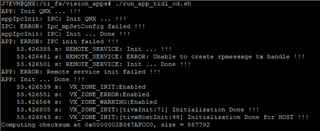
How can I solve this issue?

  • Hi,

    Some thoughts:

    1)  Please ensure was a full scrub/clean/rebuild was done.   Often times there are resident artifacts from previous memory configurations that can cause issues.   All firmware binaries (R5/C6/C7), A72 libraries and A72 resource managers / applications must be rebuilt to pull in the updated memory map. This can be accomplished by running the below, then proceeding with your desired build / install

    cd vision_apps

    make sdk_clean; make sdk_scrub; make vision_apps_clean; make vision_apps_scrub

    2) Please ensure that all images and binaries have been updated on the target, both in the QNX-IFS, the filesystem being used, and/or any other locations where content may be being used from.  All cores must be using the updated memory map as well as the A72 binaries.   For example if using an SD boot, after doing the full rebuild, it may be worth it to create a new SD card from scratch with updated content.

    3) After board boots, please run a "pidin syspage=asinfo", and provide output.  This will show if your memory carveout made in the BSP Build file is in place.

    4) Please provide the ti-processor-sdk-rtos-j721e-evm-07_02_00_06/vision_apps/apps/basic_demos/app_tirtos/tirtos_qnx/system_memory_map.html, this will show the memory settings that were done, and can be used to verify against the code modifications provided above.

    5) While likely not related to your current issue, please be aware of the memory map constraints 8.9. Understanding and updating SDK memory map for J721E — Processor SDK RTOS J721E.

    The initial SIGSEGV being see on the tiipc-mgr needs to be addressed before running any other applications.

    Regards,

    kb