Part Number: SK-TDA4VM
您好
我是剛接觸TI產品的新手,我已完成OS步驟,請問拿到SK-TDA4VM開發板需要做甚麼設定嗎
請問SK-TDA4VM如何關機?
支援無線網卡Intel 8265NGW嗎?
謝謝
This thread has been locked.
If you have a related question, please click the "Ask a related question" button in the top right corner. The newly created question will be automatically linked to this question.
Part Number: SK-TDA4VM
您好
我是剛接觸TI產品的新手,我已完成OS步驟,請問拿到SK-TDA4VM開發板需要做甚麼設定嗎
請問SK-TDA4VM如何關機?
支援無線網卡Intel 8265NGW嗎?
謝謝
Hi,
Is it the same as operating the Raspberry Pi system?
TDA4VM-SK runs the Linux OS, so the look and feel should be similar. However, there will be differences because we use a different Linux distro (Arago for TDA4VM-SK vs Raspbian for Raspberry Pi). Let me know if there is a specific feature on the Raspberry Pi system that you are looking for.
Does this board support the wireless network card Intel 8265NGW?
We have only tested the wireless network card Intel 9260 on the TDA4VM-SK. Let me check with the team if Intel 8265NGW works and get back to you.
Regards,
Takuma
Thanks for your reply
What I want to confirm is that after I install linux, I can only click on the terminal on the display screen. Would you like to confirm that this is correct?
Do you use the following commands from the terminal to install python or connect to the network?
Hello,
I need some more context to provide you a good answer. Can I request you to please answer the following questions:
Regards,
Takuma
Hi,
Answer your question
1. I see the SK-TDA4VM SDK doc software installation procedure on the official website has some problems.
Is it only from PC The SK-DTA4VM board can be installed only by commanding the terminal tera term to control the SK-DTA4VM board?
Or I can directly enter ./setup_script.sh in the terminal of the SK-DTA4VM board to work?
2.YES. Or all operations are performed under the terminal?
Hello,
1. We install everything needed to boot the SK-TDA4VM board onto a micro SD card using balenaEtcher on a PC. After booting the SK-TDA4VM using the micro SD card, then connecting Tera Term, then logging in as root, the ./setup_script.sh is ran to install dependencies.
2. We do not provide a desktop GUI with our Linux distro, which is different from the Raspberry Pi. We provide a headless Linux where you have access to a Linux terminal, and all operations are performed under the terminal after you are able to boot the board.
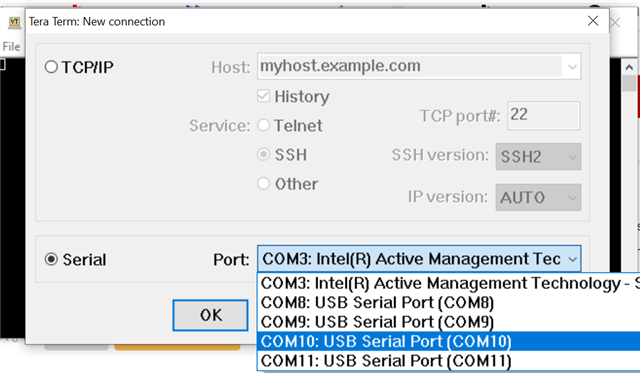
Could you verify if Tera Term sees 5 different COM ports open when the TDA4VM-SK is connected? COM10 on my screenshot below is the port to connect and I am able to login to Linux and run the ./setup_script.sh. The COM port number may be different on your board.
If you do not see 5 different COM ports, then there may be a missing driver. A Windows driver called "CP210x Universal Windows Driver" can be installed here if that is the case: https://www.silabs.com/developers/usb-to-uart-bridge-vcp-drivers

Regards,
Takuma
Hello,
Is the error the same as the one in the following E2E? https://e2e.ti.com/support/processors-group/processors/f/processors-forum/1045012/tda4vm-linux-sdk-for-edge-ai-applications-environment
Also, were you able to log in to the Linux terminal?
Regards,
Takuma
Hello,
It's the same error.
I currently use a computer to log in to the terminal to control the SK-TDA4VM.
Can I directly operate on SK-TDA4VM or run python programs without using a computer?
I am a beginner who is new to TI products. I don’t know how to use this system in SK-DA4VM products.
Are there any basic teaching courses or web pages available for my reference?
thanks
Hello,
It's the same error.
Is the SK-TDA4VM connected to the internet behind a company proxy?
Are there any basic teaching courses or web pages available for my reference?
For the teaching courses: We have a series called Edge AI Academy that first goes through the fundamentals of edge AI, then goes through some hands-on examples using the SK-TDA4VM. I will put the link here: Edge AI Academy
Can I directly operate on SK-TDA4VM or run python programs without using a computer?
Unfortunately, we currently do not have the feature to directly operate on SK-TDA4VM. All operations are done through a separate computer connected through UART or SSH.
Regards,
Takuma
Hello,
Thanks for your reply.
I installed the Intel® Wireless-AC 9260 on the SK-TDA4VM, but the Intel® Wireless-AC 9260 wireless network card was not read.
Does SK-TDA4VM have a wireless network card driver? Or do I need to install the driver of the wireless network card by myself?
In addition, when running apt-get update, the error is apt-get commond not found. Which version of linux is used?
thanksHello,
Or do I need to install the driver of the wireless network card by myself?
Could you check the /lib/firmware directory for some files that start with iwlwifi-9260? The drivers should be included with the installation.
Additionally, could you run ifconfig -a and post the result?
In addition, when running apt-get update, the error is apt-get commond not found. Which version of linux is used?
Please take a look at this E2E: https://e2e.ti.com/support/processors-group/processors/f/processors-forum/674674/linux-beaglebn-apt-get-installation/2483789#2483789. It is for a different board, but essentially apt-get is not available for our Yocto-based Linux distro, Arago. We use opkg, but it requires some setup to install packages like apt-get.
A potential workaround would be to install a Docker image for Ubuntu distro on top of Arago, which would have the ability to run apt-get. However, running Docker will take up additional memory and provide a tighter memory limitation. I will link the reference to build Docker for Ubuntu here: http://software-dl.ti.com/jacinto7/esd/processor-sdk-linux-sk-tda4vm/08_00_01_10/exports/docs/docker_environment.html
Regards,
Takuma
你好,
1.Could you check the /lib/firmware directory for some files that start with iwlwifi-9260?
This is the file in the directory is the file with iwlwifi-9260
LICENCE.ibt_firmware iwlwifi-8265-21.ucode j7-c71_0-fw
LICENCE.iwlwifi_firmware iwlwifi-8265-22.ucode j7-main-r5f0_0-fw
cadence iwlwifi-8265-27.ucode j7-main-
rfwlf0wifi 8265-31.ucode j7-mcu-r5f0_0-fw
intel iwlwifi-8265-34.ucode pdk-ipc
iwlwifi-3160-17.ucode iwlwifi-8265-36.ucode pru
iwlwifi-8000C-13.ucode iwlwifi- 13.ucode iwlthwifi-3160-17.ucode iwlwifi -8265-36.ucode -b0-jf-b0-33.ucode pvdec_full_bin.fw
iwlwifi-8000C-16.ucode iwlwifi-9260-th-b0-jf-b0-34.ucoderegulation.db
iwlwifi-8000C-21.ucode iwlwifi-9260-th -b0-jf-b0-38.ucode 監管
.db.p7s iwlwifi-8000C-22.ucode iwlwifi-9260-th-b0-jf-b0-41.ucode rgx.fw.22.104.208.318
iwlwifi-8000C-27.ucode iwlwifi-9260-th-b0-jf-b0-43.ucode rgx.sh.22.104.208.318
iwlwifi-8000C-31.ucode iwlwifi-9260-th-b0-jf-b0-466 ucode ti-connectivity
iwlwifi-8000C-34.ucode j7-c66_0-fw vision_apps_eaik
iwlwifi-8000C-36.ucode j7-c66_1-fw vision_apps_evm
2.Could you run ifconfig -a and post the result?
The result of running ifconfig -a
can0: flags=128<NOARP> mtu 16 metric 1
unspec 00-00-00-00-00-00-00-00-00-00-00-00-00-00-00-00 txqueuelen 10 (UNSPEC)
RX packets 0 bytes 0 (0.0 B)
RX errors 0 dropped 0 overruns 0 frame 0
TX packets 0 bytes 0 (0.0 B)
TX errors 0 dropped 0 overruns 0 carrier 0 collisions 0
device interrupt 20
can1: flags=128<NOARP> mtu 16 metric 1
unspec 00-00-00-00-00-00-00-00-00-00-00-00-00-00-00-00 txqueuelen 10 (UNSPEC)
RX packets 0 bytes 0 (0.0 B)
RX errors 0 dropped 0 overruns 0 frame 0
TX packets 0 bytes 0 (0.0 B)
TX errors 0 dropped 0 overruns 0 carrier 0 collisions 0
device interrupt 41
can2: flags=128<NOARP> mtu 16 metric 1
unspec 00-00-00-00-00-00-00-00-00-00-00-00-00-00-00-00 txqueuelen 10 (UNSPEC)
RX packets 0 bytes 0 (0.0 B)
RX errors 0 dropped 0 overruns 0 frame 0
TX packets 0 bytes 0 (0.0 B)
TX errors 0 dropped 0 overruns 0 carrier 0 collisions 0
device interrupt 43
can3: flags=128<NOARP> mtu 16 metric 1
unspec 00-00-00-00-00-00-00-00-00-00-00-00-00-00-00-00 txqueuelen 10 (UNSPEC)
RX packets 0 bytes 0 (0.0 B)
RX errors 0 dropped 0 overruns 0 frame 0
TX packets 0 bytes 0 (0.0 B)
TX errors 0 dropped 0 overruns 0 carrier 0 collisions 0
device interrupt 45
docker0: flags=4099<UP,BROADCAST,MULTICAST> mtu 1500 metric 1
inet 172.17.0.1 netmask 255.255.0.0 broadcast 172.17.255.255
ether 02:42:be:0a:3f:af txqueuelen 0 (Ethernet)
RX packets 0 bytes 0 (0.0 B)
RX errors 0 dropped 0 overruns 0 frame 0
TX packets 0 bytes 0 (0.0 B)
TX errors 0 dropped 0 overruns 0 carrier 0 collisions 0
eth0: flags=4099<UP,BROADCAST,MULTICAST> mtu 1500 metric 1
ether 24:76:25:96:1d:04 txqueuelen 1000 (Ethernet)
RX packets 0 bytes 0 (0.0 B)
RX errors 0 dropped 0 overruns 0 frame 0
TX packets 0 bytes 0 (0.0 B)
TX errors 0 dropped 0 overruns 0 carrier 0 collisions 0
lo: flags=73<UP,LOOPBACK,RUNNING> mtu 65536 metric 1
inet 127.0.0.1 netmask 255.0.0.0
inet6 ::1 prefixlen 128 scopeid 0x10<host>
loop txqueuelen 1000 (Local Loopback)
RX packets 82 bytes 6220 (6.0 KiB)
RX errors 0 dropped 0 overruns 0 frame 0
TX packets 82 bytes 6220 (6.0 KiB)
TX errors 0 dropped 0 overruns 0 carrier 0 collisions 0
wlp1s0: flags=4098<BROADCAST,MULTICAST> mtu 1500 metric 1
ether fc:44:82:48:15:de txqueuelen 1000 (Ethernet)
RX packets 0 bytes 0 (0.0 B)
RX errors 0 dropped 0 overruns 0 frame 0
TX packets 0 bytes 0 (0.0 B)
TX errors 0 dropped 0 overruns 0 carrier 0 collisions 0Hello,
Thanks for the information.
Could you try the following:
I have tested the above and it should connect you to an open network (no password).
/lib/firmware has the correct firmware for the wifi card installed correctly, and ifconfig -a tells me that the wifi card is being detected successfully by the board (wlp1s0 is the wifi card). The issue seems to be that the wifi card is not started up.
Regards,
Takuma
Hello,
I have the wireless network card activated, I refer to how to use commands on the network to connect to WPA WIFI.
I first run wpa_passphrase gorilla >> /etc/wpa_supplicant.conf and enter the password.
Check wpa_supplicant.conf to enter SSID and PSK.
Then run sudo wpa_supplicant -Dwext -iwlan0 -c /etc/wpa_supplicant.conf
But an error occurred
ioctl[SIOCSIWPMKSA]: Inappropriate ioctl for device
ioctl[SIOCSIWMODE]: Inappropriate ioctl for device
ioctl[SIOCGIWRANGE]: Inappropriate ioctl for device
ioctl[SIOCGIWMODE]: Inappropriate ioctl for device
ioctl[SIOCSIWAP]: Inappropriate ioctl for device
ioctl[SIOCSIWESSID]: Inappropriate ioctl for device
ioctl[SIOCSIWENCODEEXT]: Inappropriate ioctl for device
ioctl[SIOCSIWPMKSA]: Inappropriate ioctl for device
ioctl[SIOCSIWSCAN]: Inappropriate ioctl for device
wlp1s0: CTRL-EVENT-SCAN-FAILED ret=-1 retry=1
Hello,
For connecting to a wpa protected network, could you try the following:
If it says "nl80211: Could not set interface 'p2p-dev-wlp1s0' UP" then there may be a wpa_supplicant process running in the background. This can be fixed with killall wpa_supplicant. Let me know if the above works.
Regards,
Takuma