This thread has been locked.

If you have a related question, please click the "Ask a related question" button in the top right corner. The newly created question will be automatically linked to this question.

EVMK2EX: Problems restoring nand flash.

Part Number: EVMK2EX
Other Parts Discussed in Thread: CCSTUDIO, 66AK2E05, AM1802

I am trying to restore the nand flash on the EVMK2EX using the instructions found here https://software-dl.ti.com/processor-sdk-linux/esd/docs/06_03_00_106/linux/Overview/Program_EVM.html.  It looks like I have all the environment variables set correctly however I am getting an error reporting that 'An invalid processor ID has been found.'  

Am I doing something wrong? Any suggestions?

This is the complete output I get:

F:\ti\processor_sdk_rtos_k2e_6_03_00_106\bin>%DSS_SCRIPT_DIR%\dss.bat program_evm.js evmk2e nand
Running dss.bat
f:\ti\ccs1040_k2e\ccs\ccs_base\scripting\bin\..\..\DebugServer
board: evmk2e
endian: Little
emulation: XDS2xx emulator
binaries: ../prebuilt-images/
ccxml: e:\TI\MCSDK_3_01_04_07\mcsdk_bios_3_01_04_07\tools\program_evm\configs\evmk2e\evmk2e.ccxml
SEVERE: Can't generate board data file C:\Users\MiLewis\AppData\Local\TEXASI~1\CCS\CCS104~1\0\0\BrdDat\ccBoard0.dat
An invalid processor ID has been found.

SEVERE: Could not start server: DebugServer.1: Can't generate board data file C:\Users\MiLewis\AppData\Local\TEXASI~1\CCS\CCS104~1\0\0\BrdDat\ccBoard0.dat
An invalid processor ID has been found.

org.mozilla.javascript.WrappedException: Wrapped com.ti.ccstudio.scripting.environment.ScriptingException: Could not start server: DebugServer.1: Can't generate board data file C:\Users\MiLewis\AppData\Local\TEXASI~1\CCS\CCS104~1\0\0\BrdDat\ccBoard0.dat
An invalid processor ID has been found.
(program_evm.js#342)
at org.mozilla.javascript.Context.throwAsScriptRuntimeEx(Context.java:1693)
at org.mozilla.javascript.MemberBox.invoke(MemberBox.java:160)
at org.mozilla.javascript.NativeJavaMethod.call(NativeJavaMethod.java:204)
at org.mozilla.javascript.optimizer.OptRuntime.call2(OptRuntime.java:76)
at org.mozilla.javascript.gen.c1._c0(program_evm.js:342)
at org.mozilla.javascript.gen.c1.call(program_evm.js)
at org.mozilla.javascript.ContextFactory.doTopCall(ContextFactory.java:340)
at org.mozilla.javascript.ScriptRuntime.doTopCall(ScriptRuntime.java:2758)
at org.mozilla.javascript.gen.c1.call(program_evm.js)
at org.mozilla.javascript.gen.c1.exec(program_evm.js)
at org.mozilla.javascript.tools.shell.Main.evaluateScript(Main.java:503)
at org.mozilla.javascript.tools.shell.Main.processFileSecure(Main.java:425)
at org.mozilla.javascript.tools.shell.Main.processFile(Main.java:391)
at org.mozilla.javascript.tools.shell.Main.processSource(Main.java:382)
at org.mozilla.javascript.tools.shell.Main.processFiles(Main.java:179)
at org.mozilla.javascript.tools.shell.Main$IProxy.run(Main.java:100)
at org.mozilla.javascript.Context.call(Context.java:528)
at org.mozilla.javascript.ContextFactory.call(ContextFactory.java:450)
at org.mozilla.javascript.tools.shell.Main.exec(Main.java:162)
at com.ti.ccstudio.apps.internal.scripting.RunScript$1.run(RunScript.java:89)
Caused by: com.ti.ccstudio.scripting.environment.ScriptingException: Could not start server: DebugServer.1: Can't generate board data file C:\Users\MiLewis\AppData\Local\TEXASI~1\CCS\CCS104~1\0\0\BrdDat\ccBoard0.dat
An invalid processor ID has been found.

at com.ti.debug.engine.scripting.DebugServer$SessionFactory.<init>(DebugServer.java:158)
at com.ti.debug.engine.scripting.DebugServer.openSession(DebugServer.java:1257)
at sun.reflect.NativeMethodAccessorImpl.invoke0(Native Method)
at sun.reflect.NativeMethodAccessorImpl.invoke(Unknown Source)
at sun.reflect.DelegatingMethodAccessorImpl.invoke(Unknown Source)
at java.lang.reflect.Method.invoke(Unknown Source)
at org.mozilla.javascript.MemberBox.invoke(MemberBox.java:145)
... 18 more

Thanks,

Mike

  • Mike,

    SEVERE: Could not start server: DebugServer.1: Can't generate board data file C:\Users\MiLewis\AppData\Local\TEXASI~1\CCS\CCS104~1\0\0\BrdDat\ccBoard0.dat
    An invalid processor ID has been found.

    1. Please open the script file, "dss.bat program_evm.js" and do check the list of boards supported and the syntax name for the board.

    Verify "evmk2e" board is listed in the script.

    2. Are you able to do "target connect" using .cxml file by selecting the "evmk2e" . The target connection should get successful. This step will confirm, whether the CCS is able to establish the connection with the evmk2e.  

    Please visit this link and follow the steps up to "10.2.1.1.2.4.8. Success!" --------  10.2.1.1.2.4. Create Target Configuration File for EVM  

    http://software-dl.ti.com/processor-sdk-rtos/esd/docs/latest/rtos/index_how_to_guides.html#setup-ccs-for-evm-and-processor-sdk-rtos

    3. Please try using the CCS version 9.3, that is the compatible version for the processor SDK 6.3. 

    Sometimes, the script file may not match the same path if CCS 10.4 version is used.

    Regards

    Shankari G

  • Shankari:

    Thanks for the suggestions, I have checked the program_evm.js file and the evmk2e.ccxml both seem to include support for the evmk2e"

    The contents of evmk3e.ccxml are:

    <?xml version="1.0" encoding="UTF-8" standalone="no"?>
    <configurations XML_version="1.2" id="configurations_0">
    <configuration XML_version="1.2" id="Texas Instruments XDS2xx USB Debug Probe_0">
    <instance XML_version="1.2" desc="Texas Instruments XDS2xx USB Debug Probe_0" href="connections/TIXDS2XXUSB_Connection.xml" id="Texas Instruments XDS2xx USB Debug Probe_0" xml="TIXDS2XXUSB_Connection.xml" xmlpath="connections"/>
    <connection XML_version="1.2" id="Texas Instruments XDS2xx USB Debug Probe_0">
    <instance XML_version="1.2" href="drivers/tixds560icepick_d.xml" id="drivers" xml="tixds560icepick_d.xml" xmlpath="drivers"/>
    <instance XML_version="1.2" href="drivers/tixds560c66xx.xml" id="drivers" xml="tixds560c66xx.xml" xmlpath="drivers"/>
    <instance XML_version="1.2" href="drivers/tixds560cs_dap.xml" id="drivers" xml="tixds560cs_dap.xml" xmlpath="drivers"/>
    <instance XML_version="1.2" href="drivers/tixds560cortexA15.xml" id="drivers" xml="tixds560cortexA15.xml" xmlpath="drivers"/>
    <instance XML_version="1.2" href="drivers/tixds560cs_child.xml" id="drivers" xml="tixds560cs_child.xml" xmlpath="drivers"/>
    <instance XML_version="1.2" href="drivers/tixds560csstm.xml" id="drivers" xml="tixds560csstm.xml" xmlpath="drivers"/>
    <instance XML_version="1.2" href="drivers/tixds560etbcs.xml" id="drivers" xml="tixds560etbcs.xml" xmlpath="drivers"/>
    <platform XML_version="1.2" id="platform_0">
    <instance XML_version="1.2" desc="66AK2E05_0" href="devices/66AK2E05.xml" id="66AK2E05_0" xml="66AK2E05.xml" xmlpath="devices"/>
    </platform>
    </connection>
    </configuration>
    </configurations>

    And there seems to be support for this board in program_evm.js:

    case "evmk2h":
    cpu_id = "C66xx_0";
    var nAddress = 0x0C000000;
    var nandNorAddress = 0x80000000;
    var iblByteSwap = false;
    break;
    case "evmk2e":
    cpu_id = "C66xx_0";
    var nAddress = 0x0C000000;
    var nandNorAddress = 0x80000000;
    var iblByteSwap = false;
    break;
    case "evmk2l":
    cpu_id = "C66xx_0";
    var nAddress = 0x0C000000;
    var nandNorAddress = 0x80000000;
    var iblByteSwap = false;
    break;

    I have used the evmk2e.ccxml configuration to connect to the board.

    Unfortunately, its difficult to try a different version of CCS.

    Thanks,

    Mike

  • Mike,

    Step no:2 , target connect

    Test connection:

    Open *.ccxml file in CCS--> select the connection type as shown below and select the Board or device as "66AK2E05" and click "test connection" and the output should popout like this:

    ----------------


    [Start: Texas Instruments XDS2xx USB Debug Probe_0]

    Execute the command:

    %ccs_base%/common/uscif/dbgjtag -f %boarddatafile% -rv -o -S integrity

    [Result]


    -----[Print the board config pathname(s)]------------------------------------

    C:\Users\Admin\AppData\Local\TEXASI~1\CCS\
    ccs930\0\0\BrdDat\testBoard.dat

    -----[Print the reset-command software log-file]-----------------------------

    This utility has selected a 560/2xx-class product.
    This utility will load the program 'xds2xxu.out'.
    The library build date was 'Nov 25 2019'.
    The library build time was '14:43:38'.
    The library package version is '8.4.0.00006'.
    The library component version is '35.35.0.0'.
    The controller does not use a programmable FPGA.
    The controller has a version number of '13' (0x0000000d).
    The controller has an insertion length of '0' (0x00000000).
    This utility will attempt to reset the controller.
    This utility has successfully reset the controller.

    -----[Print the reset-command hardware log-file]-----------------------------

    This emulator does not create a reset log-file.

    -----[Perform the Integrity scan-test on the JTAG IR]------------------------

    This test will use blocks of 64 32-bit words.
    This test will be applied just once.

    Do a test using 0xFFFFFFFF.
    Scan tests: 1, skipped: 0, failed: 0
    Do a test using 0x00000000.
    Scan tests: 2, skipped: 0, failed: 0
    Do a test using 0xFE03E0E2.
    Scan tests: 3, skipped: 0, failed: 0
    Do a test using 0x01FC1F1D.
    Scan tests: 4, skipped: 0, failed: 0
    Do a test using 0x5533CCAA.
    Scan tests: 5, skipped: 0, failed: 0
    Do a test using 0xAACC3355.
    Scan tests: 6, skipped: 0, failed: 0
    All of the values were scanned correctly.

    The JTAG IR Integrity scan-test has succeeded.

    -----[Perform the Integrity scan-test on the JTAG DR]------------------------

    This test will use blocks of 64 32-bit words.
    This test will be applied just once.

    Do a test using 0xFFFFFFFF.
    Scan tests: 1, skipped: 0, failed: 0
    Do a test using 0x00000000.
    Scan tests: 2, skipped: 0, failed: 0
    Do a test using 0xFE03E0E2.
    Scan tests: 3, skipped: 0, failed: 0
    Do a test using 0x01FC1F1D.
    Scan tests: 4, skipped: 0, failed: 0
    Do a test using 0x5533CCAA.
    Scan tests: 5, skipped: 0, failed: 0
    Do a test using 0xAACC3355.
    Scan tests: 6, skipped: 0, failed: 0
    All of the values were scanned correctly.

    The JTAG DR Integrity scan-test has succeeded.

    [End: Texas Instruments XDS2xx USB Debug Probe_0]

    ------------------------

    If your target connection is successful through CCS, you will see the gel output something like below.

  • For some reason, my first reply to this was returned so I’m just resending it


    Mike Lewis
    Prin Digital Engineer
    Edge | Processing


    Mercury Systems
    800 SW 2nd Avenue, Suite 350, Gainesville, FL 32601
    +1 352.554.8125 office

    Mike.Lewis@mrcy.com | mrcy.com


    The contents of this email and any attachments are intended only
    for the designated recipient(s) and may contain proprietary information
    of Mercury Systems, Inc. If you received this email in error, please
    contact the sender and delete the material from your systems.


    From: Lewis, Mike [USA]
    Sent: Wednesday, November 10, 2021 9:43 AM
    To: 'TI E2E support forums' <noreply-e2e@mail.ti.com>
    Subject: RE: [EXTERNAL] Processors forum: EVMK2EX: Problems restoring nand flash.


    Good Morninng Shankari:


    This is a screen dump of the ‘Test Connection’ function in connections:


    I had tested this before, but its clear that its successful.


    So I tried to run the command you specified and got an error.  I did have to set the two environment variables you used in your example.  Could it be that I haven’t run some initialization script that would set those variables?   I echo’d them to the screen so you can see what they’re set to


    F:\ti\processor_sdk_rtos_k2e_6_03_00_106\bin>echo %boarddatafile%

    'c:\Users\MiLewis\AppData\Local\Texas Instrument\CCS\0\0\BrdDat\testBoard.dat'


    F:\ti\processor_sdk_rtos_k2e_6_03_00_106\bin>echo %ccs_base%

    f:\ti\ccs1040\ccs\ccs_base


    F:\ti\processor_sdk_rtos_k2e_6_03_00_106\bin>%ccs_base%\common\uscif\dbgjtag -f %boarddatafile% -rv -o -S integrity


    Error: This utility has invalid arguments.


    F:\ti\processor_sdk_rtos_k2e_6_03_00_106\bin>


    When I try to connect using Debug I get this output


    IcePick_D_0: Warning: A firmware update is recommended for the XDS200 debug probe. Click the "Update" button to update the firmware. Click the "Continue" button to continue without updating. (Emulation package 9.4.0.00129)

    C66xx_0: GEL: Error loading file 'F:\ti\ccs1040\ccs\ccs_base\emulation\boards\evmk2e\gel\evmk2e.gel': line 2813: unexpected token: 1000


    This computer is on a network that doesn’t allow access to most ‘outside’ sites.  When I tried to do the update for the XDS200 it just timed out.


    Note that I am able to connect to the Arm core as shown below:


    I’m curious, the original problem lies in the program_evm module indicating an illegal processor ID.  Are these somehow related?  I haven’t used CCS for quite some time so I’m just trying to understand what we’re testing here.


    Any pointers to CCS documentation is welcome!

    Mike


    Mike Lewis
    Prin Digital Engineer
    Edge | Processing


    Mercury Systems
    800 SW 2nd Avenue, Suite 350, Gainesville, FL 32601
    +1 352.554.8125 office

    Mike.Lewis@mrcy.com | mrcy.com


    The contents of this email and any attachments are intended only
    for the designated recipient(s) and may contain proprietary information
    of Mercury Systems, Inc. If you received this email in error, please
    contact the sender and delete the material from your systems.


    From: TI E2E support forums <noreply-e2e@mail.ti.com>
    Sent: Tuesday, November 9, 2021 9:08 AM
    To: Lewis, Mike [USA] <Mike.Lewis@mrcy.com>
    Subject: [EXTERNAL] Processors forum: EVMK2EX: Problems restoring nand flash.


    CAUTION: This email originated from outside of the organization.
    Do not click links or open attachments unless you recognize the sender and know the content is safe.


    A Message from the TI E2ETm design support forums


    Shankari G replied to EVMK2EX: Problems restoring nand flash..

    Mike,

    Step no:2 , target connect

    Test connection:

    Open *.ccxml file in CCS--> select the connection type as shown below and select the Board or device as "66AK2E05" and click "test connection" and the output should popout like this:

    ----------------

    [Start: Texas Instruments XDS2xx USB Debug Probe_0]

    Execute the command:

    %ccs_base%/common/uscif/dbgjtag -f %boarddatafile% -rv -o -S integrity

    [Result]


    -----[Print the board config pathname(s)]------------------------------------

    C:\Users\Admin\AppData\Local\TEXASI~1\CCS\
    ccs930\0\0\BrdDat\testBoard.dat

    -----[Print the reset-command software log-file]-----------------------------

    This utility has selected a 560/2xx-class product.
    This utility will load the program 'xds2xxu.out'.
    The library build date was 'Nov 25 2019'.
    The library build time was '14:43:38'.
    The library package version is '8.4.0.00006'.
    The library component version is '35.35.0.0'.
    The controller does not use a programmable FPGA.
    The controller has a version number of '13' (0x0000000d).
    The controller has an insertion length of '0' (0x00000000).
    This utility will attempt to reset the controller.
    This utility has successfully reset the controller.

    -----[Print the reset-command hardware log-file]-----------------------------

    This emulator does not create a reset log-file.

    -----[Perform the Integrity scan-test on the JTAG IR]------------------------

    This test will use blocks of 64 32-bit words.
    This test will be applied just once.

    Do a test using 0xFFFFFFFF.
    Scan tests: 1, skipped: 0, failed: 0
    Do a test using 0x00000000.
    Scan tests: 2, skipped: 0, failed: 0
    Do a test using 0xFE03E0E2.
    Scan tests: 3, skipped: 0, failed: 0
    Do a test using 0x01FC1F1D.
    Scan tests: 4, skipped: 0, failed: 0
    Do a test using 0x5533CCAA.
    Scan tests: 5, skipped: 0, failed: 0
    Do a test using 0xAACC3355.
    Scan tests: 6, skipped: 0, failed: 0
    All of the values were scanned correctly.

    The JTAG IR Integrity scan-test has succeeded.

    -----[Perform the Integrity scan-test on the JTAG DR]------------------------

    This test will use blocks of 64 32-bit words.
    This test will be applied just once.

    Do a test using 0xFFFFFFFF.
    Scan tests: 1, skipped: 0, failed: 0
    Do a test using 0x00000000.
    Scan tests: 2, skipped: 0, failed: 0
    Do a test using 0xFE03E0E2.
    Scan tests: 3, skipped: 0, failed: 0
    Do a test using 0x01FC1F1D.
    Scan tests: 4, skipped: 0, failed: 0
    Do a test using 0x5533CCAA.
    Scan tests: 5, skipped: 0, failed: 0
    Do a test using 0xAACC3355.
    Scan tests: 6, skipped: 0, failed: 0
    All of the values were scanned correctly.

    The JTAG DR Integrity scan-test has succeeded.

    [End: Texas Instruments XDS2xx USB Debug Probe_0]

    ------------------------

    If your target connection is successful through CCS, you will see the gel output something like below.


    You received this notification because you subscribed to the forum.  To unsubscribe from only this thread, go here.

    Flag this post as spam/abuse.

     It doesn't look like the screen clips I had in the email have made it through so in summary I can run the test connection OK and I can connect to the Arm cores using debugger

    Mike

  • Dear Customer,

    Customer says" When I try to connect using Debug I get this output

    IcePick_D_0: Warning: A firmware update is recommended for the XDS200 debug probe. Click the "Update" button to update the firmware. Click the "Continue" button to continue without updating. (Emulation package 9.4.0.00129) " 

    You have to update the firmware on the onboard emulator-xds200.

    To update the firmware of the onboard emulator, please follow these steps. The same steps, I have captured and documented as FAQ.

    https://e2e.ti.com/support/processors-group/processors/f/processors-forum/1048033/faq-processor-sdk-c665x-how-to-update-the-firmware-of-the-inbuilt-xds-emulator-on-c6657-evm-the-xds-in-the-evm-has-the-older-firmware-which-does-not-connect-work-with-ccs-9-3?tisearch=e2e-quicksearch&keymatch=FAQ%20firmware%20update

    Steps to update the firmware:

    Go to the directory where the utility is installed:

    C:>cd C:\ti\ccs0930\ccs\ccs_base\common\uscif\xds2xx

        b. Launch and Run the configuration file (.cxml )  just to make sure a XDS200-class debugger is connected.. and to know the firmware-revision installed on it.

    C:\ti\ccs0930\ccs\ccs_base\common\uscif\xds2xx>xds2xx_conf get xds2xxu 0

        c. Run the commands in the exact order shown below:

    C:\ti\ccs0930\ccs\ccs_base\common\uscif\xds2xx>xds2xx_conf update xds2xxu 0 xds200_firmware_v1009.bin

    C:\ti\ccs0930\ccs\ccs_base\common\uscif\xds2xx>xds2xx_conf program xds2xxu 0 xds2xx_cpld_v1009.xsvf

    C:\ti\ccs0930\ccs\ccs_base\common\uscif\xds2xx>xds2xx_conf boot xds2xxu 0

      d. Run the command in step 2 again to check that the correct firmware was loaded.

    C:\ti\ccs0930\ccs\ccs_base\common\uscif\xds2xx>xds2xx_conf get xds2xxu 0

    ----

    Regards

    Shankari G 

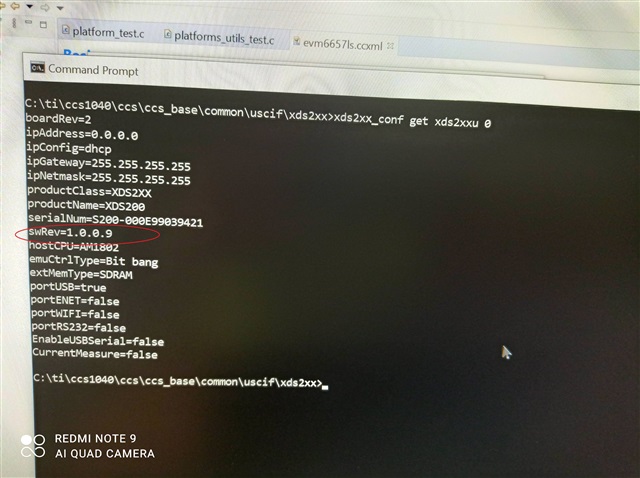
  • OK, I have finally had chance to do the xds200 update, but based on the output shown below it was already up to date

    F:\ti\ccs1040\ccs\ccs_base\common\uscif\xds2xx>xds2xx_conf get xds2xxu 0
    boardRev=2
    ipAddress=0.0.0.0
    ipConfig=dhcp
    ipGateway=255.255.255.255
    ipNetmask=255.255.255.255
    productClass=XDS2XX
    productName=XDS200
    serialNum=S200-000E990390A7
    swRev=1.0.0.9
    hostCPU=AM1802
    emuCtrlType=Bit bang
    extMemType=SDRAM
    portUSB=true
    portENET=false
    portWIFI=false
    portRS232=false
    EnableUSBSerial=false
    CurrentMeasure=false

    F:\ti\ccs1040\ccs\ccs_base\common\uscif\xds2xx>xds2xx_conf update xds2xxu 0 xds200_firmware_v1009.bin

    F:\ti\ccs1040\ccs\ccs_base\common\uscif\xds2xx>xds2xx_conf program xds2xxu 0 xds2xx_cpld_v1009.xsvf

    F:\ti\ccs1040\ccs\ccs_base\common\uscif\xds2xx>xds2xx_conf boot xds2xxu 0

    F:\ti\ccs1040\ccs\ccs_base\common\uscif\xds2xx>xds2xx_conf get xds2xxu 0
    boardRev=2
    ipAddress=0.0.0.0
    ipConfig=dhcp
    ipGateway=255.255.255.255
    ipNetmask=255.255.255.255
    productClass=XDS2XX
    productName=XDS200
    serialNum=S200-000E990390A7
    swRev=1.0.0.9
    hostCPU=AM1802
    emuCtrlType=Bit bang
    extMemType=SDRAM
    portUSB=true
    portENET=false
    portWIFI=false
    portRS232=false
    EnableUSBSerial=false
    CurrentMeasure=false


    So this still leaves the original issue as to why I’m getting an invalid processor ID when running the scripts to try to restore the Keystone flash to the original contents.

    What should I do from here?
    Mike

  • Mike,

    Actually, I have come across this error, " invalid processor ID" only....  when I intend to run the example of a processor device ( for example: C6678 ) into some other device, say K2E/C6657 etc.

    Please post the screenshot of the following.

    1. Screenshot of CCS with this error popping out.

    2. Screenshot of "Test connection - OK"

    3. Screenshot of output of gel file. ( Name of the gel used etc)

    4. camera-snapshot on your EVM board with XDS connection.

    Regards

    Shankari

  • OK, here's the output from the test connection function:

    [Start: Texas Instruments XDS2xx USB Debug Probe_0]

    Execute the command:

    %ccs_base%/common/uscif/dbgjtag -f %boarddatafile% -rv -o -S integrity

    [Result]


    -----[Print the board config pathname(s)]------------------------------------

    C:\Users\MiLewis\AppData\Local\TEXASI~1\
    CCS\ccs1040\0\0\BrdDat\testBoard.dat

    -----[Print the reset-command software log-file]-----------------------------

    This utility has selected a 560/2xx-class product.
    This utility will load the program 'xds2xxu.out'.
    The library build date was 'Jun 25 2021'.
    The library build time was '16:23:59'.
    The library package version is '9.4.0.00129'.
    The library component version is '35.35.0.0'.
    The controller does not use a programmable FPGA.
    The controller has a version number of '13' (0x0000000d).
    The controller has an insertion length of '0' (0x00000000).
    This utility will attempt to reset the controller.
    This utility has successfully reset the controller.

    -----[Print the reset-command hardware log-file]-----------------------------

    This emulator does not create a reset log-file.

    -----[Perform the Integrity scan-test on the JTAG IR]------------------------

    This test will use blocks of 64 32-bit words.
    This test will be applied just once.

    Do a test using 0xFFFFFFFF.
    Scan tests: 1, skipped: 0, failed: 0
    Do a test using 0x00000000.
    Scan tests: 2, skipped: 0, failed: 0
    Do a test using 0xFE03E0E2.
    Scan tests: 3, skipped: 0, failed: 0
    Do a test using 0x01FC1F1D.
    Scan tests: 4, skipped: 0, failed: 0
    Do a test using 0x5533CCAA.
    Scan tests: 5, skipped: 0, failed: 0
    Do a test using 0xAACC3355.
    Scan tests: 6, skipped: 0, failed: 0
    All of the values were scanned correctly.

    The JTAG IR Integrity scan-test has succeeded.

    -----[Perform the Integrity scan-test on the JTAG DR]------------------------

    This test will use blocks of 64 32-bit words.
    This test will be applied just once.

    Do a test using 0xFFFFFFFF.
    Scan tests: 1, skipped: 0, failed: 0
    Do a test using 0x00000000.
    Scan tests: 2, skipped: 0, failed: 0
    Do a test using 0xFE03E0E2.
    Scan tests: 3, skipped: 0, failed: 0
    Do a test using 0x01FC1F1D.
    Scan tests: 4, skipped: 0, failed: 0
    Do a test using 0x5533CCAA.
    Scan tests: 5, skipped: 0, failed: 0
    Do a test using 0xAACC3355.
    Scan tests: 6, skipped: 0, failed: 0
    All of the values were scanned correctly.

    The JTAG DR Integrity scan-test has succeeded.

    [End: Texas Instruments XDS2xx USB Debug Probe_0]

    And this is the screen shot of the 'test connection'

    And this is a screen clip when running debug ... 

    I'm unable to provide a snapshot of the actual connection to my desktop as I'm working remote today. Buts is just a USB connection to my desktop from the KE2 eval board

    Also here's a screen shot of when I connect to the A15_0 core in the debugger, so it connects OK it seems

    Mike

  • Mike,

    Good day!

    1. In all your screenshots, i do not see the error popping out, "An invalid processor ID has been found."

    2. Secondly, I already adviced to use the CCS version 9.3,  (refer my first post, here ," Please try using the CCS version 9.3, that is the compatible version for the processor SDK 6.3. Sometimes, the script file may not match the same path if CCS 10.4 version is used."

    But I could see in your screenshot of test-connection...you are still using CCS 10.4!!! ???

    Regards

    Shankari G

  • Hi Shankari, sorry about the delay responding. I was out for the holidays and then tied up with another project. 

    1.  In the last set of outputs I did not run the test that generates the 'An invalid processor ID has been found' In the very first post of this problem I included that output message.

    2.  Yes I understand that you're recommending I use CCS 9.3.  Please understand that to get software installed on my computer requires a considerable amount of interaction with our IT group.  I will try to begin this process to see if I can get it approved.  Is there an equivalent set of scripts that are compatible with 10.4?

    Mike

  • Mike,

    You are always welcome to modify the scripts of 10.4 CCS and make use of it.

    As the EVM and SDK were tested with the recommended CCS 9.3, I am insisting to use them.

    Otherwise, feel free, to use 10.4. I

    f without any issues, CCS 10.4, works for you, then you can keep the same.

    You might get very lesser support for incompatible versions of CCS vs SDK. 

    All the best !

    Regards

    Shankari G