This thread has been locked.

If you have a related question, please click the "Ask a related question" button in the top right corner. The newly created question will be automatically linked to this question.

TDA4VM: use NV12 as input no obj detected

Part Number: TDA4VM

Hi team

i use sdk 8.0 tidlmodel import tools import model. config file like bellow.
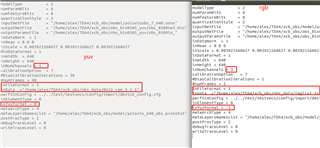
the result shows rgb can detect ,while yuv no detect.

if my yuv config file set wrong parms?

how to add calib img.when inputfile is raw data?

for suport batch=4 yuv data as model input.

how to modify the model export ,config setting and calib used data?

  • Find the below example config file for mode; trained with RGB input and Importing the same for YUV nv12 format input.

    Yes, the input is expected to be in RAW binary format.

    Please try the with batch size = 4, if is functional then you can try the batch size of 4

    modelType          = 1
    numParamBits      = 8
    quantizationStyle  = 2
    inputNetFile      = "../../test/testvecs/models/public/tensorflow/mobileNet_v2/mobilenet_v2_1.0_224_final.pb"
    outputNetFile      = "../../test/testvecs/config/tidl_models/tensorflow/tidl_net_mobilenet_v2_1.0_224_yuv.bin"
    outputParamsFile   = "../../test/testvecs/config/tidl_models/tensorflow/tidl_net_mobilenet_v2_1.0_224_yuv_"
    inDataNorm  = 1
    inMean = 128 128 128
    inScale =  0.0078125 0.0078125 0.0078125
    inWidth  = 224
    inHeight = 224
    inNumChannels = 1
    inData  =   "../../test/testvecs/input/airshow_yuv420_224x224_224x112.yuv"
    perfSimConfig = "../../test/testvecs/config/import/device_config.cfg"
    postProcType = 1
    inFileFormat = 1
    rawDataInElementType = 0
    foldPreBnConv2D = 1
    inYuvFormat = 0
    numFrames   = 1

    Thanks and regards,

    Kumar.D