This thread has been locked.

If you have a related question, please click the "Ask a related question" button in the top right corner. The newly created question will be automatically linked to this question.

AM6442: Linux HSR/PRP issue

Part Number: AM6442


Hi experts

According to AM64 Linux SDK8.2:

https://software-dl.ti.com/processor-sdk-linux/esd/AM64X/08_02_00_23/exports/docs/linux/Foundational_Components/Kernel/Kernel_Drivers/Network/HSR_PRP.html

 I follow the step in SDK document with SK EVM and GP EVM, and use eth0 and eth1 port like this
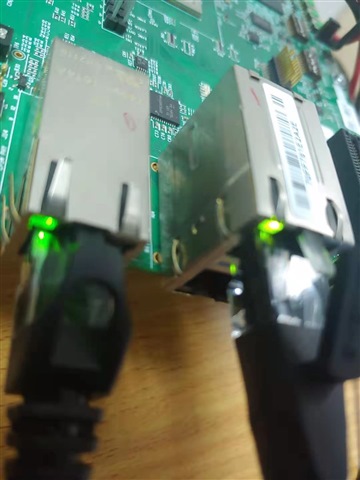
When I ping the port, there’s nothing happen, even if I use the two PRU Ethernet ports, there still nothing happen

In addition, after prp0 is configured, I see that prp0 is not in up state, so I need to ifconfig PRP0 up. Is this normal?

Another question is that PRP0's netmask is 255.255.255.255. Is this need to use broadcast?

BR

Ethan

  • Actually, if I use ifconfig to config the port, it can ping, but flow the step in SDK to use ip link, it cannot ping

  • Hello Ethan,

    I got my boards set up this weekend, but I did not have time to run any tests yet.

    Note that the two stacked PHY connection points are connected to the PRU Ethernet ports by default. So you are trying to run HSR/PRP with one CPSW port, and one PRU Ethernet port. I do not know if that configuration is supported. I also need to verify that PRU Ethernet supports HSR/PRP running on Linux (and not just CPSW Ethernet).

    Do you see the same behavior if you run tests again using both PRU Ethernet ports?

    Once you have followed the steps in that SDK document page, I would expect that you could ping the IP address of the other board. I do not expect that you need to change the netmask from the default settings.

    Regards,

    Nick

  • Do you see the same behavior if you run tests again using both PRU Ethernet ports?

    Yes, I have followed the step in SDK without doing other things, and I just check the netmask of prp0

  • Hello Ethan,

    First off, looks like I was incorrect. The two ports that you indicated in your picture are both configured to be CPSW ports in the test I ran with SDK 8.1 on the AM64x EVM board.

    Secondly, the instructions as-is also do not work for me at https://software-dl.ti.com/processor-sdk-linux/esd/AM64X/08_01_00_39/exports/docs/linux/Foundational_Components/Kernel/Kernel_Drivers/Network/HSR_PRP.html . For some reason the system does not seem to recognize the IP address? I will file a ticket to get a developer to comment.

    However, I could get the steps to work by using "ifconfig" instead of "ip" for some of the commands. My steps are below.

    ===== AM64x EVM board, SDK 8.1 ==========
    
    root@am64xx-evm:~# ifconfig eth0 down
    [   78.470247] am65-cpsw-nuss 8000000.ethernet eth0: Link is Down
    root@am64xx-evm:~# ifconfig eth1 down
    [   83.465689] am65-cpsw-nuss 8000000.ethernet eth1: Link is Down
    
    root@am64xx-evm:~# ifconfig -a
    ...
    eth0: flags=4098<BROADCAST,MULTICAST>  mtu 1500  metric 1
            ether f4:84:4c:f9:4d:3b  txqueuelen 1000  (Ethernet)
            RX packets 20  bytes 4125 (4.0 KiB)
            RX errors 0  dropped 0  overruns 0  frame 0
            TX packets 25  bytes 4088 (3.9 KiB)
            TX errors 0  dropped 0 overruns 0  carrier 0  collisions 0
    
    eth1: flags=4098<BROADCAST,MULTICAST>  mtu 1500  metric 1
            ether 70:ff:76:1d:ed:00  txqueuelen 1000  (Ethernet)
            RX packets 15  bytes 3549 (3.4 KiB)
            RX errors 0  dropped 0  overruns 0  frame 0
            TX packets 28  bytes 4484 (4.3 KiB)
            TX errors 0  dropped 0 overruns 0  carrier 0  collisions 0
    
    root@am64xx-evm:~# ifconfig eth0 hw ether 70:ff:76:1d:ed:00
    root@am64xx-evm:~# ifconfig eth1 hw ether 70:ff:76:1d:ed:00
    root@am64xx-evm:~# ifconfig eth0 up
    root@am64xx-evm:~# ifconfig eth1 up
    
    root@am64xx-evm:~# ip link add name hsr0 type hsr slave1 eth0 slave2 eth1 supervision 45 version 1
    [  242.907936] device eth0 entered promiscuous mode
    [  242.928856] device eth1 entered promiscuous mode
    root@am64xx-evm:~# ifconfig hsr0 192.168.2.20
    [  277.428427] IPv6: ADDRCONF(NETDEV_CHANGE): hsr0: link becomes ready
    root@am64xx-evm:~# ping 192.168.2.21
    
    ====== AM64x SK board, SDK 8.2 =====
    
    root@am64xx-evm:~# ifconfig eth0 down
    root@am64xx-evm:~# ifconfig eth1 down
    root@am64xx-evm:~# ifconfig -a
    root@am64xx-evm:~# ifconfig eth0 hw ether ac:1f:0f:84:01:d2
    root@am64xx-evm:~# ifconfig eth1 hw ether ac:1f:0f:84:01:d2
    root@am64xx-evm:~# ifconfig eth0 up
    root@am64xx-evm:~# ifconfig eth1 up
    root@am64xx-evm:~# ip link add name hsr0 type hsr slave1 eth0 slave2 eth1 supervision 45 version 1
    [  249.577543] device eth0 entered promiscuous mode
    [  249.614916] device eth1 entered promiscuous mode
    root@am64xx-evm:~# ifconfig hsr0 192.168.2.21
    [  260.818245] IPv6: ADDRCONF(NETDEV_CHANGE): hsr0: link becomes ready
    

    The ping test continued running even when an Ethernet cable was unplugged and replugged:

    root@am64xx-evm:~# ping 192.168.2.21
    PING 192.168.2.21 (192.168.2.21): 56 data bytes
    64 bytes from 192.168.2.21: seq=0 ttl=64 time=1.059 ms
    64 bytes from 192.168.2.21: seq=1 ttl=64 time=0.593 ms
    64 bytes from 192.168.2.21: seq=2 ttl=64 time=0.442 ms
    64 bytes from 192.168.2.21: seq=3 ttl=64 time=0.577 ms
    64 bytes from 192.168.2.21: seq=4 ttl=64 time=0.590 ms
    64 bytes from 192.168.2.21: seq=5 ttl=64 time=0.595 ms
    64 bytes from 192.168.2.21: seq=6 ttl=64 time=0.481 ms
    64 bytes from 192.168.2.21: seq=7 ttl=64 time=0.401 ms
    64 bytes from 192.168.2.21: seq=8 ttl=64 time=0.593 ms
    64 bytes from 192.168.2.21: seq=9 ttl=64 time=0.603 ms
    64 bytes from 192.168.2.21: seq=10 ttl=64 time=0.627 ms
    64 bytes from 192.168.2.21: seq=11 ttl=64 time=0.583 ms
    [  302.201042] am65-cpsw-nuss 8000000.ethernet eth0: Link is Down
    64 bytes from 192.168.2.21: seq=12 ttl=64 time=0.640 ms
    64 bytes from 192.168.2.21: seq=13 ttl=64 time=0.604 ms
    64 bytes from 192.168.2.21: seq=14 ttl=64 time=0.639 ms
    64 bytes from 192.168.2.21: seq=15 ttl=64 time=0.563 ms
    64 bytes from 192.168.2.21: seq=16 ttl=64 time=0.582 ms
    64 bytes from 192.168.2.21: seq=17 ttl=64 time=0.575 ms
    64 bytes from 192.168.2.21: seq=18 ttl=64 time=0.701 ms
    64 bytes from 192.168.2.21: seq=19 ttl=64 time=0.601 ms
    [  310.392624] am65-cpsw-nuss 8000000.ethernet eth0: Link is Up - 1Gbps/Full - flow control off
    64 bytes from 192.168.2.21: seq=20 ttl=64 time=0.498 ms
    64 bytes from 192.168.2.21: seq=21 ttl=64 time=0.582 ms
    64 bytes from 192.168.2.21: seq=22 ttl=64 time=0.575 ms
    64 bytes from 192.168.2.21: seq=23 ttl=64 time=0.561 ms
    

    Regards,

    Nick