Part Number: AM3358
Hello,
We are trying to bring up CAN 2.0 on our AM335x MPU. However, we are not able to establish CAN communication using CAN-USB Peak CAN adapter connect to a host.
When we probe the CAN Transceiver Tx line while sending a "cangen can0" from the Linux command line, we see no activity on r Tx line.
Similarly, when we send can messages from our PEAK View App on the host pc to the board, we are able to see acitivity on the Rx line of the receiver but "candump can0" returns no messages.
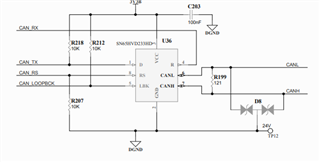
Our CAN transceiver configuration can be found below:
...
&dcan0 {
status = "okay";
pinctrl-names = "default";
pintcrl-0 = <&dcan_pins_default>;
can-transceiver {
max-bitrate=<1000000>;
};
};
can_pins_default: can_pins_default {
pinctrl-single,pins = <
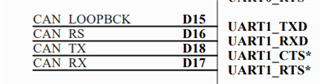
AM33XX_IOPAD(0x97c, PIN_INPUT | MUX_MODE2) /* (D17) uart1_rtsn.dcan0_rx */
AM33XX_IOPAD(0x978, PIN_OUTPUT | MUX_MODE2) /* (D18) uart1_ctsn.dcan0_tx */
AM33XX_IOPAD(0x980, PIN_OUTPUT | MUX_MODE7) /* (D16) uart1_rxd.gpio0[14] (RS Pin) */
AM33XX_IOPAD(0x984, PIN_OUTPUT | MUX_MODE7) /* (D15) uart1_txd.gpio0[15] (Loopback pin) */
>;
};
We are initializing our can0 bus with the following commands:
ip link set can0 type can bitrate 500000
ip link set can0 up
We also make sure the loopback pin is low, by manually setting the gpio0[15] to 0 through /sys/class/gpio
Below is our Linux version and can debug message output:
Linux version 5.10.0-rc6-g9e977d2b4674-dirty
[ 3.019334] c_can_platform 481cc000.can: c_can_platform device registered (regs=607695bf, irq=37)
[ 3.309513] can: controller area network core
[ 3.318533] can: raw protocol
[ 3.321521] can: broadcast manager protocol
[ 3.325757] can: netlink gateway - max_hops=1
[ 4.367040] mcp251xfd spi0.0 can1: MCP2518FD rev0.0 (-RX_INT -MAB_NO_WARN +CRC_REG +CRC_RX +CRC_TX +ECC -HD c:40.00MHz m:16.66MHz r:16.66MHz e:0.00MHz) successfully initialized.
[ 12.408398] ubi0: scanning is finished
[ 47.339691] c_can_platform 481cc000.can can0: setting BTR=0209 BRPE=0000
[ 47.346821] IPv6: ADDRCONF(NETDEV_CHANGE): can0: link becomes ready