This thread has been locked.

If you have a related question, please click the "Ask a related question" button in the top right corner. The newly created question will be automatically linked to this question.

CCSTUDIO: Error on Ubuntu 18.04

Part Number: CCSTUDIO

Hello Team,

My customer gets the following message when attempting to install CCS 12 on my Ubuntu 18.04 machine.
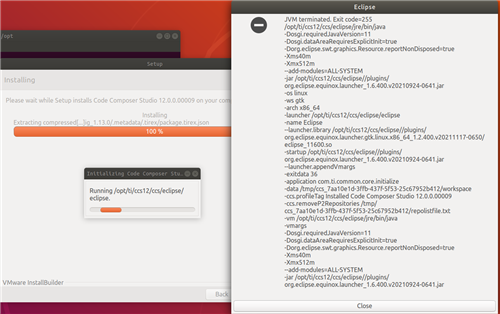
Tried the following:

  • Installing into /opt/ti/..
  • Installing into ~/ti/..
  • Installing v11 and v12 of CCS
  • $ sudo apt update + sudo apt upgrade
  • Fixing broken packages with Synaptic Package Manager
  • Multiple restarts

Further info:

  • Eclipse installed without any issues
  • java -version
    openjdk version "11.0.16" 2022-07-19
  • Dependency check in installer  is OK
  • Custom install with only Sitara AM3x, AM4x, ... , MPUs selected
  • Installer finishes and offers to create a desktop icon (this does not happen)
  • install_drivers.sh script runs without error
  • Attemptin to run ~/ti/ccs12/ccs/ccstudio in terminal:
    $ ./ccstudio 
    No such file or directory
    If this continues, please run fsclean or set TI_APPDATA_DIR to directory you have permissions to access

Install Log: Install Log.txt

Regards,

Renan

  • Attemptin to run ~/ti/ccs12/ccs/ccstudio in terminal:
    $ ./ccstudio 
    No such file or directory

    Renan the folder looks a bit off.  If you look in ~/ti/ccs12/ccs/eclipse/ are there ccstudio and eclipse executables present?  Note the /eclipse after /ccs

    Does that ccstudio run?

    John

  • Hello JohnS,

    Please see the response from my customer:

    lawnsifl@wnnb00590:~/ti/ccs12/ccs/eclipse$ ./ccstudio
    No such file or directory
    If this continues, please run fsclean or set TI_APPDATA_DIR to directory you have permissions to access

    lawnsifl@wnnb00590:~/ti/ccs12/ccs/eclipse$ ./eclipse
    SLF4J: Failed to load class "org.slf4j.impl.StaticLoggerBinder".
    SLF4J: Defaulting to no-operation (NOP) logger implementation
    SLF4J: See www.slf4j.org/codes.html for further details.

    Running ./ccstudio fails.
    Running ./eclipse succeeds but with errors (see above).

    Regards,

    Renn

  • lawnsifl@wnnb00590:~/ti/ccs12/ccs/eclipse$ ./eclipse
    SLF4J: Failed to load class "org.slf4j.impl.StaticLoggerBinder".
    SLF4J: Defaulting to no-operation (NOP) logger implementation
    SLF4J: See www.slf4j.org/codes.html for further details.

    These messages are a known issue and can be ignored:

    https://sir.ext.ti.com/jira/browse/EXT_EP-10874

    lawnsifl@wnnb00590:~/ti/ccs12/ccs/eclipse$ ./ccstudio
    No such file or directory

    Can the customer provide the contents of the ~/ti/ccs12/ccs/eclipse folder? Maybe the output of 'ls' of the directory.

    Also note that it appears that the customer has a non-alphanumeric character in their username. That can potentially cause issues:

    https://software-dl.ti.com/ccs/esd/documents/users_guide/ccs_faqs.html#why-do-i-need-to-avoid-non-alphanumeric-unicode-characters-in-my-paths

    Thanks

    ki

  • Hello Ki,

    Good day. Please see update from my customer:

    output:
    lawnsifl@wnnb00590:~/ti/ccs12/ccs/eclipse$ ll
    total 552
    drwxr-xr-x 10 lawnsifl keine_berechtigungen 4096 Aug 18 10:18 ./
    drwxr-xr-x 13 lawnsifl keine_berechtigungen 4096 Aug 18 10:18 ../
    -rw-rw-r-- 1 lawnsifl keine_berechtigungen 170307 Aug 18 10:17 artifacts.xml
    -rw-r--r-- 1 lawnsifl keine_berechtigungen 526 Aug 18 10:16 ccs.properties
    -rwxr-xr-x 1 lawnsifl keine_berechtigungen 24968 Jul 23 2019 ccstudio*
    -rw-r--r-- 1 lawnsifl keine_berechtigungen 993 Jun 3 10:57 ccstudio.ini
    drwxrwxr-x 13 lawnsifl keine_berechtigungen 4096 Aug 22 09:38 configuration/
    drwxrwxr-x 2 lawnsifl keine_berechtigungen 4096 Aug 18 10:14 dropins/
    -rwxr-xr-x 1 lawnsifl keine_berechtigungen 86328 Jun 23 22:01 eclipse*
    -rw-rw-r-- 1 lawnsifl keine_berechtigungen 407 Aug 18 10:17 eclipse.ini
    -rw-rw-r-- 1 lawnsifl keine_berechtigungen 61 Jun 23 22:01 .eclipseproduct
    drwxrwxr-x 114 lawnsifl keine_berechtigungen 12288 Aug 18 10:17 features/

    -rw-rw-r-- 1 lawnsifl keine_berechtigungen 140566 Jun 23 22:01 icon.xpm
    drwxrwxr-x 7 lawnsifl keine_berechtigungen 4096 Aug 18 10:14 jre/
    -rw-rw-r-- 1 lawnsifl keine_berechtigungen 9260 Jun 23 22:01 notice.html
    drwxrwxr-x 6 lawnsifl keine_berechtigungen 4096 Aug 18 10:16 p2/
    drwxrwxr-x 70 lawnsifl keine_berechtigungen 53248 Aug 18 10:16 plugins/
    drwxrwxr-x 2 lawnsifl keine_berechtigungen 4096 Aug 18 10:14 readme/
    -rw-r--r-- 1 lawnsifl keine_berechtigungen 1 Aug 18 10:18 .success
    drwxr-xr-x 2 lawnsifl keine_berechtigungen 4096 Aug 18 10:14 utils/

    Regards,

    Renan

  • This looks fine. Hence I suspect that the issue is that the user had limited access to the CCS install location.

    Please have the customer open a terminal window and then set the TI_APPDATA_DIR environment variable to a path that they have full permissions to and the have them launch CCS by running the ccstudio executable from the same terminal.

  • Hello Ki,

    Please see our customer response below:

    lawnsifl@wnnb00590:~$ export TI_APPDATA_DIR="~/ti/"
    lawnsifl@wnnb00590:~$ cd ~/ti/ccs12/ccs/eclipse/
    lawnsifl@wnnb00590:~/ti/ccs12/ccs/eclipse$ ./ccstudio
    SLF4J: Failed to load class "org.slf4j.impl.StaticLoggerBinder".
    SLF4J: Defaulting to no-operation (NOP) logger implementation
    SLF4J: See www.slf4j.org/codes.html for further details.
    Segmentation fault (core dumped)

    lawnsifl@wnnb00590:~$ ll | grep ti/
    drwxr-xr-x 6 lawnsifl keine_berechtigungen 4096 Aug 29 13:02 ti/
    drwxr-xr-x 3 root root 4096 Jun 10 12:01 .ti/

    This gets me to the workspace selector, but crashes after pressing launch

    Thanks in advance.

    Regards,

    Renan

  • This gets me to the workspace selector, but crashes after pressing launch

    Please have them try again and if it crashes again, provide the eclipse error log found in: <WORKSPACE FOLDER>/.metadata/.log

    Thanks

    ki

  • Hello Kai,

    Please see our customer feedback below:

    This worked now:

    lawnsifl@wnnb00590:~$ export TI_APPDATA_DIR=~/ti/
    lawnsifl@wnnb00590:~$ cd ti/ccs12/ccs/eclipse/
    lawnsifl@wnnb00590:~/ti/ccs12/ccs/eclipse$ ./ccstudio
    SLF4J: Failed to load class "org.slf4j.impl.StaticLoggerBinder".
    SLF4J: Defaulting to no-operation (NOP) logger implementation
    SLF4J: See www.slf4j.org/codes.html for further details.
    Chromium userdata location: /home/lawnsifl@intranet.zkw.at/workspace/.jxbrowser.userdata

    (Code Composer Studio:3979): Gtk-WARNING **: 09:30:31.524: GtkToolbar 0x329cc80 reported min size 22 and natural size 20 in get_preferred_width(); natural size must be >= min size

    (Code Composer Studio:3979): Gtk-WARNING **: 09:30:31.565: Negative content width -4 (allocation 2, extents 3x3) while allocating gadget (node progressbar, owner GtkProgressBar)

    (Code Composer Studio:3979): Gtk-WARNING **: 09:30:31.565: Negative content width -2 (allocation 0, extents 1x1) while allocating gadget (node trough, owner GtkProgressBar)

    CCS HTTP adapter started! [ccs.port:41057] - Open 'http://localhost:41057/ide' in web browser to see listing of available APIs...


    Warning: Nashorn engine is planned to be removed from a future JDK release
    Warning: Nashorn engine is planned to be removed from a future JDK release
    Warning: Nashorn engine is planned to be removed from a future JDK release

    Regards,

    Renan

  • This worked now:

    To confirm: Is CCS running ok now?

  • Hello Kai,

    Yes the CCS is now running thank you for your help.

    It seems the quotation marks in the environment variable path were causing issues.

    CCS studio now launches after setting TI_APPDATA_DIR in .profile

    Regards,

    Renan