This thread has been locked.

If you have a related question, please click the "Ask a related question" button in the top right corner. The newly created question will be automatically linked to this question.

SK-TDA4VM: Facing issue while detecting the second USB camera on SK-TDA4 evaluation hardware

Part Number: SK-TDA4VM

Hello TI Team

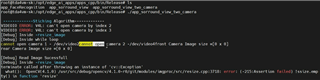
Currently we are able to detect the single USB camera using v4l2 driver on SK-TDA4 EVM board. But further facing issue while detecting the another USB camera on the same SK-TDA4 evaluation hardware board.

PFA the snapshot attached , here we are able to detect first USB camera only with "video2" device.so could you please help in this case  :

- What are the code changes we need to do for detecting the second camera on same SK-TDA4 board using v4l2 drive on Linux side.

- Which files we need to take care for detecting the second camera on same SK-TDA4 board.

Or please share the correct link to solved this issue.

- Thanks and regards

Prashant Shinde

  • Hi ,

    I really doubt we have validated USB based camera, i will check and confirm the same with

    Since this is standard Linux USB driver, i would suggest to check this in Linux community. 

    Regards,

    Brijesh 

  • Hi Prashant Shinde,

    Whatever printed on the terminal is from a helper script in edge_ai_apps
    there was a small issue where it was parsing only on camera entry
    you can apply below patch to edge_ai_apps to fix this
    you 

    From 9638a0592d6c2200cbfc8279c7a9b522b0d2ebfe Mon Sep 17 00:00:00 2001
    From: Rahul T R <r-ravikumar@ti.com>
    Date: Thu, 8 Sep 2022 12:05:41 +0530
    Subject: [PATCH] setup: Add support to detect multiple USB cams
    
    Currently only one USB camera gets detected,
    Add support to detect multiple
    
    Signed-off-by: Rahul T R <r-ravikumar@ti.com>
    ---
     scripts/setup_cameras.sh | 14 ++++++++++----
     1 file changed, 10 insertions(+), 4 deletions(-)
    
    diff --git a/scripts/setup_cameras.sh b/scripts/setup_cameras.sh
    index 9ab59ad..f2830c7 100755
    --- a/scripts/setup_cameras.sh
    +++ b/scripts/setup_cameras.sh
    @@ -145,10 +145,16 @@ setup_CSI_cameras(){
     }
    
     setup_USB_camera(){
    -    USB_CAM_DEV=`ls /dev/v4l/by-path/*usb*video-index0 | head -1 | xargs readlink -f`
    -    echo "USB Camera detected"
    -    echo "    device = "$USB_CAM_DEV
    -    echo "    format = jpeg"
    +    USB_CAM_ARR=(`ls /dev/v4l/by-path/*usb*video-index0`)
    +    count=0
    +    for i in ${USB_CAM_ARR[@]}
    +    do
    +        USB_CAM_DEV=`readlink -f $i`
    +        echo "USB Camera $count detected"
    +        echo "    device = "$USB_CAM_DEV
    +        echo "    format = jpeg"
    +        count=$(($count + 1))
    +    done
     }
    
    
    --
    2.37.2


    Regards

    Rahul T R

  • Hi Brijesh
    Thanks for your input..

  • Hi Rahul Ravikumar...
    Thanks you..

    It looks need to change in the script file only.
    So is there any change required in the Linux USB drive side?
    Further if I connect both the USB camera sensor module to SK-TDA4 device , with this minimal change in the script that suggested by you , it will detect both the camera's and its drivers to get worked fine?

  • Hi Prashant Shinde,

    Driver will load automatically
    it just that the script was not printing

    Also refer to below link to use two usb cams simultaneously
    https://software-dl.ti.com/jacinto7/esd/processor-sdk-linux-sk-tda4vm/08_02_00/exports/docs/faq.html#getting-error-when-trying-to-capture-from-multiple-usb-cameras-simultaneously

    Regards

    Rahul T R

  • Hi Rahil 
    Thanks for your input, I modified the script and tested over the SK-TDA4 board, now its detecting both the USB camera's.

    PFA the snapshot for the same :

    But one more thing I observed that , if I connected single camera to either of connector 1) USB device USB2.0 (Gen1) Type C  Or  2) USB3.1 (Gen1) Type A  

    the device getting detected with video2 only. So that means USB driver itself detecting by default video2 device irrespective of the USB connector either 1) USB device USB2.0 (Gen1) Type C  Or  2) USB3.1 (Gen1) Type A  is it right?
     
    Secondly can we connect 4 USB cameras with USB hub device and capture the images using all those?

  • Hi Prashant Shinde,

    Yes you are correct, the enumeration is not based on what type of camera or USB port

    Yes you can connect 4 cameras
    please make the modification to the UVC driver as given in 
    https://software-dl.ti.com/jacinto7/esd/processor-sdk-linux-sk-tda4vm/08_02_00/exports/docs/faq.html#getting-error-when-trying-to-capture-from-multiple-usb-cameras-simultaneously

    Regards

    Rahul T R

  • Hi Rahul,
    Sorry for the late reply..

    I gone through the link you shared, and referred all steps that mentioned in the page :
    So using uvcvideo kernel patch for uvc usb device, made uvcvideo driver changes accordingly in the PSDK Linux and built driver to generate uvcvideo.ko file.Further tested the uvcvideo.ko file to validate uvc driver code patch changes by flashing it on SK HW. But after flashing uvcvideo.ko in SK hardware , I gone through below issue.

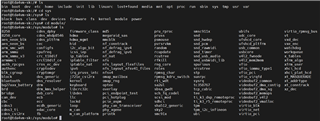
    1) Once I given the last echo command: "echo 1200 > /sys/module/uvcvideo/parameters/bandwidth_cap"
    It was showing an error "No such file or directory".PFA the snapshot for the same.


    2) Even if we run the "init_script.sh" camera script , below observations I found 
    - No USB getting detected. PFA the snapshot for the same.

    3)Further while running SVS application for two camera's, it's not able to open the video devices, shows an error for both the USB camera's like
    - "Can't open camera by index". PFA the snapshot for the same.

    One more important observation I found that once I flash the "uvcvideo.ko" file in the SK hardware, and restart the hardware again
    then at path "/sys/module/" , the uvcvideo folder is getting removed.

    So with this experiment with the UVC driver , I came to conclusion that this driver patch may be for Jacinto board and not for SK-TDA4 board.
    So could you please suggest the solution for these mentioned issue.

    Note :I used "ti-processor-sdk-linux-j7-evm-08_04_00_11-Linux-x86-Install.bin" file for uvc driver changes.

  • Hi ,

    Can you please let me know, which version of SDK you used for
    flashing the SD card,

    You should use same version of PSDK Linux to apply the patch and build the .ko
    file
    If you share the EdgeAI SDK version, I can exactly point you to which PSDK LINUX to use

    Regards

    Rahul T R

  • Hi Rahul
    I 'm using PSDK Linux : ti-processor-sdk-linux-j7-evm-08_04_00_11-Linux-x86-Install.bin installer with "08_04_00_11" this version.
    And for flashing uvcvideo.ko , used sftp protocol application to flashed ".ko" file in the sd-card at path : rootfs\lib\modules\5.10.100-g7a7a3af903\kernel\drivers\media\usb\uvc. Could you please let me know is this driver patch for Jacinto board only ?

  • Hi Prashant,

    You are using 8.2 SDK
    please use 8.2 PSDK Linux to create .ko file

    Below is the link for the same
    PROCESSOR-SDK-LINUX-J721E Software development kit (SDK) | TI.com

    Regards
    Rahul T R

  • Hi Rahul
    I generated separately uvcvideo.ko uvc kernel module on lower version 8.2 of PSDK Linux platform as well to validate UVCUSB kernel patch on SK-TDA4 EVM board and tested the camera setup script and svs application but even though observed the below same issues that shown in previous discussion:

    - No USB getting detected.

    - "Can't open camera by index"
    So could you please suggest any different code change in UVC kernel patch which will solve this issue.

  • Hi Prasant,

    Can you please share the boot logs
    Also please try below command

    insmod uvcvideo.ko

    And send the output

    Regards
    Rahul T R