Part Number: SK-AM62
Still I cannot boot via NFS while SD Card boot is fully functional. I have read all he the tickets for Jacinto but for Sitara it is not working.
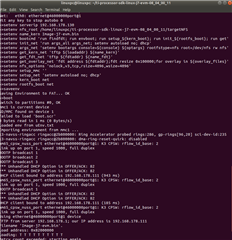
Applying the ./setup.sh script works but always ends up with "Bad Linux ARM64 Image magic!" even it seems to load the "Image-arm62xx-evm.bin" and the "k3-am625-sk.dtb" files. I have two IP addresses and difficulties to decide what is the right one.
Any ideas what I can do?
=>
=> boot
switch to partitions #0, OK
mmc1 is current device
SD/MMC found on device 1
Failed to load 'boot.scr'
1490 bytes read in 3 ms (484.4iB/s)
Loaded env from uEnv.txt
Importing environment from mmc1 ...
Running uenvcmd ...
lready setup.in 2 ms (0 Bytes/s)
link up on port 1, speed 1000, full duplex
BOOTP broadcast 1
*** Unhandled DHCP Option in OFFER/ACK: 82
*** Unhandled DHCP Option in OFFER/ACK: 82
DHCP client bound to address 192.168.178.126 (172 ms)
link up on port 1, sed 1000, full duplex
BOOTP broadcast 1
*** Unhandled DHCP Option in OFFER/ACK: 82
*** Unhandled DHCP Option in OFFER/ACK: 82
DHCP client bound  address 192.168.178.126 (192 ms)
link up on port 1, speed 1000, full duplex
Using etherne8000000port@1 device
TFTP from server 192.168.178.1; our IP aress is 192.168.178.126
Filename 'Image-am62xx-evm.bin'.
Load address: 0x8200000
                       Loading: T T T T T T T T T T
Retry count exceeded; starting again
link up on port 1, spe 1000, full duplex
Using ethernet@8000000port@1 device
TFTP om server 192.168.178.1; our IP address is 192.168.178.126
Filename 'k3-am625k.dtb'.
Load address: 0x88000000
Loading: T T T T T T T T T T
Retry count exceeded; starting again
libfdt fdt_check_heade): FDT_ERR_BADMAGIC
No FDT memory address configured. Please configure
the FDT address via "fdt addr <address>" command
                                                Aborting!
Bad Linux ARM64 Image magic!
=>