This thread has been locked.

If you have a related question, please click the "Ask a related question" button in the top right corner. The newly created question will be automatically linked to this question.

SK-AM64B: MCU+ SDK Getting Started (UART Boot, SD Boot, CCS init) issues

Part Number: SK-AM64B
Other Parts Discussed in Thread: UNIFLASH

My customer is seeing the following issues when trying to get started with R5F development on the SK-AM64B EVM.

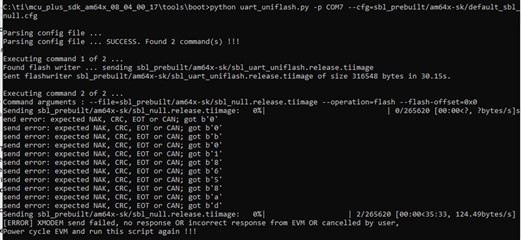
  1. UART boot started kinda working – but ends in XMODEM send failed in Python script
    1. See image below
    2. Tried many times on 2 different boards. Never works but gets different data every time.
  2. SOC Initialization Using SD Boot provides no visual indication that its working
    1. Maybe it did something, Im not sure, because UART boot wasn’t printing “C” but now it is after I tried booting with that SD card.
  3. SOC Initialization Using CCS Scripting doesn’t work
    1. Cant get past this error -1170
      1. Have tried connecting JTAG after powering on
    2. But I can connect to the PRUs, see image below

Is “mcu_plus_sdk_am64x_08_04_00_17” the right version to be using with SK-AM64B ?

UART boot problem :
 

PRU Connection works but M3 connection does not :


  • Hello ,

    Can you please confirm you are using GPEVM or HS_FS HW version?

    If you are trying to send GPEVM images to the HS_FS version, you may get a UART boot problem.

    If you are using HS_FS HW version, please try to update below paths in default_sbl_ospi and default_sbl_null cfg files.

    # First point to sbl_uart_uniflash binary, which function's as a server to flash one or more files
    --flash-writer=sbl_prebuilt/am64x-sk/sbl_uart_uniflash.release.tiimage - > Update image file  to sbl_uart_uniflash.release.hs_fs.tiimage

    # Now send one or more files to flash or flashverify as needed. The order of sending files does not matter

    # Program the OSPI PHY tuning attack vector
    --operation=flash-phy-tuning-data

    # When sending bootloader make sure to flash at offset 0x0. ROM expects bootloader at offset 0x0
    --file=sbl_prebuilt/am64x-sk/sbl_ospi.release.tiimage --operation=flash --flash-offset=0x0 - > - > Update image file  to sbl_ospi.release.hs_fs.tiimage


    Please let me know if you face any issue.

    Regards,

    S.Anil.

  • S.Anil,

    Thanks for you response. The SK-AM64B EVM has the HS_FS version.

    Do you have any guidance for #2 or #3 on the HS_FS silicon?

    Or do you think that #3 should work correctly once the hs_fs files are flashed into the OSPI?

    Jason

  • Hello ,

    As mentioned earlier you need to update default_sbl_ospi and default_sbl_null cfg files in your workspace for HS_FS Hw version.

    Please check below path and update default_sbl_ospi and default_sbl_null cfg files.

    Path : C:\ti\mcu_plus_sdk_am64x_08_04_00_17\tools\boot\sbl_prebuilt\am64x-sk

    default_sbl_null cfg

    # First point to sbl_uart_uniflash binary, which function's as a server to flash one or more files
    --flash-writer=sbl_prebuilt/am64x-sk/sbl_uart_uniflash.release.tiimage - > Update image file  to sbl_uart_uniflash.release.hs_fs.tiimage

    # When sending bootloader make sure to flash at offset 0x0. ROM expects bootloader at offset 0x0
    --file=sbl_prebuilt/am64x-sk/sbl_null.release.tiimage --operation=flash --flash-offset=0x0 - > - Update image file  to sbl_null.release.hs_fs.tiimage

    default_sbl_ospi cfg

    # First point to sbl_uart_uniflash binary, which function's as a server to flash one or more files
    --flash-writer=sbl_prebuilt/am64x-sk/sbl_uart_uniflash.release.tiimage - > Update image file  to sbl_uart_uniflash.release.hs_fs.tiimage

    # When sending bootloader make sure to flash at offset 0x0. ROM expects bootloader at offset 0x0
    --file=sbl_prebuilt/am64x-sk/sbl_ospi.release.tiimage --operation=flash --flash-offset=0x0 - > - Update image file  to sbl_ospi.release.hs_fs.tiimage

    do you think that #3 should work correctly once the hs_fs files are flashed into the OSPI?

    Yes your understanding is correct. After flashing HS_FS images (use default_sbl_null cfg file) you can connect JTAG to all cores.

    Please use sbl_null.release.hs_fs.tiimage for HS_FS Hw version for SOC initialization using SD boot mode.

    Please check below link for migrating details..

    software-dl.ti.com/.../HSFS_MIGRATION_GUIDE.html


    Please let me know if this helps your query .

    Regards,

    S.Anil.