This thread has been locked.

If you have a related question, please click the "Ask a related question" button in the top right corner. The newly created question will be automatically linked to this question.

AM5728: loadJsfile error from internal memory in am5728?

Part Number: AM5728

Hi sir,

I am using AM5728 custom boards (Reference of AM5728 board) it's not booting from sd card,

because through CCS i loaded loadJSFile then it's giving below error in Board-1

Board-1:

js:> loadJSFile C:\Users\Admin\workspace_v8\am57xx-dss-files\am57xx-ctt.dss
Error connecting to the target: emulation failure occurred (C:\Users\Admin\workspace_v8\am57xx-dss-files\am57xx-ctt.dss#231)
js:> loadJSFile C:\Users\Admin\workspace_v8\am57xx-dss-files\am57xx-ctt.dss
ID_CODE = 0x2b99002f
AM572x SR2.0 detected.

Error reading memory: Errors during memory.readData(): Address: 0x4a0026c4 Error: 0x1 (C:\Users\Admin\workspace_v8\am57xx-dss-files\am57xx-ctt.dss#40)

(May be QSPI flash any junk data is there?)

Board-2

Error connecting to the target:
(Error -241 @ 0x0)
A router subpath could not be accessed.
A security error has probably occurred.
Make sure your device is unlocked.
(Emulation package 8.4.0.00006)
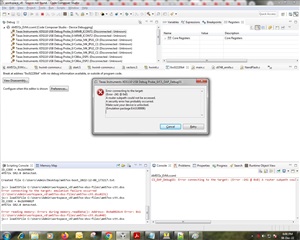
js:> loadJSFile C:\Users\Admin\workspace_v8\am57xx-dss-files\am57xx-ctt.dss
Error connecting to the target: emulation failure occurred (C:\Users\Admin\workspace_v8\am57xx-dss-files\am57xx-ctt.dss#231)

Board-3

js:> loadJSFile C:\Users\Admin\workspace_v8\am57xx-dss-files\am57xx-ctt.dss
ID_CODE = 0x2b99002f
AM572x SR2.0 detected.

Created file C:\Users\Admin/Desktop/am57xx-boot_2022-12-08_173217.txt

(File inside data:

CTRL_CORE_BOOTSTRAP = 0x00008127
* sysboot15 = 1, internal pulldown permanently disabled (recommended for eMMC boot)
* XIP/NAND BOOTDEVICESIZE = 8-bit
* XIP/NAND MUXCS0DEVICE = Non-muxed
* XIP/NAND BOOTWAITEN, wait pin not monitored
* SPEEDSELECT = 20 MHz
* QSPI offset = 64KB
* QSPI_4 -> SD -> USB

Current tracing vector, word 1 = 0x00000000

Current tracing vector, word 2 = 0x00000000

Current tracing vector, word 3 = 0x00000000

Current tracing vector, word 4 = 0x00000000

Cold reset tracing vector, word 1 = 0x00000000

Cold reset tracing vector, word 2 = 0x00000000

Cold reset tracing vector, word 3 = 0x00000000

Cold reset tracing vector, word 4 = 0x00000000

Current copy of the PRM_RSTST register (reset reasons) = 0x4805b000
* Bit 12 : TSHUT_MM_RST
* Bit 13 : TSHUT_CORE_RST
* Bit 15 : TSHUT_DSPEVE_RST
* Bit 16 : TSHUT_IVA_RST

PRM_RSTST = 0x00000001
* Bit 0 : GLOBAL_COLD_RST

Cortex A15 Program Counter = 0xc02220b4

It's booting from SD card also no issue in Board-3

in Board-1 and Board-2 issue is there?

Could you give me some suggestion for debugging

Thanking you,

Regards,

Ramachandra

  • Hi,

    js:> loadJSFile C:\Users\Admin\workspace_v8\am57xx-dss-files\am57xx-ctt.dss

    Is this is a custom script? I don't see this as part of AM57x release.

    Also, are you able to connect to the cores manually?

    Regards,
    Parth

  • Hi,

    All dss files are from am5728 evm reference only, in board-3 all are working in two boards issue. 

    Board-1: is connecting A15_0 core module and manually i am loading u-boot_spl but it's failing and i tried to load load js file above problem occurs.

    1)Launch Selected configuration from am5728.ccxml and Load and test configuration of Device Name: GPEVM_AM572X

    2) CPU Reset then PC=0x00000000

    3)Tools--> Load Memory ->u-boot-spl.bin (0x40300000) -->Type Size(32-bits)-->Finish

    4)Run -->Load Symbols --> u-boot-spl(not giving any address) --> OK

    5)checking Disassembler and Memory Browser data present or not.

    6)Change Program Counter to 0x40300000 and break points near calling hang function in board_init_r function

    7)Run the code.

    In beagle board it will stop (##ERROR ## Please Reset the board ###)

    but in our custom board nothing it's displaying, it will go and stop in 0x0000000c PRUSS1_GP register.

    i tried padconf dss file 

    js:> loadJSFile C:\Users\Admin\workspace_v8\am57xx-dss-files\am57xx-padconf.dss
    ID_CODE = 0x2b99002f
    AM572x SR2.0 detected.


    Trouble reading address 0x4a003400. Skipping register.


    Trouble reading address 0x4a003404. Skipping register.


    Trouble reading address 0x4a003408. Skipping register.


    Trouble reading address 0x4a00340c. Skipping register.


    Trouble reading address 0x4a003410. Skipping register.

    Board-2:

    It's not connecting to internal cores also and all voltages generating and reset also coming to the device

    Could you give me some suggestions

    Thanking you,

    Regards,

    Ramachandra

  • Hi Ramachandra,

    I still don't see these files in my workspace, which CCS version are you using? Can you please share the steps to get these dss files?

    Also, what is your use case here? What are you trying to do with these scripts? Have you tried to implement the sequence manually?

    Regards,
    Parth

  • Hi Parth,

    I am using CCS V.8.3.1.0004 and AM5728 Custom boards based on evm.

     Board is connecting A15_0 core module and manually i am loading u-boot_spl but it's failing and then

    i tried to load load DSS file problem occurs.

    js:> loadJSFile C:\Users\Admin\workspace_v8\am57xx-dss-files\am57xx-padconf.dss
    ID_CODE = 0x2b99002f
    AM572x SR2.0 detected.


    Trouble reading address 0x4a003400. Skipping register.


    Trouble reading address 0x4a003404. Skipping register.


    Trouble reading address 0x4a003408. Skipping register.

    js:> loadJSFile C:\Users\Admin\workspace_v8\am57xx-dss-files\am57xx-ctt.dss
    Error connecting to the target: emulation failure occurred (C:\Users\Admin\workspace_v8\am57xx-dss-files\am57xx-ctt.dss#231)
    js:> loadJSFile C:\Users\Admin\workspace_v8\am57xx-dss-files\am57xx-ctt.dss
    ID_CODE = 0x2b99002f
    AM572x SR2.0 detected.

    Error reading memory: Errors during memory.readData(): Address: 0x4a0026c4 Error: 0x1 (C:\Users\Admin\workspace_v8\am57xx-dss-files\am57xx-ctt.dss#40)

    u-boot loading procedure from CCS not loading

    1)Launch Selected configuration from am5728.ccxml and Load and test configuration of Device Name: GPEVM_AM572X

    2) CPU Reset then PC=0x00000000

    3)Tools--> Load Memory ->u-boot-spl.bin (0x40300000) -->Type Size(32-bits)-->Finish

    4)Run -->Load Symbols --> u-boot-spl(not giving any address) --> OK

    5)checking Disassembler and Memory Browser data present or not.

    6)Change Program Counter to 0x40300000 and break points near calling hang function in board_init_r function

    7)Run the code.

    In beagle board it will stop (##ERROR ## Please Reset the board ###)

    but in our custom board nothing it's displaying, it will go and stop in 0x0000000c PRUSS1_GP register.

  • Hi,

    So, are you trying to load u-boot via JTAG? Any specific reason for using JTAG?

    If no specific reason, the there are other boot modes available. See https://e2e.ti.com/support/processors-group/processors/f/processors-forum/959283/faq-ccs-am5728-am57xx-boot-modes-supported for details.

    Regards,
    Parth