This thread has been locked.

If you have a related question, please click the "Ask a related question" button in the top right corner. The newly created question will be automatically linked to this question.

AM5718: PCie error

Part Number: AM5718


Hi team,

Customer made about 40 cards with AM5718 and they found that in some of them there is a bug related to the PCie.

Specifically, Linux gives an interruption with the following messages:

dra7-pcie 51000000.pcie: Link Request Reset
dra7-pcie 51000000.pcie: Link-up state change
dra7-pcie 51000000.pcie: CFG 'Bus Master Enable' change
dra7-pcie 51000000.pcie: CFG 'Memory Space Enable' change

When this effect occurs, they end up leaving the processor frozen in that state and it does not recover until it is restarted.

They have revision 1 processors mounted on the cards. And they have seen that there is a PCIe errata in the revision, specifically:
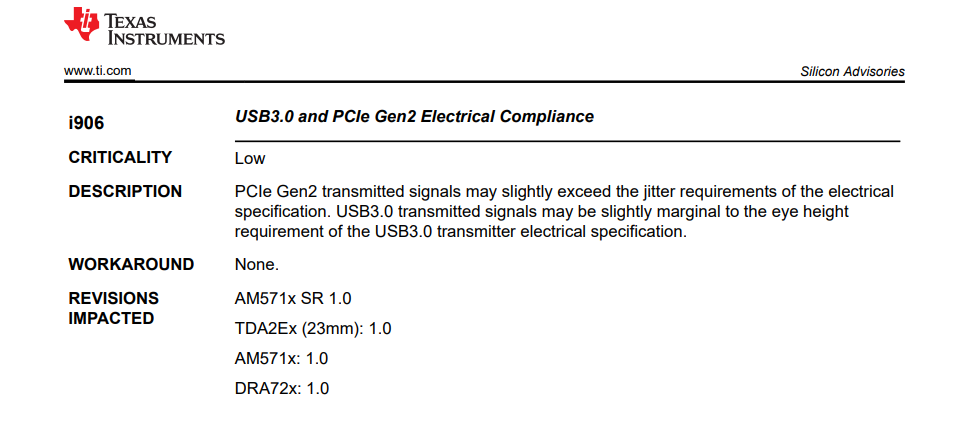
Could the problem be due to this error and that it works on some cards and not on others?

Any other idea on where the problem may be coming from?

Best,

Juan.

  • Juan, 

    It seems the link is lost. Can you confirm:

    1. AM57 is used as RC or EP?

    2. If EP, did the host issue a hot reset?

    regards

    Jian

  • Hi Jian,

    We are the Juan's costumer. I confirm to you that we are using AM5718 as RC.

    The link PCIe it is implemented with only 2 devices in the same board without connectors, the AM5718 is the RC and the other device (it is a small bridge PCIe-ethernet) is used as EP.

    Regards,

    Gorka

  • Gorka, 

    Thanks for the clarification. Link can be lost due to several reasons - either due to change of signal conditions, due to marginal clock jitter as mentioned in the errata, or, the EP device went to low power modes. Below are some thoughts to debug further:

    1. Before freezing, use lspci command to query the capability of EP, to verify if ASPM is enabled. 

    2. If you have JTAG access to the board, you can connect CCS to the AM57, without any GEL, to query what is the LTSSM state when device is frozen. or, if you have another core that is still alive, you can read the same register from that core. 

    3. if you other ways to connect to the EP device, check what is the LTSSM status of the card. It might be stuck in quiet mode. 

    regards

    jian

  • Hi Jian

    1- We have checked your point 1. We use lspci command, and we have checked that the ASPM is disabled in the EP.


    2- For the point 2, we have a binary running on the DSP which gives us a console interface through an UART port. We have implemented in this console an option to read register 0x51002104 (PCIECTRL_TI_CONF_DEVICE_CMD) and get its value back. When PCIe and linux are still alive, we read a 0x00000045 value (L0 state in LTSMM) from this register, both with the console of the DSP through the UART and with devmem2 in Linux.

    Then we set the DSP to send traces continuously through the UART console and we wait for the PCIe and Linux to die. When they die, the DSP keeps sending traces through the UART console, so we know it's still alive even if the A15 seems to be dead.

    Then, we try to read register 0x51002104 (PCIECTRL_TI_CONF_DEVICE_CMD) through the UART console and the DSP gets stuck, we lose UART console.


    We have also tried to check it out via jtag. We can see the same value (0x00000045) in the register (L0 state in LTSMM) but once PCIe and linux are dead the jtag is no longer capable to connect to the A15 and the CCS console shows this message: CortexA15_0: Trouble Halting Target CPU: (Error -1323 @ 0xBF09340C) Device failed to enter debug/halt mode because pipeline is stalled. Power-cycle the board. If error persists, confirm configuration and/or try more reliable JTAG settings (e.g. lower TCLK). (Emulation package 9.9.0.00040)

    regards,

    Gorka

  • Hi Gorka,

    Unlocking the thread, and apologies for the long delay. Is this still an open issue? If yes, could you share the latest update?

    If this is an open issue, some recommendations I can make is to see if you can collect traces using a debugger like Lauterbach to see what the code was doing before the freeze. Otherwise, if there is a way to get call stack that would give some information for what part of code froze up, though not as informative as a trace.

    Additionally, are you not able to access all registers, or only PCIe related registers when the device freezes up. If access to only the PCIe related registers freezes up the system, we can narrow down the range of registers to look at.

    Regards,

    Takuma