This thread has been locked.

If you have a related question, please click the "Ask a related question" button in the top right corner. The newly created question will be automatically linked to this question.

CCSTUDIO: GUI Composer: Limit canvas size and fix line graph scale

Part Number: CCSTUDIO


I have two questions after experimenting a bit with GUI composer studio:

1) How do I set the width of the canvas ("viewport"?)  ?  I have a few widgets on the left side of the application, and when I run the application, I have all of this dead space to the right. How do I get rid of this deadspace?

2) When using the linegraph widget, the y-axis scale changes often, usually in response to some noise spike.  I would like to fix the axis to, for example, +/- 20.0.   Is there a way to do this?

Thanks!

  • Hi Mark,

    What version of GC are you using? v2 or v3?

    Thanks

    ki

  • 1) How do I set the width of the canvas ("viewport"?)  ?  I have a few widgets on the left side of the application, and when I run the application, I have all of this dead space to the right. How do I get rid of this deadspace?

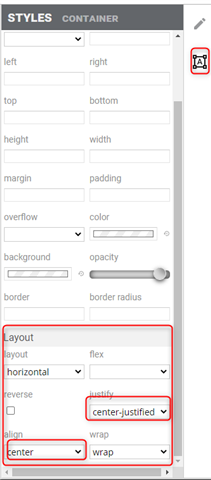
    Try playing with the Styles settings for the canvas, specifically the Layout. In the example below, I have the widgets set to be in the center

    Note that there is no way to shrink the canvas size (without resizing the browser itself). You can tweak the widget to take over the whole canvas if you wish however.

    2) When using the linegraph widget, the y-axis scale changes often, usually in response to some noise spike.  I would like to fix the axis to, for example, +/- 20.0.   Is there a way to do this?

    In the line graph properties, set your series_[x]_min and series_[x]_max values and the make sure fixedScale is enabled.

    Thanks

    ki