This thread has been locked.

If you have a related question, please click the "Ask a related question" button in the top right corner. The newly created question will be automatically linked to this question.

LCDC Data Enable Mode


TI Team,

I am reviewing the LCDC user guide and wanted to make sure I can drive a display without using hysnc and vsync and only a data enable signal.  The LCDC datasheet seems to imply this in section 2.1.4 but it doesn't go into detail of how this happens.  I am making the assumption that the LCDC controller always sends out hsync, vsync, and data enable (DE) in active tft mode?  

If we want to run in DE mode, what are the appropriate register values that need to be programmed?

- There does not seem to be any setting that indicates run in DE mode.

- In DE mode there is no H front porch, H back porch, H pulse width, V front porch, B back porch, and V pulse width.  How are RASTER_TIMING_0 and RASTER_TIMING_1 registers supposed to be programmed to accomplish DE mode functionality?  I am assuming that the DE timing is based off of the H front porch, H back porch and H pulse width?

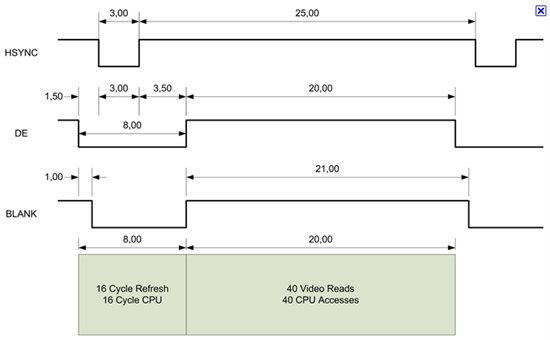
I did not see a timing diagram like this and wanted to make sure we can use this controller in this fashion as shown in the picture (Disregard the timings in the picture):
 

  • TI Team,

    Here is what I found after reading the datasheet in detail.  Is this correct?

    You can definitely use the DE signal to gate the data to the display.   However in this situation you also get HSYNC and VSYNC transitioning as well.  If the display does not respond to HSYNC and VSYNC then this should not be a problem.  The DE signal is based on the LCD Raster_Timing_0 Register and will automatically toggle if the display is in TFT Active Mode.  DE is positioned based on the HBP, HFP, HSW, and PPL settings.  So if you want DE to be positioned exactly with the data you would not modify anything different than you are doing today. 

  • TI Team,

    I am using the C6748 device.  Sorry for not being clear.

    -Jason

  • JasonHaedt said:
    You can definitely use the DE signal to gate the data to the display.   However in this situation you also get HSYNC and VSYNC transitioning as well.  If the display does not respond to HSYNC and VSYNC then this should not be a problem.  The DE signal is based on the LCD Raster_Timing_0 Register and will automatically toggle if the display is in TFT Active Mode.  DE is positioned based on the HBP, HFP, HSW, and PPL settings.  So if you want DE to be positioned exactly with the data you would not modify anything different than you are doing today. 

    It sounds like you have answered your own question, you should certainly be able to use the DE signal to drive your display and ignore the HSYNC and VSYNC signals, I have seen this mode used before though not on this particular device. In general I would start with some basic settings based on your display to try to get something synced to it and than adjust the values as necessary to lock into the display.

  • You can do it.

    Please just make sure your display is a DE-only panel. :)