


We are having issues attempting to enable and configure spread spectrum mode on clocks on the AM6254 processor.
We are testing out changes on the PLL1_HSDIV6 clock, brought out on our system as AUDIO_EXT_REFCLK1.
These are the default values in our software for our application:
0x00681098 (PLL0_PLL1_HSDIV_CTRL6) - 0x00008031
0x00681040 (PLL0_PLL1_SS_CTRL) - 0x80000000
0x00681044 (PLL0_PLL1_SS_SPREAD) - 0x00010001
In our default software, this gives an output of a 19.2MHz clock with no SS, which we confirmed with an oscilloscope.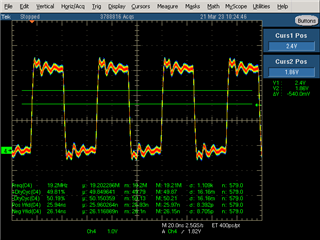
We were also able to confirm that PLL1_HSDIV6 is the clock in question by changing the clock divider in 0x00681098 to a different value and back and seeing the clock immediately change.
From the TRM and the Clock Tree Tool, we found the following register changes to enable the SS mode with a spread of 3.1% in a downspread variance on this clock:
0x00681098 - No change
0x00681040 - 0x00000010
0x00681044 - 0x0000001F
Upon changing these registers we saw no change to the clock. When we restarted the machine, the clock booted with the board as a 100MHz clock, and then after boot changed to a 3.681 MHz clock, both with no SS either.

Can you help clarify my understanding of how to enable and use SS mode on clocks on this system?
