This thread has been locked.

If you have a related question, please click the "Ask a related question" button in the top right corner. The newly created question will be automatically linked to this question.

PROCESSOR-SDK-AM62X: Testing OLDI Interface on Am62x SK Board.

Part Number: PROCESSOR-SDK-AM62X
Other Parts Discussed in Thread: AB15

Hi TI,

We are trying to test the OLDI interface on Am62x SK Board. The LCD Module we are using is from Lincoln(LCD185-101CTL1ARNTT).

The FPC connector on the Am62x SK board, will not match with the LCD Module used, so we made a LCD Mating connector to match the Pin outs.

While trying to make device tree entry for the Licoln LCD, we haven't found any device tree binding. Bu we found a device tree file

under arch/arm64/dts/k3-am62x-lp-sk-oldi-panel.dts but the compatible driver in this file is compatible = "microtips,13-101hieb0hf0-s";.

My question is:

1. How can we test the Lincoln LCD Module (LCD185-101CTL1ARNTT) on Am62x SK Board.

2. while trying to discuss about the LCD Driver with Lincoln LCD Module Manufacturer,

they suggested that TI has already have a board which is communicating with the same LCD Module.

3. Can anyone kindly suggest the the board Name where the Lincoln LCD Module Used.

4. Can we use the Microtips LCD Module  (13-101hieb0hf0-s) to directly interface with Am62x SK Board and use the k3-am62x-lp-sk-oldi-panel.dts file.

   Will that work.

           Kindly let us know your feedback on this.

Regards,

Murali C

  • Hello Murali C,

    Did the LT team not give you the adapter board and schematic? I would recommend to check with their internal team for schematics and datasheets. In terms of SW, yes you can use the following DTB file: https://git.ti.com/cgit/ti-linux-kernel/ti-linux-kernel/tree/arch/arm64/boot/dts/ti/k3-am625-sk-oldi-panel.dts?h=ti-linux-5.10.y. However, in the following file change the timing information: https://git.ti.com/cgit/ti-linux-kernel/ti-linux-kernel/tree/drivers/gpu/drm/panel/panel-simple.c?h=ti-linux-5.10.y#n2821.

    Regards,
    Krunal

  • Hi Krunal,

    Thanks for the information. we got the datasheet from Lincoln. we have made the adapter board which connects the Lincoln LCD with Am62x Evaluation Board. 

    I have gone through the file you mentioned. 

     https://git.ti.com/cgit/ti-linux-kernel/ti-linux-kernel/tree/drivers/gpu/drm/panel/panel-simple.c?h=ti-linux-5.10.y#n2821

    I found the structures related to microtips LCD, which is mentioned below.These are the only two structures on Microtips. 

    static const struct drm_display_mode microtips_13_101hieb0hf0_s_mode = {

    .clock            = 150275,
    .hdisplay       = 1920,
    .hsync_start  = 1920 + 32,
    .hsync_end   = 1920 + 32 + 52,
    .htotal            = 1920 + 32 + 52 + 24,
    .vdisplay        = 1200,
    .vsync_start   = 1200 + 24,
    .vsync_end    = 1200 + 24 + 8,
    .vtotal             = 1200 + 24 + 8 + 3,
    };

    static const struct panel_desc microtips_13_101hieb0hf0_s = {
    .modes = &microtips_13_101hieb0hf0_s_mode,
    .bpc = 8,
    .num_modes = 1,
    .size = {
    .width = 217,
    .height = 136,
    },
    .delay = {
    .prepare = 50,
    .disable = 50,
    },
    .bus_flags = DRM_BUS_FLAG_DE_HIGH,
    .bus_format = MEDIA_BUS_FMT_RGB888_1X7X4_SPWG,
    .connector_type = DRM_MODE_CONNECTOR_LVDS,
    };
    I have few Queries related tho this:
     1. As per my understanding, I need to change this parameters by referring Lincoln LCD Datasheet. Is my understanding correct.
     2. Whether changing the parameters inside this structure will be sufficient to make the LCD work(LIncoln) or do we need to modify any other files inside kernel.
     3. As per my understanding to use the dts file, we need to convert it to dtbo and add it inside root/boot folder.Then need to run the command at
         u-boot   
            $  setenv name_overlays k3-am625-sk-oldi-panel.dtbo
            $  boot
          is my understanding correct on adding dts file.

    Kindly let us know your response on this.
     
    Regards,
    Murali Chikkanna

  • Hi Murali,

    1. Yes, that's correct.

    2. No, just the timing changes inside the structure is sufficient.

    3. Yes, your understadning is correct and we documented the steps here: https://software-dl.ti.com/processor-sdk-linux/esd/AM62X/08_06_00_42/exports/docs/linux/How_to_Guides/Target/How_to_enable_Microtips_LVDS_Panel_on_AM62_SK_EVM.html?highlight=lvds

    Regards,
    Krunal

  • Hi krunal,

    Thank you for your reply and sorry for the delayed response.

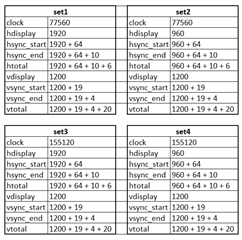
    As we started testing the LCD as a full time job. These are the changes we made as per your response on the timing parameters.

    These are the different sets of configuration donw after referring to the Lincoln Datasheet and tested so far. But we are not getting any response on the display.

    Procedure we have followed:

    1. Build the .dtbo file and copied into root/boot folder.

    2. changed the timing parameters on the panel-simple.c file and build the Linux Image and copied to root/boot folder.

    3. Turned on the board, but cant able to see anything on the display.

    some of the logs which i tested are listed below.

    root@am62xx-evm:~# dmesg | grep drm
    [ 1.529784] [drm] Initialized tidss 1.0.0 20180215 for 30200000.dss on minor 0
    [ 1.710005] tidss 30200000.dss: [drm] fb0: tidssdrmfb frame buffer device
    [ 5.409148] [drm] Initialized pvr 1.15.6133109 20170530 for fd00000.gpu on minor 1

    root@am62xx-evm:~# kmsprint

    Connector 0 (39) LVDS-1 (connected)
    Encoder 0 (38) LVDS
    Crtc 0 (37) 1920x1200 150.275 1920/32/52/24 1200/24/8/3 60 (60.00)
    Plane 1 (40) fb-id: 51 (crtcs: 0 1) 0,0 1920x1200 -> 0,0 1920x1200 (AR12 AB12 RA12 RG16 BG16 AR15 AB15 AR24 AB24 RA24 BA24 RG24 BG24 AR)
    FB 51 1920x1200
    Connector 1 (48) HDMI-A-1 (disconnected)
    Encoder 1 (47) NONE

    root@am62xx-evm:~# kmstest -c dp -r 640x480
    Could not get DRM master permission. Card already in use?

    root@am62xx-evm:~# kmstest
    Could not get DRM master permission. Card already in use?

    root@am62xx-evm:~# modetest
    trying to open device 'i915'...failed
    trying to open device 'amdgpu'...failed
    trying to open device 'radeon'...failed
    trying to open device 'nouveau'...failed
    trying to open device 'vmwgfx'...failed
    trying to open device 'omapdrm'...failed
    trying to open device 'exynos'...failed
    trying to open device 'tilcdc'...failed
    trying to open device 'msm'...failed
    trying to open device 'sti'...failed
    trying to open device 'tegra'...failed
    trying to open device 'imx-drm'...failed
    trying to open device 'rockchip'...failed
    trying to open device 'atmel-hlcdc'...failed
    trying to open device 'fsl-dcu-drm'...failed
    trying to open device 'vc4'...failed
    trying to open device 'virtio_gpu'...failed
    trying to open device 'mediatek'...failed
    trying to open device 'meson'...failed
    trying to open device 'pl111'...failed
    trying to open device 'stm'...failed
    trying to open device 'sun4i-drm'...failed
    trying to open device 'armada-drm'...failed
    no device found

    Regards,

    Murali Chikkanna 

  • Hello Murali,

    Are you sure you are updating your Kernel image? The timing values that kmsprint shows does not reflect the values in the images you shared.

    Regards,
    Krunal

  • Also, the command is "modetest -M tidss" and before running kmstest or modetest, you need to run "/etc/init.d/weston stop".

    Regards,
    Krunal

  • Hi krunal,

    I will check with the kernel Image. Is there any tools or commands that i can use to display image on the LCD. Because when i try to probe the clock signals, i cant able to get any output, while the kernel boot.

    After booting up the kernel, any image will be displayed on the LCD or we need to use some kind of tools or commands to run a image on the LCD.

    And also what is kmtest and modetest will do, does they transfer any image(colour bars) to the LCD.

    Regards,

    Murali Chikkanna

  • Hi Murali,

    I usually run kmstest because it displays colorbars on the screen but before launching kmstest, you need to disable weston. Also, at the time of Linux boot, you should see splash images on the LVDS if everything is initialized correctly.

    Regards,
    Krunal