This thread has been locked.

If you have a related question, please click the "Ask a related question" button in the top right corner. The newly created question will be automatically linked to this question.

CCSTUDIO: CCS Compile Error

Part Number: CCSTUDIO
Other Parts Discussed in Thread: TMS320F2812, C2000WARE, SPRC097

Hi Experts,

Good day.

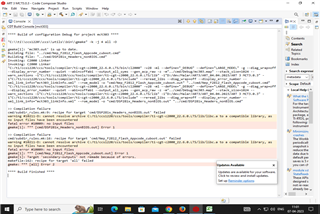
I got these errors while compiling in CCS.

#10009 no input files
gmake: *** [all] Error 2
gmake[1]: *** [cmd/DSP281x_Headers_nonBIOS.out] Error 1
gmake[1]: *** [cmd/Nep_F2812_Flash_Appcode_cuboot.out] Error 1
gmake[1]: Target 'secondary-outputs' not remade because of errors.

Please help us with this.

Keep safe.


Regards,

Josel

  • I think I need the following file to solve my issue.
    1. cmd/DSP281x_Headers_nonBIOS.out
    2. cmd/Nep_F2812_Flash_Appcode_cuboot.out
  • Malarkodi,

                    It appears you are using TMS320F2812. This is a fairly old device (the very first C2000 MCU with the c28x core) that does not have C2000ware Driverlib support, which is offered for more recent C2000 devices. Have you installed the C281x C/C++ Header Files and Peripheral Examples from https://www.ti.com/tool/SPRC097? If so, please try out a supplied example and let us know if it compiles OK. You may also want to install the latest CCS version 12.2.

    If you are evaluating this device for a new project, you may want to consider using one of our newer devices. Our newer devices have a lot more features often at a lower cost. Please let me know if I can help further.

  • Hi Hareesh,

    Good Morning.

    I had already installed Code composer studio Version 12.2.

    My intention is to migrate an old project which is developed by using CCSV3.3 to CCS12.2.

    I am using a C2000 -TMS320C28XX.  
    After migrating I got the following error and output and hex file not generating.
    Request you give the download Link for CCSV3.3  or the relevant supporting file for the following errors.


    Please advise.

    Regards,

    Josel
  • Malarkodi,

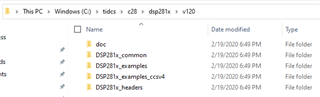
             I presume you have already installed the DSP28x header files (SPRC097  C281x C/C++ Header Files and Peripheral Examples). If you have, you should see a directory structure similar to the below:

    I think I need the following file to solve my issue.
    1. cmd/DSP281x_Headers_nonBIOS.out

    The DSP281x_Headers_nonBIOS.cmd file should be present in C:\tidcs\c28\dsp281x\v120\DSP281x_headers\cmd

    2. cmd/Nep_F2812_Flash_Appcode_cuboot.out

    This is your application code. It is not part of the header files.

    Request you give the download Link for CCSV3.3 

    Unlike the latest version of CCS, CCSv3.3 is not free. Let me check with the CCS team for more information. 

    or the relevant supporting file for the following errors.

    Have you tried creating the project from scratch in CCSv12.2 as opposed to importing the legacy CCSv3.3 project?

    What JTAG Debug probe are you using? I am asking because CCS12.2 does not support older probes such as XDS510.

  • Malarkodi,

                Even if you acquire a license for CCSv3.3, I would like to caution you about running it on Windows 10. We do not recommended Windows 10 with CCSv3.3. It *may* work but there is no guarantee. We strongly recommended an XP machine (an XP VM can work too). Also, JTAG debug probes for CCSv3.3 are not freely available anymore. The company that used to make them (Spectrum Digital) shut down a few years ago. My recommendation would be to get your project to build successfully with CCSv12.2.

  • Malarkodi,

    In case you need access to CCSv3.3, here is the latest CCS 3.3 version which is available for free download:

    https://www.ti.com/licreg/docs/swlicexportcontrol.tsp?form_type=2&prod_no=CCS_3.3.83.20_Platinum.zip&ref_url=https://software-dl.ti.com/dsps/dsps_public_sw/sdo_ccstudio/CCSv3/CCS_3_3/

    This version has 28x support but not 24x.