This thread has been locked.

If you have a related question, please click the "Ask a related question" button in the top right corner. The newly created question will be automatically linked to this question.

TMS320C6748: RGB LCD display misalignment issue

Part Number: TMS320C6748

Platform: TMS320C6748

LCD interface:RGB565

Active Screen Size:480*360

Issue description:

At different CPU frequencies, the same picture is displayed and the data is periodically refreshed once per second.

When the CPU frequency is set to 100MHz, the picture is displayed normally. When the frequency is increased to 200MHz or 300MHz, the display will be mislocated when the data is refreshed.

Normal picture and sequence diagram:
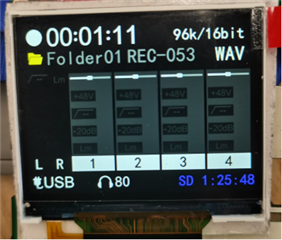
(Figure 1).Normal display

As shown in Figure 1, this is the normal display.

The CPU frequency is 100MHz, the LCD_PCLK frequency is 10MHz, and the screen refresh rate is about 51Hz.

The signal captured by the logic analyzer is shown in Figure 2(the red box is 1 frame range) :
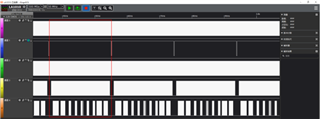
(Figure 2).Sequence diagram corresponding to Figure 1

channel 0:PCLK (10MHz)、

channel 1:VS(51.6Hz)、

channel 2:HS(19.8kHz)、

channel 3:DE、

channel 4:DATA0.

Abnormal picture and sequence diagram:

(Figure 3).Abnormal display A                                         (Figure 4).Abnormal display B

As shown in Figure 3, Figure 4, this is the Abnormal display.

The CPU frequency is 300MHz, the LCD_PCLK frequency is 10MHz, and the screen refresh rate is about 51Hz.

The signal captured by the logic analyzer is shown in Figure 5(the red box is 1 frame range):

(Figure 5).Sequence diagram corresponding to Figure 3

Comparative analysis of normal and abnormal sequences:

Since (Figure 1) and (Figure 3) show basically the same content, you can determine by comparison that the content shown in the red box below in Figure 5 is just a frame of data. But the data in Figure 5 is not synchronized with frame signals such as VS and DE.
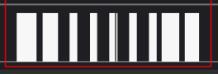
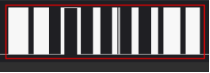
(Figure 6).DATA0 data waveform comparison

It can be seen that the dislocation of the picture display is caused by the synchronization of DATA and VS frame signals.

Question:

  • Is the display dislocation described above related to CPU frequency?
  • The Raster LCD controller sends the image data to the LCD display through DMA. If the CPU writes the image data to the display buffer at this time, will there be a conflict? If there is a conflict, how to resolve it?

  • Raster LCD controller sends image data to LCD display through DMA. If the CPU also uses DMA for data transmission, will there be a conflict? If there is a conflict, how to resolve it?

  • The header file lcd_drv.h

    #ifndef _LCD_DRV_H_
    #define _LCD_DRV_H_
    
    #include <xdc/std.h>
    #include <stdio.h>
    #include <stdarg.h>
    
    #include "lcd_drv.h"
    
    //================================宏定义=========================================================
    
    // LCD 分辨率
    #define LCD_WIDTH               (480)
    #define LCD_HEIGHT              (360)
    
    // 调试板的大小和偏移
    #define PALETTE_SIZE            32
    #define PALETTE_OFFSET          4
    
    // TFT LCD显存数据结构体
    typedef struct
    {
    	uint8_t palette[PALETTE_OFFSET+PALETTE_SIZE];
    	uint16_t dat[LCD_HEIGHT][LCD_WIDTH];
    }fb_data_t;
    
    void tft_lcd_draw_pixel(uint16_t x, uint16_t y, uint16_t color);
    void tft_lcd_draw_xline(uint16_t x, uint16_t y, uint16_t length, uint16_t color);
    void tft_lcd_draw_yline(uint16_t x, uint16_t y, uint16_t length, uint16_t color);
    void tft_lcd_fill_rectangle(uint16_t x, uint16_t y, uint16_t width, uint16_t height, uint16_t color, uint8_t dir_mode);
    
    void lcdc_raster_init(unsigned int cpu_freq);
    
    #endif


  • The source file lcd_drv.c

    #include <xdc/std.h>
    #include <ti/sysbios/knl/Queue.h>
    #include <ti/sysbios/knl/Task.h>
    
    #include "hw_types.h"
    #include "soc_C6748.h"
    #include "hw_psc_C6748.h"
    #include "hw_syscfg0_C6748.h"
    
    #include "psc.h"
    #include "gpio.h"
    #include "spi.h"
    #include "lidd.h"
    #include "raster.h"
    
    #include "lcd_drv.h"
    #include "Drv_SpiFlash.h"
    
    #include "board.h"
    
    #include "DEBUG_config.h"
    
    /************************外部变量******************************/
    //无
    
    /************************全局变量******************************/
    //无
    
    /************************模块局部变量******************************/
    //无
    
    #define GrOffScreen16BPPSize(lWidth, lHeight)            \
            (4 + (16*2) + (lWidth * lHeight * 2))
    
    #pragma DATA_ALIGN(g_pucBuffer0, 4);
    unsigned char g_pucBuffer0[GrOffScreen16BPPSize(LCD_WIDTH, LCD_HEIGHT)];
    
    // 图形库显示结构
    // tDisplay g_s800x480x16Display;
    
    // 调色板
    unsigned short palette_32b[PALETTE_SIZE/2] =
    			{0x4000u, 0x0000u, 0x0000u, 0x0000u, 0x0000u, 0x0000u, 0x0000u, 0x0000u,
    			 0x0000u, 0x0000u, 0x0000u, 0x0000u, 0x0000u, 0x0000u, 0x0000u, 0x0000u};
    
    // 全局显示上下文
    // tContext g_sContext;
    /****************************************************************************/
    /*                                                                          */
    /*              LCD 中断服务函数                                            */
    /*                                                                          */
    /****************************************************************************/
    void LCDIsr(void)
    {
        unsigned int  status;
    
        status = RasterIntStatus(SOC_LCDC_0_REGS,RASTER_END_OF_FRAME0_INT_STAT |
                                                 RASTER_END_OF_FRAME1_INT_STAT );
    
        RasterClearGetIntStatus(SOC_LCDC_0_REGS, status);
    }
    
    // 输入频率的单位是MHz
    void lcdc_raster_init(unsigned int cpu_freq)
    {
        // 禁用光栅
        RasterDisable(SOC_LCDC_0_REGS);
        
        // 时钟配置
        RasterClkConfig(SOC_LCDC_0_REGS,10000000, cpu_freq*1000000/2);
    
        // 配置 LCD DMA 控制器
        RasterDMAConfig(SOC_LCDC_0_REGS, RASTER_DOUBLE_FRAME_BUFFER,
                        RASTER_BURST_SIZE_16, RASTER_FIFO_THRESHOLD_8,
                        RASTER_BIG_ENDIAN_DISABLE);
    
        // 模式配置(例如:TFT 或者 STN,彩色或者黑白 等等)
        RasterModeConfig(SOC_LCDC_0_REGS, RASTER_DISPLAY_MODE_TFT,
                         RASTER_PALETTE_DATA, RASTER_COLOR, RASTER_RIGHT_ALIGNED);
    
        // 帧缓存数据以 LSB 方式排列
        RasterLSBDataOrderSelect(SOC_LCDC_0_REGS);
        
        // 禁用 Nibble 模式
        RasterNibbleModeDisable(SOC_LCDC_0_REGS);
       
        // 配置光栅控制器极性
        RasterTiming2Configure(SOC_LCDC_0_REGS, RASTER_FRAME_CLOCK_LOW |
                                                RASTER_LINE_CLOCK_LOW  |
                                                RASTER_PIXEL_CLOCK_LOW |
                                                RASTER_SYNC_EDGE_RISING|
                                                RASTER_SYNC_CTRL_ACTIVE|
                                                RASTER_AC_BIAS_HIGH     , 0, 255);
    
    	// RasterHparamConfig(baseAddr,     numOfppl, hsw,hfp,hbp);
        RasterHparamConfig(SOC_LCDC_0_REGS, LCD_WIDTH, 10, 4, 10);
    	// RasterVparamConfig( baseAddr,    Lpp,       vsw,vfp,vbp);
    	RasterVparamConfig(SOC_LCDC_0_REGS, LCD_HEIGHT, 4, 8, 12);
    
    	// 配置 FIFO DMA 延时
    	RasterFIFODMADelayConfig(SOC_LCDC_0_REGS, 2);
    
        unsigned int i = 0, j = 0;
    	unsigned char *src, *dest;
    
      	// 配置基本框架
    	RasterDMAFBConfig(SOC_LCDC_0_REGS,
    					  (unsigned int)(g_pucBuffer0+PALETTE_OFFSET),
    					  (unsigned int)(g_pucBuffer0+PALETTE_OFFSET) + sizeof(g_pucBuffer0) - 2 - PALETTE_OFFSET,
    					  0);
    
    	RasterDMAFBConfig(SOC_LCDC_0_REGS,
    					  (unsigned int)(g_pucBuffer0+PALETTE_OFFSET),
    					  (unsigned int)(g_pucBuffer0+PALETTE_OFFSET) + sizeof(g_pucBuffer0) - 2 - PALETTE_OFFSET,
    					  1);
    
    	// 拷贝调色板到离屏显存中
    	src = (unsigned char *)palette_32b;
    	dest = (unsigned char *)(g_pucBuffer0+PALETTE_OFFSET);
    	for( i = 4; i < (PALETTE_SIZE+4); i++)
    	{
    		*dest++ = *src++;
    	}
    
    	// 使能LCD帧结束中断
    	RasterEndOfFrameIntEnable(SOC_LCDC_0_REGS);
    
    	// 使能光栅
    	RasterEnable(SOC_LCDC_0_REGS);
    }
    
    /****************************************************************************/
    unsigned int LCDVersionGet(void)
    {
        return 1;
    }
    
    /**
     * @brief: TFT LCD写一个像素到显存
     * @author: lusd
     * @param [in] x, 横轴坐标, 范围0~479
     * @param [in] y, 纵轴坐标, 范围0~359
     * @param [in] color, RGB565颜色值
     * @return none.
     */
    void tft_lcd_draw_pixel(uint16_t x, uint16_t y, uint16_t color)
    {
    	fb_data_t *fb_dat;
    
    	if ((x < LCD_WIDTH) && (y < LCD_HEIGHT)) {
    		fb_dat = (fb_data_t *)(g_pucBuffer0);
    		fb_dat->dat[y][x] = color;
    	}
    }
    
    
    /**
     * @brief: TFT LCD在显存中画横线
     * @author: lusd
     * @param [in] x, 横轴起始坐标, 范围0~479
     * @param [in] y, 纵轴起始坐标, 范围0~359
     * @param [in] length, 长度, 范围0~479, 超出屏幕部分忽略
     * @param [in] color, RGB565颜色值
     * @return none.
     */
    void tft_lcd_draw_xline(uint16_t x, uint16_t y, uint16_t length, uint16_t color)
    {
    	uint16_t *dest16;
    	fb_data_t *fb_dat;
    
    	if ((x < LCD_WIDTH) && (y < LCD_HEIGHT)) {
    		fb_dat = (fb_data_t *)(g_pucBuffer0);
    		dest16 = &(fb_dat->dat[y][x]);
    		if ((x + length) > LCD_WIDTH) {
    			length = LCD_WIDTH - x;
    		}
    		while (length--) {
    			*dest16++ = color;
    		}		
    	}
    }
    
    /**
     * @brief: TFT LCD在显存中画竖线
     * @author: lusd
     * @param [in] x, 横轴起始坐标, 范围0~479
     * @param [in] y, 纵轴起始坐标, 范围0~359
     * @param [in] length, 长度, 范围0~359, 超出屏幕部分忽略
     * @param [in] color, RGB565颜色值
     * @return none.
     */
    void tft_lcd_draw_yline(uint16_t x, uint16_t y, uint16_t length, uint16_t color)
    {
    	uint16_t h, y_end;
    	fb_data_t *fb_dat;
    
    	if ((x < LCD_WIDTH) && (y < LCD_HEIGHT)) {
    		fb_dat = (fb_data_t *)(g_pucBuffer0);
    		if ((y + length) > LCD_HEIGHT) {
    			length = LCD_HEIGHT - y;
    		}
    		y_end = y + length;
    		for (h=y; h<y_end; h++) {
    			fb_dat->dat[h][x] = color;
    		}
    	}
    }
    
    /**
     * @brief: TFT LCD在显存中填充一个矩形区域
     * @author: lusd
     * @param [in] x, 横轴起始坐标, 范围0~479
     * @param [in] y, 纵轴起始坐标, 范围0~359
     * @param [in] width, 宽, 范围0~479, 超出屏幕部分忽略
     * @param [in] height, 高, 范围0~359, 超出屏幕部分忽略
     * @param [in] color, RGB565颜色值
     * @return none.
     */
    void tft_lcd_fill_rectangle(uint16_t x, uint16_t y, uint16_t width, uint16_t height, uint16_t color)
    {
    	uint16_t w, h, x_end, y_end;
    	fb_data_t *fb_dat;
    
    	if ((x < LCD_WIDTH) && (y < LCD_HEIGHT)) {
    		fb_dat = (fb_data_t *)(g_pucBuffer0);
    		if ((x + width) > LCD_WIDTH) {
    			width = LCD_WIDTH - x;
    		}
    		if ((y + height) > LCD_HEIGHT) {
    			height = LCD_HEIGHT - y;
    		}
    		x_end = x + width;
    		y_end = y + height;
    
    		for (h=y; h<y_end; h++) {
    			for (w=x; w<x_end; w++) {
    				fb_dat->dat[h][w] = color;
    			}
    		}
    	}
    }


  • Hello Shide

    Sorry to keep you waiting. Unfortunately we no longer support RTOS/barermetal/starterware queries on this family of devices. 

    https://e2e.ti.com/support/processors-group/processors/f/processors-forum/1071334/notice-regarding-processor-sdk-ti-rtos-for-am335x-am437x-omap-l13x-c674x-k2g-devices

    It is unclear why the CPU frequency is making a difference

    please see if some old posts like the following help

    https://e2e.ti.com/support/processors-group/processors/f/processors-forum/223339/c6748-lcdc-clarifications

    OMAP-L1x_C674x_AM1x LCD Controller (LCDC) Throughput and Optimization Techniques - Texas Instruments Wiki.pdf

    I have also attached a pdf version of the wiki that is linked in that old post

    Hope this helps 

    Regards

    Mukul 

  • Hi, Mukul

    Thanks for your reply.

    As you said, Starterware is no longer supported. Does there any other peripheral driver libraries are available, for C6748?

    Can you provide some examples to test the Raster LCD controller?

    BR.

    Shide Lu.

  • Hello,

    Unfortunately, we do not have any other libraries or examples available to share.

    Regards,
    Krunal