This thread has been locked.

If you have a related question, please click the "Ask a related question" button in the top right corner. The newly created question will be automatically linked to this question.

CCSTUDIO: Stack Usage data export

Genius 3186 points

Part Number: CCSTUDIO
Other Parts Discussed in Thread: TMS320F28375D

Hi

I am using CCS version 11 for test TMS320F28375D.

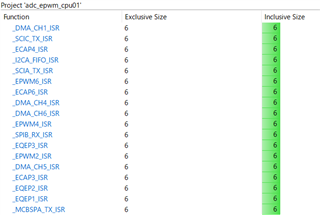
I can see that how many size of stack using in function at stack usage window.

Question: Is there any way to export stack usage data?

I want to get data(lools like .csv or text) of this function name, Exclusive size, and Inclusive size. 
Thanks,

GR

  • Hi,

    Thanks for your query. We have taken your inputs and will revert back soon.

    Thanks & Regards,

    Tushar

  • Hi GR,

    I want to get data(lools like .csv or text) of this function name, Exclusive size, and Inclusive size. 

    To get the data in text format please use TI-CGT(Code Generation Tools XML Processing Utilities) tool. To download the tool click Code Generation Tool. For guidelines regarding how to use the tool refer cg_xml_overview.pdf

    After downloading and installing the tool, do the following steps:

    •  Open command prompt and run the following command
      • <tool installation path>\utils\ofd6x -xg <path of binary file> | perl <tool installation path>\ofd\call_graph.pl > <filename to store output data>
      • e.g. C:\ofd6x -xg C:\file.out | perl call_graph.pl > D:\filename.text

    Open the file to see the stack usage in graph representation. For more information view the documentation by loading the file $install_root/index.htm into your web browser.

    Thanks & Regards,

    Tushar Thakur

  • Hi Tushar,

    Thank you to your information.

    I used cgxml-2.61.00 .

    I'll write this down as a reminder.

    In this version, I could not use "perl <install path>call_graph.pl", So I replased to  "-xg | <install path>.call_graph.exe".

    Best Regards,

    GR

  • Hi GR,

    In this version, I could not use "perl <install path>call_graph.pl", So I replased to  "-xg | <install path>.call_graph.exe".

    Thanks for replying. May be you don't have perl installed in your system. Instead you can use call_graph.exe.

    Thanks & Regards,

    Tushar