This thread has been locked.

If you have a related question, please click the "Ask a related question" button in the top right corner. The newly created question will be automatically linked to this question.

TIDL Model Conversion: Problems converting from torch to onnx to TIDL format.

Part Number: TDA4VM


Hi, 

We are trying to test segmentation model conversion for the developer board of tda4vm. We are facing some issues with model conversion, especially semantic segmentation. 

Our goal is to convert one of the semantic segmentation models provided by Texas instruments and run it on the target. 

For this we followed the following steps, 

First we checked some of the models that were provided by TI. 

We downloaded deeplabv3plus_mobilenet_v2_edgeai_lite from this link. The onnx model link

We were able to convert this model in rtos SDK 8.0 and rtos SDK 8.5( also using corresponding edgeai-tidl-tools repo(8.5))

Now we are trying to convert the torch model to onnx and then onnx to TIDL model. For this, we use the recommended version of torchvision from texas instruments github repo. https://github.com/TexasInstruments/edgeai-torchvision/tree/master  We build it using a Dockerfile. 

We used this to convert the same deeplabv3plus_mobilenetv2_edgeai_lite model. We were able to conver this model from torch to onnx. We were also able to load the weights of the trained model(link). 

When we try to convert this onnx model to TIDL model, we have the following problems 

In SDK 8.0 version -> We get a segmentation fault error. After putting debug_level to more than 3, we don't get much information 

python deeplab_onnx_to_tidl.py              
 0.0s:  VX_ZONE_INIT:Enabled
 0.22s:  VX_ZONE_ERROR:Enabled
 0.24s:  VX_ZONE_WARNING:Enabled
tidl_tools_path                                 = /fastdata/niranjan/j721e/sdk_files/ti-processor-sdk-rtos-j721e-evm-08_00_00_12/tidl_j7_08_00_00_10/tidl_tools 
artifacts_folder                                = ./deeplabv3plus_mobilenet_v2_tv/ 
tidl_tensor_bits                                = 8 
debug_level                                     = 10 
num_tidl_subgraphs                              = 16 
tidl_denylist                                   = 
tidl_calibration_accuracy_level                 = 64 
tidl_calibration_options:num_frames_calibration = 1 
tidl_calibration_options:bias_calibration_iterations = 1 
power_of_2_quantization                         = 2 
enable_high_resolution_optimization             = 0 
pre_batchnorm_fold                              = 0 
add_data_convert_ops                          = 0 
output_feature_16bit_names_list                 =  
m_params_16bit_names_list                       =  
reserved_compile_constraints_flag               = 1601 
ti_internal_reserved_1                          = 
Parsing ONNX Model 
model_proto 0x7fff99a71db0 
 Supported TIDL layer type ---            Clip -- Clip_0 
 Supported TIDL layer type ---            Conv -- Conv_1 
 Supported TIDL layer type ---            Clip -- Clip_2 
 Supported TIDL layer type --- BatchNormalization -- BatchNormalization_3 
 Supported TIDL layer type ---            Clip -- Clip_4 
 Supported TIDL layer type ---            Conv -- Conv_5 
 Supported TIDL layer type ---            Clip -- Clip_6 
 Supported TIDL layer type ---            Conv -- Conv_7 
 Supported TIDL layer type ---            Clip -- Clip_8 
 Supported TIDL layer type ---            Conv -- Conv_9 
 Supported TIDL layer type ---            Clip -- Clip_10 
 Supported TIDL layer type ---            Conv -- Conv_11 
 Supported TIDL layer type ---            Clip -- Clip_12 
 Supported TIDL layer type ---            Conv -- Conv_13 
 Supported TIDL layer type ---            Clip -- Clip_14 
 Supported TIDL layer type ---            Conv -- Conv_15 
 Supported TIDL layer type ---            Clip -- Clip_16 
 Supported TIDL layer type ---            Conv -- Conv_17 
 Supported TIDL layer type ---            Clip -- Clip_18 
 Supported TIDL layer type ---            Conv -- Conv_19 
 Supported TIDL layer type ---            Clip -- Clip_20 
[1]    2197650 segmentation fault (core dumped)  python deeplab_onnx_to_tidl.py

In sdk 8.5 -> We are able to compile the onnx model into TIDL format. However, it breaks up the model into multiple smaller graphs
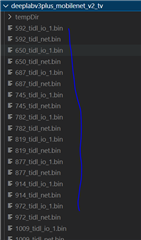
However, if the onnx model from the official link is used, no sub graphs/models are created. 

Could you let us know where we are going wrong in our steps. Is this the workflow you intended for model conversion or is it something else?

Thank You

Niranjan

  • Hi Niranjan,

    The models from the TI model zoo have all the operators supported on DSP, so there is only one graph and no subgraphs created. I suspect the model which you have converted to onnx has some layers which are unsupported on DSP and hence are delegated to native runtime (ARM core on board). The subgraphs which you see above in the artifacts folder are the ones which will get delegated to DSP. You can also check out the runtimes_visualization.svg file in the artifacts folder to get better idea of subgraphs. This is the expected flow of our Open source runtime offering.

    Regards,

    Anand

  • Hi Anand, 

    Thanks for the quick response. I understand that breaking the graph into subgraphs is for unsupported layers. 

    I guess, I could not explain the question properly. 
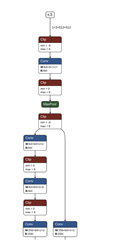
    For now, we are trying to convert the model of deeplabv3plus_mobilnenet_v2. We got the link to the onnx model. link. We were able to convert the model to TIDL format in both sdk 8.0 or sdk8.5(with some warnings). The graph of the onnx model is as shown below. 


    Since the above is an onnx model and what we are after is a model that we could train. 

    So we start with a similar torchvision model from the texas instruments torchvision repo. https://github.com/TexasInstruments/edgeai-torchvision/tree/master
    Here we are trying to convert the similar torch model to onnx and then to TIDL. We do this by the below code

    import torch
    from references.edgeailite.engine import infer_pixel2pixel
    
    # Create the parse and set default arguments
    args = infer_pixel2pixel.get_config()
    
    args.batch_size = 32 #80                  #12 #16 #32 #64
    args.img_resize = (384, 768)         #(256,512) #(512,512) # #(1024, 2048) #(512,1024)  #(720, 1280)
    args.output_size = (1024, 2048)
    args.model_config.input_channels = (3,)
    args.model_config.output_type = ['segmentation']
    args.model_config.output_channels = None
    args.losses = [['segmentation_loss']]
    args.metrics = [['segmentation_metrics']]
    args.model_name = "deeplabv3plus_resnet50_edgeailite"
    args.model_config.output_channels = [19]
    args.model_config.num_decoders = 1
    args.opset_version = 11
    
    model = xvision.models.pixel2pixel.__dict__[args.model_name](args.model_config)
    # check if we got the model as well as parameters to change the names in pretrained
    model, change_names_dict = model if isinstance(model, (list,tuple)) else (model,None)
    
    
    def create_rand_inputs(args, is_cuda):
        dummy_input = []
        for i_ch in args.model_config.input_channels:
            x = torch.rand((1, i_ch, args.img_resize[0], args.img_resize[1]))
            x = x.cuda() if is_cuda else x
            dummy_input.append(x)
        #
        return dummy_input
    
    # if args.quantize:
    # dummy input is used by quantized models to analyze graph
    is_cuda = next(model.parameters()).is_cuda
    dummy_input = create_rand_inputs(args, is_cuda=is_cuda)


    def write_onnx_model(args, model, save_path, name='checkpoint.onnx'):
        is_cuda = next(model.parameters()).is_cuda
        input_list = create_rand_inputs(args, is_cuda=is_cuda)
        #
        model.eval()
        torch.onnx.export(model, input_list, os.path.join(save_path, name), export_params=True, verbose=False,
                          do_constant_folding=True, opset_version=args.opset_version)
    
    write_onnx_model(args, model, './', name='deeplabv3plus_resnet50_edgeailite.onnx')
    

    Using the above script, we get the onnx model format like below. 

    I do think there is something wrong with the code or some kind of wrong way of calling the model. Does the xvision models have to be trained before we export them to onnx models?

    Thank You
    Niranjan

  • Ok Niranjan,

    So if I understand the question correctly, using the model as it is from model zoo link, all layers are supported, but using a similar model from the torchvision repo and exporting to onnx, some unsupported layers get added. And your question is why are the unsupported layers are getting added - is that correct?

    Regards,

    Anand

  • Hi Anand, 

    Yes that is one of the question. It is specific to this model. 
    But also, I just have a general question. What is the workflow you suggest for model training and model conversion? 
    Do I train my model(lets say classification or segmentation) in edge ai torchvision environment and then use that model to convert it in using edgeai-tidl tools? 

    Thank You
    Niranjan 

  • Hi Niranjan,

    Ok understood, I have looped in one of my colleagues who can better help on the model training pipeline.

    Regards,

    Anand