This thread has been locked.

If you have a related question, please click the "Ask a related question" button in the top right corner. The newly created question will be automatically linked to this question.

TDA4VM: QNX 7.1 GLES can not display after changing display pipeline num

Part Number: TDA4VM

We have a project, the system is QNX 7.1, we need to change the displayed pipeline when using gles.


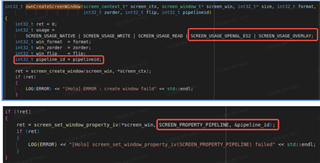
Use the gles2-gears test demo that comes with the qnx system, specify the pipeline, and it can be displayed normally. But when we use the gles test demo written by ourself to specify the pipeline, it cannot be displayed.


Can you provide the source code of gles2-gears, or other gles test programs that can specify a pipeline?

some code:
some logs:

1.gles2-gears display normally

gles2-gears -zorder=4 -pipeline=1

2. our test app not working


 The following is our test demo source code.

renderer_app.tar.gz.gz

  • Thank you for the detailed post.

    General response is that this question should be directed to QNX, as QNX is the owner of the Screen package which in turn is using the QNX graphics and display driver.

    When the screen package is launched, it will pull in a graphics.conf file.  One thing to check is that the pipeline that is being used in code, is correctly defined/aligned with  the  graphics.conf file.

    Screen Documentation: - About Screen (qnx.com)

    - Configuring Screen (qnx.com)

    In the graphics configuration file provided by TI PSDK QNX at psdkqa/qnx/scripts/screen/usr/lib/graphics/jacinto7/graphics.conf.dss_on_a72, pipelines are mapped to display / framebuffer as below.

    To locate the graphic configuration file that is being used on your target run "pidin ar" and look for the command line parameters with the "screen" binary.

    Regards,

    kb