This thread has been locked.

If you have a related question, please click the "Ask a related question" button in the top right corner. The newly created question will be automatically linked to this question.

DRA821U: j7200_evm launch.js issue

Part Number: DRA821U
Other Parts Discussed in Thread: DRA821

I am using

  • Ubuntu 22.04.3 LTS
  • CCS12.5
  • pdk_j7200_09_00_01_03

I am following the instructions here

https://software-dl.ti.com/jacinto7/esd/processor-sdk-rtos-j7200/latest/exports/docs/psdk_rtos/docs/user_guide/ccs_setup_j7200.html

I have edited the launch.js with my pdk path like this

//PDK path. Edit this
pdkPath = "/home/jeff/ti/ti-processor-sdk-rtos-j7200-evm-09_00_01_01/pdk_j7200_09_00_01_03";

//path to board config elf
pathSciclient = pdkPath+"/packages/ti/drv/sciclient/tools/ccsLoadDmsc/j7200/"
ccs_init_elf_file = pathSciclient+"sciclient_ccs_init_mcu1_0_release.xer5f";

When I run the .js file I get this error

js:> loadJSFile ("/home/jeff/ti/ti-processor-sdk-rtos-j7200-evm-09_00_01_01/pdk_j7200_09_00_01_03/packages/ti/drv/sciclient/tools/ccsLoadDmsc/j7200")
Error getting reset type: Error getting reset type; index out of range (/home/jeff/ti/ti-processor-sdk-rtos-j7200-evm-09_00_01_01/pdk_j7200_09_00_01_03/packages/ti/drv/sciclient/tools/ccsLoadDmsc/j7200/launch.js#101)

I also tried

js:> loadJSFile ("/home/jeff/ti/ti-processor-sdk-rtos-j7200-evm-09_00_01_01/pdk_j7200_09_00_01_03/packages/ti/drv/sciclient/tools/ccsLoadDmsc/j7200/launch.js")
Error getting reset type: Error getting reset type; index out of range (/home/jeff/ti/ti-processor-sdk-rtos-j7200-evm-09_00_01_01/pdk_j7200_09_00_01_03/packages/ti/drv/sciclient/tools/ccsLoadDmsc/j7200/launch.js#101)

Can you please help me understand what the error is?

Thanks, Jeff

  • Hi,

    I have been able to successfully run launch.js file at my end. The only difference seems to be with the CCS version. I am using 12.3. Can you also please try it on 12.3 and see if that works?

    Regards,
    Parth

  • I tried 12.3 but I still have the same problem. But previously I missed that there is an earlier issue, when I launch the target  j7200.

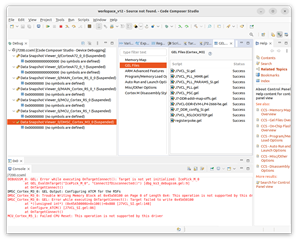
    DEBUGSSM_0: GEL: Error while executing OnTargetConnect(): Target is not yet initialized: IcePick_M_0
         at GEL_EvalOnTarget("IcePick_M_0", "ConnectIfDisconnected()") [dbg_ks3_debugssm.gel:9]
         at OnTargetConnect()
    DMSC_Cortex_M3_0: GEL Output: Configuring ATCM for the R5Fs
    DMSC_Cortex_M3_0: Trouble Writing Memory Block at 0x45a50100 on Page 0 of Length 0x4: This operation is not supported by this driver
    DMSC_Cortex_M3_0: GEL: Error while executing OnTargetConnect(): Target failed to write 0x45A50100
         at *((unsigned int*) (0x45A50000U+0x100))=0x888 [J7VCL_SI.gel:148]
         at Configure_ATCM() [J7VCL_SI.gel:86]
         at OnTargetConnect()

    The target initialization script is set to

    ../../emulation/gel/J7200_DRA821/J7VCL_SI.gel

    I don't think I am attaching to the processors. This is a brand new install of Ubuntu, I have never successfully been able to get past this point. So it may be and issue with the com ports. When I plug in the USB cables connected to the j7200_evm I  see these ports enumerate

    • ../../devices/pci0000:00/0000:00:14.0/usb1/1-4/1-4.4/1-4.4:1.0/tty/ttyACM0
    • ../../devices/pci0000:00/0000:00:14.0/usb1/1-4/1-4.4/1-4.4:1.0/tty/ttyACM1
    • ../../devices/pci0000:00/0000:00:14.0/usb1/1-4/1-4.2/1-4.2:1.0/ttyUSB0/tty/ttyUSB0/
      ../../devices/pci0000:00/0000:00:14.0/usb1/1-4/1-4.2/1-4.2:1.1/ttyUSB1/tty/ttyUSB1/
      ../../devices/pci0000:00/0000:00:14.0/usb1/1-4/1-4.3/1-4.3:1.0/ttyUSB2/tty/ttyUSB2/
      ../../devices/pci0000:00/0000:00:14.0/usb1/1-4/1-4.3/1-4.3:1.1/ttyUSB3/tty/ttyUSB3/
      ../../devices/pci0000:00/0000:00:14.0/usb1/1-4/1-4.3/1-4.3:1.2/ttyUSB4/tty/ttyUSB4/
      ../../devices/pci0000:00/0000:00:14.0/usb1/1-4/1-4.3/1-4.3:1.3/ttyUSB5/tty/ttyUSB5/

    How can I test or enable CCS to attach, is there a permissions issue?

  • It looks like the DMSC gel files run correctly

  • also I think this looks right but not 100% sure what it's supposed to look like

    ./xdsdfu -e

    USB Device Firmware Upgrade Utility
    Copyright (c) 2008-2019 Texas Instruments Incorporated. All rights reserved.

    Scanning USB buses for supported XDS110 devices...


    <<<< Device 0 >>>>

    VID: 0x0451 PID: 0xbef3
    Device Name: XDS110 Embed with CMSIS-DAP
    Version: 3.0.0.26
    Manufacturer: Texas Instruments
    Serial Num: 37220541
    Mode: Runtime
    Configuration: Standard

    Found 1 device.

  • Issue resolved. I had the wrong connection selected in the General Setup -> connection