This thread has been locked.

If you have a related question, please click the "Ask a related question" button in the top right corner. The newly created question will be automatically linked to this question.

AM62A7: compile kernel errors.

Part Number: AM62A7

Hi TI,

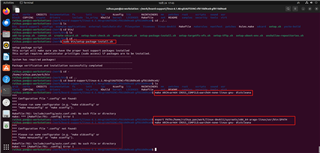
I use TI SDK (version:09_00_01_03). In the default environment, various compilations will report errors:

make ARCH=arm64 CROSS_COMPILE=aarch64-none-linux-gnu- distclean

==============================================

make ARCH=arm64 CROSS_COMPILE=aarch64-none-linux-gnu- defconfig ti_arm64_prune.config

make ARCH=arm64 CROSS_COMPILE=aarch64-none-linux-gnu- k3-am62a7-sk-csi2-imx219.dtbo


make ARCH=arm64 CROSS_COMPILE=aarch64-none-linux-gnu- dtbs

===================================================

command:

make all

Can you guide me how to compile the kernel?

Best Regards,

Daohong

  • Your first attempt has the paths wrong when exporting the toolchain variables, pointing to an invalid directory. You'd always want to use a full absolute path for this.

    Anyways, can you please review and follow the instructions here:

    https://dev.ti.com/tirex/explore/node?node=A__AXAZPHPxR06gXOFyveYkjA__AM62A-ACADEMY__WeZ9SsL__LATEST

    I just tried the "Build Kernel Using the SDK Top Level Makefile" approach described in that Linux Academy section using the exact same SDK you are using on an Ubuntu 22.04 host and it worked without any issues.

    One thing to double-check is always making sure you have all the right build dependencies installed but this is something that should have been taken care of by the SDK installer. Perhaps try running the `bin/setup-package-install.sh` script again and see if it produces any errors.

    Regards, Andreas

  • Hi  Andreas,

    My server environment compilation result:

    SDK : 09_00_01_03

    20.04.1-Ubuntu

    install ti-processor-sdk-linux-edgeai-am62axx-evm-09_00_01_03-Linux-x86-Install.bin.


    setp 1:

    make linux

    sudo ROOTFS_PART=<sdcard-mounting-point> make linux_install

    Execution result is OK.

    setp 2:

    export PATH=/home/ruihua.pan/work/linux-devkit/sysroots/x86_64-arago-linux/usr/bin:$PATH

    make ARCH=arm64 CROSS_COMPILE=aarch64-none-linux-gnu- distclean

    Execution result is not OK.

    I found that the command execution failed. I executed the `bin/setup-package-install.sh` script  mentioned in your reply. After the execution, I repeated the previous step.

    The command execution result still has an error:

    ---------------------------------------------------

    Although the previous instruction execution error occurred, I continued to modify 'k3-am62a-mcu.dtsi' and then used make linux, but the compilation did not pass.

    Can you help me point out which steps are incorrect and send me the correct steps you used for comparison?

    ************************************************************************

    I re-did the experiment, reinstalling ti-processor-sdk-linux-edgeai-am62axx-evm-09_00_01_03-Linux-x86-Install.bin and directly doing make install. Then, following this link: https://software-dl.ti.com/jacinto7/esd/processor-sdk-linux-edgeai/AM62AX/09_00_00/exports/docs/linux/How_to_Guides/Target/How_to_test_MCAN_on_AM62x.html#enable-device-tree-overlay, modified k3-am62a-mcu.dtsi and 'make install' again.

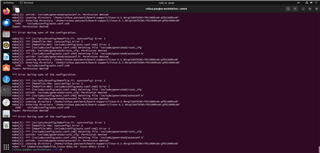
    make[3]: *** [scripts/kconfig/Makefile:77: syncconfig] Error 1
    make[2]: *** [Makefile:704: syncconfig] Error 2
    make[1]: *** [Makefile:805: include/config/auto.conf.cmd] Error 2
    make[1]: *** [include/config/auto.conf.cmd] Deleting file 'include/generated/rustc_cfg'
    make[1]: unlink: include/generated/rustc_cfg: Permission denied
    make[1]: *** [include/config/auto.conf.cmd] Deleting file 'include/generated/autoconf.h'
    make[1]: unlink: include/generated/autoconf.h: Permission denied
    make[1]: Leaving directory '/home/ruihua.pan/work/board-support/linux-6.1.46+gitAUTOINC+f8110d9ce8-gf8110d9ce8'
    make[1]: Entering directory '/home/ruihua.pan/work/board-support/linux-6.1.46+gitAUTOINC+f8110d9ce8-gf8110d9ce8'
      SYNC    include/config/auto.conf.cmd
    fopen: Permission denied
    
    *** Error during sync of the configuration.
    
    make[3]: *** [scripts/kconfig/Makefile:77: syncconfig] Error 1
    make[2]: *** [Makefile:704: syncconfig] Error 2
    make[1]: *** [Makefile:805: include/config/auto.conf.cmd] Error 2
    make[1]: *** [include/config/auto.conf.cmd] Deleting file 'include/generated/rustc_cfg'
    make[1]: unlink: include/generated/rustc_cfg: Permission denied
    make[1]: *** [include/config/auto.conf.cmd] Deleting file 'include/generated/autoconf.h'
    make[1]: unlink: include/generated/autoconf.h: Permission denied
    make[1]: Leaving directory '/home/ruihua.pan/work/board-support/linux-6.1.46+gitAUTOINC+f8110d9ce8-gf8110d9ce8'
    make[1]: Entering directory '/home/ruihua.pan/work/board-support/linux-6.1.46+gitAUTOINC+f8110d9ce8-gf8110d9ce8'
      SYNC    include/config/auto.conf.cmd
    fopen: Permission denied
    
    *** Error during sync of the configuration.
    
    make[3]: *** [scripts/kconfig/Makefile:77: syncconfig] Error 1
    make[2]: *** [Makefile:704: syncconfig] Error 2
    make[1]: *** [Makefile:805: include/config/auto.conf.cmd] Error 2
    make[1]: *** [include/config/auto.conf.cmd] Deleting file 'include/generated/rustc_cfg'
    make[1]: unlink: include/generated/rustc_cfg: Permission denied
    make[1]: *** [include/config/auto.conf.cmd] Deleting file 'include/generated/autoconf.h'
    make[1]: unlink: include/generated/autoconf.h: Permission denied
    make[1]: Leaving directory '/home/ruihua.pan/work/board-support/linux-6.1.46+gitAUTOINC+f8110d9ce8-gf8110d9ce8'
    make: *** [makerules/Makefile_linux-dtbs:10: linux-dtbs] Error 2
    
    **************************************************************************
    Use the GCC tools in this path to compile the device tree  ti-processor-sdk-linux-edgeai-am62axx-evm-09_00_01_03/external-toolchain-dir/arm-gnu-toolchain-11.3.rel1-x86_64-aarch64-none-linux-gnu/bin.  

    Regards, Daohong

  • setp 2:

    export PATH=/home/ruihua.pan/work/linux-devkit/sysroots/x86_64-arago-linux/usr/bin:$PATH

    Try using a path of `.../linux-devkit/sysroots/x86_64-arago-linux/usr/bin/aarch64-oe-linux` and a CROSS_COMPILE prefix of `aarch64-oe-linux-`. Looks like our Linux SDK user's guide wasn't updated to reflect the changes that we made going from SDK v8.x (uses "external toolchain") to SDK v9.x (uses "Yocto-internal toolchain).

    I filed an internal ticket (SITSW-3205) to get our docs updated. 

    Regards, Andreas

  • Hi  Andreas,

    Are these two commands used? After entering these two commands, the ls command cannot be used.

    export PATH=/home/ruihua.pan/ti-processor-sdk-linux-edgeai-am62axx-evm-09_00_01_03/linux-devkit/sysroots/x86_64-arago-linux/usr/bin/aarch64-oe-linux
    
    
    make ARCH=arm64 CROSS_COMPILE=aarch64-oe-linux- distclean

    Regards,Daohong

  • Looks like you forgot adding the existing $PATH at the end of your new PATH definition. Open a new shell and try it again.

    Regards, Andreas

  • Hi  Andreas,

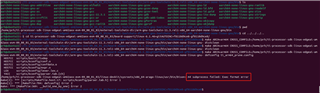
    It seems there's still a problem.

    Regards,Daohong

  • Can you confirm you can access that compiler from the command line, like this?

    a0797059@dasso:~/ti/ti-processor-sdk-linux-edgeai-am62axx-evm-09_00_01_03
    $ export PATH=/home/a0797059/ti/ti-processor-sdk-linux-edgeai-am62axx-evm-09_00_01_03/linux-devkit/sysroots/x86_64-arago-linux/usr/bin/aarch64-oe-linux:$PATH
    a0797059@dasso:~/ti/ti-processor-sdk-linux-edgeai-am62axx-evm-09_00_01_03
    $ aarch64-oe-linux-gcc --version
    aarch64-oe-linux-gcc (GCC) 11.3.0
    Copyright (C) 2021 Free Software Foundation, Inc.
    This is free software; see the source for copying conditions.  There is NO
    warranty; not even for MERCHANTABILITY or FITNESS FOR A PARTICULAR PURPOSE.
    
    a0797059@dasso:~/ti/ti-processor-sdk-linux-edgeai-am62axx-evm-09_00_01_03
    $ which aarch64-oe-linux-gcc
    /home/a0797059/ti/ti-processor-sdk-linux-edgeai-am62axx-evm-09_00_01_03/linux-devkit/sysroots/x86_64-arago-linux/usr/bin/aarch64-oe-linux/aarch64-oe-linux-gcc
    a0797059@dasso:~/ti/ti-processor-sdk-linux-edgeai-am62axx-evm-09_00_01_03
    $

    With this same setup I also just confirmed I can build the Kernel without issues...

    a0797059@dasso:~/ti/ti-processor-sdk-linux-edgeai-am62axx-evm-09_00_01_03/board-support/linux-6.1.46+gitAUTOINC+f8110d9ce8-gf8110d9ce8 (ti-linux-6.1.y)
    $ make ARCH=arm64 CROSS_COMPILE=aarch64-oe-linux- Image
      SYNC    include/config/auto.conf.cmd
      UPD     include/generated/compile.h
      CC      scripts/mod/empty.o
      CC      scripts/mod/devicetable-offsets.s
      MKELF   scripts/mod/elfconfig.h
      HOSTCC  scripts/mod/modpost.o
      HOSTCC  scripts/mod/sumversion.o
      HOSTCC  scripts/mod/file2alias.o
      HOSTLD  scripts/mod/modpost
      CC      kernel/bounds.s
      CC      arch/arm64/kernel/asm-offsets.s
      UPD     include/generated/asm-offsets.h
      CALL    scripts/checksyscalls.sh
    <...snip...>

    Please double check your setup/paths/commands, etc.

    Regards, Andreas