Part Number: SK-AM62A-LP
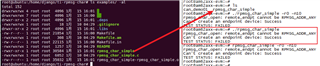
A problem shows in my EVM after the code compiled when I run the RPMSG example code from the website:
However,the default one is OK:
My tools are also OK:
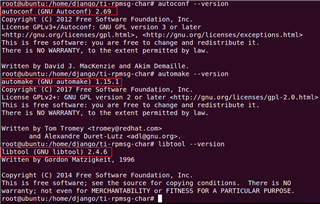
So, what's the problem about the RPMSG example code?

This thread has been locked.
If you have a related question, please click the "Ask a related question" button in the top right corner. The newly created question will be automatically linked to this question.
Part Number: SK-AM62A-LP
A problem shows in my EVM after the code compiled when I run the RPMSG example code from the website:
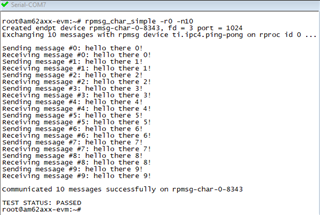
However,the default one is OK:
My tools are also OK:
So, what's the problem about the RPMSG example code?

Hello Django Wang ,
You may get a delayed reply as today is a holiday in Dallas.
Regards,
S.Anil.
Hello Django,
Can you please confirm that you have followed the build steps exactly, like in this response:
and then tested the generated project, like in this response?
https://e2e.ti.com/support/processors-group/processors/f/processors-forum/1307125/sk-am62-ipc/4988376#4988376
(note that the exact rpmsg_ids for the cores in AM62x will be slightly different than for AM62Ax, refer to
https://dev.ti.com/tirex/explore/node?node=A__AYEyuCg.JDdHqpTk3sF27g__AM62A-ACADEMY__WeZ9SsL__LATEST
Regards,
Nick

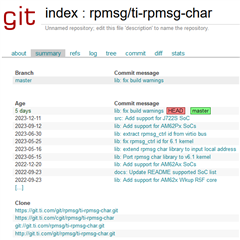
root@ubuntu:/home/django# git clone git://git.ti.com/rpmsg/ti-rpmsg-char.git
Cloning into 'ti-rpmsg-char'...
remote: Counting objects: 146, done.
remote: Compressing objects: 100% (143/143), done.
remote: Total 146 (delta 93), reused 0 (delta 0)
Receiving objects: 100% (146/146), 73.08 KiB | 285.00 KiB/s, done.
Resolving deltas: 100% (93/93), done.
root@ubuntu:/home/django# ls
AM62A                           canfd_test01                   Downloads  timer      ti-rpmsg-char
bcompare-4.4.5.27371_amd64.deb  cmake-3.28.0-rc4-linux-x86_64  ti         TI_pinmux  workspace_v12
root@ubuntu:/home/django#
root@ubuntu:/home/django#
root@ubuntu:/home/django# cd ti-rpmsg-char/
root@ubuntu:/home/django/ti-rpmsg-char#
root@ubuntu:/home/django/ti-rpmsg-char#
root@ubuntu:/home/django/ti-rpmsg-char#
root@ubuntu:/home/django/ti-rpmsg-char# ls -al
total 108
drwxr-xr-x  6 root   root    4096 1��  17 10:05 .
drwxrwxrwx 31 django django  4096 1��  17 10:05 ..
-rw-r--r--  1 root   root    1770 1��  17 10:05 configure.ac
drwxr-xr-x  2 root   root    4096 1��  17 10:05 examples
drwxr-xr-x  8 root   root    4096 1��  17 10:05 .git
-rw-r--r--  1 root   root     461 1��  17 10:05 .gitignore
drwxr-xr-x  2 root   root    4096 1��  17 10:05 include
-rw-r--r--  1 root   root      14 1��  17 10:05 Makefile.am
-rw-r--r--  1 root   root    3217 1��  17 10:05 README
drwxr-xr-x  2 root   root    4096 1��  17 10:05 src
-rw-r--r--  1 root   root   65719 1��  17 10:05 TI_RPMsg_Char_0.1.0_manifest.html
root@ubuntu:/home/django/ti-rpmsg-char# git status
On branch master
Your branch is up to date with 'origin/master'.

nothing to commit, working tree clean
root@ubuntu:/home/django/ti-rpmsg-char# git branch
* master
root@ubuntu:/home/django/ti-rpmsg-char# git pull --rebase origin master
From git://git.ti.com/rpmsg/ti-rpmsg-char
 * branch            master     -> FETCH_HEAD
Already up to date.
Current branch master is up to date.
root@ubuntu:/home/django/ti-rpmsg-char# export PATH=/home/django/AM62A/gcc-arm-9.2-2019.12-x86_64-aarch64-none-linux-gnu/bin:$PATH
root@ubuntu:/home/django/ti-rpmsg-char# autoreconf -i
libtoolize: putting auxiliary files in AC_CONFIG_AUX_DIR, 'build-aux'.
libtoolize: copying file 'build-aux/ltmain.sh'
libtoolize: Consider adding 'AC_CONFIG_MACRO_DIRS([m4])' to configure.ac,
libtoolize: and rerunning libtoolize and aclocal.
libtoolize: Consider adding '-I m4' to ACLOCAL_AMFLAGS in Makefile.am.
configure.ac:23: installing 'build-aux/compile'
configure.ac:23: installing 'build-aux/config.guess'
configure.ac:23: installing 'build-aux/config.sub'
configure.ac:17: installing 'build-aux/install-sh'
configure.ac:17: installing 'build-aux/missing'
examples/Makefile.am: installing 'build-aux/depcomp'
root@ubuntu:/home/django/ti-rpmsg-char# mkdir outputs
root@ubuntu:/home/django/ti-rpmsg-char# ./configure --host=aarch64-none-linux-gnu --prefix=/home/django/ti-rpmsg-char/outputs
checking for a BSD-compatible install... /usr/bin/install -c
checking whether build environment is sane... yes
checking for aarch64-none-linux-gnu-strip... aarch64-none-linux-gnu-strip
checking for a thread-safe mkdir -p... /bin/mkdir -p
checking for gawk... gawk
checking whether make sets $(MAKE)... yes
checking whether make supports nested variables... yes
checking whether to enable maintainer-specific portions of Makefiles... no
checking build system type... x86_64-pc-linux-gnu
checking host system type... aarch64-none-linux-gnu
checking how to print strings... printf
checking for style of include used by make... GNU
checking for aarch64-none-linux-gnu-gcc... aarch64-none-linux-gnu-gcc
checking whether the C compiler works... yes
checking for C compiler default output file name... a.out
checking for suffix of executables...
checking whether we are cross compiling... yes
checking for suffix of object files... o
checking whether we are using the GNU C compiler... yes
checking whether aarch64-none-linux-gnu-gcc accepts -g... yes
checking for aarch64-none-linux-gnu-gcc option to accept ISO C89... none needed
checking whether aarch64-none-linux-gnu-gcc understands -c and -o together... yes
checking dependency style of aarch64-none-linux-gnu-gcc... gcc3
checking for a sed that does not truncate output... /bin/sed
checking for grep that handles long lines and -e... /bin/grep
checking for egrep... /bin/grep -E
checking for fgrep... /bin/grep -F
checking for ld used by aarch64-none-linux-gnu-gcc... /home/django/AM62A/gcc-arm-9.2-2019.12-x86_64-aarch64-none-linux-gnu/aarch64-none-linux-gnu/bin/ld
checking if the linker (/home/django/AM62A/gcc-arm-9.2-2019.12-x86_64-aarch64-none-linux-gnu/aarch64-none-linux-gnu/bin/ld) is GNU ld... yes
checking for BSD- or MS-compatible name lister (nm)... /home/django/AM62A/gcc-arm-9.2-2019.12-x86_64-aarch64-none-linux-gnu/bin/aarch64-none-linux-gnu-nm -B
checking the name lister (/home/django/AM62A/gcc-arm-9.2-2019.12-x86_64-aarch64-none-linux-gnu/bin/aarch64-none-linux-gnu-nm -B) interface... BSD nm
checking whether ln -s works... yes
checking the maximum length of command line arguments... 1572864
checking how to convert x86_64-pc-linux-gnu file names to aarch64-none-linux-gnu format... func_convert_file_noop
checking how to convert x86_64-pc-linux-gnu file names to toolchain format... func_convert_file_noop
checking for /home/django/AM62A/gcc-arm-9.2-2019.12-x86_64-aarch64-none-linux-gnu/aarch64-none-linux-gnu/bin/ld option to reload object files... -r
checking for aarch64-none-linux-gnu-objdump... aarch64-none-linux-gnu-objdump
checking how to recognize dependent libraries... pass_all
checking for aarch64-none-linux-gnu-dlltool... no
checking for dlltool... no
checking how to associate runtime and link libraries... printf %s\n
checking for aarch64-none-linux-gnu-ar... aarch64-none-linux-gnu-ar
checking for archiver @FILE support... @
checking for aarch64-none-linux-gnu-strip... (cached) aarch64-none-linux-gnu-strip
checking for aarch64-none-linux-gnu-ranlib... aarch64-none-linux-gnu-ranlib
checking command to parse /home/django/AM62A/gcc-arm-9.2-2019.12-x86_64-aarch64-none-linux-gnu/bin/aarch64-none-linux-gnu-nm -B output from aarch64-none-linux-gnu-gcc object... ok
checking for sysroot... no
checking for a working dd... /bin/dd
checking how to truncate binary pipes... /bin/dd bs=4096 count=1
checking for aarch64-none-linux-gnu-mt... no
checking for mt... mt
configure: WARNING: using cross tools not prefixed with host triplet
checking if mt is a manifest tool... no
checking how to run the C preprocessor... aarch64-none-linux-gnu-gcc -E
checking for ANSI C header files... yes
checking for sys/types.h... yes
checking for sys/stat.h... yes
checking for stdlib.h... yes
checking for string.h... yes
checking for memory.h... yes
checking for strings.h... yes
checking for inttypes.h... yes
checking for stdint.h... yes
checking for unistd.h... yes
checking for dlfcn.h... yes
checking for objdir... .libs
checking if aarch64-none-linux-gnu-gcc supports -fno-rtti -fno-exceptions... no
checking for aarch64-none-linux-gnu-gcc option to produce PIC... -fPIC -DPIC
checking if aarch64-none-linux-gnu-gcc PIC flag -fPIC -DPIC works... yes
checking if aarch64-none-linux-gnu-gcc static flag -static works... yes
checking if aarch64-none-linux-gnu-gcc supports -c -o file.o... yes
checking if aarch64-none-linux-gnu-gcc supports -c -o file.o... (cached) yes
checking whether the aarch64-none-linux-gnu-gcc linker (/home/django/AM62A/gcc-arm-9.2-2019.12-x86_64-aarch64-none-linux-gnu/aarch64-none-linux-gnu/bin/ld) supports shared libraries... yes
checking whether -lc should be explicitly linked in... no
checking dynamic linker characteristics... GNU/Linux ld.so
checking how to hardcode library paths into programs... immediate
checking whether stripping libraries is possible... yes
checking if libtool supports shared libraries... yes
checking whether to build shared libraries... yes
checking whether to build static libraries... yes
checking for aarch64-none-linux-gnu-gcc... (cached) aarch64-none-linux-gnu-gcc
checking whether we are using the GNU C compiler... (cached) yes
checking whether aarch64-none-linux-gnu-gcc accepts -g... (cached) yes
checking for aarch64-none-linux-gnu-gcc option to accept ISO C89... (cached) none needed
checking whether aarch64-none-linux-gnu-gcc understands -c and -o together... (cached) yes
checking dependency style of aarch64-none-linux-gnu-gcc... (cached) gcc3
checking for ANSI C header files... (cached) yes
checking fcntl.h usability... yes
checking fcntl.h presence... yes
checking for fcntl.h... yes
checking stddef.h usability... yes
checking stddef.h presence... yes
checking for stddef.h... yes
checking for stdint.h... (cached) yes
checking for stdlib.h... (cached) yes
checking for string.h... (cached) yes
checking sys/ioctl.h usability... yes
checking sys/ioctl.h presence... yes
checking for sys/ioctl.h... yes
checking for unistd.h... (cached) yes
checking for stdbool.h that conforms to C99... yes
checking for _Bool... yes
checking for size_t... yes
checking for uint32_t... yes
checking for stdlib.h... (cached) yes
checking for GNU libc compatible malloc... no
checking for memset... yes
checking for realpath... yes
checking for strerror... yes
checking for strtol... yes
checking that generated files are newer than configure... done
configure: creating ./config.status
config.status: creating Makefile
config.status: creating src/Makefile
config.status: creating src/ti_rpmsg_char.pc
config.status: creating examples/Makefile
config.status: creating config.h
config.status: executing depfiles commands
config.status: executing libtool commands
-----------------------------------------------------------

Thank you for installing the Linux ti-rpmsg-char package

Installation directory prefix: '/home/django/ti-rpmsg-char/outputs'.
Compilation command: 'aarch64-none-linux-gnu-gcc -g -O2 '

Now type 'make; sudo make install' to generate the program
and install it to your system. sudo usage is optional and
depends on the permissions of the prefix folder being used
or installation.

------------------------------------------------------------
root@ubuntu:/home/django/ti-rpmsg-char# make
make  all-recursive
make[1]: Entering directory '/home/django/ti-rpmsg-char'
Making all in src
make[2]: Entering directory '/home/django/ti-rpmsg-char/src'
/bin/sh ../libtool  --tag=CC   --mode=compile aarch64-none-linux-gnu-gcc -DHAVE_CONFIG_H -I. -I..    -I../include -g -O2 -MT libti_rpmsg_char_la-rpmsg_char.lo -MD -MP -MF .deps/libti_rpmsg_char_la-rpmsg_char.Tpo -c -o libti_rpmsg_char_la-rpmsg_char.lo `test -f 'rpmsg_char.c' || echo './'`rpmsg_char.c
libtool: compile:  aarch64-none-linux-gnu-gcc -DHAVE_CONFIG_H -I. -I.. -I../include -g -O2 -MT libti_rpmsg_char_la-rpmsg_char.lo -MD -MP -MF .deps/libti_rpmsg_char_la-rpmsg_char.Tpo -c rpmsg_char.c  -fPIC -DPIC -o .libs/libti_rpmsg_char_la-rpmsg_char.o
libtool: compile:  aarch64-none-linux-gnu-gcc -DHAVE_CONFIG_H -I. -I.. -I../include -g -O2 -MT libti_rpmsg_char_la-rpmsg_char.lo -MD -MP -MF .deps/libti_rpmsg_char_la-rpmsg_char.Tpo -c rpmsg_char.c -o libti_rpmsg_char_la-rpmsg_char.o >/dev/null 2>&1
mv -f .deps/libti_rpmsg_char_la-rpmsg_char.Tpo .deps/libti_rpmsg_char_la-rpmsg_char.Plo
/bin/sh ../libtool  --tag=CC   --mode=compile aarch64-none-linux-gnu-gcc -DHAVE_CONFIG_H -I. -I..    -I../include -g -O2 -MT libti_rpmsg_char_la-soc.lo -MD -MP -MF .deps/libti_rpmsg_char_la-soc.Tpo -c -o libti_rpmsg_char_la-soc.lo `test -f 'soc.c' || echo './'`soc.c
libtool: compile:  aarch64-none-linux-gnu-gcc -DHAVE_CONFIG_H -I. -I.. -I../include -g -O2 -MT libti_rpmsg_char_la-soc.lo -MD -MP -MF .deps/libti_rpmsg_char_la-soc.Tpo -c soc.c  -fPIC -DPIC -o .libs/libti_rpmsg_char_la-soc.o
libtool: compile:  aarch64-none-linux-gnu-gcc -DHAVE_CONFIG_H -I. -I.. -I../include -g -O2 -MT libti_rpmsg_char_la-soc.lo -MD -MP -MF .deps/libti_rpmsg_char_la-soc.Tpo -c soc.c -o libti_rpmsg_char_la-soc.o >/dev/null 2>&1
mv -f .deps/libti_rpmsg_char_la-soc.Tpo .deps/libti_rpmsg_char_la-soc.Plo
/bin/sh ../libtool  --tag=CC   --mode=compile aarch64-none-linux-gnu-gcc -DHAVE_CONFIG_H -I. -I..    -I../include -g -O2 -MT libti_rpmsg_char_la-utils.lo -MD -MP -MF .deps/libti_rpmsg_char_la-utils.Tpo -c -o libti_rpmsg_char_la-utils.lo `test -f 'utils.c' || echo './'`utils.c
libtool: compile:  aarch64-none-linux-gnu-gcc -DHAVE_CONFIG_H -I. -I.. -I../include -g -O2 -MT libti_rpmsg_char_la-utils.lo -MD -MP -MF .deps/libti_rpmsg_char_la-utils.Tpo -c utils.c  -fPIC -DPIC -o .libs/libti_rpmsg_char_la-utils.o
libtool: compile:  aarch64-none-linux-gnu-gcc -DHAVE_CONFIG_H -I. -I.. -I../include -g -O2 -MT libti_rpmsg_char_la-utils.lo -MD -MP -MF .deps/libti_rpmsg_char_la-utils.Tpo -c utils.c -o libti_rpmsg_char_la-utils.o >/dev/null 2>&1
mv -f .deps/libti_rpmsg_char_la-utils.Tpo .deps/libti_rpmsg_char_la-utils.Plo
/bin/sh ../libtool  --tag=CC   --mode=link aarch64-none-linux-gnu-gcc -I../include -g -O2 -version-number 0:6:5 -no-undefined  -o libti_rpmsg_char.la -rpath /home/django/ti-rpmsg-char/outputs/lib libti_rpmsg_char_la-rpmsg_char.lo libti_rpmsg_char_la-soc.lo libti_rpmsg_char_la-utils.lo
libtool: link: aarch64-none-linux-gnu-gcc -shared  -fPIC -DPIC  .libs/libti_rpmsg_char_la-rpmsg_char.o .libs/libti_rpmsg_char_la-soc.o .libs/libti_rpmsg_char_la-utils.o    -g -O2   -Wl,-soname -Wl,libti_rpmsg_char.so.0 -o .libs/libti_rpmsg_char.so.0.6.5
libtool: link: (cd ".libs" && rm -f "libti_rpmsg_char.so.0" && ln -s "libti_rpmsg_char.so.0.6.5" "libti_rpmsg_char.so.0")
libtool: link: (cd ".libs" && rm -f "libti_rpmsg_char.so" && ln -s "libti_rpmsg_char.so.0.6.5" "libti_rpmsg_char.so")
libtool: link: aarch64-none-linux-gnu-ar cru .libs/libti_rpmsg_char.a  libti_rpmsg_char_la-rpmsg_char.o libti_rpmsg_char_la-soc.o libti_rpmsg_char_la-utils.o
libtool: link: aarch64-none-linux-gnu-ranlib .libs/libti_rpmsg_char.a
libtool: link: ( cd ".libs" && rm -f "libti_rpmsg_char.la" && ln -s "../libti_rpmsg_char.la" "libti_rpmsg_char.la" )
make[2]: Leaving directory '/home/django/ti-rpmsg-char/src'
make[2]: Entering directory '/home/django/ti-rpmsg-char'
make[2]: Leaving directory '/home/django/ti-rpmsg-char'
make[1]: Leaving directory '/home/django/ti-rpmsg-char'
root@ubuntu:/home/django/ti-rpmsg-char# make install
Making install in src
make[1]: Entering directory '/home/django/ti-rpmsg-char/src'
make[2]: Entering directory '/home/django/ti-rpmsg-char/src'
 /bin/mkdir -p '/home/django/ti-rpmsg-char/outputs/lib'
 /bin/sh ../libtool   --mode=install /usr/bin/install -c   libti_rpmsg_char.la '/home/django/ti-rpmsg-char/outputs/lib'
libtool: install: /usr/bin/install -c .libs/libti_rpmsg_char.so.0.6.5 /home/django/ti-rpmsg-char/outputs/lib/libti_rpmsg_char.so.0.6.5
libtool: install: (cd /home/django/ti-rpmsg-char/outputs/lib && { ln -s -f libti_rpmsg_char.so.0.6.5 libti_rpmsg_char.so.0 || { rm -f libti_rpmsg_char.so.0 && ln -s libti_rpmsg_char.so.0.6.5 libti_rpmsg_char.so.0; }; })
libtool: install: (cd /home/django/ti-rpmsg-char/outputs/lib && { ln -s -f libti_rpmsg_char.so.0.6.5 libti_rpmsg_char.so || { rm -f libti_rpmsg_char.so && ln -s libti_rpmsg_char.so.0.6.5 libti_rpmsg_char.so; }; })
libtool: install: /usr/bin/install -c .libs/libti_rpmsg_char.lai /home/django/ti-rpmsg-char/outputs/lib/libti_rpmsg_char.la
libtool: install: /usr/bin/install -c .libs/libti_rpmsg_char.a /home/django/ti-rpmsg-char/outputs/lib/libti_rpmsg_char.a
libtool: install: chmod 644 /home/django/ti-rpmsg-char/outputs/lib/libti_rpmsg_char.a
libtool: install: aarch64-none-linux-gnu-ranlib /home/django/ti-rpmsg-char/outputs/lib/libti_rpmsg_char.a
libtool: finish: PATH="/home/django/AM62A/gcc-arm-9.2-2019.12-x86_64-aarch64-none-linux-gnu/bin:/home/django/AM62A/gcc-arm-9.2-2019.12-x86_64-aarch64-none-linux-gnu/bin:/usr/local/sbin:/usr/local/bin:/usr/sbin:/usr/bin:/sbin:/bin:/usr/games:/usr/local/games:/snap/bin:/sbin" ldconfig -n /home/django/ti-rpmsg-char/outputs/lib
----------------------------------------------------------------------
Libraries have been installed in:
   /home/django/ti-rpmsg-char/outputs/lib

If you ever happen to want to link against installed libraries
in a given directory, LIBDIR, you must either use libtool, and
specify the full pathname of the library, or use the '-LLIBDIR'
flag during linking and do at least one of the following:
   - add LIBDIR to the 'LD_LIBRARY_PATH' environment variable
     during execution
   - add LIBDIR to the 'LD_RUN_PATH' environment variable
     during linking
   - use the '-Wl,-rpath -Wl,LIBDIR' linker flag
   - have your system administrator add LIBDIR to '/etc/ld.so.conf'

See any operating system documentation about shared libraries for
more information, such as the ld(1) and ld.so(8) manual pages.
----------------------------------------------------------------------
 /bin/mkdir -p '/home/django/ti-rpmsg-char/outputs/include'
 /usr/bin/install -c -m 644 ../include/ti_rpmsg_char.h ../include/rproc_id.h '/home/django/ti-rpmsg-char/outputs/include'
make[2]: Leaving directory '/home/django/ti-rpmsg-char/src'
make[1]: Leaving directory '/home/django/ti-rpmsg-char/src'
make[1]: Entering directory '/home/django/ti-rpmsg-char'
make[2]: Entering directory '/home/django/ti-rpmsg-char'
make[2]: Nothing to be done for 'install-exec-am'.
make[2]: Nothing to be done for 'install-data-am'.
make[2]: Leaving directory '/home/django/ti-rpmsg-char'
make[1]: Leaving directory '/home/django/ti-rpmsg-char'
root@ubuntu:/home/django/ti-rpmsg-char# make -C examples;
make: Entering directory '/home/django/ti-rpmsg-char/examples'
aarch64-none-linux-gnu-gcc -DHAVE_CONFIG_H -I. -I..  -Wall -g -O2 -I/home/django/ti-rpmsg-char/outputs/include  -Wall -g -O2 -I/home/django/ti-rpmsg-char/outputs/include -g -O2 -MT rpmsg_char_simple-rpmsg_char_simple.o -MD -MP -MF .deps/rpmsg_char_simple-rpmsg_char_simple.Tpo -c -o rpmsg_char_simple-rpmsg_char_simple.o `test -f 'rpmsg_char_simple.c' || echo './'`rpmsg_char_simple.c
mv -f .deps/rpmsg_char_simple-rpmsg_char_simple.Tpo .deps/rpmsg_char_simple-rpmsg_char_simple.Po
/bin/sh ../libtool  --tag=CC   --mode=link aarch64-none-linux-gnu-gcc -Wall -g -O2 -I/home/django/ti-rpmsg-char/outputs/include -g -O2 -L/home/django/ti-rpmsg-char/outputs/lib  -o rpmsg_char_simple rpmsg_char_simple-rpmsg_char_simple.o -lpthread -lti_rpmsg_char
libtool: link: aarch64-none-linux-gnu-gcc -Wall -g -O2 -I/home/django/ti-rpmsg-char/outputs/include -g -O2 -o rpmsg_char_simple rpmsg_char_simple-rpmsg_char_simple.o  -L/home/django/ti-rpmsg-char/outputs/lib -lpthread /home/django/ti-rpmsg-char/outputs/lib/libti_rpmsg_char.so -Wl,-rpath -Wl,/home/django/ti-rpmsg-char/outputs/lib -Wl,-rpath -Wl,/home/django/ti-rpmsg-char/outputs/lib
make: Leaving directory '/home/django/ti-rpmsg-char/examples'
root@ubuntu:/home/django/ti-rpmsg-char# make -C examples install;
make: Entering directory '/home/django/ti-rpmsg-char/examples'
make[1]: Entering directory '/home/django/ti-rpmsg-char/examples'
 /bin/mkdir -p '/home/django/ti-rpmsg-char/outputs/bin'
  /bin/sh ../libtool   --mode=install /usr/bin/install -c rpmsg_char_simple '/home/django/ti-rpmsg-char/outputs/bin'
libtool: install: /usr/bin/install -c rpmsg_char_simple /home/django/ti-rpmsg-char/outputs/bin/rpmsg_char_simple
make[1]: Nothing to be done for 'install-data-am'.
make[1]: Leaving directory '/home/django/ti-rpmsg-char/examples'
make: Leaving directory '/home/django/ti-rpmsg-char/examples'
root@ubuntu:/home/django/ti-rpmsg-char# ls outputs/
bin  include  lib
root@ubuntu:/home/django/ti-rpmsg-char# ls outputs/bin -a
.  ..  rpmsg_char_simple
This is my operation log above. Despite the executed file "rpmsg_char_simple" is successfully generated, the run result is still failed on EVM:
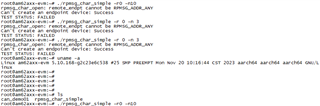
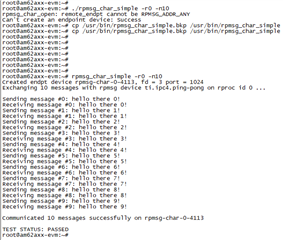
However, the default one in "mcu_plus_sdk_am62ax_08_06_00_18" is OK. That's crazy if I used the generated one on the EVM.
This project above is built & based on the "cmake tool" to compile and generate the execute file successfully. As you can see in the files, all the *.c and *.h files are completely copied from the above original project.
However, it fails to run on the EVM below:
So ,what's the reason for it? I just change the automake tool to cmake tool in order to create the makefile adapted with the project.
Hello, I've solve the all issue commited by myself. I make it much easier by just run the Cmake tool to compile the whole project, it seems to be Okay!
I should modify the critical word"CMAKE_CXX_COMPILER" to "CMAKE_C_COMPILER" in my project, then evrything is OK!
Thank you!

Hello Django,
Thanks for confirming your solution! That's helpful for other people with the same problem who might find your thread later.
Regards,
Nick