


Hello Champs,
HW: own board based on MMWCAS-DSP-EVM, same except for adding UART function
SW:PROCESSOR_SDK_VISION_03_07_01_00
Customer is attempting to recreate a development board circuit based on the MMWCAS-DSP-EVM board circuit, using the TDA2X chip. The configuration currently in use is the tda2xx_cascade_linux_radar version. When he connected the development board to the computer, the serial port displays that the kernel is not loading.
U-Boot SPL 2016.05-00018-g6bc25a5 (Aug 05 2019 - 14:43:03)
DRA752-GP ES2.0
no pinctrl for hs200_1_8v
no pinctrl for ddr_1_8v
Card did not respond to voltage select!
*** Warning - MMC init failed, using default environment

Trying to boot from MMC1
reading dra7-ipu2-fw.lzop
spl_load_file_fat: error reading file dra7-ipu2-fw.lzop, err - -1
spl: error reading image dra7-ipu2-fw.lzop, err - -1
Error loading remotecore IPU2!,Continuing with boot ...
reading dra7-dsp1-fw.lzop
spl_load_file_fat: error reading file dra7-dsp1-fw.lzop, err - -1
spl: error reading image dra7-dsp1-fw.lzop, err - -1
Error loading remotecore DSP1!,Continuing with boot ...
reading dra7-dsp2-fw.lzop
spl_load_file_fat: error reading file dra7-dsp2-fw.lzop, err - -1
spl: error reading image dra7-dsp2-fw.lzop, err - -1
Error loading remotecore DSP2!,Continuing with boot ...
reading dra7-ipu1-fw.lzop
spl_load_file_fat: error reading file dra7-ipu1-fw.lzop, err - -1
spl: error reading image dra7-ipu1-fw.lzop, err - -1
Error loading remotecore IPU1!,Continuing with boot ...
Card did not respond to voltage select!
*** Warning - MMC init failed, using default environment

reading u-boot.img
reading u-boot.img
reading u-boot.img
reading u-boot.img


U-Boot 2016.05-00018-g6bc25a5 (Aug 05 2019 - 14:43:03 +0530)

CPU  : DRA752-GP ES2.0
Model: TI DRA742
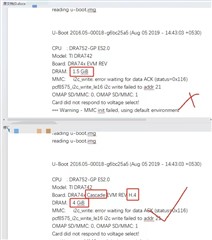
Board: DRA74x EVM REV
DRAM:  1.5 GiB
MMC:   i2c_write: error waiting for data ACK (status=0x116)
pcf8575_i2c_write_le16 i2c write failed to addr 21
OMAP SD/MMC: 0, OMAP SD/MMC: 1
Card did not respond to voltage select!
*** Warning - MMC init failed, using default environment

Warning: fastboot.board_rev: unknown board revision
Card did not respond to voltage select!
ERROR: invalid mmc device

at arch/arm/cpu/armv7/omap-common/utils.c:193/mmc_get_part_size()
Warning: fastboot.userdata_size: unable to calc
SCSI:  SATA link 0 timeout.
AHCI 0001.0300 32 slots 1 ports 3 Gbps 0x1 impl SATA mode
flags: 64bit ncq stag pm led clo only pmp pio slum part ccc apst
scanning bus for devices...
Found 0 device(s).
Net:   Could not get PHY for ethernet@48484000: addr 2

Warning: ethernet@48484000 using MAC address from ROM
eth0: ethernet@48484000
Hit any key to stop autoboot:  0
## Error: "board_findfdt" not defined
MMC: no card present
MMC: no card present
MMC: no card present
Card did not respond to voltage select!
MMC: no card present
Card did not respond to voltage select!
** Bad device mmc 1 **
Card did not respond to voltage select!
** Bad device mmc 1 **
Card did not respond to voltage select!
** Bad device mmc 1 **
Card did not respond to voltage select!
** Bad device mmc 1 **
mmc - MMC sub system

Usage:
mmc info - display info of the current MMC device
mmc read addr blk# cnt
mmc write addr blk# cnt
mmc erase blk# cnt
mmc rescan
mmc part - lists available partition on current mmc device
mmc dev [dev] [part] - show or set current mmc device [partition]
mmc list - lists available devices
mmc hwpartition [args...] - does hardware partitioning
  arguments (sizes in 512-byte blocks):
    [user [enh start cnt] [wrrel {on|off}]] - sets user data area attributes
    [gp1|gp2|gp3|gp4 cnt [enh] [wrrel {on|off}]] - general purpose partition
    [check|set|complete] - mode, complete set partitioning completed
  WARNING: Partitioning is a write-once setting once it is set to complete.
  Power cycling is required to initialize partitions after set to complete.
mmc bootbus dev boot_bus_width reset_boot_bus_width boot_mode
 - Set the BOOT_BUS_WIDTH field of the specified device
mmc bootpart-resize <dev> <boot part size MB> <RPMB part size MB>
 - Change sizes of boot and RPMB partitions of specified device
mmc partconf dev boot_ack boot_partition partition_access
 - Change the bits of the PARTITION_CONFIG field of the specified device
mmc rst-function dev value
 - Change the RST_n_FUNCTION field of the specified device
   WARNING: This is a write-once field and 0 / 1 / 2 are the only valid values.
mmc setdsr <value> - set DSR register value

mmc - MMC sub system

Usage:
mmc info - display info of the current MMC device
mmc read addr blk# cnt
mmc write addr blk# cnt
mmc erase blk# cnt
mmc rescan
mmc part - lists available partition on current mmc device
mmc dev [dev] [part] - show or set current mmc device [partition]
mmc list - lists available devices
mmc hwpartition [args...] - does hardware partitioning
  arguments (sizes in 512-byte blocks):
    [user [enh start cnt] [wrrel {on|off}]] - sets user data area attributes
    [gp1|gp2|gp3|gp4 cnt [enh] [wrrel {on|off}]] - general purpose partition
    [check|set|complete] - mode, complete set partitioning completed
  WARNING: Partitioning is a write-once setting once it is set to complete.
  Power cycling is required to initialize partitions after set to complete.
mmc bootbus dev boot_bus_width reset_boot_bus_width boot_mode
 - Set the BOOT_BUS_WIDTH field of the specified device
mmc bootpart-resize <dev> <boot part size MB> <RPMB part size MB>
 - Change sizes of boot and RPMB partitions of specified device
mmc partconf dev boot_ack boot_partition partition_access
 - Change the bits of the PARTITION_CONFIG field of the specified device
mmc rst-function dev value
 - Change the RST_n_FUNCTION field of the specified device
   WARNING: This is a write-once field and 0 / 1 / 2 are the only valid values.
mmc setdsr <value> - set DSR register value

Booting from eMMC ...
Wrong Image Format for bootm command
ERROR: can't get kernel image!
The image below is a comparison of the serial output from my custom board and the MMWCAS-DSP-EVM output. Could you advise on how to modify the configuration files to enable the system to boot properly? Is it necessary to flash the onboard EEPROM?
Thanks
Regards
Shine
