Part Number: TDA4VM
Hi,
Our camera is raw data image, which needs to be converted to yuv image through vpac module,
please provide corresponding support in linux.
Regards,
Cesar
This thread has been locked.
If you have a related question, please click the "Ask a related question" button in the top right corner. The newly created question will be automatically linked to this question.
Part Number: TDA4VM
Hi,
Our camera is raw data image, which needs to be converted to yuv image through vpac module,
please provide corresponding support in linux.
Regards,
Cesar
Hi
VPAC is supported only on R5F, you can use VPAC OpenVX nodes to access VPAC functionality from Linux.
Regards,
Brijesh
Hi Brijesh,
Please provide relevant documentation and routine tests, thank you.
Regards,
Cesar
Hi Cesar,
We have single camera and multi-camera demo in vision apps, which uses VPAC functionality from R5F. Could you please refer to these demos?
Vision Apps User Guide: Single Camera VPAC Application
Vision Apps User Guide: Multi Camera VPAC Application
Regards,
Brijesh
Hi Brijesh,
Csi2rx gets the camera data from the Linux end, which is /dev/videox;
and get camera raw image on the linux, how use vpac.
Regards,
Cesar
Hi Cesar,
Maybe you can use gStreamer plugin to process the data on Linux. There is a gStreamer plugin available for VISS. But i think it is part of edgeAIsdk. If you can use it, i will try to get more information and share documentation.
Regards,
Brijesh
Hi Brijesh,
Brijesh said: “ i will try to get more information and share documentation. "
ok, you can provide relevant documentation.
Regards,
Cesar
Hi Cesar,
Please refer to below documentation,
1. Overview — Processor SDK Linux for AM68A Documentation
Regards,
Brijesh
Hi Brijesh,
How do the following files compile and generate themselves?

Regards,
Cesar
Hi Cesar,
I know from the RTOS side. In RTOS size, under imaging folder, each sensor has its own generate_dcc.sh script. Running this script generates this dcc binary files.
Regards,
Brijesh
Hi Brijesh,
Please provide ISP tunning tool for Windows,
The following document describes

Regards,
Cesar
Hi Cesar,
ISP tuning tool already supports Windows. Please contact your local TI support team for it.
Regards,
Brijesh
Hi Brijesh,
the dcc_viss.bin dcc_2a.bin
Please provide the analysis of the internal parameters of the dcc file, and it is best to have the meaning of graphical analysis of each parameter.
Regards,
Cesar
Hi Cesar,
Please refer to tuning tool for this information.
Regards,
Brijesh
Hi Brijesh,
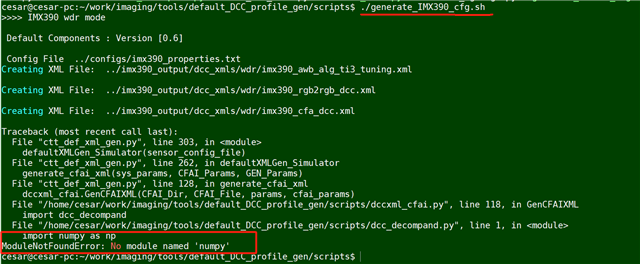
error occurred
execute: ./generate_IMX390_cfg.sh, python3 ctt_def_xml_gen.py ../configs/imx390_properties.txt

Regards,
Cesar
Hi Cesar,
I think the python is not installed properly in this case, or numPy module is not installed correctly. Can you please method suggested on below link?
python - Error "Import Error: No module named numpy" on Windows - Stack Overflow
Regards,
Brijesh