This thread has been locked.

If you have a related question, please click the "Ask a related question" button in the top right corner. The newly created question will be automatically linked to this question.

PROCESSOR-SDK-AM62A: MCU timer values

Part Number: PROCESSOR-SDK-AM62A


Hello,

I have a couple questions regarding the timer module in the MCU. My MCU SDK version is mcu_plus_sdk_am62ax_09_00_00_19.

Is it normal to see the time jump in the beginning of the program? Why does it jump to a very high value? Also when it resets, why doesn't this reset back to 0? This complicates timestamping as I'm not aware of where the count actually starts. 

I configured a timer with the settings below and I'm testing it in a task by saving a count value every 5ms (via TimerP_getCount( gTimerBaseAddr[CONFIG_TIMER0] ) ). I attached screenshots of my output below as well.

Test output of timestamps:

When timer jumps in the beginning.

When timer resets:

Thanks,

Joseph

  • Hello Joseph,

    Thanks for your query.

    As far as I can understand, you are trying to measure the "count" value after every 5 ms set as per TimerP APIs.

    Also, you are seeing that the timer is not resetting back to 0 upon warm reset.

    Can you please share with me your application and enable me to test this on my setup.

    Regards,

    Vaibhav

  • Hi Vaibhav,

    Yes that's correct. I'm trying to measure the count value after every 5ms to test the TimerP APIs.

    Also, you are seeing that the timer is not resetting back to 0 upon warm reset.

    For this I meant whenever the timer is done, it doesn't reset to 0. My understanding is my continuous timer restarts after every second because that's what I configured for the timer period.

    My app code to test this was done on a Freertos example. I configured a timer with the syscfg settings that's shown in the screenshot above.

    void main_task(void *args)
    {
        uint32_t timerticks[250] = {0};
        uint32_t clockticks[250] = {0};
        int test_count2 = 0;
        // Assuming all drivers and init functions were started
        
        while(1)
        {
            /* Test Timer */
            timerticks[test_count2] = TimerP_getCount( gTimerBaseAddr[CONFIG_TIMER0] );
            clockticks[test_count2] = ClockP_getTicks();
            if( ++test_count2 == 250 )
            {
              for( int i = 0; i < 250; i++ )
              {
                DebugP_log( "timerticks[%i]: %u, clockticks[%i]: %u\r\n", i, timerticks[i], i, clockticks[i] );
              }
            }
            
            vTaskDelay( pdMS_TO_TICKS(5) );
        }
    }

    Thanks,

    Joseph

  • Hello Joseph,

    Thanks for your response.

    Allow me sometime to look through this.

    Regards,

    Vaibhav

  • Hi Vaibhav,

    Is there any update on this?

    Thanks,

    Joseph

  • Hello Joseph,

    Thanks for your patience.

    You will receive an update in few hours.

    Regards,

    Vaibhav

  • Hello Joseph,

    Sorry for the delayed reply.

    Currently, in MCU+SDK, we do Overflow interrupt based timer implementation.

    Which means that when the timer overflowed you may get an interrupt.

    After the overflow again, the timer will start from the overflow counter value(0XFFFF FFFF) - user timer value(in your use case, 1sec count value at 25MHZ clk / Prescale value) and it will not start from 0.

    So, that's the reason every time you see big numbers.

    You are expecting that Matched mode, which is not implemented in the MCU+SDK driver.

    Regards,

    S. Anil

  • Hi S.Anil,

    Thanks for your update. It looks like this timer's use case is to do something whenever the overflow interrupt occurs.

    Is there a Timer I can use where I can just read a free running counter? If not available in the MCU SDK, is there one I can access in the MAIN domain from MCU domain?

    I'm mainly interested in taking periodic timestamps in the MCU. I'm currently using xTaskGetTickCountFromISR() for this but I'd like to use a hardware timer to ensure the most accurate timestamp.

    Thanks,

    Joseph 

  • Hello Joseph ,

    There is a PMU timer that is available on R5F and you can use it for time stamp application applications, but again, this will not work properly in Free rtos applications.

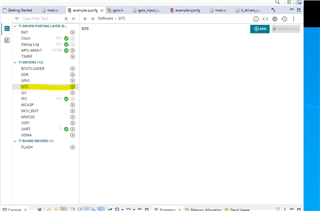
    You can try the GTC timer, and it is available on the WAKEUP domain and just configure from system config and run this wakeup application on your soc.

    So, that your GTC is running continuously on WKUP domain . Now, for the MCU R5F application, just try to read the GTC counter values .

    Regards,

    S.Anil.

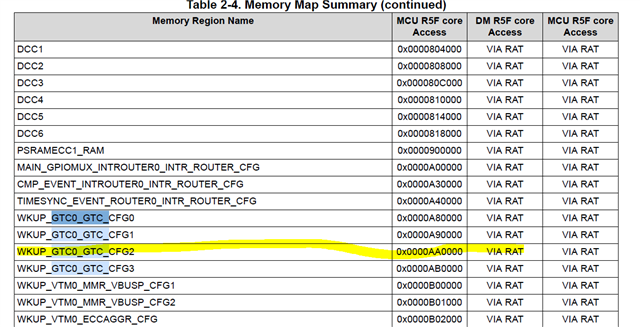
  • Thank you for providing this option. It looks like the GTC counter values are taken from the LO and HI registers at addresses 0x00AA0000 and 0x00AA0004.

    Assuming I configure the GTC in the WKUP's system config and load it with the A53 U-boot, will the MCU R5F require any RAT region changes to access the registers above? My MCU app is currently built on top of the ipc linux freertos example.

    Thanks,

    Joseph

  • Hello Joseph,

    Yes GTC timer has 64bit value .So, you need to read both LO and HI counter values .

    I have looked at the TRM , GTC can be read from MCU R5F via RAT .

    I can give suggestions for  how to read the counter values through RAT in MCU R5F by EOD.

    Regards,

    S.Anil.

  • Hello Joseph,

    Please try the settings below in your MCU R5F application.

    As per TRM, the GTC is divided into 4 parts. GTC_CONFIG0 to GTC_CONFIG3 and each one is 4KB.

    So, WKUP GTC address should be changed to MCU R5F RAT Region.

    I have captured all the images related to the configuration below configuration. Please let me know if you need any questions.

    After making these changes, you need to a call below to API to read the content of the GTC timer.

    Now, BaseAddr has content of the GTC counter. Can you please confirm whether these settings work or not on your side ?

    Regards,

    S. Anil.

    uint32_t BaseAddr;
    BaseAddr = (uint32_t) AddrTranslateP_getLocalAddr(CSL_WKUP_GTC0_GTC_CFG2_BASE);

    Regards,

    Anil.

  • Hi Anil,

    Thanks for the clear instructions. We're currently evaluating our design so I'll let you know once I get to try this out.

    Regards,

    Joseph

  • Hello Joseph,

    Ya sure . I am closing the thread now and open this one or a new one in future if the still have any doubts on this topic.

    Regards,

    Anil.