This thread has been locked.

If you have a related question, please click the "Ask a related question" button in the top right corner. The newly created question will be automatically linked to this question.

SK-AM64B: AM64x UART Initialization Procedure

Part Number: SK-AM64B

I started using the pre-built image version 09.02.00.08.
I'm trying to use the UART method to boot the eval board into Linux and subsequently write a firmware image to the (blank) sdcard.
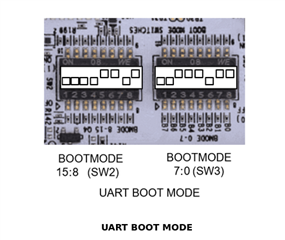
The BOOTMODE (SW2 and SW3) is set to 00000000_00111011 (binary).
 
From the Linux host:
 
taz:~/work/misc$ sx -kb u-boot-spl.bin < /dev/ttyUSB0 > /dev/ttyUSB0
Sending u-boot-spl.bin, 2362 blocks: Give your local XMODEM receive command now.
^C
sx: caught signal 2; exiting
taz:~/work/misc$
 
Based on 'Give your local XMODEM receive command now', I tried running the above in the background then running the next command, that didn't work either.
 
I tried '/dev/USB1' and other variations (see e2e.ti.com/.../sk-am64b-am64x-dfu-and-uart-initialization-procedure) for this method too. No luck.
 
Q. What am I missing?
 
Thanks,
 
Lee
  • Hello Lee,

    Apologies for delayed response!

    Please run the following commands to boot via UART to the U-boot prompt.

    $ sb --xmodem $OUT_R5/tiboot3.bin > $UART_BOOT_MAIN_UART < $UART_BOOT_MAIN_UART
    $ sb --ymodem $OUT_AXX/tispl.bin > $UART_BOOT_MAIN_UART < $UART_BOOT_MAIN_UART
    $ sb --ymodem $OUT_AXX/u-boot.img > $UART_BOOT_MAIN_UART < $UART_BOOT_MAIN_UART


    UART_BOOT_MAIN_UART should be set to serial ports such as /dev/ttyUSBx.

    Regards,
    Aparna

  • Hi Aparna,

    The first command takes several minutes and eventually fails:

    nemo:~/work/misc$ sb --xmodem tiboot3.bin > /dev/ttyUSB0 < /dev/ttyUSB0
    Sending tiboot3.bin, 2614 blocks: Give your local XMODEM receive command now.
    Xmodem sectors/kbytes sent:   0/ 0kRetry 0: Timeout on sector ACK
    Retry 0: Timeout on sector ACK
    Retry 0: Timeout on sector ACK
    Retry 0: Timeout on sector ACK
    Retry 0: Timeout on sector ACK
    Retry 0: Timeout on sector ACK
    Retry 0: Timeout on sector ACK
    Retry 0: Timeout on sector ACK
    Retry 0: Timeout on sector ACK
    Retry 0: Timeout on sector ACK
    Retry 0: Timeout on sector ACK
    Retry 0: Retry Count Exceeded

    Transfer incomplete

    There is a long pause (~1min) after 'Sending tiboot3.bin, 2614 blocks: Give your local XMODEM receive command now.'

  • Hi Lee,

    Please make sure you have the correct boot mode settings for AM64 SK:


    Regards,
    Aparna

  • Hi Aparna,

    I tried the UART BOOT MODE settings suggested above, same outcome. The difference between my original settings and yours is that you have the Backup Boot Mode set to 'UART', whereas I had this selected to be 'None'. You also have BOOT MODE bit 8 set high, what does that do? The TRM (Table 4-4) defines BOOT MODE bits [9..7] as be 'Reserved'.

    I toggled every BOOT MODE pin and probed the board to confirm the voltages were consistent with the switch state, they were consistent.

    Just in case it is relevant, my PCB is red, not white like shown above. I have the SK-AM64B.

    Can you send me a transcript of it working? Ideally with tiboot3.bin from the SDK9.2.

  • Hi,

    Is the board properly powered up and UART port is connected ?

    I have tried the same method on a different EVM for the time being:

    aparna@aparna-HP-Z2-Tower-G9-Workstation-Desktop-PC:~/ti/ti-processor-sdk-linux-edgeai-am62axx-evm-09_00_01_03$ sb --xmodem /home/aparna/ti/ti-processor-sdk-linux-edgeai-am62axx-evm-09_00_01_03/board-support/prebuilt-images/tiboot3.bin > /dev/ttyUSB0 < /dev/ttyUSB0
    Sending /home/aparna/ti/ti-processor-sdk-linux-edgeai-am62axx-evm-09_00_01_03/board-support/prebuilt-images/tiboot3.bin, 2706 blocks: Give your local XMODEM receive command now.
    Bytes Sent: 346496   BPS:6104                            
    
    Transfer complete


    On removing the power supply I got the same output as yours:
    aparna@aparna-HP-Z2-Tower-G9-Workstation-Desktop-PC:~/ti/ti-processor-sdk-linux-edgeai-am62axx-evm-09_00_01_03$ sb --xmodem /home/aparna/ti/ti-processor-sdk-linux-edgeai-am62axx-evm-09_00_01_03/board-support/prebuilt-images/tiboot3.bin > /dev/ttyUSB0 < /dev/ttyUSB0
    Sending /home/aparna/ti/ti-processor-sdk-linux-edgeai-am62axx-evm-09_00_01_03/board-support/prebuilt-images/tiboot3.bin, 2706 blocks: Give your local XMODEM receive command now.
    Xmodem sectors/kbytes sent:   0/ 0kRetry 0: Timeout on sector ACK
    Retry 0: Timeout on sector ACK


    Regards,
    Aparna

  • Hi Aparna,

    Thanks for sharing details of it working.

    The board is powered, three green top-side LEDs are on, red under-side LED only flashes on, then remains off after powering up.

    Is there any significant difference between the tiboot3.bin included in the .wic image to others (of the same name) that are generated as part of the build?

  • Hi Lee,

    Please check if you have a HS-FS or GP evm. The tiboot3.bin in the boot partition, after flashing the wic image can be used for HS-FS board. For GP, you will have to rename the tiboot3-am62ax-gp-evm.bin to tiboot3.bin and use it.

    I have used the images present in /board-support/prebuilt-images directory. You can try this as well.

    Regards,
    Aparna

  • Hi Aparna,

    Following: e2e.ti.com/.../faq-am6xx-how-to-check-if-device-type-is-hs-se-hs-fs-or-gp

    $ python3 7080.uart_boot_socid.py data.txt
    -----------------------
    SoC ID Header Info:
    -----------------------
    NumBlocks            : [2]
    -----------------------
    SoC ID Public ROM Info:
    -----------------------
    SubBlockId           :
    SubBlockSize         :
    DeviceName           : am64x
    DeviceType           : HSFS
    DMSC ROM Version     : [0, 2, 0, 0]
    R5 ROM Version       : [0, 2, 0, 0]

    From: https://www.ti.com/tool/PROCESSOR-SDK-AM64X#downloads, which SDK should I be using: 'PROCESSOR-SDK-LINUX-AM64X' or 'PROCESSOR-SDK-LINUX-AM64X-HS'? If the latter, when I select download, the latest version is 08.02.00.23 (not 09.02.xx.xx).

  • Hello Lee,

    You have HS-FS board. Hence you need the PROCESSOR-SDK-LINUX-AM64X, which has the latest version 09.02

    Regards,
    Aparna

  • Hi Aparna,

    We did make some progress, we can now download the first file (tiboot3.bin), but can't download the second file (tispl.bin). The previous issue was resolved by setting the BAUD rate and using the correct /dev/ttyUSB<n> device. I tried using pre-built files from the SDK 9.0.0.3, SDK 9.1.0.8 and SDK 9.2.1.9, the outcome was the same in each case. Here is the transcript from SDK 9.2.1.9:

    nemo:~/work/misc/pb-9.2.1.9$ sudo stty -F /dev/ttyUSB1 115200

    nemo:~/work/misc/pb-9.2.1.9$ sb --xmodem tiboot3.bin > /dev/ttyUSB1 < /dev/ttyUSB1
    Sending tiboot3.bin, 4782 blocks: Give your local XMODEM receive command now.
    Bytes Sent: 612224   BPS:9515

    Transfer complete

    nemo:~/work/misc/pb-9.2.1.9$ sb --ymodem tispl.bin > /dev/ttyUSB1 < /dev/ttyUSB1
    Sending: tispl.bin
    Ymodem sectors/kbytes sent:   0/ 0k

    ^Csb: caught signal 2; exiting

    Any suggestions on what else to try?

  • Have we tried using the Windows utility teraterm on your setup?
    Best,
    -Hong

  • I used Teraterm, that showed the following console message:

    Resetting on cold boot to workaround ErrataID:i2331
    Please resend tiboot3.bin in case of UART/DFU boot

    Using Teraterm I was able to get to the U-Boot prompt that way.

    So I re-tried the following using 'sb' commands (in this case using SDK 9.0):

    nemo:~/work/misc/pb-bin-9.0.0.3$ sudo stty -F /dev/ttyUSB1 115200

    nemo:~/work/misc/pb-bin-9.0.0.3$ sb --xmodem tiboot3.bin > /dev/ttyUSB1 < /dev/ttyUSB1
    Sending tiboot3.bin, 4094 blocks: Give your local XMODEM receive command now.
    Bytes Sent: 524160   BPS:9549
    Transfer complete

    nemo:~/work/misc/pb-bin-9.0.0.3$ sb --xmodem tiboot3.bin > /dev/ttyUSB1 < /dev/ttyUSB1
    Sending tiboot3.bin, 4094 blocks: Give your local XMODEM receive command now.
    Bytes Sent: 524160   BPS:9662
    Transfer complete

    nemo:~/work/misc/pb-bin-9.0.0.3$ sb --ymodem tispl.bin > /dev/ttyUSB1 < /dev/ttyUSB1
    Sending: tispl.bin
    Bytes Sent: 868224   BPS:9152
    Sending:
    Ymodem sectors/kbytes sent:   0/ 0k
    Transfer complete

    nemo:~/work/misc/pb-bin-9.0.0.3$ sb --ymodem u-boot.img > /dev/ttyUSB1 < /dev/ttyUSB1
    Sending: u-boot.img
    Bytes Sent:1013120   BPS:9106
    Sending:
    Ymodem sectors/kbytes sent:   0/ 0k
    Transfer complete

    nemo:~/work/misc/pb-bin-9.0.0.3$ tio /dev/ttyUSB1
    [tio 17:13:21] tio v1.32
    [tio 17:13:21] Press ctrl-t q to quit
    [tio 17:13:21] Connected

    U-Boot 2023.04-g24098ea90d (Jul 06 2023 - 12:59:40 +0000)

    SoC:   AM64X SR2.0 HS-FS
    Model: Texas Instruments AM642 SK
    Board: AM64B-SKEVM rev A
    DRAM:  2 GiB
    Core:  63 devices, 31 uclasses, devicetree: separate
    MMC:   mmc@fa00000: 1
    Loading Environment from MMC... MMC Device 0 not found
    *** Warning - No MMC card found, using default environment

    In:    serial@2800000
    Out:   serial@2800000
    Err:   serial@2800000
    Net:   eth0: ethernet@8000000port@1
    Warning: ethernet@8000000port@2 MAC addresses don't match:
    Address in ROM is               1c:63:49:1a:d9:f8
    Address in environment is       70:ff:76:1f:45:0c
    , eth1: ethernet@8000000port@2
    Hit any key to stop autoboot:  0
    =>

    Not sending the tiboot3.bin twice was the last issue.

    Thanks Aparna & Hong.