This thread has been locked.

If you have a related question, please click the "Ask a related question" button in the top right corner. The newly created question will be automatically linked to this question.

SK-AM64B: Error When Launching Target Configuration

Part Number: SK-AM64B

I am encountering an error when I try to launch the target configuration for the SK-AM64B. The error is shown below:
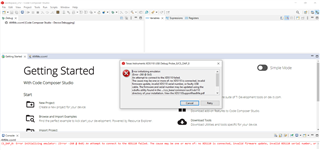
Here are the details of my target configuration:

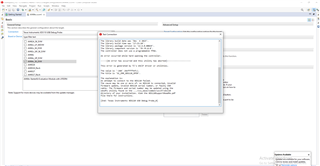
I also receive a similar error when I try to test the connection:
  • Hello Chibudem,

    Thanks for reaching out to Texas Instruments E2E support forum.

    I also receive a similar error when I try to test the connection:

    The error above is thrown by CCS when the device driver is unable to communicate with the JTAG debugger either via USB or Ethernet. 

    Can you please check the connection between the host and the target device?

    Please refer host-connection-error for more details. 

    Regards,

    Tushar

  • I ran the xdsdfu -e command and the XDS debugger can't be found. Does this mean there's an issue with the debugger?

  • Hello Chibudem,

    Thanks for your reply.

    I ran the xdsdfu -e command and the XDS debugger can't be found. Does this mean there's an issue with the debugger?

    Have you verified that the debugger is connected properly?

    Are you able to use debugger with other machine? 

    The above message is coming because the xdsdfu utility is not able to find any connected device.

    Are you able to see any connected devices in the device manager?

    Please refer below screenshot.

    Regards,

    Tushar

  • According to the SK-AM64B user guide, the XDS110 Debugger should be connected through the J12 USB port. I have tried both the J12 and J11 USB ports and have encountered the same issues. The XDS110 debugger does not show up in device manager. I was able to flash the SOC initialization binary using this machine so I don't think it's an issue with the machine.

  • Hello Chibudem,

    Thanks for your reply.

    I was able to flash the SOC initialization binary using this machine so I don't think it's an issue with the machine.

    Have you tried to connect the board on different machine and still facing the issue?

    Have you also tried connecting different AM64x-SK board and is that working?

    Also can you please tell are you using an external XDS110 debugger or internal XDS110 debugger circuit present on EVM?

    Regards,

    Tushar

  • I am using the internal XDS110 debugger circuit on the EVM. I only have one board, so I can't try a different one. I am facing the same issue when attempting on a different machine.

  • Hello Chibudem,

    Thanks for your reply.

    I am not sure how to replicate your issue at our end, Can you please confirm are the proper drivers installed on your system?

    Please refer EVM_SETUP_PAGE for more detail. 

    Regards,

    Tushar

  • I didn't have any issues with drivers when I flashed the SOC initialization binary so I'm not sure if that's the issue. I downloaded the drivers according to the EVM setup instructions before I flashed the SOC initialization binary.

  • Hello Chibudem,

    Thanks for your reply.

    I think what you installed is usb to uart bridge vcp driver.

    Can you please try to connect the debugger after installing the USB to FTDI driver once?

    Please find FTDI_Setup.zip 

    Regards,

    Tushar

  • I had previously downloaded that driver. I downloaded it again and installed it and I am still facing the same issue. Even without the correct driver, the debugger should show up in some form in the device manager when I connect to the J12 USB port but it doesn't.

  • Hello Chibudem,

    Thanks for your patience.

    I have tried both the J12 and J11 USB ports and have encountered the same issues. The XDS110 debugger does not show up in device manager

    As mentioned in your earlier replies that you have tried connecting to both J11 and J12 and not able to see any COM ports in the device manager. The issue seems be more specific to USB to UART drivers as you should atleast see the COM ports for J11 (Debug Console). 

    If only XDS110(i.e. J12) is not working you would be able see the COM ports as shown in below screenshot while connected to J11(Debug Console) port.

    Can you please share the screenshot of COM ports seen in the device manager?

    Please find necessary drivers at https://www.silabs.com/developers/usb-to-uart-bridge-vcp-drivers.

    Regards,

    Tushar

  • I can see the Silicon Labs COM port connection when I am connected to J11. I wouldn't have been able to flash the SOC initialization binary without being able to connect to the UART terminal. My issue is only with the XDS110 Debugger. When I connect to J12, nothing shows up in device manager at all. This probably means the XDS110 debugger isn't detected at all regardless of whether the correct drivers are installed. I have also installed the necessary drivers from the link and face the same issue.

  • Hello Chibudem,

    Thanks for your reply.

    This probably means the XDS110 debugger isn't detected at all regardless of whether the correct drivers are installed. I have also installed the necessary drivers from the link and face the same issue.

    If this is the case the only way to confirm that it is hardware problem rather than software/driver issues for XDS110 debugger, you will need to check another working AM64x-SK EVM. 

    Please try to connect the XDS110 debugger with another AM64x-SK on the same PC and let us know the results.

    Regards,

    Tushar