This thread has been locked.

If you have a related question, please click the "Ask a related question" button in the top right corner. The newly created question will be automatically linked to this question.

AM623: EVM board - JTAG error

Part Number: AM623
Other Parts Discussed in Thread: TMDSEMU560V2STM-U

Hi TI team,

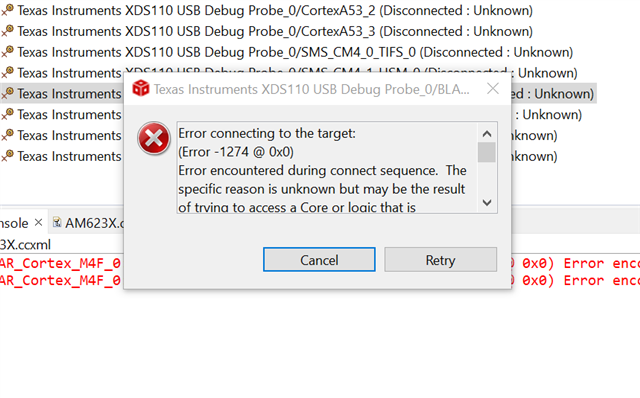
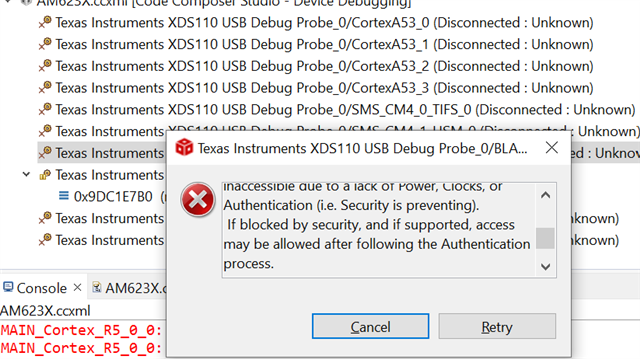
 We are facing the below error when connecting to target in AM62x_SK_EVM with JTAG interface in both on-board(XDS110) and external(XDS200) emulation.

  • Hello Muthuvel,

    Thanks for reaching out to Texas Instruments E2E support forum.

    Can you please confirm have you initialized the Board with SBL binaries?

    Please refer EVM_FLASH_SOC_INIT for more details.

    You will not be able to connect to a core if the EVM is not initialized properly.

    Regards,

    Tushar

  • Hi Tushar,

    still facing below error while connecting target..

    **** Build of configuration Debug for project hello_world_am62x-sip-sk_m4fss0-0_freertos_ti-arm-clang ****
    
    "C:\\ti\\ccs1271\\ccs\\utils\\bin\\gmake" -k -j 4 all -O 
     
    Building file: "../example.syscfg"
    Invoking: SysConfig
    "C:/ti/sysconfig_1.18.0/sysconfig_cli.bat" --script "C:/Users/labpc/workspace_v12/hello_world_am62x-sip-sk_m4fss0-0_freertos_ti-arm-clang/example.syscfg" -o "syscfg" -s "C:/ti/mcu_plus_sdk_am62x_09_02_00_38/.metadata/product.json" --context "m4fss0-0" --part Default --package ALW --compiler ticlang
    Running script...
    Validating...
    Generating Code (example.syscfg)...
    Writing C:\Users\labpc\workspace_v12\hello_world_am62x-sip-sk_m4fss0-0_freertos_ti-arm-clang\Debug\syscfg\ti_dpl_config.c...
    Writing C:\Users\labpc\workspace_v12\hello_world_am62x-sip-sk_m4fss0-0_freertos_ti-arm-clang\Debug\syscfg\ti_dpl_config.h...
    Writing C:\Users\labpc\workspace_v12\hello_world_am62x-sip-sk_m4fss0-0_freertos_ti-arm-clang\Debug\syscfg\ti_drivers_config.c...
    Writing C:\Users\labpc\workspace_v12\hello_world_am62x-sip-sk_m4fss0-0_freertos_ti-arm-clang\Debug\syscfg\ti_drivers_config.h...
    Writing C:\Users\labpc\workspace_v12\hello_world_am62x-sip-sk_m4fss0-0_freertos_ti-arm-clang\Debug\syscfg\ti_drivers_open_close.c...
    Writing C:\Users\labpc\workspace_v12\hello_world_am62x-sip-sk_m4fss0-0_freertos_ti-arm-clang\Debug\syscfg\ti_drivers_open_close.h...
    Writing C:\Users\labpc\workspace_v12\hello_world_am62x-sip-sk_m4fss0-0_freertos_ti-arm-clang\Debug\syscfg\ti_pinmux_config.c...
    Writing C:\Users\labpc\workspace_v12\hello_world_am62x-sip-sk_m4fss0-0_freertos_ti-arm-clang\Debug\syscfg\ti_power_clock_config.c...
    Writing C:\Users\labpc\workspace_v12\hello_world_am62x-sip-sk_m4fss0-0_freertos_ti-arm-clang\Debug\syscfg\ti_board_config.c...
    Writing C:\Users\labpc\workspace_v12\hello_world_am62x-sip-sk_m4fss0-0_freertos_ti-arm-clang\Debug\syscfg\ti_board_config.h...
    Writing C:\Users\labpc\workspace_v12\hello_world_am62x-sip-sk_m4fss0-0_freertos_ti-arm-clang\Debug\syscfg\ti_board_open_close.c...
    Writing C:\Users\labpc\workspace_v12\hello_world_am62x-sip-sk_m4fss0-0_freertos_ti-arm-clang\Debug\syscfg\ti_board_open_close.h...
    Finished building: "../example.syscfg"
     
    Building file: "syscfg/ti_dpl_config.c"
    Invoking: Arm Compiler
    "C:/ti/ccs1271/ccs/tools/compiler/ti-cgt-armllvm_3.2.2.LTS/bin/tiarmclang.exe" -c -mcpu=cortex-m4 -mfloat-abi=hard -mlittle-endian -mthumb -I"C:/ti/ccs1271/ccs/tools/compiler/ti-cgt-armllvm_3.2.2.LTS/include/c" -I"C:/ti/mcu_plus_sdk_am62x_09_02_00_38/source" -I"C:/ti/mcu_plus_sdk_am62x_09_02_00_38/source/kernel/freertos/FreeRTOS-Kernel/include" -I"C:/ti/mcu_plus_sdk_am62x_09_02_00_38/source/kernel/freertos/portable/TI_ARM_CLANG/ARM_CM4F" -I"C:/ti/mcu_plus_sdk_am62x_09_02_00_38/source/kernel/freertos/config/am62x/m4f" -DSOC_AM62X -D_DEBUG_=1 -g -Wall -Wno-gnu-variable-sized-type-not-at-end -Wno-unused-function -MMD -MP -MF"syscfg/ti_dpl_config.d_raw" -MT"syscfg/ti_dpl_config.o" -I"C:/Users/labpc/workspace_v12/hello_world_am62x-sip-sk_m4fss0-0_freertos_ti-arm-clang/Debug/syscfg"   -o"syscfg/ti_dpl_config.o" "syscfg/ti_dpl_config.c"
    Finished building: "syscfg/ti_dpl_config.c"
     
    Building file: "syscfg/ti_drivers_config.c"
    Invoking: Arm Compiler
    "C:/ti/ccs1271/ccs/tools/compiler/ti-cgt-armllvm_3.2.2.LTS/bin/tiarmclang.exe" -c -mcpu=cortex-m4 -mfloat-abi=hard -mlittle-endian -mthumb -I"C:/ti/ccs1271/ccs/tools/compiler/ti-cgt-armllvm_3.2.2.LTS/include/c" -I"C:/ti/mcu_plus_sdk_am62x_09_02_00_38/source" -I"C:/ti/mcu_plus_sdk_am62x_09_02_00_38/source/kernel/freertos/FreeRTOS-Kernel/include" -I"C:/ti/mcu_plus_sdk_am62x_09_02_00_38/source/kernel/freertos/portable/TI_ARM_CLANG/ARM_CM4F" -I"C:/ti/mcu_plus_sdk_am62x_09_02_00_38/source/kernel/freertos/config/am62x/m4f" -DSOC_AM62X -D_DEBUG_=1 -g -Wall -Wno-gnu-variable-sized-type-not-at-end -Wno-unused-function -MMD -MP -MF"syscfg/ti_drivers_config.d_raw" -MT"syscfg/ti_drivers_config.o" -I"C:/Users/labpc/workspace_v12/hello_world_am62x-sip-sk_m4fss0-0_freertos_ti-arm-clang/Debug/syscfg"   -o"syscfg/ti_drivers_config.o" "syscfg/ti_drivers_config.c"
    Finished building: "syscfg/ti_drivers_config.c"
     
    Building file: "syscfg/ti_drivers_open_close.c"
    Invoking: Arm Compiler
    "C:/ti/ccs1271/ccs/tools/compiler/ti-cgt-armllvm_3.2.2.LTS/bin/tiarmclang.exe" -c -mcpu=cortex-m4 -mfloat-abi=hard -mlittle-endian -mthumb -I"C:/ti/ccs1271/ccs/tools/compiler/ti-cgt-armllvm_3.2.2.LTS/include/c" -I"C:/ti/mcu_plus_sdk_am62x_09_02_00_38/source" -I"C:/ti/mcu_plus_sdk_am62x_09_02_00_38/source/kernel/freertos/FreeRTOS-Kernel/include" -I"C:/ti/mcu_plus_sdk_am62x_09_02_00_38/source/kernel/freertos/portable/TI_ARM_CLANG/ARM_CM4F" -I"C:/ti/mcu_plus_sdk_am62x_09_02_00_38/source/kernel/freertos/config/am62x/m4f" -DSOC_AM62X -D_DEBUG_=1 -g -Wall -Wno-gnu-variable-sized-type-not-at-end -Wno-unused-function -MMD -MP -MF"syscfg/ti_drivers_open_close.d_raw" -MT"syscfg/ti_drivers_open_close.o" -I"C:/Users/labpc/workspace_v12/hello_world_am62x-sip-sk_m4fss0-0_freertos_ti-arm-clang/Debug/syscfg"   -o"syscfg/ti_drivers_open_close.o" "syscfg/ti_drivers_open_close.c"
    Finished building: "syscfg/ti_drivers_open_close.c"
     
    Building file: "syscfg/ti_pinmux_config.c"
    Invoking: Arm Compiler
    "C:/ti/ccs1271/ccs/tools/compiler/ti-cgt-armllvm_3.2.2.LTS/bin/tiarmclang.exe" -c -mcpu=cortex-m4 -mfloat-abi=hard -mlittle-endian -mthumb -I"C:/ti/ccs1271/ccs/tools/compiler/ti-cgt-armllvm_3.2.2.LTS/include/c" -I"C:/ti/mcu_plus_sdk_am62x_09_02_00_38/source" -I"C:/ti/mcu_plus_sdk_am62x_09_02_00_38/source/kernel/freertos/FreeRTOS-Kernel/include" -I"C:/ti/mcu_plus_sdk_am62x_09_02_00_38/source/kernel/freertos/portable/TI_ARM_CLANG/ARM_CM4F" -I"C:/ti/mcu_plus_sdk_am62x_09_02_00_38/source/kernel/freertos/config/am62x/m4f" -DSOC_AM62X -D_DEBUG_=1 -g -Wall -Wno-gnu-variable-sized-type-not-at-end -Wno-unused-function -MMD -MP -MF"syscfg/ti_pinmux_config.d_raw" -MT"syscfg/ti_pinmux_config.o" -I"C:/Users/labpc/workspace_v12/hello_world_am62x-sip-sk_m4fss0-0_freertos_ti-arm-clang/Debug/syscfg"   -o"syscfg/ti_pinmux_config.o" "syscfg/ti_pinmux_config.c"
    Finished building: "syscfg/ti_pinmux_config.c"
     
    Building file: "syscfg/ti_power_clock_config.c"
    Invoking: Arm Compiler
    "C:/ti/ccs1271/ccs/tools/compiler/ti-cgt-armllvm_3.2.2.LTS/bin/tiarmclang.exe" -c -mcpu=cortex-m4 -mfloat-abi=hard -mlittle-endian -mthumb -I"C:/ti/ccs1271/ccs/tools/compiler/ti-cgt-armllvm_3.2.2.LTS/include/c" -I"C:/ti/mcu_plus_sdk_am62x_09_02_00_38/source" -I"C:/ti/mcu_plus_sdk_am62x_09_02_00_38/source/kernel/freertos/FreeRTOS-Kernel/include" -I"C:/ti/mcu_plus_sdk_am62x_09_02_00_38/source/kernel/freertos/portable/TI_ARM_CLANG/ARM_CM4F" -I"C:/ti/mcu_plus_sdk_am62x_09_02_00_38/source/kernel/freertos/config/am62x/m4f" -DSOC_AM62X -D_DEBUG_=1 -g -Wall -Wno-gnu-variable-sized-type-not-at-end -Wno-unused-function -MMD -MP -MF"syscfg/ti_power_clock_config.d_raw" -MT"syscfg/ti_power_clock_config.o" -I"C:/Users/labpc/workspace_v12/hello_world_am62x-sip-sk_m4fss0-0_freertos_ti-arm-clang/Debug/syscfg"   -o"syscfg/ti_power_clock_config.o" "syscfg/ti_power_clock_config.c"
    Finished building: "syscfg/ti_power_clock_config.c"
     
    Building file: "syscfg/ti_board_config.c"
    Invoking: Arm Compiler
    "C:/ti/ccs1271/ccs/tools/compiler/ti-cgt-armllvm_3.2.2.LTS/bin/tiarmclang.exe" -c -mcpu=cortex-m4 -mfloat-abi=hard -mlittle-endian -mthumb -I"C:/ti/ccs1271/ccs/tools/compiler/ti-cgt-armllvm_3.2.2.LTS/include/c" -I"C:/ti/mcu_plus_sdk_am62x_09_02_00_38/source" -I"C:/ti/mcu_plus_sdk_am62x_09_02_00_38/source/kernel/freertos/FreeRTOS-Kernel/include" -I"C:/ti/mcu_plus_sdk_am62x_09_02_00_38/source/kernel/freertos/portable/TI_ARM_CLANG/ARM_CM4F" -I"C:/ti/mcu_plus_sdk_am62x_09_02_00_38/source/kernel/freertos/config/am62x/m4f" -DSOC_AM62X -D_DEBUG_=1 -g -Wall -Wno-gnu-variable-sized-type-not-at-end -Wno-unused-function -MMD -MP -MF"syscfg/ti_board_config.d_raw" -MT"syscfg/ti_board_config.o" -I"C:/Users/labpc/workspace_v12/hello_world_am62x-sip-sk_m4fss0-0_freertos_ti-arm-clang/Debug/syscfg"   -o"syscfg/ti_board_config.o" "syscfg/ti_board_config.c"
    Finished building: "syscfg/ti_board_config.c"
     
    Building file: "syscfg/ti_board_open_close.c"
    Invoking: Arm Compiler
    "C:/ti/ccs1271/ccs/tools/compiler/ti-cgt-armllvm_3.2.2.LTS/bin/tiarmclang.exe" -c -mcpu=cortex-m4 -mfloat-abi=hard -mlittle-endian -mthumb -I"C:/ti/ccs1271/ccs/tools/compiler/ti-cgt-armllvm_3.2.2.LTS/include/c" -I"C:/ti/mcu_plus_sdk_am62x_09_02_00_38/source" -I"C:/ti/mcu_plus_sdk_am62x_09_02_00_38/source/kernel/freertos/FreeRTOS-Kernel/include" -I"C:/ti/mcu_plus_sdk_am62x_09_02_00_38/source/kernel/freertos/portable/TI_ARM_CLANG/ARM_CM4F" -I"C:/ti/mcu_plus_sdk_am62x_09_02_00_38/source/kernel/freertos/config/am62x/m4f" -DSOC_AM62X -D_DEBUG_=1 -g -Wall -Wno-gnu-variable-sized-type-not-at-end -Wno-unused-function -MMD -MP -MF"syscfg/ti_board_open_close.d_raw" -MT"syscfg/ti_board_open_close.o" -I"C:/Users/labpc/workspace_v12/hello_world_am62x-sip-sk_m4fss0-0_freertos_ti-arm-clang/Debug/syscfg"   -o"syscfg/ti_board_open_close.o" "syscfg/ti_board_open_close.c"
    Finished building: "syscfg/ti_board_open_close.c"
     
    Building file: "../hello_world.c"
    Invoking: Arm Compiler
    "C:/ti/ccs1271/ccs/tools/compiler/ti-cgt-armllvm_3.2.2.LTS/bin/tiarmclang.exe" -c -mcpu=cortex-m4 -mfloat-abi=hard -mlittle-endian -mthumb -I"C:/ti/ccs1271/ccs/tools/compiler/ti-cgt-armllvm_3.2.2.LTS/include/c" -I"C:/ti/mcu_plus_sdk_am62x_09_02_00_38/source" -I"C:/ti/mcu_plus_sdk_am62x_09_02_00_38/source/kernel/freertos/FreeRTOS-Kernel/include" -I"C:/ti/mcu_plus_sdk_am62x_09_02_00_38/source/kernel/freertos/portable/TI_ARM_CLANG/ARM_CM4F" -I"C:/ti/mcu_plus_sdk_am62x_09_02_00_38/source/kernel/freertos/config/am62x/m4f" -DSOC_AM62X -D_DEBUG_=1 -g -Wall -Wno-gnu-variable-sized-type-not-at-end -Wno-unused-function -MMD -MP -MF"hello_world.d_raw" -MT"hello_world.o" -I"C:/Users/labpc/workspace_v12/hello_world_am62x-sip-sk_m4fss0-0_freertos_ti-arm-clang/Debug/syscfg"   -o"hello_world.o" "../hello_world.c"
    Finished building: "../hello_world.c"
     
    Building file: "../main.c"
    Invoking: Arm Compiler
    "C:/ti/ccs1271/ccs/tools/compiler/ti-cgt-armllvm_3.2.2.LTS/bin/tiarmclang.exe" -c -mcpu=cortex-m4 -mfloat-abi=hard -mlittle-endian -mthumb -I"C:/ti/ccs1271/ccs/tools/compiler/ti-cgt-armllvm_3.2.2.LTS/include/c" -I"C:/ti/mcu_plus_sdk_am62x_09_02_00_38/source" -I"C:/ti/mcu_plus_sdk_am62x_09_02_00_38/source/kernel/freertos/FreeRTOS-Kernel/include" -I"C:/ti/mcu_plus_sdk_am62x_09_02_00_38/source/kernel/freertos/portable/TI_ARM_CLANG/ARM_CM4F" -I"C:/ti/mcu_plus_sdk_am62x_09_02_00_38/source/kernel/freertos/config/am62x/m4f" -DSOC_AM62X -D_DEBUG_=1 -g -Wall -Wno-gnu-variable-sized-type-not-at-end -Wno-unused-function -MMD -MP -MF"main.d_raw" -MT"main.o" -I"C:/Users/labpc/workspace_v12/hello_world_am62x-sip-sk_m4fss0-0_freertos_ti-arm-clang/Debug/syscfg"   -o"main.o" "../main.c"
    Finished building: "../main.c"
     
    Building target: "hello_world_am62x-sip-sk_m4fss0-0_freertos_ti-arm-clang.out"
    Invoking: Arm Linker
    "C:/ti/ccs1271/ccs/tools/compiler/ti-cgt-armllvm_3.2.2.LTS/bin/tiarmclang.exe" -mcpu=cortex-m4 -mfloat-abi=hard -mlittle-endian -mthumb -DSOC_AM62X -D_DEBUG_=1 -g -Wall -Wno-gnu-variable-sized-type-not-at-end -Wno-unused-function -Wl,-m"hello_world.Debug.map" -Wl,-i"C:/ti/mcu_plus_sdk_am62x_09_02_00_38/source/kernel/freertos/lib" -Wl,-i"C:/ti/mcu_plus_sdk_am62x_09_02_00_38/source/drivers/lib" -Wl,-i"C:/ti/mcu_plus_sdk_am62x_09_02_00_38/source/board/lib" -Wl,-i"C:/ti/mcu_plus_sdk_am62x_09_02_00_38/source/drivers/device_manager/sciserver/lib" -Wl,-i"C:/ti/mcu_plus_sdk_am62x_09_02_00_38/source/drivers/device_manager/rm_pm_hal/lib" -Wl,-i"C:/ti/mcu_plus_sdk_am62x_09_02_00_38/source/drivers/device_manager/sciclient_direct/lib" -Wl,-i"C:/ti/mcu_plus_sdk_am62x_09_02_00_38/source/drivers/device_manager/self_reset/lib" -Wl,-i"C:/ti/mcu_plus_sdk_am62x_09_02_00_38/source/drivers/device_manager/dm_stub/lib" -Wl,-i"C:/ti/ccs1271/ccs/tools/compiler/ti-cgt-armllvm_3.2.2.LTS/lib" -Wl,--reread_libs -Wl,--diag_wrap=off -Wl,--display_error_number -Wl,--warn_sections -Wl,--xml_link_info="hello_world_am62x-sip-sk_m4fss0-0_freertos_ti-arm-clang_linkInfo.xml" -Wl,--ram_model -o "hello_world_am62x-sip-sk_m4fss0-0_freertos_ti-arm-clang.out" "./syscfg/ti_dpl_config.o" "./syscfg/ti_drivers_config.o" "./syscfg/ti_drivers_open_close.o" "./syscfg/ti_pinmux_config.o" "./syscfg/ti_power_clock_config.o" "./syscfg/ti_board_config.o" "./syscfg/ti_board_open_close.o" "./hello_world.o" "./main.o" "../linker.cmd"  -Wl,-lfreertos.am62x.m4f.ti-arm-clang.debug.lib -Wl,-ldrivers.am62x.m4f.ti-arm-clang.debug.lib -Wl,-lboard.am62x.m4f.ti-arm-clang.debug.lib -Wl,-llibc.a -Wl,-llibsysbm.a 
    Finished building target: "hello_world_am62x-sip-sk_m4fss0-0_freertos_ti-arm-clang.out"
     
    C:/ti/ccs1271/ccs/utils/bin/gmake -C C:\Users\labpc\workspace_v12\hello_world_am62x-sip-sk_m4fss0-0_freertos_ti-arm-clang -f makefile_ccs_bootimage_gen OUTNAME=hello_world_am62x-sip-sk_m4fss0-0_freertos_ti-arm-clang PROFILE=Debug MCU_PLUS_SDK_PATH=C:/ti/mcu_plus_sdk_am62x_09_02_00_38 CG_TOOL_ROOT=C:/ti/ccs1271/ccs/tools/compiler/ti-cgt-armllvm_3.2.2.LTS CCS_INSTALL_DIR=C:\ti\ccs1271\ccs CCS_IDE_MODE=desktop
     Boot image: am62x:m4fss0-0:freertos:ti-arm-clang C:/Users/labpc/workspace_v12/hello_world_am62x-sip-sk_m4fss0-0_freertos_ti-arm-clang/Debug/hello_world_am62x-sip-sk_m4fss0-0_freertos_ti-arm-clang.appimage  ...
    C:\ti\ccs1271\ccs/tools/node/node C:/ti/mcu_plus_sdk_am62x_09_02_00_38/tools/boot/out2rprc/elf2rprc.js Debug/hello_world_am62x-sip-sk_m4fss0-0_freertos_ti-arm-clang.out >> Debug/temp_stdout_Debug.txt
    C:\ti\ccs1271\ccs/utils/cygwin/cp hello_world_am62x-sip-sk_m4fss0-0_freertos_ti-arm-clang.rprc C:/Users/labpc/workspace_v12/hello_world_am62x-sip-sk_m4fss0-0_freertos_ti-arm-clang/Debug/hello_world_am62x-sip-sk_m4fss0-0_freertos_ti-arm-clang.rprc
    C:\ti\ccs1271\ccs/utils/cygwin/cp C:/Users/labpc/workspace_v12/hello_world_am62x-sip-sk_m4fss0-0_freertos_ti-arm-clang/Debug/hello_world_am62x-sip-sk_m4fss0-0_freertos_ti-arm-clang.rprc C:/Users/labpc/workspace_v12/hello_world_am62x-sip-sk_m4fss0-0_freertos_ti-arm-clang/Debug/hello_world_am62x-sip-sk_m4fss0-0_freertos_ti-arm-clang.rprc_tmp
    C:\ti\ccs1271\ccs/utils/cygwin/rm -f C:/Users/labpc/workspace_v12/hello_world_am62x-sip-sk_m4fss0-0_freertos_ti-arm-clang/Debug/hello_world_am62x-sip-sk_m4fss0-0_freertos_ti-arm-clang.rprc
    C:/ti/mcu_plus_sdk_am62x_09_02_00_38/tools/boot/xipGen/xipGen.exe -i C:/Users/labpc/workspace_v12/hello_world_am62x-sip-sk_m4fss0-0_freertos_ti-arm-clang/Debug/hello_world_am62x-sip-sk_m4fss0-0_freertos_ti-arm-clang.rprc_tmp -o C:/Users/labpc/workspace_v12/hello_world_am62x-sip-sk_m4fss0-0_freertos_ti-arm-clang/Debug/hello_world_am62x-sip-sk_m4fss0-0_freertos_ti-arm-clang.rprc -x C:/Users/labpc/workspace_v12/hello_world_am62x-sip-sk_m4fss0-0_freertos_ti-arm-clang/Debug/hello_world_am62x-sip-sk_m4fss0-0_freertos_ti-arm-clang.rprc_xip --flash-start-addr 0x60000000 -v > Debug/temp_stdout_Debug.txt
    C:\ti\ccs1271\ccs/tools/node/node C:/ti/mcu_plus_sdk_am62x_09_02_00_38/tools/boot/multicoreImageGen/multicoreImageGen.js --devID 55 --out C:/Users/labpc/workspace_v12/hello_world_am62x-sip-sk_m4fss0-0_freertos_ti-arm-clang/Debug/hello_world_am62x-sip-sk_m4fss0-0_freertos_ti-arm-clang.appimage C:/Users/labpc/workspace_v12/hello_world_am62x-sip-sk_m4fss0-0_freertos_ti-arm-clang/Debug/hello_world_am62x-sip-sk_m4fss0-0_freertos_ti-arm-clang.rprc@5  >> Debug/temp_stdout_Debug.txt
    C:\ti\ccs1271\ccs/tools/node/node C:/ti/mcu_plus_sdk_am62x_09_02_00_38/tools/boot/multicoreImageGen/multicoreImageGen.js --devID 55 --out C:/Users/labpc/workspace_v12/hello_world_am62x-sip-sk_m4fss0-0_freertos_ti-arm-clang/Debug/hello_world_am62x-sip-sk_m4fss0-0_freertos_ti-arm-clang.appimage_xip C:/Users/labpc/workspace_v12/hello_world_am62x-sip-sk_m4fss0-0_freertos_ti-arm-clang/Debug/hello_world_am62x-sip-sk_m4fss0-0_freertos_ti-arm-clang.rprc_xip@5  >> Debug/temp_stdout_Debug.txt
    python C:/ti/mcu_plus_sdk_am62x_09_02_00_38/tools/boot/signing/appimage_x509_cert_gen.py --bin C:/Users/labpc/workspace_v12/hello_world_am62x-sip-sk_m4fss0-0_freertos_ti-arm-clang/Debug/hello_world_am62x-sip-sk_m4fss0-0_freertos_ti-arm-clang.appimage --authtype 0  --loadaddr 84000000 --key C:/ti/mcu_plus_sdk_am62x_09_02_00_38/tools/boot/signing/app_degenerateKey.pem --output C:/Users/labpc/workspace_v12/hello_world_am62x-sip-sk_m4fss0-0_freertos_ti-arm-clang/Debug/hello_world_am62x-sip-sk_m4fss0-0_freertos_ti-arm-clang.appimage.hs_fs --keyversion 1.5
    Generating certificate for C:/Users/labpc/workspace_v12/hello_world_am62x-sip-sk_m4fss0-0_freertos_ti-arm-clang/Debug/hello_world_am62x-sip-sk_m4fss0-0_freertos_ti-arm-clang.appimage ...
    makefile_ccs_bootimage_gen:77: recipe for target 'all' failed
    'openssl' is not recognized as an internal or external command,
    operable program or batch file.
    Traceback (most recent call last):
      File "C:\ti\mcu_plus_sdk_am62x_09_02_00_38\tools\boot\signing\appimage_x509_cert_gen.py", line 260, in <module>
        cert_str = get_cert(args)
                   ^^^^^^^^^^^^^^
      File "C:\ti\mcu_plus_sdk_am62x_09_02_00_38\tools\boot\signing\appimage_x509_cert_gen.py", line 183, in get_cert
        sha_val = subprocess.check_output('openssl dgst -{} -hex {}'.format(g_sha_to_use, bin_file), shell=True).decode()
                  ^^^^^^^^^^^^^^^^^^^^^^^^^^^^^^^^^^^^^^^^^^^^^^^^^^^^^^^^^^^^^^^^^^^^^^^^^^^^^^^^^^^^^^^^^^^^^^
      File "C:\Users\labpc\AppData\Local\Programs\Python\Python312\Lib\subprocess.py", line 466, in check_output
        return run(*popenargs, stdout=PIPE, timeout=timeout, check=True,
               ^^^^^^^^^^^^^^^^^^^^^^^^^^^^^^^^^^^^^^^^^^^^^^^^^^^^^^^^^
      File "C:\Users\labpc\AppData\Local\Programs\Python\Python312\Lib\subprocess.py", line 571, in run
        raise CalledProcessError(retcode, process.args,
    subprocess.CalledProcessError: Command 'openssl dgst -sha512 -hex C:/Users/labpc/workspace_v12/hello_world_am62x-sip-sk_m4fss0-0_freertos_ti-arm-clang/Debug/hello_world_am62x-sip-sk_m4fss0-0_freertos_ti-arm-clang.appimage' returned non-zero exit status 1.
    gmake[3]: *** [all] Error 1
    gmake[2]: [post-build] Error 2 (ignored)
    makefile:164: recipe for target 'post-build' failed


    can we schedule meeting regarding this issue .... 

  • Hello Muthuvel,

    Thanks for your response.

    still facing below error while connecting target..

    Now the above issue is different from the earlier issue.

    Can you please confirm are you able to see the SBL logs when board is powered up? 

    SBL logs looks similar to below image.

    Have you done any changes in the default hello_world example provided as a part of MCU+SDK?

    I can also see from the above logs it looks like the post build steps are failing for the example.

    Regards,

    Tushar

  • Hi Tushar,

    We did not make any changes to the default Hello world example.


    thanks,

    muthuvel k

  • Hello Muthuvel,

    Thanks for your reply.

    We did not make any changes to the default Hello world example.

    I can see that you have marked the thread as resolved.

    Are you able to load the example now after initializing the EVM with SBL binaries?

    Regards,

    Tushar

  • Hi Tushar,

    I can see that you have marked the thread as resolved.

    By mistake clicked resolved button. Unable to revert also.

    We already flashed our project program file in EVM board and it's working fine, also able to access all the ports.

    Currently we are trying to access AM62 through JTAG for debugging.

    We followed AM62x MCU+ SDK 09.02.01 guide to connect target but failed, please refer the below image.

     We are facing the below error when connecting to target in AM62x_SK_EVM with JTAG interface in both on-board(XDS110) and external(XDS200) emulation.


    Also, we tried to program a basic Hello world program as per AM62x MCU+ SDK 09.02.01 guide, at that point we face this error.
    Hello world program file downloaded from project explorer -> MCU+ SDK for AM62x -> Examples -> hello_world 

    still facing below error while connecting target..


    1) Am I missing any files or procedure to be followed.
    2)Can we perform DDR4 full memory test using TMDSEMU560V2STM-U. We tired, couldn't be able to connect the target.
    We have seen one reference using XDS200 JTAG emulator to perform full memory test of DDR4 using CSS. Link

    Thanks,
    Muthuvel K

  • Hello Muthuvel,

    Thanks for your response.

    2)Can we perform DDR4 full memory test using TMDSEMU560V2STM-U. We tired, couldn't be able to connect the target.
    We have seen one reference using XDS200 JTAG emulator to perform full memory test of DDR4 using CSS. Link

    Can you please share the target configuration file (*.ccxml)?

    1) Am I missing any files or procedure to be followed.

    Also can you please try the method suggested here? Please let us know the result.

    Regards,

    Tushar

  • Hi Tushar,

    Here BLAZAR_Cortex_M4F_1 was not found...

  • Hello Muthuvel,

    From the above error logs I can see that you are trying to load M4F core's example on A53 core which is causing the problem.

    Can you please try the below method and let me know if you still face any issues?

    Please refer below video.

    Regards,

    Tushar

  • Hi Tushar,

    while rebuilding and connecting target  it get error

    still facing below error while connecting target..

    2867.Error.txt
    Fullscreen
    89
    90
    91
    92
    93
    94
    95
    96
    97
    98
    99
    100
    101
    102
    103
    104
    Traceback (most recent call last):
    File "C:\ti\mcu_plus_sdk_am62x_09_02_00_38\tools\boot\signing\appimage_x509_cert_gen.py", line 260, in <module>
    cert_str = get_cert(args)
    ^^^^^^^^^^^^^^
    File "C:\ti\mcu_plus_sdk_am62x_09_02_00_38\tools\boot\signing\appimage_x509_cert_gen.py", line 183, in get_cert
    sha_val = subprocess.check_output('openssl dgst -{} -hex {}'.format(g_sha_to_use, bin_file), shell=True).decode()
    ^^^^^^^^^^^^^^^^^^^^^^^^^^^^^^^^^^^^^^^^^^^^^^^^^^^^^^^^^^^^^^^^^^^^^^^^^^^^^^^^^^^^^^^^^^^^^^
    File "C:\Users\labpc\AppData\Local\Programs\Python\Python312\Lib\subprocess.py", line 466, in check_output
    return run(*popenargs, stdout=PIPE, timeout=timeout, check=True,
    ^^^^^^^^^^^^^^^^^^^^^^^^^^^^^^^^^^^^^^^^^^^^^^^^^^^^^^^^^
    File "C:\Users\labpc\AppData\Local\Programs\Python\Python312\Lib\subprocess.py", line 571, in run
    raise CalledProcessError(retcode, process.args,
    subprocess.CalledProcessError: Command 'openssl dgst -sha512 -hex C:/Users/labpc/workspace_v12/hello_world_am62x-sip-sk_m4fss0-0_freertos_ti-arm-clang/Debug/hello_world_am62x-sip-sk_m4fss0-0_freertos_ti-arm-clang.appimage' returned non-zero exit status 1.
    gmake[3]: *** [all] Error 1
    gmake[2]: [post-build] Error 2 (ignored)
    makefile:164: recipe for target 'post-build' failed
  • Hello Muthuvel,

    Can you please tell which boot mode are you using?

    Are you able to see the SBL logs when board is powered up or reset is done?

    Regards,

    Tushar

  • Hi Muthuvel,

    I can in the error logs you are having an openssl command error.

    Can you please install the openssl?  Please refer Open SSL for details.

    Regards,

    Tushar

  • Hi Tushar,

    After installation we are facing below error.

    thanks,

    Muthuvel K

  • Hi Tushar,

    We are using NOR flash Boot.

    Able to see log once powered up.

    Thanks,

    Muthuvel K

  • Hello Muthuvel,

    Thanks for sharing the above information.

    Can you please confirm which debugger are you using (XDS110, XDS200, TMDSEMU560V2STM-U) ?

    As in your earlier replies I can see that you are trying to use the XDS200 debugger, but the above error logs says about XDS110 debugger.

    Please select the right configuration in your target configuration (*.ccxml) file.

    Regards,

    Tushar

  • Hi Tushar,

    We are tried with different debugger emulator but now trying with inbuilt xds110 on EVM

    Thanks,

    Muthuvel K 

  • Hi Tushar,

    Please select the right configuration in your target configuration (*.ccxml) file.

    configured xds110 and done Test connection also it shows Succeed.

    Thanks,

    Muthuvel K

  • Hi Muthuvel,

    Thanks for the confirmation.

    Also can you please confirm when configured for XDS110 debugger, the EVM is not connected to the external XDS200 debugger?

    If an external debugger is connected with the EVM the onboard XDS110 debugger will not work. 

    Regards,

    Tushar

  • Hi Tushar,

     External emulator is not connected.

    Thanks,

    Muthuvel K

  • Hello Muthuvel,

    Can you please try with another AM62x EVM?

    Or can you also try with different USB cables?

    Regards,

    Tushar

  • Hi Tushar,

    We are having AM62x SKEVM only.

    CSS version 12.7.

    Thanks,

    Muthuvel K
     

  • Hi Tushar,

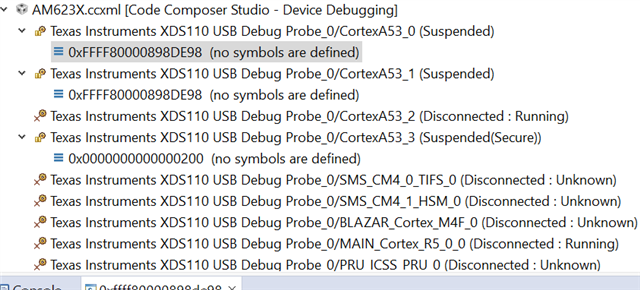
    R5 and A53 core target is connected.

    shall i try hello world with A53 core.

    Thanks,

    Muthuvel K

  • Hello Muthuvel,

    shall i try hello world with A53 core.

    Loading M4F core's example on A53 or R5F will not work.

    We are having AM62x SKEVM only

    If you have more than one AM62x SK EVM, can you please try with the another one just to check whether it is a hardware issue or not?

    Also if you more than one USB cable, can you connect different USB cable to the EVM?

    Also can you please share the SBL logs?

    Regards,

    Tushar

  • Hi Tushar,

    connected A53 core and now facing "No verification error"

    but if want to change no verification on css tool 12.7 how to change ...

    in 12.7 Tool->Debugger option is not available

    0

  • Hi Tushar,

    Now we need to load example on A53 core only..

    How to get A53 core examples..

    Thanks ,

    Muthuvel K

  • Hello Muthuvel,

    connected A53 core and now facing "No verification error"

    but if want to change no verification on css tool 12.7 how to change ...

    As I already mentioned in my earlier reply that even after connecting to A53 core you will not be able to run M4F example on A53. You will need A53 examples to run it on A53 cores.

    Now we need to load example on A53 core only..

    How to get A53 core examples..

    The current version of MCU+SDK you are using does not support A53 development. Please use the latest MCU+SDK version to have A53 examples.

    Example for A53 cores are experimental and will not be supported on E2E public forum.

    Please refer EXPERIMENTAL_FEATURES for more details.

    Please find the latest version on MCU-PLUS-SDK-AM62X 

    Regards,

    Tushar

  • Hi Tushar,

    If we run examples on A53 core is cause any probelm?

    Our Aim is to run some examples through JTAG to verifiy.

    Thanks,

    Muthuvel K

  • Hi Muthuvel,

    If we run examples on A53 core is cause any probelm?

    Our Aim is to run some examples through JTAG to verifiy.

    If your aim is to just verify the JTAG, you can use A53 examples and load it on A53 core. There is no problem at all.

    Regards,

    Tushar

  • Hi Tushar,

    While importing MCU-PLUS-SDK-AM62X  latest version facing below error.

    Thanks,

    Muthuvel K

  • Hi Tushar,

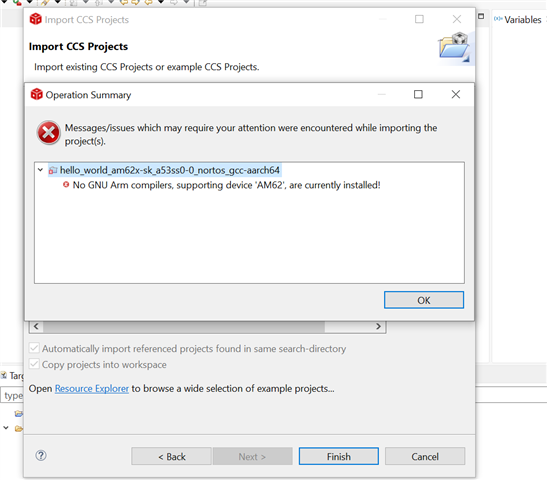
    while Import latest a53 example facing below error.

    Thanks,

    Muthuvel K

  • Hi Muthuvel,

    Can you please confirm, do you have GCC compiler installed at C:\ti?

    GCC AARCH64 compiler is required to do development on A53 cores.  

    Please refer GCC_AARCH64_DOWNLOAD.

    Regards,

    Tushar 

  • Hi Tushar,

    Still facing error..

    Thanks,

    Muthuvel K

  • Hello Muthuvel,

    Please extract the *.tar file in C:\ti directory.

    You should have a similar folder as shown in below image.

    Regards,

    Tushar

  • Hi Tushar,

    Please extract the *.tar file in C:\ti directory.

    Done.But still facing error

    Thanks,

    Muthuvel K

  • Hi Muthuvel,

    Please follow below steps to add compiler to CCS.

    • Navigate to Windows -> Preferences

    • Under Preferences, go to Code Composer Studio -> Build -> Compilers.

    • Add the path of your GCC compiler as shown in above image.

    After doing the above steps, you should be able to import the example.

    Regards,

    Tushar

  • Hi Tushar,

    After OpenSSL installation post build error is cleared.

    GCC compiler also done now we are able to import A53 examples.

    Thank you for your continuous support...

    now target is connected but in console seen GEL error.

    Thanks,

    Muthuvel

  • Hi Muthuvel,

    In the target configuration file can you please check which GEL file is used for initialization?

    Please refer below image.

    Also can you please try using the below provided *.ccxml file and let me know the results?

    Target Configuration - AM62x_SK_EVM_XDS110.ccxml

    Regards,

    Tushar

  • Hi Tushar.

    Target Configuration - AM62x_SK_EVM_XDS110.ccxml

    Imported Above Target file.

    But still same error..

    Thanks,

    Muthuvel K

  • Hello Muthuvel,

    I am not able to reproduce the issue at my end.

    Can you please provide the steps for replicating the issue at our end also?

    It is very difficult to support if the issue is not reproducible.

    Please refer below video.

    I am using CCS v12.06.

    Regards,

    Tushar

  • Hi Tushar,

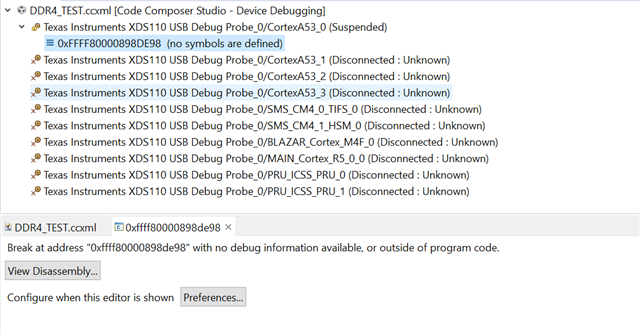
    A53 core was connected, disconnected, and then reconnected; this time, there was no Gel error.

    Is this Fine?

    Thanks,

    Muthuvel K

  • Hello Muthuvel,

    Is this Fine?

    The output logs on the console looks okay to me.

    Are you able to load examples on A53 cores?

    Regards,

    Tushar