Tool/software:
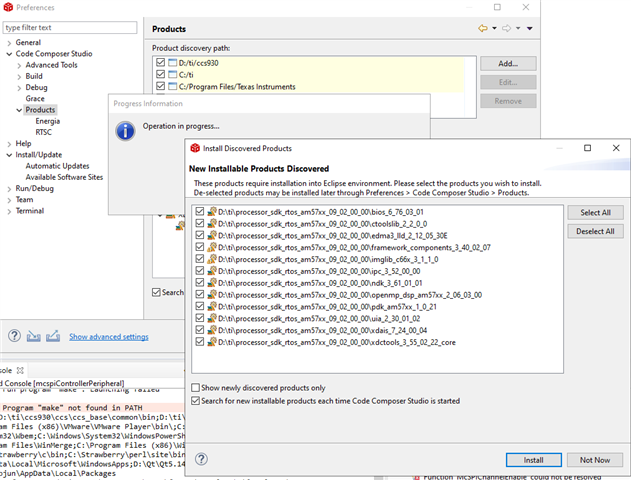
Under Windows10, I installed ccs9.30, and processor_sdk_rtos_am57xx_09_02_00_00, then follow some thread to install modules.
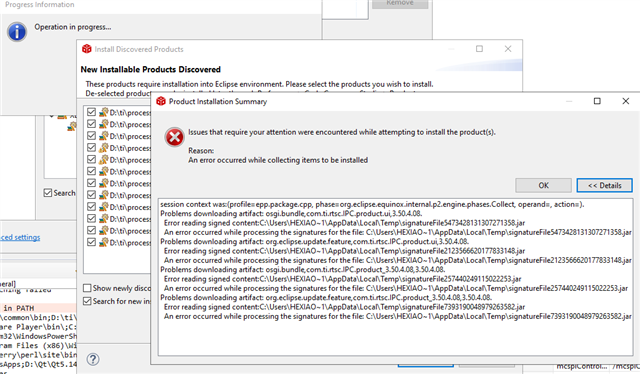
Intention is to use PDK create project. but unfortunate is some error occur.
Would you help me out?
Thanks!
This thread has been locked.
If you have a related question, please click the "Ask a related question" button in the top right corner. The newly created question will be automatically linked to this question.
Tool/software:
Under Windows10, I installed ccs9.30, and processor_sdk_rtos_am57xx_09_02_00_00, then follow some thread to install modules.
Intention is to use PDK create project. but unfortunate is some error occur.
Would you help me out?
Thanks!


Hi ,
This seems to be some issue with CCS. Can you please try re-installing the CCS and see if that works?
Regards,
Parth
I think the problem you are seeing is being caused by an incompatibility of the Eclipse feature and plugin signatures with the version Eclipse being used. It looks like the signatures for the features and plugins for "ipc_3_52_00_00" are no longer valid.
You should be able to work around this by opening a Windows explorer, navigating to the folder where this component is installed, and rename the META-INF folder for each features and plugins. If you are using the default install locations, that would mean you could rename these four folders:
C:\ti\processor_sdk_rtos_am57xx_09_02_00_00\ipc_3_52_00_00\eclipse\features\com.ti.rtsc.IPC.product.ui_3.52.00.00\META-INF -> META-INF.bak (for example)
C:\ti\processor_sdk_rtos_am57xx_09_02_00_00\ipc_3_52_00_00\eclipse\features\com.ti.rtsc.IPC.product_3.52.00.00\META-INF -> META-INF.bak
C:\ti\processor_sdk_rtos_am57xx_09_02_00_00\ipc_3_52_00_00\eclipse\plugins\com.ti.rtsc.IPC.product.ui_3.52.00.00\META-INF -> META-INF.bak
C:\ti\processor_sdk_rtos_am57xx_09_02_00_00\ipc_3_52_00_00\eclipse\plugins\com.ti.rtsc.IPC.product_3.52.00.00\META-INF -> META-INF.bak
The META-INF folder only hold the signature for the original JAR file. CCS should still load the content without the signature.