This thread has been locked.

If you have a related question, please click the "Ask a related question" button in the top right corner. The newly created question will be automatically linked to this question.

TDA4VM: Adding text to the OD detections

Part Number: TDA4VM

Tool/software:

Hi Team.

I'm working with SDK v 08_02_00_05(LINUX+RTOS).

I have a working 4 camera OD application. The postproc kernel is a customised one as my DL model produces 3 outputs.

I have added distance estimation logic inside the postproc kernel and able to get two values(Lateral and Longitudinal). Now I need to display one of this values on the display output along with the detection box as shown in atttached image.
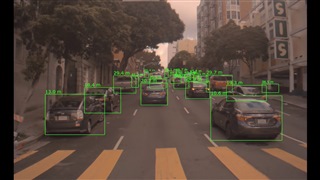
Kindly help me in how to achieve that.

Thanks,

Chaitanya Prakash Uppala

  • Hi,

    This should be similar to drawing the cpuLoad for the graphics display where we print the cpu load number on the screen. Here we use the Draw2D_drawString() API to achieve this.

    You can refer the implementation of appGrpxDrawCpuLoad() in vision_apps/utils/grpx/src/app_grpx_cpu_load.c

    Regards,

    Nikhil

  • Hi Nikhil,

    Please find the attached snippet and video reference,

    static void drawBox(vx_uint8 *y_data, vx_uint8 *cbcr_data, vx_int32 width, vx_int32 height, vx_int32 xmin, vx_int32 ymin, vx_int32 xmax, vx_int32 ymax, vx_int32 label, vx_uint8 color_map[][3], vx_int32 max_classes, float lng)
    {
        //printf("inside drawbox\n");
        vx_uint8 y_label, cb_label, cr_label;
        vx_int32 i;
        Draw2D_Handle DHandle;
        Draw2D_BufInfo DBufInfo;
        Draw2D_FontPrm sDist;
        int32_t retStatus;
        char lngString[32];
        snprintf(lngString, sizeof(lngString), "%.2f", lng);
        sDist.fontIdx = 8;
        retStatus = Draw2D_create(&DHandle);
    
    
        printf("retStatus %d\n",retStatus);
        xmin = (xmin >> 1) << 1;
        xmax = (xmax >> 1) << 1;
        ymin = (ymin >> 1) << 1;
        ymax = (ymax >> 1) << 1;
    
        y_label  = color_map[label][0];
        cb_label = color_map[label][1];
        cr_label = color_map[label][2];
    
        if(label >= max_classes)
        {
        y_label  = 255;
        cb_label = 128;
        cr_label = 128;
        }
    
        if(y_data != NULL)
        {
            vx_int32 box_height  = ymax - ymin;
            for(i = 0; i < box_height; i++)
            {
                y_data[(width * (ymin + i)) + xmin] = y_label;
                y_data[(width * (ymin + i)) + xmax] = y_label;
            }
    
            vx_int32 box_width  = xmax - xmin;
            for(i = 0; i < box_width; i++)
            {
                y_data[(width * ymin) + xmin + i] = y_label;
                y_data[(width * ymax) + xmin + i] = y_label;
            }
        }
    
        if(cbcr_data != NULL)
        {
            ymin = ymin >> 1;
            ymax = ymax >> 1;
    
            vx_int32 box_height  = ymax - ymin;
            for(i = 0; i < box_height; i++)
            {
                cbcr_data[(width * (ymin + i)) + xmin + 0] = cb_label;
                cbcr_data[(width * (ymin + i)) + xmin + 1] = cr_label;
    
                cbcr_data[(width * (ymin + i)) + xmax + 0] = cb_label;
                cbcr_data[(width * (ymin + i)) + xmax + 1] = cr_label;
            }
    
            vx_int32 box_width  = xmax - xmin;
            for(i = 0; i < box_width; i+=2)
            {
                cbcr_data[(width * ymin) + xmin + i + 0] = cb_label;
                cbcr_data[(width * ymin) + xmin + i + 1] = cr_label;
    
                cbcr_data[(width * ymax) + xmin + i + 0] = cb_label;
                cbcr_data[(width * ymax) + xmin + i + 1] = cr_label;
            }
        }
        //printf("above  Draw2D_drawString\n");
        if(DHandle != NULL)
        {
            //        printf("\nReceived valid Draw2D handle = %u\n...", DHandle);
            DBufInfo.bufAddr[0] = y_data;
            DBufInfo.bufAddr[1] = cbcr_data;
    
            DBufInfo.bufWidth = width;
            DBufInfo.bufHeight = height;
            DBufInfo.bufPitch[0] = width;
            DBufInfo.bufPitch[1] = width;
            //int desiredFontSize = 12;  // Set to the desired size
            //Draw2D_setFontSize(DHandle, desiredFontSize);
            DBufInfo.dataFormat = DRAW2D_DF_YUV420SP_UV;
            retStatus = Draw2D_setBufInfo(DHandle, &DBufInfo);
            //int x=(xmin+xmax)/2;
            Draw2D_drawString(DHandle, xmin, ymin, lngString, &sDist);
            //drawStringWithSize(DHandle, xmin, ymax, lngString, desiredFontSize, &sDist);
            retStatus = Draw2D_delete(DHandle);
        }
        //printf("exiting drawbox\n");
    
    }

    Able to get the distance display on monitor, but the size is too large and coordinates are not correct.

    Is there any API I'm missing that to be added? Also, I have tried changing value of  this parameter sDist.fontIdx = 12; the font appeared to be decreased when modified the value but clarity of number(distance) is missing. Later included Draw2D_getFontProperty(&sDist, &fontProp); function,still no change in behaviour.

    Kindly let me know what causing this behaviour.

    Regards,

    Chaitanya Prakash Uppala

  • Hi Chaitanya,

    Can you try reducing the width and height of the font in draw2d_fontxx.c in utils/draw2d/src/ folder? 

    Regards,

    Nikhil

  • Hi,

    This depends on the fontIdx used in your code. Please select any one of the font in your code and change the corresponding .c file values.

    Regards,

    Nikhil

  • Hi Nikhil,

    I have tried changing the gDraw2D_Font_CharHeight, gDraw2D_Font_CharWidth parameters but the application wasn't working as expected.

    Please find the attached video references for the description of my concern.

    gDraw2D_Font_CharWidth     = 15; gDraw2D_Font_CharHeight    = 25; These are the default values came with SDK. With these, it is giving proper display output but a little large in size. While trying to modify the value as shown below.

    1) gDraw2D_Font_CharWidth = 14;  gDraw2D_Font_CharHeight = 25;

    The output is as shown below

    2) gDraw2D_Font_CharWidth = 15;  gDraw2D_Font_CharHeight = 10;

    The output is as shown below

    Is the values can't be reduced further from the one given by SDK? Because when I have changed height from 25 to 20 it worked fine, but further reduction behaved as shown in video. And in width case even from 15 to 14, it behaved unexpected manner.

    Kindly comment on this and let me know how to proceed from here.

    Regards,

    Chaitanya Prakash Uppala

  • Hi Chaitanya,

    I checked this internally again and the bitmap (i.e. the array) you see here is fixed for that font sizes. 

    So for new font size, you would have to get a new bitmap, which is currently not supported in vision_apps.

    However, we have a similar utility in edgeAI apps, which also consists of the font sizes. But you would have to integrate and test this functionality in your application.

    You could see the same in the below 

    edgeai_nv12_font_utils.c « src - edgeai/edgeai-apps-utils - Unnamed repository; edit this file 'description' to name the repository.

    Regards,

    Nikhil

  • Hi Nikhil,

    Thanks for the response.

    edgeai_nv12_font_utils.c « src - edgeai/edgeai-apps-utils - Unnamed repository; edit this file 'description' to name the repository.

    I'll try experimenting that.

    Please find the attached snippet of drawbox functionality, using this able to get the output as shown in attached image.

    static void drawBox(vx_uint8 *y_data, vx_uint8 *cbcr_data, vx_int32 width, vx_int32 height, vx_int32 xmin, vx_int32 ymin, vx_int32 xmax, vx_int32 ymax, vx_int32 label, vx_uint8 color_map[][3], vx_int32 max_classes, float lng)
    {
    //printf("inside drawbox\n");
    vx_uint8 y_label, cb_label, cr_label;
    vx_int32 i;
    Draw2D_Handle DHandle;
    Draw2D_BufInfo DBufInfo;
    Draw2D_FontPrm sDist;
    Draw2D_FontProperty fontProp;
    
    char lngString[32];
    snprintf(lngString, sizeof(lngString), "%.2f", lng);
    sDist.fontIdx = 13;
    Draw2D_create(&DHandle);
    
    Draw2D_getFontProperty(&sDist, &fontProp);
    
    
    if(DHandle != NULL)
    {
    // printf("\nReceived valid Draw2D handle = %u\n...", DHandle);
    DBufInfo.bufAddr[0] = y_data;
    DBufInfo.bufAddr[1] = cbcr_data;
    
    DBufInfo.bufWidth = width;
    DBufInfo.bufHeight = height;
    DBufInfo.bufPitch[0] = width;
    DBufInfo.bufPitch[1] = width;
    //int desiredFontSize = 12; // Set to the desired size
    //Draw2D_setFontSize(DHandle, desiredFontSize);
    DBufInfo.dataFormat = DRAW2D_DF_YUV420SP_UV;
    DBufInfo.transperentColor = DRAW2D_TRANSPARENT_COLOR;
    DBufInfo.transperentColorFormat = DRAW2D_TRANSPARENT_COLOR_FORMAT;
    Draw2D_setBufInfo(DHandle, &DBufInfo);
    
    Draw2D_drawString(DHandle, xmin, ymax, lngString, &sDist);
    
    Draw2D_delete(DHandle);
    }


    .....
    
    /*rest of the drawbox functionality*/
    
    ....
    
    return 0;
    
    }

    Even I have used,

    1)DBufInfo.transperentColor = DRAW2D_TRANSPARENT_COLOR;
    DBufInfo.transperentColorFormat = DRAW2D_TRANSPARENT_COLOR_FORMAT;

    2)

    Draw2D_RegionPrm regionPrm;
    regionPrm.startX = xmin;
    regionPrm.startY = ymax;
    regionPrm.width = width;
    regionPrm.height = height;
    regionPrm.color = transparentBlue;

    Draw2D_fillRegion(DHandle, &regionPrm);

    the output still remains the same, unable to remove the black background. 

    I need the text to be transparent. Could you please guide me how to achieve this.

    Thanks and Regards,

    Chaitanya Prakash Uppala

  • Hello Nikhil,

    Any update on the above mentioned query.

    Thanks and Regards,

    Chaitanya Prakash Uppala

  • Hi 

    Sorry for the delay in response.

    Could you try the below for drawing a string and let me know if you are still seeing the background colour?

    i.e. using fontIdx = 0 instead of 13.

    Regards,

    Nikhil 

  • Hi Nikhil,

    As per your suggestion modified the code. Please find the attached code snippet for the same.

    static void drawBox(vx_uint8 *y_data, vx_uint8 *cbcr_data, vx_int32 width, vx_int32 height, vx_int32 xmin, vx_int32 ymin, vx_int32 xmax, vx_int32 ymax, vx_int32 label, vx_uint8 color_map[][3], vx_int32 max_classes, float lng, float lat)
    {
        //printf("inside drawbox\n");
        vx_uint8 y_label, cb_label, cr_label;
        uint32_t adjusted_x=xmin,adjusted_y=ymax;
        vx_int32 i;
        Draw2D_Handle DHandle;
        Draw2D_BufInfo DBufInfo;
        Draw2D_FontPrm sDist;
        char lngString[8],latString[8];
        snprintf(lngString, sizeof(lngString), "%.2f", lng);
        snprintf(latString, sizeof(latString), "%.2f", lat);
    
        Draw2D_setFontColor(RGB888_TO_RGB565(0,255,0),RGB888_TO_RGB565(0,0,0),RGB888_TO_RGB565(0,0,0));
        sDist.fontIdx = 0;//13;
    
        Draw2D_create(&DHandle);
        if (ymax > THRESHOLD_Y) {
            adjusted_y = ymin - 2*STRING_HEIGHT;
        }
        if (xmax > THRESHOLD_X) {
            //adjusted_x = xmin-50;
            adjusted_x = xmax-70;
        }
        if(DHandle != NULL)
        {
            //        printf("\nReceived valid Draw2D handle = %u\n...", DHandle);
            DBufInfo.bufAddr[0] = y_data;
            DBufInfo.bufAddr[1] = cbcr_data;
    
            DBufInfo.bufWidth = width;
            DBufInfo.bufHeight = height;
            DBufInfo.bufPitch[0] = width;
            DBufInfo.bufPitch[1] = width;
            DBufInfo.dataFormat = DRAW2D_DF_YUV420SP_UV;
            DBufInfo.transperentColor = DRAW2D_TRANSPARENT_COLOR;
            DBufInfo.transperentColorFormat = DRAW2D_TRANSPARENT_COLOR_FORMAT;
            Draw2D_clearBuf(DHandle);
            Draw2D_setBufInfo(DHandle, &DBufInfo);
            printf("adjusted x and adj y 1st string values are %d and %d\n",adjusted_x,adjusted_y);
            Draw2D_drawString(DHandle, adjusted_x, adjusted_y, lngString, &sDist);
            adjusted_y += STRING_HEIGHT;
            //int latStringY = adjusted_y + fontProp.height + 5;
            Draw2D_drawString(DHandle, adjusted_x, adjusted_y, latString, &sDist);
            Draw2D_delete(DHandle);
        }
        ...
        rest of the drawbox code
        ...
    }
    With the above snippet the output is as in shown attachment.

    The font size increased more, and right half of utilization cores display part also changed to green color in between the run.

    Regards,

    Chaitanya Prakash Uppala

  • Hi Chaitanya,

    From the edgeai demos page, I see that all the demos have the same background associated with it. So I do not think there is a way to remove the black background. You could however change it's color though

    3. Edge AI sample apps — Processor SDK Linux Edge AI for SK-TDA4VM Documentation

    Regards,

    Nikhil

  • Thanks for the support. My query has been resolved. Closing the thread

    Regards,

    Chaitanya Prakash Uppala