This thread has been locked.

If you have a related question, please click the "Ask a related question" button in the top right corner. The newly created question will be automatically linked to this question.

TDA4VM: MSC

Part Number: TDA4VM

Tool/software:

Hi experts,

SDK8.6

J721E EVM board

tda4-project/PDK0806_RTOS/vision_apps/apps/basic_demos/app_multi_cam/main.c

Only 1 camera output YUYV

1.yuyv - color_convert(NV12) -

display_in_image = obj->cvt_out_image;

Image display ok, just like I saved the image:

save-corver-image_0000.zip

2.yuyv- color_convert(NV12) - 

obj->cvt_out_image = vxCreateImage(obj->context, DISPLAY_WIDTH, DISPLAY_HEIGHT, VX_DF_IMAGE_NV12);

obj->node_cvt = vxColorConvertNode(obj->graph, color_convert_in_image, obj->cvt_out_image);

obj->cap_multi_frames = vxCreateObjectArray(obj->context, (vx_reference)obj->cvt_out_image, obj->sensorObj.num_cameras_enabled);

ldc_in_arr = obj->cap_multi_frames;

display_in_image = obj->imgMosaicObj.output_image[0];

image display unusual. just like I saved the image:

save-mosaic-image_0001.zip

What modification did we miss? How to solve?

Looking forward to your reply.

Thanks

Regards,

Barry

  • Hi Barry,

    Sorry, could you please get more clarity here?

    You are getting a good image when you display cvt_out_image directly but the error is seen when you have ldc and mosaic node involved?

    Does your application still have capture node?

    Regards,

    Nikhil

  • Hi Nikhil,

    I am tda4-project/PDK0806_RTOS/vision_apps/apps/basic_demos/app_multi_cam/main.c

    Only 1 camera output YUYV

    1.

    ldc = 0 ,enable_mosaic = 0

    display ok just like save image save-corver-image_0000.zip .

    2.

    ldc = 0 ,enable_mosaic = 1

     display unusual just like save image save-mosaic-image_0001.zip .

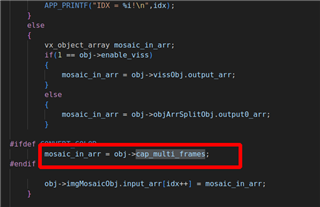
    Our changes in app_multi_cam/main.c are shown in the screenshot, What did we miss? How to solve?

    Regards,

    Barry

  • Hi Barry,

    So if I understand your graph correctly, then is it the below?

    Capture -> vxColorConvertNode -> display works fine

    Capture -> vxColorConvertNode -> Mosaic -> display throws error?

    If yes, can you dump the intermediate images and check which node is the issue here? 

    Regards,

    Nikhil

  • Hi Nikhil,

    1.Your understanding is correct.

    vxColorConvertNode output save image OK:save-corver-image_0000.zip

    Mosaic output save image not OK:save-mosaic-image_0001.zip

    2.The problem lies in the assignment of mosaic_in_arr. What actions do we need to take between vxColorConvertNode and mosaic_in_arr?

    Here is what we have done now (mosaic output image is abnormal):

    obj->node_cvt = vxColorConvertNode(obj->graph, color_convert_in_image, obj->cvt_out_image);
    
    obj->node_cvt = vxColorConvertNode(obj->graph, color_convert_in_image, obj->cvt_out_image);
    obj->cap_multi_frames = vxCreateObjectArray(obj->context, (vx_reference)obj->cvt_out_image, obj->sensorObj.num_cameras_enabled);
    status = vxSetNodeTarget(obj->node_cvt, VX_TARGET_STRING, TIVX_TARGET_DSP1);
    status = tivxSetNodeParameterNumBufByIndex(obj->node_cvt, 1u, CAPTURE_BUFFER_Q_DEPTH);
    
    mosaic_in_arr = obj->cap_multi_frames; 

    Looking forward to reply.

    Regards,

    Barry

  • Hi Barry,

    May I know how have you configured the mosaic node?

    Also, are you seeing the same issue if you use the LDC node instead of vxColorConvertNode() as the main objective is to convert from YUV422 to NV12 right?

    Regards,

    Nikhil

  • Hi Nikhil,

    We use tda4-project/PDK0806_RTOS/vision_apps/apps/basic_demos/app_multi_cam/main.c

    Our modifications in main.c are only the following, so what modifications do we need to add?

    obj->node_cvt = vxColorConvertNode(obj->graph, color_convert_in_image, obj->cvt_out_image);
    
    obj->node_cvt = vxColorConvertNode(obj->graph, color_convert_in_image, obj->cvt_out_image);
    obj->cap_multi_frames = vxCreateObjectArray(obj->context, (vx_reference)obj->cvt_out_image, obj->sensorObj.num_cameras_enabled);
    status = vxSetNodeTarget(obj->node_cvt, VX_TARGET_STRING, TIVX_TARGET_DSP1);
    status = tivxSetNodeParameterNumBufByIndex(obj->node_cvt, 1u, CAPTURE_BUFFER_Q_DEPTH);
    
    //mosaic_in_arr = obj->objArrSplitObj.output0_arr;      //disable
    
    mosaic_in_arr = obj->cap_multi_frames;  //enable


    1.We did not modify the configuration of the mosaic node.

    2.camera output  YUYV, I understand that LDC doesn't support its input, right?

    Regards,

    Barry

  • Hi Barry,

    Few suggestions here

    1. Can you still keep the object array splitter node as input to mosaic and add the color convert node in between capture node and object array splitter node?

    or pass the object array splitter node output as color_convert_in_image to the color convert node and then pass this node output as mosaic node input. Just to keep the graph changes minimal.

    2. Can you create the object array cap_multi_frames using an exempler and then extract the vx_image from the same and pass it to the color convert node? Rather than using the exempler to the node as done now?

    Regards,
    Nikhil

  • Hi Nikhil,

    1)When we set it up like this:

    color_convert_in_image = (vx_image)vxGetObjectArrayItem((vx_object_array)mosaic_in_arr, 0);

    or

    color_convert_in_image = (vx_image)vxGetObjectArrayItem((vx_object_array)obj->objArrSplitObj.output0_arr, 0);

    The error is as follows:

    Capture graph done!
    21814.482181 s: VX_ZONE_ERROR:[vxGetObjectArrayItem:207] Provided reference was not an object array, returning an error reference
    21814.482246 s: VX_ZONE_ERROR:[vxSetParameterByIndex:239] Invalid type 0x00000811!
    21814.482254 s: VX_ZONE_ERROR:[vxSetParameterByIndex:287] Specified: parameter[0] type:00000811 => 0xffffb12d7838
    21814.482260 s: VX_ZONE_ERROR:[vxSetParameterByIndex:289] Required: parameter[0] dir:0 type:0000080f
    21814.482318 s: VX_ZONE_ERROR:[vxSetReferenceName:646] Invalid reference
    create convert color node return status: -12

    vxColorConvertNode output type is vx_image

    So can you tell us what we need to do in between? Looking forward to your reply.

    mosaic_in_arr input type is vx_object_array

    2)

    2.By the way, when we use M2M node instead of vxColorConvertNode, the mosaic output is OK.

    Regards,
    Barry

  • Hi,

    By the way, when we use M2M node instead of vxColorConvertNode, the mosaic output is OK

    If the DSS M2M is working fine then the same code changes regarding the connectivity of nodes should have worked for the color convert node.

    Please let me know if you are okay to use DSS_M2M instead of color convert node?

    Regards,

    Nikhil

  • Hi Nikhil,

    1.What are the codes for implementing the mosaic principle in TDA4? Just to better understand the principle of its implementation.

    2.What are the documentation describing the MSC implementation principle in TDA4? Please send us, thanks

    Regards,

    Barry

  • Hi Barry,

    1.What are the codes for implementing the mosaic principle in TDA4? Just to better understand the principle of its implementation.

    The mosaic node is used to implement the mosaic principle. Internally this uses MSC HWA on TDA4 to scale down the images and arrange them in a grid.

    The mosaic node requires configuration, output image, input object array and number of inputs as parameters.

    You could refer the multi-cam demo in the SDK to see how it is configured in the api set_img_mosaic_params()

    2.What are the documentation describing the MSC implementation principle in TDA4? Please send us, thanks

    You could refer the Technical reference manual to understand our MSC HWA.

    https://www.ti.com/lit/zip/spruil1

    Regards,

    Nikhil

  • Hi Nikhil,

    Thanks for your reply.

    I believe we can operate the set_img_mosaic_params API well.

    1. In the SDK, is there any relevant code that implements image scaling and image stitching operations?

    2. If these operations are completed by hardware, please send the specific location described in the spec.

    Looking forward to getting the above 2 points confirmed, thanks.

    Regards,

    Barry

  • Hi Barry.

    In the SDK, is there any relevant code that implements image scaling and image stitching operations?

    If you are describing the operation done by the mosaic node, then the scaling in done by the MSC HWA whereas as the stitching in done in the Software based on the number of windows specified in set_img_mosaic_params().

    You could find this implementation in the target implementation of the mosaic node which is tivxKernelImgMosaicMscProcess() in vision_apps/kernels/img_proc/r5f/vx_img_mosaic_msc_target.c

    Hope this answers your query

    Regards,

    Nikhil

  • You're welcome