This thread has been locked.

If you have a related question, please click the "Ask a related question" button in the top right corner. The newly created question will be automatically linked to this question.

PROCESSOR-SDK-AM335X: Request for Support: AM335x Processor DDR Memory Upgrade and Configuration

Part Number: PROCESSOR-SDK-AM335X

Tool/software:

Dear TI Support,

I am currently using an AM335x processor with SDK version 02.00.02.11 and am seeking recommendations for a compatible 1GB DDR memory module.

During testing, I am trying to upgrade from a 4GB to an 8GB module, but the system only recognizes 4GB.

Currently, the sdram_config is set to MT41J512M8H125_EMIF_SDCONF. I would like to test with MT41J512M16H125_EMIF_SDCONF (16-bit) configuration.

Is this supported?

I could not find relevant information for this configuration in the current SDK.

I would appreciate your assistance on this matter.

Thank you.

Best regards,

  • I assume you mean 8Gbit?  The max supported density is 8Gb.

    To change DDR configuration, you have to use the EMIF tool as described in this app note:  https://www.ti.com/lit/pdf/sprack4  Link to a spreadsheet tool is in the appnote

    Once configured correctly, U-Boot will automatically detect, verify, and configure the size of DDR during runtime in the architectural files by using get_ram_size()

    Regards,

    James

  • Hello,

    The link you mentioned (https://www.ti.com/lit/pdf/sprack4) is an application note co-authored by TI and ISSI chip manufacturers. We tested with the 8G configuration values as you suggested, but the results were the same.

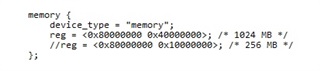
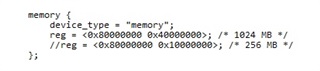
    While testing, I confirmed that when I set the memory configuration to 1Gbyte in the kernel DTS and booted with regular U-Boot instead of Falcon boot, 1GB of memory was recognized.

    However, Falcon boot still does not recognize it.

    Let me summarize what we have done so far.

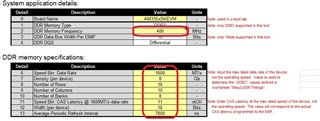
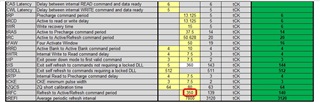
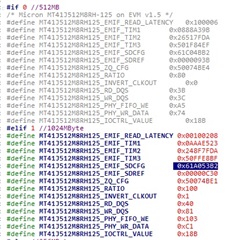
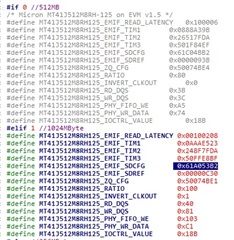
    AM335x EMIF TOOL configuration details

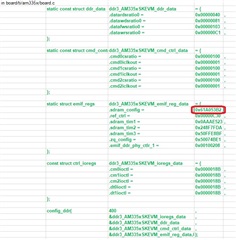
    I have applied the u-boot settings obtained this way to the source code.

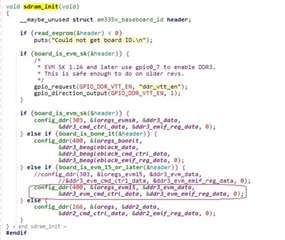
    I tested by applying a 1GB setting value to the variable currently using 512MB for accurate testing.

    Please verify that there are no issues with the above settings for configuring 1GB of memory.

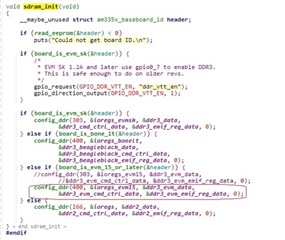
    I also changed the PPL value in config_ddr from 303 to 400 in sram_init()

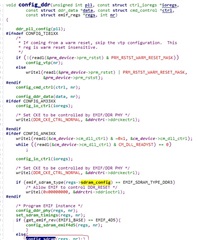
    I confirmed the entry into config_sdram from the config_ddr function using printf.

    It seems that the config_sdram function doesn't have any significant functionality other than storing configurations.

    Additionally, where else should I look?

    Where can I find get_ram_size() in the source code? It's not in sdram_init

    I would appreciate your assistance on this matter.

  • Since you can get regular u-boot working, i don't think this is a DDR issue.  Sounds like you have the correct DDR configuration.  Sorry i don't know what falcon boot is, i'll have to pass this to the software team.

    Regards,

    James

  • Hello

    Is this response from TI (Texas Instruments) software support?

    Should I wait for an additional response?

    Best Regards,

  • Yes, Please note that supporting SDK 2.x (released on 2015/2016) from TI is very limited.
    Have you booted to u-boot prompt?
    Best,
    -Hong

  • Hello,

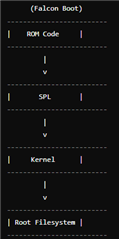
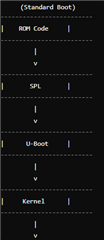
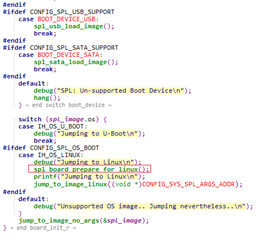
    We are booting by loading the kernel directly from the SPL to increase the boot speed, rather than using the typical U-Boot method.

    However, as I mentioned before,

    When configured in the DTS file and booted as shown below, 1GB is recognized.

    I have a question regarding the get_ram_size() that you mentioned in your previous response

    ===========================================================================================================

    Once configured correctly, U-Boot will automatically detect, verify, and configure the size of DDR during runtime in the architectural files by using get_ram_size().

    ===========================================================================================================

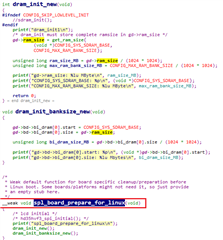
    here is no get_ram_size() function in the sdram_init() function included in the SPL part of the U-Boot we are using

    If I add a function that performs the same role as get_ram_size(), is it possible to configure and use 1GB?

    If so, could you provide a sample code for get_ram_size()?

    I look forward to your response.

  • I tested it using the functions in the link you provided, but the results are the same.

    I tried setting it before jumping in SPL and also tried it inside void s_init(void), but the result was the same.

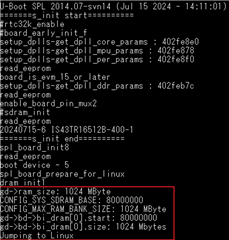
    As a result of checking the memory size through debugging messages,

    Even in Uboot, 1024Mbyte (1Gbyte) is recognized well.

    It operates with the same follow until it jumps from a regular DTB to a kernel using Falcon DTB.

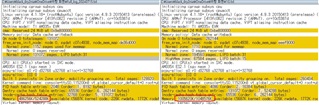
    This is the message after booting the kernel.

    Comparing the kernel boot messages

    On node 0 totalpages: 131072 (512M)
    On node 0 totalpages: 262144 (1G)

    PID hash table entries: 2048 (512M)
    PID hash table entries: 4096 (1G)

    Dentry cache hash table entries: 65536 (512M)
    Dentry cache hash table entries: 131072 (1G)

    Memory: 486256K/524288K available (5687K kernel code, 226K rwdata, 1772K rodata, 240K init, 185K bss, 13456K reserved, 24576K cma-reserved, 0K highmem)

    Memory: 1005620K/1048576K available (5687K kernel code, 226K rwdata, 1772K rodata, 240K init, 185K bss, 18380K reserved, 24576K cma-reserved, 245760K highmem)


    All of these data are twice as different. Where is this set?

    The falcon dtb file we use was created as follows:

    ===========================================================

    U-Boot# nand read 0x82000000 NAND.kernel;

    U-Boot# nand read 0x88000000 NAND.u-boot-spl-os;

    U-Boot# run nandargs;

    U-Boot# spl export fdt 0x82000000 - 0x88000000

    ## Booting kernel from Legacy Image at 82000000 ...

       Image Name:   linux-4.1.18

       Created:      2016-10-12   7:18:22 UTC

       Image Type:   ARM Linux Kernel Image (uncompressed)

       Data Size:    2915392 Bytes = 2.8 MiB

       Load Address: 82000000

       Entry Point:  82000000

       Verifying Checksum ... OK

    ## Flattened Device Tree blob at 88000000

       Booting using the fdt blob at 0x88000000

       Loading Kernel Image ... OK

       reserving fdt memory region: addr=8ffe3000 size=a000

       Loading Device Tree to 8fff3000, end 8fffffff ... OK

    subcommand not supported

    subcommand not supported

       reserving fdt memory region: addr=8ffe3000 size=a000

       Loading Device Tree to 8ffd3000, end 8ffe2fff ... OK

    Argument image is now in RAM: 0x8ffd3000

    U-Boot# nand erase.part NAND.u-boot-spl-os;

    U-Boot# nand write 0x8ffe3000 NAND.u-boot-spl-os 0x20000

    U-Boot# mmc rescan

    U-Boot# nand read 0x82000000 NAND.u-boot-spl-os;

    NAND read: device 0 offset 0x20000, size 0x20000

    131072 bytes read: OK

    U-Boot# fatwrite mmc 0 0x82000000 am335x-evm-falcon.dtb 0x20000

    writing am335x-evm-falcon.dtb

    131072 bytes written

    U-Boot# ls mmc 0 

        76492   mlo

     13369344   sg-df.ubi

                found.000/

     62783488   sg-fs.ubi

       432968   u-boot.img

      2915216   uimage

                !!sqbd/

       131072  am335x-evm-falcon.dtb

    6 file(s), 2 dir(s)

    ===========================================================

    Why is falcon.dtb different from a regular dtb file?

    If you have any other ideas, please pass them on.


  • Here is an early e2e on DDR size configuration and resize with SDK 6.3 on TI AM335x EVM for your reference
    https://e2e.ti.com/support/processors-group/processors/f/processors-forum/984366/am3356-memory-change/3647854#3647854
    Best,
    -Hong

  • Hello,

    I found the solution in the reference article you provided. Thank you. The solution was to add "mem=1024M" to the kernel command, which resolved the issue. Thanks again.

    I have one more question. Currently, with the Uboot setting and kernel command set to "mem=1024M" for a 1024MB memory configuration,

    is it okay to use 512MB memory?

    Kernel command line: console=ttyS0,115200n8 vt.global_cursor_default=0 root=ubi0:rootfs rw ubi.mtd=NAND.file-system,2048 rootfstype=ubifs rootwait=1 quiet mem=1024M

    I confirmed that the board recognizes it as 1024MB when applying 512MB memory.

    I would appreciate your response.

  • You'll be able to configure DDR size either in u-boot or re-configure it for kernel via bootargs "mem=ddr_size" as noted in the referenced e2e.
    Best,
    -Hong

  • Thank you for your response.

    I understand that memory settings are configured in U-Boot and kernel configuration.

    What I want to know is whether there will be any stability issues if we use the same settings for both 1024MB and 512MB memory configurations.

    Ideally, each should be configured according to its own settings, but I want to know if it is possible to use one configuration for both memory sizes while maintaining backward compatibility.

    To summarize:

    If I change the PLL from 303 to 400 and the tRFC timing from 230ns to 350ns, will there be any compatibility issues if I use the 1024MB settings directly for the 512MB configuration as well?

    Specifically:

    • MT41K256M16HA125E_EMIF_READ_LATENCY: Read latency setting.
    • MT41K256M16HA125E_EMIF_TIM1: Timing setting 1.
    • MT41K256M16HA125E_EMIF_TIM2: Timing setting 2.
    • MT41K256M16HA125E_EMIF_TIM3: Timing setting 3.
    • MT41K256M16HA125E_EMIF_SDCFG: Memory configuration setting.
    • MT41K256M16HA125E_EMIF_SDREF: Refresh setting.
    • MT41K256M16HA125E_ZQ_CFG: ZQ calibration setting.
    • MT41K256M16HA125E_RATIO: Ratio setting.
    • MT41K256M16HA125E_INVERT_CLKOUT: Clock output inversion setting.
    • MT41K256M16HA125E_IOCTRL_VALUE: I/O control value setting.

    Or is it that while it might work, there could be minor issues due to differences, and we should test it thoroughly to make a decision?

    Thank you for your response.

  • As noted in the APN, the DDR parameter needs to be configured with the EMIF tool per DDR device specifications.
    I don't think one DDR parameter configuration is applicable to two DDR devices with different DDR spec in general.
    Best,
    -Hong

  • Thank you so much for your help.