This thread has been locked.

If you have a related question, please click the "Ask a related question" button in the top right corner. The newly created question will be automatically linked to this question.

TDA4VM: MscScale

Part Number: TDA4VM

Tool/software:

Hi experts,

SDK8.6

camera image:1920x1536

crop1 node:1280x800

MscScale node:1560x1280

We want to achieve the above Crop + MscScale results with one operation.

What node should we use? What CMD should we use?

Looking forward to your reply,Thanks

Regards,

Barry

  • Hi Barry,

    You need not use any node for the crop operation. You just have to modify the pointer location of the image before sending the same into the MSC node. 

    Regards,

    Nikhil

  • Hi Nikhil,

    Thank you for your prompt reply.

    1. We want to let the scale do the crop operation. So how should we add crop to the MSC scale?

    YOU:You need not use any node for the crop operation. You just have to modify the pointer location of the image before sending the same into the MSC node. 

    2. We can achieve ROI by modifying the crop, but who will do the modification you mentioned? Will this process generate consumption load? Thank you.

    Looking forward to your reply.

    Regards,

    Barry

  • Hi Barry,

    You can refer to the crop implementation of the display node and try the same with the MSC node.

    The target implementation for DSS node can be found in vx_display_target.c

    Here you can follow the macro TIVX_DISPLAY_CROP_PARAMS and see how using these crop parameters offset recalculation occurs using the API tivxDisplayCalcOffset() in the process callback.

    Regards,
    Nikhil

  • Hi Nikhil,

    How does MSC receive input image and perform ROI processing?

    And how to get the processed output image?

    What function should be used? What node? Is there any reference?

    We are very anxious about this issue and hope to get expert help.

    Looking forward to reply

  • Hi,

    It would depend on which OpenVX node you are using for the MSC HWA.

    For eg. You can find the target implementation of the node tivxVpacMscScaleNode() in the filepath ${PSDKRA}/tiovx/kernels_j7/hwa/vpac_msc/vx_vpac_msc_multi_scale_output_target.c

    The reference implementation of cropping can be found in the display node target implementation in the filepath ${PSDKRA}/tiovx/kernels_j7/hwa/display/vx_display_target.c

    Both have a common file structure, with a create, process, control and delete APIs. 

    Please refer the implementation of TIVX_DISPLAY_CROP_PARAMS from the control api of display node and implement the same in MSC node.

    You can refer the process function of the MSC node to understand it's execution

    Regards,

    Nikhil

  • Hi Nikhil,

    Thanks for your reply.

    YOU:It would depend on which OpenVX node you are using for the MSC HWA.

    It works fine when we use TIVX_VPAC_MSC_CMD_SET_COEFF.

    How to modify the MSC Scale node to output ROI? This is what we have always wanted to know.

    Can you give us a patch for this purpose?    We look forward to hearing from you.

    Thanks.

  • Hi Barry,

    It works fine when we use TIVX_VPAC_MSC_CMD_SET_COEFF.

    This is used to scale the image.

    How to modify the MSC Scale node to output ROI? This is what we have always wanted to know.

    Sorry, I did not get you. Why do you want to use output ROI here? From the description, it is mentioned crop and scale. Isn't it in this order? or is the order reversed?

    Regards,

    Nikhil

  • Hi Nikhil,

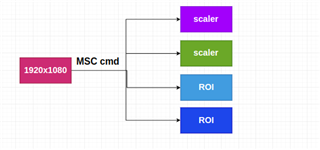
    1.OK, our ultimate goal is that an MSC CMD can complete the output of ROI+Scale. Can you send me the specific implementation method?

    We don't see this CMD, so try to add msc crop on the scale node. The question I have is how does MSC crop support image input and get image output? Can you give us some code to guide us?

    Hope to get your help. Thanks.

  • camera image:1920x1536

    crop1 node:1280x800

    MscScale node:1560x1280

    oh..ok, I thought your flow (as per description) is that the input of Msc node is the cropped image, but now I see that you want the cropped image and scaled image separately from the input camera image. 
    Is my understanding correct?

    If yes, are you scaling the image (1920 x 1536) to a dimension and then cropping it to (1280 x 800) or is it just cropping?

    Regards,

    Nikhil

  • Hi Nikhil,

    you:but now I see that you want the cropped image and scaled image separately from the input camera image. 

      Your understanding is correct. We are using app_multi_cam to add this requirement.

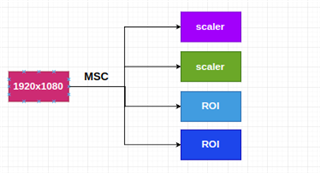
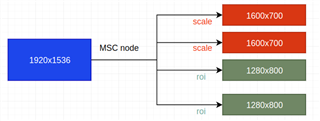
    I want an MSC CMD to complete one input image and 4 output images (2 ROI + 2 scales).

  • Hi Nikhil,

    When only SCALE is enabled, its output is normal.

    scalerObj = &obj->scalerObj;
    refs[0] = (vx_reference)scalerObj->coeff_obj;
    status = tivxNodeSendCommand(scalerObj->node, 0u,
    TIVX_VPAC_MSC_CMD_SET_COEFF,
    refs, 1u);

    When only CROP is enabled,its output is a pure green image.. What is the reason?

    cropObj = &obj->cropObj;
    refs[0] = (vx_reference)cropObj->crop_obj;
    status = tivxNodeSendCommand(cropObj->node, 0u,
    TIVX_VPAC_MSC_CMD_SET_CROP_PARAMS,
    refs, 1u);

    Is this a known issue with VPAC MSC TIVX_VPAC_MSC_CMD_SET_CROP_PARAMS? How to solve it?

    We are anxious to get your reply, thank you

  • Hi,

    cropObj = &obj->cropObj;
    refs[0] = (vx_reference)cropObj->crop_obj;
    status = tivxNodeSendCommand(cropObj->node, 0u,
    TIVX_VPAC_MSC_CMD_SET_CROP_PARAMS,
    refs, 1u);

    Is this a known issue with VPAC MSC TIVX_VPAC_MSC_CMD_SET_CROP_PARAMS? How to solve it?

    This is for the source cropping. i.e. you set the ROI of the input image so that the scaling could happen in that region. 

    If yes, are you scaling the image (1920 x 1536) to a dimension and then cropping it to (1280 x 800) or is it just cropping?

    Could you please clarify the above? This would help me understand your usecase better. 

    Are you directly cropping from the input image? or downscaling the input image and then cropping?

    Regards,

    Nikhil

  • Hi Nikhil,

    Thank you for your reply .

    My flow is below:

    1) input image -> TIVX_VPAC_MSC_CMD_SET_CROP_PARAMS -> crop output pure green image.
    2)input input ->TIVX_VPAC_MSC_CMD_SET_COEFF -> scale output image OK.
    3) input image -> TIVX_VPAC_MSC_CMD_SET_CROP_PARAMS + TIVX_VPAC_MSC_CMD_SET_COEFF -> crop / scale output image OK.

    1. I solved it and it works fine after adding crop node+scale node in the graph.

    Why is the output abnormal when there is only TIVX_VPAC_MSC_CMD_SET_CROP_PARAMS in the graph?

    2. Does TIVX_VPAC_MSC_CMD_SET_CROP_PARAMS only support setting one type of crop params parameter? (Just as the five output images are now the same)

    We want the input image to output images with different crop params, what modifications do we need to add?

    Looking forward to your reply. Thank you.

  • Hi,

    TIVX_VPAC_MSC_CMD_SET_COEFF 

    The above is required in the MSC node as this configures the filters with a set of coefficient required for MSC operation. 

    So even if you are only cropping, then the input and output image size will remain same to avoid scaling, except you crop the input source (or define the source ROI using the TIVX_VPAC_MSC_CMD_SET_CROP_PARAMS).

    Does TIVX_VPAC_MSC_CMD_SET_CROP_PARAMS only support setting one type of crop params parameter? (Just as the five output images are now the same)

    We want the input image to output images with different crop params, what modifications do we need to add?

    As mentioned above, the flag TIVX_VPAC_MSC_CMD_SET_CROP_PARAMS is to crop the input source (or set the ROI of the input source) so that scaling could be performed only this region. 

    Hence, I wanted to know if your usecase is just cropping the input image or is scaling the input image first and then cropping it?

    Regards,

    Nikhil

  • Hi Nikhil,

    Thanks for the reply.

    YOU: I wanted to know if your usecase is just cropping the input image or is scaling the input image first and then cropping it?

     input image cropping and scaling at the same time

    Our requirement is that one MSC node can simultaneously output 2 ROIs (1280x800) + 2 scales (1600x700).

    Are there any nodes that have implemented this function? If not,

    How to achieve the output of 2 ROIs in scale node? ( This is done so that the scale node outputs 2 ROIs + 2 scales) Can you send me a patch?

    I hope this reply is clear, looking forward to your reply.

  • Hi,

    Ok, if you are not scaling for ROI, then my suggestion would be to get the 2 scaled outputs using MSC node and do not use MSC node for cropping. 

    You can directly send the input image and modify the pointer location before feeding the ROI to the next node.

    May I know if you see any issue with the above approach?

    Regards,

    Nikhil

  • Hi Nikhil,

    Our goal is to let the hardware do the cropping.

    YOU: modify the pointer How to modify?

    1.Will this process generate load? Can you use a pseudo code to guide us to modify the ROI of the image?

    2. Can the scale node support the simultaneous output of ROI image + scale image? We have been asking this question but have not received the response we want;

    Looking forward to your reply

  • Hi Nikhil,

    I have output the ROI and scale via tivxVpacMscScaleNode.
    Now I have a question that I need your help to confirm:
    1.Can tivxVpacMscScaleNode support mosaic splicing function?
    2.What do the two CMDs TIVX_VPAC_MSC_CMD_SET_INPUT_PARAMS and TIVX_VPAC_MSC_CMD_SET_OUTPUT_PARAMS in tivxVpacMscScaleControl do?
    Anxiously waiting for your reply, thank you.
  • Hi,

    Sorry for the delay in response due to the holidays in India.

    1.Can tivxVpacMscScaleNode support mosaic splicing function?

    No, this node would not do mosaic function. This node would just do scaling down of the inputs. 

    However, you can use tivxImgMosaicNode() to mosaic a list of images. This internally uses the MSC HWA to perform mosaicing.

    You can find this used in the vision_apps multicam demo in vision_apps/apps/basic_demos/app_multi_cam/main.c

    2.What do the two CMDs TIVX_VPAC_MSC_CMD_SET_INPUT_PARAMS and TIVX_VPAC_MSC_CMD_SET_OUTPUT_PARAMS in tivxVpacMscScaleControl do?

    You can find the information about these commands in the below link 

    TI J721E Imaging User Guide: TI VPAC MSC (Multi-scaler) Kernel APIs

    Regards,

    Nikhil