This thread has been locked.

If you have a related question, please click the "Ask a related question" button in the top right corner. The newly created question will be automatically linked to this question.

SK-AM64B: U-Boot SPL: No Ethernet Found

Part Number: SK-AM64B

Tool/software:

Hi there,

I'm booting the SK EVM in bootmode Ethernet. BOOP server and TFTP are working and the tiboot3.bin from the Linux SDK is started. It just doesn't work:

U-Boot SPL 2023.04-ti-g836606420854 (May 09 2024 - 05:42:45 +0000)
EEPROM not available at 0x50, trying to read at 0x51
SYSFW ABI: 3.1 (firmware rev 0x0009 '9.2.8--v09.02.08 (Kool Koala)')
SPL initial stack usage: 13408 bytes
Trying to boot from eth device
Loading Environment from MMC... MMC Device 0 not found
*** Warning - No MMC card found, using default environment

No ethernet found.

No Ethernet devices found

SPL: failed to boot from all boot devices

I gues I need a U-Boot that's set up for this.

Where can I find / how can I compile a U-Boot to boot from Ethernet on the SK EVM board?

best regards,
Joachim

  • Hello Joachim, 

    BOOP server and TFTP are working and the tiboot3.bin from the Linux SDK is started

    What SDK version are you using?

    Have you built the U-boot binaries (tiboot3.bin, tispl.bin, u-boot.img) without errors? 

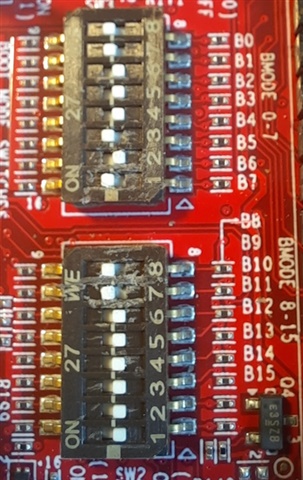
    What are your boot switch settings?

    Which ethernet port are you using on the SK AM64B EVM?

    https://software-dl.ti.com/processor-sdk-linux/esd/AM64X/09_02_01_10/exports/docs/linux/Foundational_Components/U-Boot/UG-Network-K3.html 

    Can you do a Wireshark capture on the host PC ethernet port to see what shows up when the error message shows up?

    -Daolin

  • Hi Daolin,

    What SDK version are you using?

    09.02.01.10

    Have you built the U-boot binaries (tiboot3.bin, tispl.bin, u-boot.img) without errors? 

    Yes

    What are your boot switch settings?

    Primary Bootmode = Ethernet (0100)

    Primary Boot Media = (111)

    Backup Bootmode = None (000)

    Which ethernet port are you using on the SK AM64B EVM?

    RJ45 Connector 2, the BOOTP protocoll wouldn't work otherwise.

    Can you do a Wireshark capture on the host PC ethernet port to see what shows up when the error message shows up?

    I will make a capture (I didn't save the last one) und upload it. It showed the BOOTP Pakets from and to the device and then TFTP transfering the tiboot3.img file.

    Best regards,
    Joachim

  • How can I upload the .pcapng file from wireshark? When I drag it into the edit window it uploads and then it vanishes.

  • Hi Joachim,

    Thanks for sharing the above details.

    I currently only have an SK-AM64 GP EVM instead of SK-AM64B. I was able to test on SK-AM64 GP EVM and also found only tiboot3.bin was transferred by looking at my Wireshark capture; however, I did not get an output on the console. The main difference between SK-AM64 GP and SK-AM64B is a different tiboot3.bin. Since both your results and my test results show that tiboot3.bin was transferred, I think there might be something wrong with either the tispl.bin binary and/or perhaps the PHY is not being found. 

    I'll raise a bug report on this, but a fix would be on an upcoming SDK 10.x

    -Daolin

  • Hi Joachim,

    Not sure if this issue is still present on your setup. But I was able to replicate the same issue that you saw on SDK 09.02.01.10. However, with the most recently released SDK 10.00.07.04, by adding the following to the am64x_evm_r5_defconfig, you should be able to get Ethernet boot working.

    diff --git a/configs/am64x_evm_r5_defconfig b/configs/am64x_evm_r5_defconfig
    index 7a20a0e6..c25681f1 100644
    --- a/configs/am64x_evm_r5_defconfig
    +++ b/configs/am64x_evm_r5_defconfig
    @@ -217,3 +217,4 @@ CONFIG_SYS_MAX_NAND_DEVICE=1
     # CONFIG_SPL_NAND_AM33XX_BCH is not set
     CONFIG_SYS_NAND_U_BOOT_LOCATIONS=y
     CONFIG_SYS_NAND_U_BOOT_OFFS=0x200000
    +CONFIG_NET_RANDOM_ETHADDR=y
    

    U-Boot SPL 2024.04-dirty (Aug 30 2024 - 14:33:05 -0500)
    Resetting on cold boot to workaround ErrataID:i2331
    Please resend tiboot3.bin in case of UART/DFU boot
    resetting ...
    
    U-Boot SPL 2024.04-dirty (Aug 30 2024 - 14:33:05 -0500)
    SYSFW ABI: 4.0 (firmware rev 0x000a '10.0.8--v10.00.08 (Fiery Fox)')
    EEPROM not available at 0x50, trying to read at 0x51
    SPL initial stack usage: 13392 bytes
    Trying to boot from eth device
    Loading Environment from MMC... MMC Device 0 not found
    *** Warning - No MMC card found, using default environment
    
    
    Warning: ethernet@8000000port@2 (eth1) using random MAC address - 62:fc:9e:e8:46:7a
    eth1: ethernet@8000000port@2
    ethernet@8000000port@2 Waiting for PHY auto negotiation to complete....... done
    link up on port 2, speed 1000, full duplex
    BOOTP broadcast 1
    BOOTP broadcast 2
    BOOTP broadcast 3
    DHCP client bound to address 172.168.1.92 (1263 ms)
    Using ethernet@8000000port@2 device
    TFTP from server 172.168.1.1; our IP address is 172.168.1.92
    Filename 'tispl-am64x.bin'.
    Load address: 0x82000000
    Loading: #################################################################
             #################################################################
             #################################################################
             #####  0 Bytes
             3.1 MiB/s
    done
    Bytes transferred = 1023695 (f9ecf hex)
    Authentication passed
    Authentication passed
    Loading Environment from MMC... MMC Device 0 not found
    *** Warning - No MMC card found, using default environment
    
    init_env from device 4 not supported!
    Authentication passed
    Authentication passed
    Starting ATF on ARM64 core...
    
    NOTICE:  BL31: v2.10.0(release):v2.10.0-367-g00f1ec6b87-dirty
    NOTICE:  BL31: Built : 16:09:05, Feb  9 2024
    I/TC: 
    I/TC: OP-TEE version: 4.2.0-dev (gcc version 13.3.0 (GCC)) #1 Fri Apr 12 09:51:21 UTC 2024 aarch64
    I/TC: WARNING: This OP-TEE configuration might be insecure!
    I/TC: WARNING: Please check https://optee.readthedocs.io/en/latest/architecture/porting_guidelines.html
    I/TC: Primary CPU initializing
    I/TC: GIC redistributor base address not provided
    I/TC: Assuming default GIC group status and modifier
    I/TC: SYSFW ABI: 4.0 (firmware rev 0x000a '10.0.8--v10.00.08 (Fiery Fox)')
    I/TC: HUK Initialized
    I/TC: Activated SA2UL device
    I/TC: Enabled firewalls for SA2UL TRNG device
    I/TC: SA2UL TRNG initialized
    I/TC: SA2UL Drivers initialized
    I/TC: Primary CPU switching to normal world boot
    
    U-Boot SPL 2024.04-dirty (Aug 30 2024 - 14:33:21 -0500)
    SYSFW ABI: 4.0 (firmware rev 0x000a '10.0.8--v10.00.08 (Fiery Fox)')
    Trying to boot from eth device
    Loading Environment from nowhere... OK
    
    Warning: ethernet@8000000port@2 (eth1) using random MAC address - fe:29:1f:f1:73:6e
    eth1: ethernet@8000000port@2
    ethernet@8000000port@2 Waiting for PHY auto negotiation to complete....... done
    link up on port 2, speed 1000, full duplex
    BOOTP broadcast 1
    BOOTP broadcast 2
    BOOTP broadcast 3
    DHCP client bound to address 172.168.1.93 (1037 ms)
    Using ethernet@8000000port@2 device
    TFTP from server 172.168.1.1; our IP address is 172.168.1.93
    Filename 'u-boot-am64x.img'.
    Load address: 0x82000000
    Loading: #################################################################
             #################################################################
             #################################################################
             #################################################################
             ######  0 Bytes
             810.5 KiB/s
    done
    Bytes transferred = 1359207 (14bd67 hex)
    Authentication passed
    Authentication passed
    
    
    U-Boot 2024.04-dirty (Aug 30 2024 - 14:33:21 -0500)
    
    SoC:   AM64X SR2.0 HS-FS
    Model: Texas Instruments AM642 SK
    Board: AM64B-SKEVM rev A
    DRAM:  2 GiB
    Core:  89 devices, 31 uclasses, devicetree: separate
    NAND:  0 MiB
    MMC:   mmc@fa00000: 1
    Loading Environment from nowhere... OK
    In:    serial@2800000
    Out:   serial@2800000
    Err:   serial@2800000
    Failed to probe prueth driver
    Net:   eth0: ethernet@8000000port@1, eth1: ethernet@8000000port@2
    Hit any key to stop autoboot:  0 
    

    Without the additional CONFIG_NET_RANDOM_ETHADDR, the following issue will show up

    U-Boot SPL 2024.04 (Aug 30 2024 - 14:06:37 -0500)
    SYSFW ABI: 4.0 (firmware rev 0x000a '10.0.8--v10.00.08 (Fiery Fox)')
    EEPROM not available at 0x50, trying to read at 0x51
    SPL initial stack usage: 13392 bytes
    Trying to boot from eth device
    Loading Environment from MMC... MMC Device 0 not found
    *** Warning - No MMC card found, using default environment
    
    
    Error: ethernet@8000000port@2 No valid MAC address found.
    No ethernet found.
    
    No Ethernet devices found
    SPL: failed to boot from all boot devices
    ### ERROR ### Please RESET the board ###

    -Daolin

  • Hi Daolin,

    I will give that a try.

    My current guess is that the SPL is always build for EVM even if you set the platform to SK EVM and thus uses the wrong device tree / defconfig.

    See Rules.make lines 61 ff.

    Joachim

  • Hi Joachim,

    >>>However, with the most recently released SDK 10.00.07.04, by adding the following to the am64x_evm_r5_defconfig, you should be able to get Ethernet boot working.

    Any progress on testing this out?

    >>>My current guess is that the SPL is always build for EVM even if you set the platform to SK EVM and thus uses the wrong device tree / defconfig.

    I believe that the defconfig file for the AM64x EVM and SK-AM64x should be shared/the same between the two. Have you tried changing the device tree specified in Rules.make to the sk dts and see if that changed anything?

    -Daolin

  • Hi Daolin,

    I was a little distracted by a second project but will resume this one in about two weeks. I will report the result here.

    Joachim

  • Hi Joachim,

    No problem, thanks for the update

    -Daolin

  • Hello everybody,

    I am facing the same problem as Joachim.
    I installed SDK v10.00.07.04 and after editing am64x_evm_r5_defconfig adding CONFIG_NET_RANDOM_ETHADDR=y, I was finally able to get into U-Boot.
    Anyway the dtb/Linux loading process keeps on failing. Here's the log I get:

    U-Boot SPL 2024.04-dirty (Sep 30 2024 - 11:51:07 +0200)
    Resetting on cold boot to workaround ErrataID:i2331
    Please resend tiboot3.bin in case of UART/DFU boot
    resetting ...
    
    U-Boot SPL 2024.04-dirty (Sep 30 2024 - 11:51:07 +0200)
    SYSFW ABI: 4.0 (firmware rev 0x000a '10.0.8--v10.00.08 (Fiery Fox)')
    EEPROM not available at 0x50, trying to read at 0x51
    SPL initial stack usage: 13392 bytes
    Trying to boot from eth device
    Loading Environment from MMC... MMC Device 0 not found
    *** Warning - No MMC card found, using default environment
    
    
    Warning: ethernet@8000000port@2 (eth1) using random MAC address - c6:15:3d:fa:45:0b
    eth1: ethernet@8000000port@2
    ethernet@8000000port@2 Waiting for PHY auto negotiation to complete.... done
    link up on port 2, speed 100, full duplex
    BOOTP broadcast 1
    BOOTP broadcast 2
    BOOTP broadcast 3
    DHCP client bound to address 192.168.2.44 (1020 ms)
    Using ethernet@8000000port@2 device
    TFTP from server 192.168.2.1; our IP address is 192.168.2.44
    Filename 'tispl.bin'.
    Load address: 0x82000000
    Loading: #################################################################
             #################################################################
             #################################################################
             #####  0 Bytes
             720.7 KiB/s
    done
    Bytes transferred = 1023695 (f9ecf hex)
    Authentication passed
    Authentication passed
    Loading Environment from MMC... MMC Device 0 not found
    *** Warning - No MMC card found, using default environment
    
    init_env from device 4 not supported!
    Authentication passed
    Authentication passed
    Starting ATF on ARM64 core...
    
    NOTICE:  BL31: v2.10.0(release):v2.10.0-367-g00f1ec6b87-dirty
    NOTICE:  BL31: Built : 16:09:05, Feb  9 2024
    I/TC:
    I/TC: OP-TEE version: 4.2.0-dev (gcc version 13.3.0 (GCC)) #1 Fri Apr 12 09:51:21 UTC 2024 aarch64
    I/TC: WARNING: This OP-TEE configuration might be insecure!
    I/TC: WARNING: Please check https://optee.readthedocs.io/en/latest/architecture/porting_guidelines.html
    I/TC: Primary CPU initializing
    I/TC: GIC redistributor base address not provided
    I/TC: Assuming default GIC group status and modifier
    I/TC: SYSFW ABI: 4.0 (firmware rev 0x000a '10.0.8--v10.00.08 (Fiery Fox)')
    I/TC: HUK Initialized
    I/TC: Activated SA2UL device
    I/TC: Enabled firewalls for SA2UL TRNG device
    I/TC: SA2UL TRNG initialized
    I/TC: SA2UL Drivers initialized
    I/TC: Primary CPU switching to normal world boot
    
    U-Boot SPL 2024.04-dirty (Sep 30 2024 - 11:53:12 +0200)
    SYSFW ABI: 4.0 (firmware rev 0x000a '10.0.8--v10.00.08 (Fiery Fox)')
    Trying to boot from eth device
    Loading Environment from nowhere... OK
    
    Warning: ethernet@8000000port@2 (eth1) using random MAC address - 6a:90:70:32:75:38
    eth1: ethernet@8000000port@2
    ethernet@8000000port@2 Waiting for PHY auto negotiation to complete... done
    link up on port 2, speed 100, full duplex
    BOOTP broadcast 1
    BOOTP broadcast 2
    BOOTP broadcast 3
    DHCP client bound to address 192.168.2.45 (1093 ms)
    Using ethernet@8000000port@2 device
    TFTP from server 192.168.2.1; our IP address is 192.168.2.45
    Filename 'u-boot.img'.
    Load address: 0x82000000
    Loading: #################################################################
             #################################################################
             #################################################################
             #################################################################
             ######  0 Bytes
             394.5 KiB/s
    done
    Bytes transferred = 1359207 (14bd67 hex)
    Authentication passed
    Authentication passed
    
    
    U-Boot 2024.04-dirty (Sep 30 2024 - 11:53:12 +0200)
    
    SoC:   AM64X SR2.0 HS-FS
    Model: Texas Instruments AM642 SK
    Board: AM64B-SKEVM rev A
    DRAM:  2 GiB
    Core:  89 devices, 31 uclasses, devicetree: separate
    NAND:  0 MiB
    MMC:   mmc@fa00000: 1
    Loading Environment from nowhere... OK
    In:    serial@2800000
    Out:   serial@2800000
    Err:   serial@2800000
    Failed to probe prueth driver
    Net:   eth0: ethernet@8000000port@1, eth1: ethernet@8000000port@2
    Hit any key to stop autoboot:  0
    MMC: no card present
    MMC: no card present
    ** Bad device specification mmc 1 **
    MMC: no card present
    ** Bad device specification mmc 1 **
    Couldn't find partition mmc 1:2
    Can't set block device
    MMC: no card present
    ** Bad device specification mmc 1 **
    Couldn't find partition mmc 1:2
    Can't set block device
    libfdt fdt_check_header(): FDT_ERR_BADMAGIC
    No FDT memory address configured. Please configure
    the FDT address via "fdt addr <address>" command.
    Aborting!
    Bad Linux ARM64 Image magic!
    Scanning for bootflows in all bootdevs
    Seq  Method       State   Uclass    Part  Name                      Filename
    ---  -----------  ------  --------  ----  ------------------------  ----------------
    Scanning global bootmeth 'efi_mgr':
    MMC: no card present
    No EFI system partition
    No EFI system partition
    Failed to persist EFI variables
    Scanning bootdev 'mmc@fa00000.bootdev':
    MMC: no card present
    MMC: no card present
    MMC: no card present
    MMC: no card present
    No bootdevs for 'mmc0'
    Bus usb@f400000: Register 2000840 NbrPorts 2
    Starting the controller
    USB XHCI 1.00
    scanning bus usb@f400000 for devices... 1 USB Device(s) found
    ethernet@8000000port@1 Waiting for PHY auto negotiation to complete......... TIMEOUT !
    am65_cpsw_nuss_port ethernet@8000000port@1: phy_startup failed
    am65_cpsw_nuss_port ethernet@8000000port@1: am65_cpsw_start end error
    link up on port 2, speed 100, full duplex
    BOOTP broadcast 1
    BOOTP broadcast 2
    BOOTP broadcast 3
    DHCP client bound to address 192.168.2.37 (1004 ms)
    Scanning bootdev 'port@1.bootdev':
    missing environment variable: pxeuuid
    Retrieving file: pxelinux.cfg/01-70-ff-76-1f-43-a4
    link up on port 2, speed 100, full duplex
    Using ethernet@8000000port@2 device
    TFTP from server 192.168.2.1; our IP address is 192.168.2.37
    Filename 'pxelinux.cfg/01-70-ff-76-1f-43-a4'.
    Load address: 0x80100000
    Loading: *
    TFTP error: 'File not found' (1)
    Not retrying...
    am65_cpsw_nuss_port ethernet@8000000port@2: RX dma free_pkt failed -22
    Retrieving file: pxelinux.cfg/C0A80225
    link up on port 2, speed 100, full duplex
    Using ethernet@8000000port@2 device
    TFTP from server 192.168.2.1; our IP address is 192.168.2.37
    Filename 'pxelinux.cfg/C0A80225'.
    Load address: 0x80100000
    Loading: *
    TFTP error: 'File not found' (1)
    Not retrying...
    am65_cpsw_nuss_port ethernet@8000000port@2: RX dma free_pkt failed -22
    Retrieving file: pxelinux.cfg/C0A8022
    link up on port 2, speed 100, full duplex
    Using ethernet@8000000port@2 device
    TFTP from server 192.168.2.1; our IP address is 192.168.2.37
    Filename 'pxelinux.cfg/C0A8022'.
    Load address: 0x80100000
    Loading: *
    TFTP error: 'File not found' (1)
    Not retrying...
    am65_cpsw_nuss_port ethernet@8000000port@2: RX dma free_pkt failed -22
    Retrieving file: pxelinux.cfg/C0A802
    link up on port 2, speed 100, full duplex
    Using ethernet@8000000port@2 device
    TFTP from server 192.168.2.1; our IP address is 192.168.2.37
    Filename 'pxelinux.cfg/C0A802'.
    Load address: 0x80100000
    Loading: *
    TFTP error: 'File not found' (1)
    Not retrying...
    am65_cpsw_nuss_port ethernet@8000000port@2: RX dma free_pkt failed -22
    Retrieving file: pxelinux.cfg/C0A80
    link up on port 2, speed 100, full duplex
    Using ethernet@8000000port@2 device
    TFTP from server 192.168.2.1; our IP address is 192.168.2.37
    Filename 'pxelinux.cfg/C0A80'.
    Load address: 0x80100000
    Loading: *
    TFTP error: 'File not found' (1)
    Not retrying...
    am65_cpsw_nuss_port ethernet@8000000port@2: RX dma free_pkt failed -22
    Retrieving file: pxelinux.cfg/C0A8
    link up on port 2, speed 100, full duplex
    Using ethernet@8000000port@2 device
    TFTP from server 192.168.2.1; our IP address is 192.168.2.37
    Filename 'pxelinux.cfg/C0A8'.
    Load address: 0x80100000
    Loading: *
    TFTP error: 'File not found' (1)
    Not retrying...
    am65_cpsw_nuss_port ethernet@8000000port@2: RX dma free_pkt failed -22
    Retrieving file: pxelinux.cfg/C0A
    link up on port 2, speed 100, full duplex
    Using ethernet@8000000port@2 device
    TFTP from server 192.168.2.1; our IP address is 192.168.2.37
    Filename 'pxelinux.cfg/C0A'.
    Load address: 0x80100000
    Loading: *
    TFTP error: 'File not found' (1)
    Not retrying...
    am65_cpsw_nuss_port ethernet@8000000port@2: RX dma free_pkt failed -22
    Retrieving file: pxelinux.cfg/C0
    link up on port 2, speed 100, full duplex
    Using ethernet@8000000port@2 device
    TFTP from server 192.168.2.1; our IP address is 192.168.2.37
    Filename 'pxelinux.cfg/C0'.
    Load address: 0x80100000
    Loading: *
    TFTP error: 'File not found' (1)
    Not retrying...
    am65_cpsw_nuss_port ethernet@8000000port@2: RX dma free_pkt failed -22
    Retrieving file: pxelinux.cfg/C
    link up on port 2, speed 100, full duplex
    Using ethernet@8000000port@2 device
    TFTP from server 192.168.2.1; our IP address is 192.168.2.37
    Filename 'pxelinux.cfg/C'.
    Load address: 0x80100000
    Loading: *
    TFTP error: 'File not found' (1)
    Not retrying...
    am65_cpsw_nuss_port ethernet@8000000port@2: RX dma free_pkt failed -22
    Retrieving file: pxelinux.cfg/default-arm-k3-am64x
    link up on port 2, speed 100, full duplex
    Using ethernet@8000000port@2 device
    TFTP from server 192.168.2.1; our IP address is 192.168.2.37
    Filename 'pxelinux.cfg/default-arm-k3-am64x'.
    Load address: 0x80100000
    Loading: *
    TFTP error: 'File not found' (1)
    Not retrying...
    am65_cpsw_nuss_port ethernet@8000000port@2: RX dma free_pkt failed -22
    Retrieving file: pxelinux.cfg/default-arm-k3
    link up on port 2, speed 100, full duplex
    Using ethernet@8000000port@2 device
    TFTP from server 192.168.2.1; our IP address is 192.168.2.37
    Filename 'pxelinux.cfg/default-arm-k3'.
    Load address: 0x80100000
    Loading: *
    TFTP error: 'File not found' (1)
    Not retrying...
    am65_cpsw_nuss_port ethernet@8000000port@2: RX dma free_pkt failed -22
    Retrieving file: pxelinux.cfg/default-arm
    link up on port 2, speed 100, full duplex
    Using ethernet@8000000port@2 device
    TFTP from server 192.168.2.1; our IP address is 192.168.2.37
    Filename 'pxelinux.cfg/default-arm'.
    Load address: 0x80100000
    Loading: *
    TFTP error: 'File not found' (1)
    Not retrying...
    am65_cpsw_nuss_port ethernet@8000000port@2: RX dma free_pkt failed -22
    Retrieving file: pxelinux.cfg/default
    link up on port 2, speed 100, full duplex
    Using ethernet@8000000port@2 device
    TFTP from server 192.168.2.1; our IP address is 192.168.2.37
    Filename 'pxelinux.cfg/default'.
    Load address: 0x80100000
    Loading: *
    TFTP error: 'File not found' (1)
    Not retrying...
    am65_cpsw_nuss_port ethernet@8000000port@2: RX dma free_pkt failed -22
    Scanning bootdev 'port@2.bootdev':
    missing environment variable: pxeuuid
    Retrieving file: pxelinux.cfg/01-70-ff-76-1f-43-a4
    link up on port 2, speed 100, full duplex
    Using ethernet@8000000port@2 device
    TFTP from server 192.168.2.1; our IP address is 192.168.2.37
    Filename 'pxelinux.cfg/01-70-ff-76-1f-43-a4'.
    Load address: 0x80100000
    Loading: *
    TFTP error: 'File not found' (1)
    Not retrying...
    am65_cpsw_nuss_port ethernet@8000000port@2: RX dma free_pkt failed -22
    Retrieving file: pxelinux.cfg/C0A80225
    link up on port 2, speed 100, full duplex
    Using ethernet@8000000port@2 device
    TFTP from server 192.168.2.1; our IP address is 192.168.2.37
    Filename 'pxelinux.cfg/C0A80225'.
    Load address: 0x80100000
    Loading: *
    TFTP error: 'File not found' (1)
    Not retrying...
    am65_cpsw_nuss_port ethernet@8000000port@2: RX dma free_pkt failed -22
    Retrieving file: pxelinux.cfg/C0A8022
    link up on port 2, speed 100, full duplex
    Using ethernet@8000000port@2 device
    TFTP from server 192.168.2.1; our IP address is 192.168.2.37
    Filename 'pxelinux.cfg/C0A8022'.
    Load address: 0x80100000
    Loading: *
    TFTP error: 'File not found' (1)
    Not retrying...
    am65_cpsw_nuss_port ethernet@8000000port@2: RX dma free_pkt failed -22
    Retrieving file: pxelinux.cfg/C0A802
    link up on port 2, speed 100, full duplex
    Using ethernet@8000000port@2 device
    TFTP from server 192.168.2.1; our IP address is 192.168.2.37
    Filename 'pxelinux.cfg/C0A802'.
    Load address: 0x80100000
    Loading: *
    TFTP error: 'File not found' (1)
    Not retrying...
    am65_cpsw_nuss_port ethernet@8000000port@2: RX dma free_pkt failed -22
    Retrieving file: pxelinux.cfg/C0A80
    link up on port 2, speed 100, full duplex
    Using ethernet@8000000port@2 device
    TFTP from server 192.168.2.1; our IP address is 192.168.2.37
    Filename 'pxelinux.cfg/C0A80'.
    Load address: 0x80100000
    Loading: *
    TFTP error: 'File not found' (1)
    Not retrying...
    am65_cpsw_nuss_port ethernet@8000000port@2: RX dma free_pkt failed -22
    Retrieving file: pxelinux.cfg/C0A8
    link up on port 2, speed 100, full duplex
    Using ethernet@8000000port@2 device
    TFTP from server 192.168.2.1; our IP address is 192.168.2.37
    Filename 'pxelinux.cfg/C0A8'.
    Load address: 0x80100000
    Loading: *
    TFTP error: 'File not found' (1)
    Not retrying...
    am65_cpsw_nuss_port ethernet@8000000port@2: RX dma free_pkt failed -22
    Retrieving file: pxelinux.cfg/C0A
    link up on port 2, speed 100, full duplex
    Using ethernet@8000000port@2 device
    TFTP from server 192.168.2.1; our IP address is 192.168.2.37
    Filename 'pxelinux.cfg/C0A'.
    Load address: 0x80100000
    Loading: *
    TFTP error: 'File not found' (1)
    Not retrying...
    am65_cpsw_nuss_port ethernet@8000000port@2: RX dma free_pkt failed -22
    Retrieving file: pxelinux.cfg/C0
    link up on port 2, speed 100, full duplex
    Using ethernet@8000000port@2 device
    TFTP from server 192.168.2.1; our IP address is 192.168.2.37
    Filename 'pxelinux.cfg/C0'.
    Load address: 0x80100000
    Loading: *
    TFTP error: 'File not found' (1)
    Not retrying...
    am65_cpsw_nuss_port ethernet@8000000port@2: RX dma free_pkt failed -22
    Retrieving file: pxelinux.cfg/C
    link up on port 2, speed 100, full duplex
    Using ethernet@8000000port@2 device
    TFTP from server 192.168.2.1; our IP address is 192.168.2.37
    Filename 'pxelinux.cfg/C'.
    Load address: 0x80100000
    Loading: *
    TFTP error: 'File not found' (1)
    Not retrying...
    am65_cpsw_nuss_port ethernet@8000000port@2: RX dma free_pkt failed -22
    Retrieving file: pxelinux.cfg/default-arm-k3-am64x
    link up on port 2, speed 100, full duplex
    Using ethernet@8000000port@2 device
    TFTP from server 192.168.2.1; our IP address is 192.168.2.37
    Filename 'pxelinux.cfg/default-arm-k3-am64x'.
    Load address: 0x80100000
    Loading: *
    TFTP error: 'File not found' (1)
    Not retrying...
    am65_cpsw_nuss_port ethernet@8000000port@2: RX dma free_pkt failed -22
    Retrieving file: pxelinux.cfg/default-arm-k3
    link up on port 2, speed 100, full duplex
    Using ethernet@8000000port@2 device
    TFTP from server 192.168.2.1; our IP address is 192.168.2.37
    Filename 'pxelinux.cfg/default-arm-k3'.
    Load address: 0x80100000
    Loading: *
    TFTP error: 'File not found' (1)
    Not retrying...
    am65_cpsw_nuss_port ethernet@8000000port@2: RX dma free_pkt failed -22
    Retrieving file: pxelinux.cfg/default-arm
    link up on port 2, speed 100, full duplex
    Using ethernet@8000000port@2 device
    TFTP from server 192.168.2.1; our IP address is 192.168.2.37
    Filename 'pxelinux.cfg/default-arm'.
    Load address: 0x80100000
    Loading: *
    TFTP error: 'File not found' (1)
    Not retrying...
    am65_cpsw_nuss_port ethernet@8000000port@2: RX dma free_pkt failed -22
    Retrieving file: pxelinux.cfg/default
    link up on port 2, speed 100, full duplex
    Using ethernet@8000000port@2 device
    TFTP from server 192.168.2.1; our IP address is 192.168.2.37
    Filename 'pxelinux.cfg/default'.
    Load address: 0x80100000
    Loading: *
    TFTP error: 'File not found' (1)
    Not retrying...
    am65_cpsw_nuss_port ethernet@8000000port@2: RX dma free_pkt failed -22
    Scanning bootdev 'port@1.bootdev':
    link up on port 2, speed 100, full duplex
    BOOTP broadcast 1
    DHCP client bound to address 192.168.2.37 (4 ms)
    *** Warning: no boot file name; using 'C0A80225.img'
    Using ethernet@8000000port@2 device
    TFTP from server 192.168.2.1; our IP address is 192.168.2.37
    Filename 'C0A80225.img'.
    Load address: 0x82000000
    Loading: *
    TFTP error: 'File not found' (1)
    Not retrying...
    am65_cpsw_nuss_port ethernet@8000000port@2: RX dma free_pkt failed -22
    Scanning bootdev 'port@2.bootdev':
    link up on port 2, speed 100, full duplex
    BOOTP broadcast 1
    DHCP client bound to address 192.168.2.37 (5 ms)
    *** Warning: no boot file name; using 'C0A80225.img'
    Using ethernet@8000000port@2 device
    TFTP from server 192.168.2.1; our IP address is 192.168.2.37
    Filename 'C0A80225.img'.
    Load address: 0x82000000
    Loading: *
    TFTP error: 'File not found' (1)
    Not retrying...
    am65_cpsw_nuss_port ethernet@8000000port@2: RX dma free_pkt failed -22
    No more bootdevs
    ---  -----------  ------  --------  ----  ------------------------  ----------------
    (0 bootflows, 0 valid)
    =>

    How can I make u-boot properly launch Linux?

  • Hi Federico,

    Can you make a separate E2E thread on your specific issue?

    We want to keep each thread isolated to one particular issue for easier searchability/traceability in the future.

    -Daolin