This thread has been locked.

If you have a related question, please click the "Ask a related question" button in the top right corner. The newly created question will be automatically linked to this question.

PROCESSOR-SDK-J784S4: Display Not properly working with Vision Apps and sw-vsync

Part Number: PROCESSOR-SDK-J784S4

Tool/software:

When we run the  j784s4 Evaluation board having image built with Screen bsp, We were able to make display up with default graphics.conf available with build. 
But it was able to run , only an App called gles2-gear. sw-vsync app failed, also, for vision apps, we are not able to see output. 
Do we need to do any additional configuration to make Vision Apps and sw-vsync test app work?

  • Hi,

    Vision_apps uses RTOS driver for Display which runs on the R5 core. 

    I believe you are running screen based display from the A72 core right? Hence vision_apps is not able to stream.

    Could you please disable the display from qnx and allow vision_apps to access the display driver of RTOS?

    Regards,

    Nikhil

  • okay. Understood. You mean Vision Apps does not work with QNX Screen. Does that mean Display Node supported by TIOVX also does not support QNX Screen. I have an application in QNX , that creates a VxImage and Provides it to Displya Node. Would I be able to see it display. Do I need to allow this application to access display driver of RTOS? If so How can this be done? 

  • Hi,

    You mean Vision Apps does not work with QNX Screen

    yes. Screen will be only used for GPU here in OpenGL APIs. It is not used for display

    I have an application in QNX , that creates a VxImage and Provides it to Displya Node. Would I be able to see it display.

    By default, the RTOS driver is enabled for Display. So if you build the SDK as per the steps mentioned in the Vision_Apps userguide, then you can stream the image via display node.

    Vision Apps User Guide: Build and Run (ti.com)

    Regards,

    Nikhil

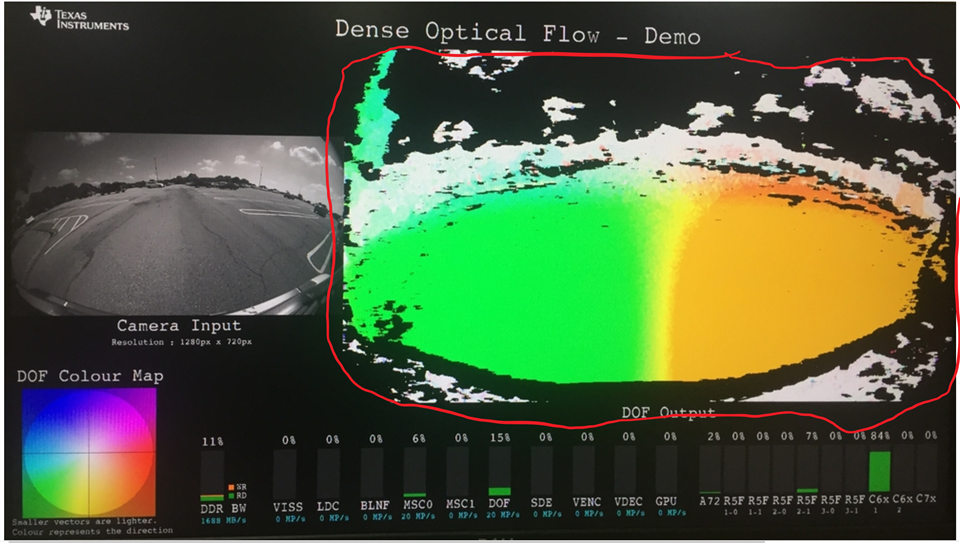
  • 1) We tried running the Vision Apps. We stopped the screen application. Then we did the steps to Run DOF App. 
    We are getting the output, as 
    The red circled portion did not render. 
    Also the Image Classification Application is not rendering anything.


    --------------
    Also, when we were running QNX applications, 
    GLES application worked with screen,(gles2-gears)
    but normal application did not work with screen.(sw-vsync)

    --------------------------
    2) 
    From boot logs I can see that Display is set on R5.  Earlier when booting , I saw in boot logs that screen is running on R5 core. How does it matter from which core, display driver runs? Does Vision Apps and screen have any problem if DSS is enabled for R5 core?


  • So you do all the screen except image marked with read in the above image? then display is working fine. 

    Regards,

    Brijesh


  • 1) So what is the reason for behavior explained in previous query 1)?

    2) Also , what about query 2) in previous question?


  • Hi,

    We tried running the Vision Apps. We stopped the screen application. Then we did the steps to Run DOF App.

    Sorry, I did not get what you meant by "stopped screen application" 

    Which application are you referring to here? 

    Vision Apps User Guide: Build and Run (ti.com)

    Following the steps above, may I know if you are able to run the DL based demos?

    From boot logs I can see that Display is set on R5.  Earlier when booting , I saw in boot logs that screen is running on R5 core. How does it matter from which core, display driver runs?

    Could you share this boot logs on R5 core and let us know what are you seeing here?

    Regards,

    Nikhil

  • Hi Nikhil,


    Which application are you referring to here? 


    What I meant is QNX Screen Application. I stopped it in QNX by giving command 
    # slay screen

    Following the steps above, may I know if you are able to run the DL based demos?

    We tried running Image Classification Application.
    But we were not able to see anything on display.


    Could you share this boot logs on R5 core and let us know what are you seeing here?

    
    U-Boot SPL 2023.04-ti-gf9b966c67473 (Mar 19 2024 - 20:31:40 +0000)
    ti_i2c_eeprom_am6_get: Ignoring record id 255
    ti_i2c_eeprom_am6_get: Ignoring record id 255
    ti_i2c_eeprom_am6_get: Ignoring record id 255
    ti_i2c_eeprom_am6_get: Ignoring record id 255
    ti_i2c_eeprom_am6_get: Ignoring record id 255
    ti_i2c_eeprom_am6_get: Ignoring record id 255
    ti_i2c_eeprom_am6_get: Ignoring record id 255
    ti_i2c_eeprom_am6_get: Ignoring record id 255
    ti_i2c_eeprom_am6_get: Ignoring record id 255
    ti_i2c_eeprom_am6_get: Ignoring record id 255
    SYSFW ABI: 3.1 (firmware rev 0x0009 '9.2.4--v09.02.04 (Kool Koala)')
    SPL initial stack usage: 13456 bytes
    Trying to boot from MMC2
    Warning: Detected image signing certificate on GP device. Skipping certificate to prevent boot failure. This will fail if the image was also encrypted
    Warning: Detected image signing certificate on GP device. Skipping certificate to prevent boot failure. This will fail if the image was also encrypted
    Warning: Detected image signing certificate on GP device. Skipping certificate to prevent boot failure. This will fail if the image was also encrypted
    Warning: Detected image signing certificate on GP device. Skipping certificate to prevent boot failure. This will fail if the image was also encrypted
    Warning: Detected image signing certificate on GP device. Skipping certificate to prevent boot failure. This will fail if the image was also encrypted
    Loading Environment from nowhere... OK
    Starting ATF on ARM64 core...
    
    NOTICE:  BL31: v2.10.0(release):v2.10.0-367-g00f1ec6b87-dirty
    NOTICE:  BL31: Built : 16:09:05, Feb  9 2024
    I/TC:
    I/TC: OP-TEE version: 4.1.0-51-g012cdca49 (gcc version 11.4.0 (GCC)) #1 Tue Jan 30 10:48:03 UTC 2024 aarch64
    I/TC: WARNING: This OP-TEE configuration might be insecure!
    I/TC: WARNING: Please check https://optee.readthedocs.io/en/latest/architecture/porting_guidelines.html
    I/TC: Primary CPU initializing
    I/TC: GIC redistributor base address not provided
    I/TC: Assuming default GIC group status and modifier
    I/TC: SYSFW ABI: 3.1 (firmware rev 0x0009 '9.2.4--v09.02.04 (Kool Koala)')
    I/TC: HUK Initialized
    I/TC: Activated SA2UL device
    I/TC: Fixing SA2UL firewall owner for GP device
    I/TC: Enabled firewalls for SA2UL TRNG device
    I/TC: SA2UL TRNG initialized
    I/TC: SA2UL Drivers initialized
    I/TC: Primary CPU switching to normal world boot
    
    U-Boot SPL 2023.04-ti-gf9b966c67473 (Mar 19 2024 - 20:31:40 +0000)
    SYSFW ABI: 3.1 (firmware rev 0x0009 '9.2.4--v09.02.04 (Kool Koala)')
    Trying to boot from MMC2
    Warning: Detected image signing certificate on GP device. Skipping certificate to prevent boot failure. This will fail if the image was also encrypted
    Warning: Detected image signing certificate on GP device. Skipping certificate to prevent boot failure. This will fail if the image was also encrypted
    
    
    U-Boot 2023.04-ti-gf9b966c67473 (Mar 19 2024 - 20:31:40 +0000)
    
    SoC:   J784S4 SR1.0 GP
    Model: Texas Instruments J784S4 EVM
    Board: J784S4X-EVM rev E4
    DRAM:  2 GiB (effective 32 GiB)
    idle-statesCore:  91 devices, 33 uclasses, devicetree: separate
    Flash: spi_nand nand@0: Winbond SPI NAND was found.
    spi_nand nand@0: 128 MiB, block size: 256 KiB, page size: 4096, OOB size: 128
    0 Bytes
    MMC:   mmc@4f80000: 0, mmc@4fb0000: 1
    Loading Environment from nowhere... OK
    In:    serial@2880000
    Out:   serial@2880000
    Err:   serial@2880000
    am65_cpsw_nuss ethernet@46000000: K3 CPSW: nuss_ver: 0x6BA02102 cpsw_ver: 0x6BA82102 ale_ver: 0x00293904 Ports:1 mdio_freq:1000000
    Net:   eth0: ethernet@46000000port@1
    Hit any key to stop autoboot:  0
    switch to partitions #0, OK
    mmc1 is current device
    SD/MMC found on device 1
    Failed to load 'boot.scr'
    556 bytes read in 26 ms (20.5 KiB/s)
    Loaded env from uEnv.txt
    Importing environment from mmc1 ...
    Running uenvcmd ...
    gpio: pin gpio@22_17 (gpio 188) value is 1
    gpio: pin gpio@22_16 (gpio 187) value is 0
    k3_r5f_rproc r5f@41000000: Core 1 is already in use. No rproc commands work
    Failed to load '/lib/firmware/j784s4-mcu-r5f0_1-fw'
    1596936 bytes read in 43 ms (35.4 MiB/s)
    Load Remote Processor 2 with data@addr=0x82000000 1596936 bytes: Success!
    322740 bytes read in 31 ms (9.9 MiB/s)
    Load Remote Processor 3 with data@addr=0x82000000 322740 bytes: Success!
    142496 bytes read in 28 ms (4.9 MiB/s)
    Load Remote Processor 4 with data@addr=0x82000000 142496 bytes: Success!
    142496 bytes read in 28 ms (4.9 MiB/s)
    Load Remote Processor 5 with data@addr=0x82000000 142496 bytes: Success!
    478396 bytes read in 32 ms (14.3 MiB/s)
    Load Remote Processor 6 with data@addr=0x82000000 478396 bytes: Success!
    142496 bytes read in 29 ms (4.7 MiB/s)
    Load Remote Processor 7 with data@addr=0x82000000 142496 bytes: Success!
    15470864 bytes read in 106 ms (139.2 MiB/s)
    Load Remote Processor 8 with data@addr=0x82000000 15470864 bytes: Success!
    15864024 bytes read in 109 ms (138.8 MiB/s)
    Load Remote Processor 9 with data@addr=0x82000000 15864024 bytes: Success!
    15475016 bytes read in 105 ms (140.6 MiB/s)
    Load Remote Processor 10 with data@addr=0x82000000 15475016 bytes: Success!
    15475016 bytes read in 105 ms (140.6 MiB/s)
    Load Remote Processor 11 with data@addr=0x82000000 15475016 bytes: Success!
    8902800 bytes read in 128 ms (66.3 MiB/s)
    ## Starting application at 0x80080000 ...
    MMU: 16-bit ASID 44-bit PA TCR_EL1=b5183519
    ARM GIC-500 r1p1, arch v3.0 detected
    gic_v3_lpi_add_entry for vectors 8192 -> 8447, Ok
    gic_v3_lpi_add_entry for vectors 8448 -> 65535, Ok
    No SPI intrinfo. Add default entry for 32 -> 991 vectors, Ok
    LPI config table #1 @ 000000008000f000, callout vaddr: ffffff8040311000
    aarch64_cpuspeed: core speed 2000
    cpu0: MPIDR=80000000
    cpu0: MIDR=411fd080 Cortex-A72 r1p0
    cpu0: CWG=4 ERG=4 Dminline=4 Iminline=4 PIPT
    cpu0: CLIDR=a200023 LoUU=1 LoC=2 LoUIS=1
    cpu0: L1 Icache 48K linesz=64 set/way=256/3
    cpu0: L1 Dcache 32K linesz=64 set/way=256/2
    cpu0: L2 Unified 2048K linesz=64 set/way=2048/16
    Enabling ITS 0
    ITS queue at 0000000080020000, num slots: 256
    Issue MAPC/SYNC/INVALL commands for ICID 0
    update CWRITER to 0x00000060
    Waiting for all commands to be processed ... Done in 1 tries
    Enable LPIs in GICR_CTLR @ 0000000001900000 for CPU0
    Display set to R5
    Skipping configuration of cpsw2g and cpsw9g & serdes
    Total Available L3 cache (MSMC SRAM): 1048576 bytes
    Loading IFS...decompressing...done
    I/TC: Secondary CPU 1 initializing
    I/TC: Secondary CPU 1 switching to normal world boot
    aarch64_cpuspeed: core speed 2000
    cpu1: MPIDR=80000001
    cpu1: MIDR=411fd080 Cortex-A72 r1p0
    cpu1: CWG=4 ERG=4 Dminline=4 Iminline=4 PIPT
    cpu1: CLIDR=a200023 LoUU=1 LoC=2 LoUIS=1
    cpu1: L1 Icache 48K linesz=64 set/way=256/3
    cpu1: L1 Dcache 32K linesz=64 set/way=256/2
    cpu1: L2 Unified 2048K linesz=64 set/way=2048/16
    ITS 0 already Enabled
    ITS queue at 0000000080020000, num slots: 256
    Issue MAPC/SYNC/INVALL commands for ICID 1
    update CWRITER to 0x000000c0
    Waiting for all commands to be processed ... Done in 1 tries
    Enable LPIs in GICR_CTLR @ 0000000001920000 for CPU1
    I/TC: Secondary CPU 2 initializing
    I/TC: Secondary CPU 2 switching to normal world boot
    aarch64_cpuspeed: core speed 2000
    cpu2: MPIDR=80000002
    cpu2: MIDR=411fd080 Cortex-A72 r1p0
    cpu2: CWG=4 ERG=4 Dminline=4 Iminline=4 PIPT
    cpu2: CLIDR=a200023 LoUU=1 LoC=2 LoUIS=1
    cpu2: L1 Icache 48K linesz=64 set/way=256/3
    cpu2: L1 Dcache 32K linesz=64 set/way=256/2
    cpu2: L2 Unified 2048K linesz=64 set/way=2048/16
    ITS 0 already Enabled
    ITS queue at 0000000080020000, num slots: 256
    Issue MAPC/SYNC/INVALL commands for ICID 2
    update CWRITER to 0x00000120
    Waiting for all commands to be processed ... Done in 1 tries
    Enable LPIs in GICR_CTLR @ 0000000001940000 for CPU2
    I/TC: Secondary CPU 3 initializing
    I/TC: Secondary CPU 3 switching to normal world boot
    aarch64_cpuspeed: core speed 2000
    cpu3: MPIDR=80000003
    cpu3: MIDR=411fd080 Cortex-A72 r1p0
    cpu3: CWG=4 ERG=4 Dminline=4 Iminline=4 PIPT
    cpu3: CLIDR=a200023 LoUU=1 LoC=2 LoUIS=1
    cpu3: L1 Icache 48K linesz=64 set/way=256/3
    cpu3: L1 Dcache 32K linesz=64 set/way=256/2
    cpu3: L2 Unified 2048K linesz=64 set/way=2048/16
    ITS 0 already Enabled
    ITS queue at 0000000080020000, num slots: 256
    Issue MAPC/SYNC/INVALL commands for ICID 3
    update CWRITER to 0x00000180
    Waiting for all commands to be processed ... Done in 1 tries
    Enable LPIs in GICR_CTLR @ 0000000001960000 for CPU3
    I/TC: Secondary CPU 4 initializing
    I/TC: Secondary CPU 4 switching to normal world boot
    aarch64_cpuspeed: core speed 2000
    cpu4: MPIDR=80000100
    cpu4: MIDR=411fd080 Cortex-A72 r1p0
    cpu4: CWG=4 ERG=4 Dminline=4 Iminline=4 PIPT
    cpu4: CLIDR=a200023 LoUU=1 LoC=2 LoUIS=1
    cpu4: L1 Icache 48K linesz=64 set/way=256/3
    cpu4: L1 Dcache 32K linesz=64 set/way=256/2
    cpu4: L2 Unified 2048K linesz=64 set/way=2048/16
    ITS 0 already Enabled
    ITS queue at 0000000080020000, num slots: 256
    Issue MAPC/SYNC/INVALL commands for ICID 4
    update CWRITER to 0x000001e0
    Waiting for all commands to be processed ... Done in 1 tries
    Enable LPIs in GICR_CTLR @ 0000000001980000 for CPU4
    I/TC: Secondary CPU 5 initializing
    I/TC: Secondary CPU 5 switching to normal world boot
    aarch64_cpuspeed: core speed 2000
    cpu5: MPIDR=80000101
    cpu5: MIDR=411fd080 Cortex-A72 r1p0
    cpu5: CWG=4 ERG=4 Dminline=4 Iminline=4 PIPT
    cpu5: CLIDR=a200023 LoUU=1 LoC=2 LoUIS=1
    cpu5: L1 Icache 48K linesz=64 set/way=256/3
    cpu5: L1 Dcache 32K linesz=64 set/way=256/2
    cpu5: L2 Unified 2048K linesz=64 set/way=2048/16
    ITS 0 already Enabled
    ITS queue at 0000000080020000, num slots: 256
    Issue MAPC/SYNC/INVALL commands for ICID 5
    update CWRITER to 0x00000240
    Waiting for all commands to be processed ... Done in 1 tries
    Enable LPIs in GICR_CTLR @ 00000000019a0000 for CPU5
    I/TC: Secondary CPU 6 initializing
    I/TC: Secondary CPU 6 switching to normal world boot
    aarch64_cpuspeed: core speed 2000
    cpu6: MPIDR=80000102
    cpu6: MIDR=411fd080 Cortex-A72 r1p0
    cpu6: CWG=4 ERG=4 Dminline=4 Iminline=4 PIPT
    cpu6: CLIDR=a200023 LoUU=1 LoC=2 LoUIS=1
    cpu6: L1 Icache 48K linesz=64 set/way=256/3
    cpu6: L1 Dcache 32K linesz=64 set/way=256/2
    cpu6: L2 Unified 2048K linesz=64 set/way=2048/16
    ITS 0 already Enabled
    ITS queue at 0000000080020000, num slots: 256
    Issue MAPC/SYNC/INVALL commands for ICID 6
    update CWRITER to 0x000002a0
    Waiting for all commands to be processed ... Done in 1 tries
    Enable LPIs in GICR_CTLR @ 00000000019c0000 for CPU6
    I/TC: Secondary CPU 7 initializing
    I/TC: Secondary CPU 7 switching to normal world boot
    aarch64_cpuspeed: core speed 2000
    cpu7: MPIDR=80000103
    cpu7: MIDR=411fd080 Cortex-A72 r1p0
    cpu7: CWG=4 ERG=4 Dminline=4 Iminline=4 PIPT
    cpu7: CLIDR=a200023 LoUU=1 LoC=2 LoUIS=1
    cpu7: L1 Icache 48K linesz=64 set/way=256/3
    cpu7: L1 Dcache 32K linesz=64 set/way=256/2
    cpu7: L2 Unified 2048K linesz=64 set/way=2048/16
    ITS 0 already Enabled
    ITS queue at 0000000080020000, num slots: 256
    Issue MAPC/SYNC/INVALL commands for ICID 7
    update CWRITER to 0x00000300
    Waiting for all commands to be processed ... Done in 1 tries
    Enable LPIs in GICR_CTLR @ 00000000019e0000 for CPU7
    
    System page at phys:0000000080023000 user:ffffff8040335000 kern:ffffff8040332000
    Starting next program at vffffff8060087300
    All ClockCycles offsets within tolerance
    Welcome to QNX Neutrino 7.1.0 on the TI J784S4 EVM Board!!
    Starting random service ...
    start serial driver
    Setting OS clock from RTC
    Starting MMC/SD memory card driver... eMMC
    Starting MMC/SD memory card driver... SD
    Path=0 - am65x
     target=0 lun=0     Direct-Access(0) - SDMMC: G1M15L Rev: 1.0
    Starting XHCI driver
    Setting environment variables...
    done..
    Mounting the sd ..
    Looking for user script to run: /ti_fs/scripts/user.sh
    Running user script...
    user.sh called...
    Setting additional environment variables...
    Starting tisci-mgr..
    Initializing sciclient in interupt mode
    Starting shmemallocator..
    Starting tiipc-mgr..
    Starting tiudma-mgr..
    Starting ti-vpu-codec-mgr
    Starting VPU Codec resource manager...
    Resource Manager loop starting
    Start screen..
    screen started with dss_on_r5 configuration..
    Starting sshd
    Starting Flash driver...
    done...
    J784S4-EVM@QNX:/# (devf  t1::f3s_flash_probe:277) Unable to properly identify any flash devices


    you can check the below lines in the attached log above.
    Display set to R5

    screen started with dss_on_r5 configuration..

  • Hi,

    Could you please share the remote core logs too? 

    You can run the script ./vision_apps_init.sh  after login.

    Regards,

    Nikhil