This thread has been locked.

If you have a related question, please click the "Ask a related question" button in the top right corner. The newly created question will be automatically linked to this question.

PROCESSOR-SDK-AM437X: PROCESSOR-SDK-AM437X HS

Part Number: PROCESSOR-SDK-AM437X
Other Parts Discussed in Thread: XAM437XBZDN80S

Tool/software:

Hi Team,

I have AM437x hs evm. And I am not able to boot up the board using sd card . 

I have downloaded and set up the sdk  - :processor-sdk-linux-am437x-hs-evm-bin-06.03.00.106 .  I have used createsdcard.sh script to flash the sd card. 

When I power up the board nothing displaying. Can you please help for the same ?

Regards,

Prashant

  • Can we check and share the AM437x HS SoC P/N on the board?
    Best,
    -Hong

  • Hello Hong,

    On the eval kit mentioned - AM437x HS EVM 

                                                4P0049

    On the back side there is tag - barcode - 18164P490034

                                                   REV 1.5C

  • Let's have AM437x SoC P/N or marking on top of AM437x SoC.
    Is it AM437xBZDNxxxS? or XAM437XBZDN80S? or something else?
    Best,
    -Hong

  • Hello Hong,

    It is XAM437XBZDN80S 

    Regards,

    Prashant

  • XAM437XBZDN80S is the HS SoC with the TI testing key set were pre-programmed at TI fab, and the TI testing key set are used to sign the binary in AM43xx secure Linux SDK. So the binary under prebuilt-images in AM43x secure Linux SDK would boot on AM43x HS EVM (XAM437XBZDN80S).
    Best,
    -Hong

  • Hello Hong,

    Thank you for the reply.  I have downloaded 

    am437x-hs-evm-linux-sdk-bin-06.03.00.106.tar.xz (xz)2 GB and used create_sd card script to load the image on SD card. But did not able to see anything on the display. 
    Regards,
    Prashant
  • I'm attaching a reference u-boot log from serial terminal on AM437x HS EVM, where I captured the log with the prebuilt binary in AM437x secure Linux SDK 6.3.0.106.
    Best,
    -Hong

    U-Boot SPL 2019.01-g333c3e72d3 (Apr 19 2020 - 03:04:54 +0000)
    Trying to boot from MMC1
    Authentication passed
    Authentication passed
    
    
    U-Boot 2019.01-g333c3e72d3 (Apr 19 2020 - 03:04:54 +0000)
    
    CPU  : AM437X-HS rev 1.2
    Model: TI AM437x GP EVM
    DRAM:  2 GiB
    PMIC:  TPS65218
    NAND:  512 MiB
    MMC:   OMAP SD/MMC: 0
    Loading Environment from FAT... *** Warning - bad CRC, using default environment
    
    Net:   
    Warning: ethernet@4a100000 using MAC address from ROM
    eth0: ethernet@4a100000
    Hit any key to stop autoboot:  2  0 
    => md.l 0x44e10040 1
    44e10040: 00400201

  • Hello Hong ,

    Thank you for the support. Can you share set up guide for boot the evm .or can you please confirm me whether I am trying correctly ?

    1. Created sd card using create_sdcard.sh and  loaded prebuild images for hs evm rfs. 

    2. Connected DB9 to UART cable to pc for boot up log. 

    3. inserted the sd card 

    4. Power up the board and checking on minicom and display. But still no success. 

    Regards,

    Prashant

  • Hi Prashant,
    Your steps looks good.
    What is your SYSBOOT pin setup?
    Refer to below for details on SYSBOOT pins and AM437x EVM setup.
    - AM43xx TRM
    https://www.ti.com/lit/pdf/spruhl7
    <5.2.5.2 SYSBOOT Configuration Pins>
    - AM437x EVM onlinr guide
    https://www.ti.com/tool/TMDSEVM437X
    Best,
    -Hong

  • Hello Hong,

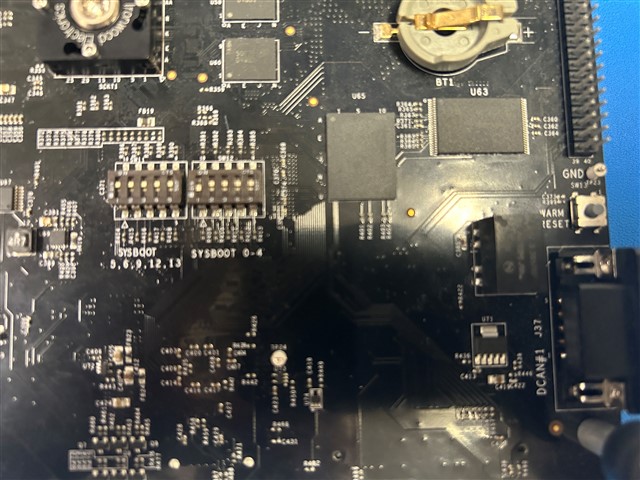
    I have checked the sysboot setting as belo

    To boot an AM437x EVM,
    • SW12: Sets sysboot bits 0 to 4
    • SW11: Sets sysboot bits 5, 6, 9, 12, and 13

    As mentioned in quick guide it is all on. Still could not see any logs on serial port. At least uboot should execute.

    Regards,

    Prashant

  • Hi Prashant,
    I'm using the DIP switch setting as attached for booting from SD on AM437X EVM.


    Best,
    -Hong