This thread has been locked.

If you have a related question, please click the "Ask a related question" button in the top right corner. The newly created question will be automatically linked to this question.

CCSTUDIO: Install CCS failure

Part Number: CCSTUDIO


Tool/software:

Hi TI expert,

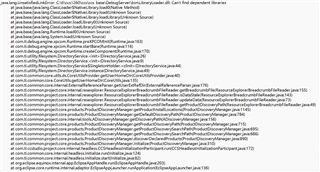
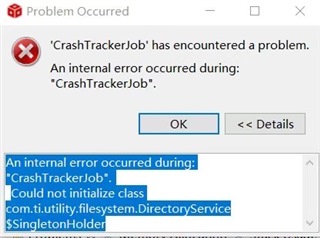
My customer tried to install CCS, When he was about to complete the installation, the following error was displayed. I also attach error log below. 

Multiple CCS versions including 11.2, 12.6 and 12.8 are tried but shows the same error. The computer is Windows10 32bit. Please help with the question. Thanks a lot!

BR,

Fengyu

  • Add one more information.

    The computer installed CCS 11.2 successfully and everything run properly before.

    Recently, they uninstalled CCS11.2, tried CCS12.6 but failed. Then, all the versions of CCS can't be installed successfully. 

  • Fengyu,

    Can you confirm that you are running a 32-bit version of Windows?

    CCS does not support 32-bit version anymore: https://software-dl.ti.com/ccs/esd/CCSv12/CCS_12_8_0/exports/CCS_12.8.0_ReleaseNotes.htm#_Toc173403754

    Thanks,

    Ricky

  • Hi Ricky,

    Apologize, their computer is 64 bit. Please refer to their computer specs.

    Since they failed to install CCS, after they import project, it shows below error. 

    BR,

    Fengyu

  • Fengyu,

    Can you clarify what the customer is seeing? Are they seeing issues during Installation? or after installation is finished and when they start CCS? 

    Also, can they try installing the latest CCS version (v12.8.1), try to install to a new folder, and see if they are still seeing the same errors?

    Thanks,

    Ricky

  • Hi Ricky,

    Both during installation and after installation, CCS shows errors.

    The first two pictures I posted are error and error log during installation. After the installation with error, we try to open CCS and import project. It shows "CrashTrackJob."

    We also tried V12.8.1, but it still shows error. 

    BR,

    Fengyu

  • Fengyu,

    Thanks for the clarification.

    Can you provide the install logs that are in the <installDir>\ccs\install_logs\ folder?

    Thanks,

    Ricky

  • Hi Ricky,

    Please refer to the attached files. Thanks!

    6318.install_logs.zip

    BR,

    Fengyu

  • Hi Fengyu,

    The error message you posted looks like it might be a problem with a missing dependency. I think there must be more to the problem though as we do test with clean Windows systems and do not see this problem.  The install logs didn't help me better understand the problem.

    Here are a couple of areas you could have a look at:

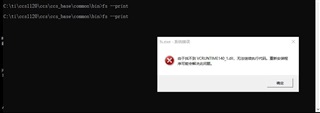
    The "LibraryLoader" referenced in the second screenshot it attempting to load DLLs from ccs\ccs_base\common\bin. I'm guessing one of these DLLs cannot be loaded for some reason.  Perhaps a simple "sanity test" of what is installed would be to open an command line window, CD to the ccs\ccs_base\common\bin, and run fs --print .

    This should print some information about the paths being used.  The paths are not important, but it would be good to know if the command runs as expected.

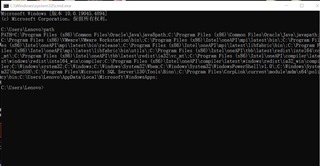
    A second area to investigate is the value of the Windows PATH environment variable.  I'm wondering if there could be something else being found on the PATH that is interfering with what the CCS install was expecting. One way to test this would be start a command line window, and then set the PATH to the minimal set of values.   IE, eliminate all the non default paths from the PATH variable.  On my system that would be something like this PATH=C:\Windows\system32;C:\Windows;C:\Windows\System32\Wbem;C:\Windows\System32\WindowsPowerShell\v1.0\; .

    Please let us know what you find.

    Thanks!

  • Hi Andy,

    Appreciate for your detail comments. We follow your suggestions and get below result. 

    For the first point, system error shows it can't find "VCRUNTIME140_1.dll", which lead to that code can't be executed.  It suggest us reinstall the application. But we tried may times but it doesn't  work. Do you have any other suggestions to fix the issue?


    For the second point, please refer to below snapshot.


    Thanks!

    BR,

    Fengyu

  • Hi Fengyu,

    The problem in your first screenshot points to there being something wrong with the Microsoft Redistributable libraries. I would recommend re-running the Microsoft redist installer for the latest version of these libraries.  You can download the Microsoft installer from here.  The direct link to the Microsoft download for x64 systems is here.

    From your second screenshot, it looks like your PATH has a number of items related to an Intel compiler product (oneAPI?), including references to "redist" folders. It makes me wonder if there is an incompatibility between that product and the CCS install.

    If reinstalling the Microsoft redistibutable does not help, the next thing would be to determine if the Intel install is causing a problem for CCS,. The easiest way to test that would be to open a command window and set your PATH variable to the same thing you currently have but without all the Intel paths.  IE, put the current PATH content in an editor, remove all the Intel path elements, and then do a set PATH=<your edited content> within the command window.  Then, try running the "fs" test again from the first point using the same command window you change the PATH in.

  • Hi Andy,

    Thanks for your help! We re-install Microsoft and the CCS runs successfully now. Really thanks for your professional input. Have a good day!

    BR,

    Fengyu