This thread has been locked.

If you have a related question, please click the "Ask a related question" button in the top right corner. The newly created question will be automatically linked to this question.

TDA4VEN-Q1: TDA4VEN-Q1: TDA4VEN GPU only calls the gCLear interface, and DDR bandwidth is very large

Part Number: TDA4VEN-Q1


Tool/software:

Hi ,TI's experts

HW :tda4ven board

SW env:sdk10.0

TDA4VEN GPU only calls the gClear interface, and the DDR bandwidth occupies up to 2.2G.

Why does it take up so much, we need your support to help optimize it

gclearcolor(0.0,0.0,1.0,1.0);

gCLear(GL COLOR BUFFER BIT I GL DEPTH BUFFER BIT);

  • Hi,

    Our expert assigned to this E2E thread is currently out of office until Dec 15. 

    Please expect a delay in response.

    Thanks,

    Neehar

  • Hi Sarabesh,

    please help check below summary about DDR BW difference.

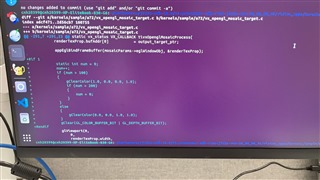
    diff --git a/kernels/sample/a72/vx_opengl_mosaic_target.c b/kernels/sample/a72/vx_opengl_mosaic_target.c
    index adcf471..cf1f775 100755
    --- a/kernels/sample/a72/vx_opengl_mosaic_target.c
    +++ b/kernels/sample/a72/vx_opengl_mosaic_target.c
    @@ -291,7 +291,23 @@ static vx_status VX_CALLBACK tivxOpenglMosaicProcess(
    renderTexProp.bufAddr[0] = output_target_ptr;

    appEglBindFrameBuffer(mosaicParams->eglWindowObj, &renderTexProp);
    -
    +#if 1
    + static int num = 0;
    + num++;
    + if (num > 100)
    + {
    + glClearColor(1.0, 0.0, 0.0, 1.0);
    + if (num > 200)
    + {
    + num = 0;
    + }
    + }
    + else
    + {
    + glClearColor(0.0, 0.0, 1.0, 1.0);
    + }
    + glClear(GL_COLOR_BUFFER_BIT | GL_DEPTH_BUFFER_BIT);
    +#endif

    Regards

    Joe

    -1-
    default case

    DDR performance statistics,
    ===========================

    DDR: READ BW: AVG = 951 MB/s, PEAK = 1673 MB/s
    DDR: WRITE BW: AVG = 3391 MB/s, PEAK = 5202 MB/s
    DDR: TOTAL BW: AVG = 4342 MB/s, PEAK = 6875 MB/s

    -2-
    enable #if 1

    DDR performance statistics,
    ===========================

    DDR: READ BW: AVG = 2177 MB/s, PEAK = 7889 MB/s
    DDR: WRITE BW: AVG = 3407 MB/s, PEAK = 12298 MB/s
    DDR: TOTAL BW: AVG = 5584 MB/s, PEAK = 20187 MB/s

    -3-
    enable #if 1 and comments glClearColor

    DDR performance statistics,
    ===========================

    DDR: READ BW: AVG = 2174 MB/s, PEAK = 8868 MB/s
    DDR: WRITE BW: AVG = 3397 MB/s, PEAK = 13884 MB/s
    DDR: TOTAL BW: AVG = 5571 MB/s, PEAK = 22752 MB/s

    -4-
    enable #if 1 and uncomments glClearColor / comments glClear

    DDR performance statistics,
    ===========================

    DDR: READ BW: AVG = 952 MB/s, PEAK = 1645 MB/s
    DDR: WRITE BW: AVG = 3396 MB/s, PEAK = 5231 MB/s
    DDR: TOTAL BW: AVG = 4348 MB/s, PEAK = 6876 MB/s

  • Hi,

    The expert engineer assigned this thread will be back from vacation tomorrow. He will look into this issue and respond as soon as possible.

    Thanks,

    Neehar

  • Hi Sarabesh,

    Could you please help to check?

    Regards

    Joe

  • Hi Sarabesh,

    Is there any update on this issue? Thanks

  • Hi Xingyu,

    I guess this makes sense. If we are doing continuously memset to a buffer, the DDR BW will increase drastically, isn't it? I think glClear is essentially setting a pixel with the fixed given color. If we set 24bit pixel value using CPU for large frame continuously, DDR BW will increase.. 

    Regards,

    Brijesh

  • ow we provide our internal test data and questions regarding this issue. Our test content, analysis, and questions are as follows:
    Question background:
    When TDA4ven GPU only calls the gClear and gClearColor interfaces, the DDR bandwidth consumption is very high. Where is the consumption? The rendering output frame rate is 25fps, and the rendering buf size is 2560 * 1440 RGBA format.
    Test steps:
    Start the processes of Bingling, svcamera, and AVM, and make the following modifications to AVM:
    Case1: UYVY input, RGBA output, tivxGpuAvmProcess function idling without rendering, turn off anti-aliasing, test DDR bandwidth data
    Case2: UYVY input, RGBA output, only call gClear and gClearColor interfaces, turn on anti-aliasing, test DDR bandwidth data
    Case3: UYVY input, RGBA output, only call gClear and gClearColor interfaces, turn off anti-aliasing, test DDR bandwidth data
    Test results/conclusion:
    our analysis and questions:
    Turning on anti-aliasing, the bandwidth consumed by glclear is 3244 - 631 = 2613M.
    Disable anti-aliasing, glclear consumes 1768 - 631 = 1137M bandwidth
    Anti-aliasing bandwidth consumption: 2613M - 1137M = 1,476M
    We estimate that the bandwidth consumed by glclearing the buffer after turning off the anti-aliasing is: 2560 * 1440 * 6 (rgba plus two depths) * 2 (read and write 2) * 25 /1024 = 1,054M
    Our questions: Is our estimation method correct? Is the consumption reasonable? Is there an optimization plan?
  • Hi jc,

    2560 x 1440 x 6 x 2 x 25 ~= 1.106GB DDR BW, so it is coming very close to 1137M BW. So i think it is reasonable, as the difference is very small. 

    As we discussed, the image size is big, almost 3.7MP, so instead of calling glClear for the entire frame, can we call this API only for the part of the image, where clearing is required? This will significantly reduce the DDR BW requirement for this API. 

    Regards,

    Brijesh 

  • hi Brijesh Jadav Do you have any API for clearing the color and depth buffers within a specific viewport? I tried other interfaces before, but they didn't work correctly.

  • Hi xie jc,

    Unfortunately, i am not sure about it. We will have to check with GPU expert here. 

    Regards,

    Brijesh

  • Hello,

    My apologies for the delay. I believe because you are using glClear to clear the entire 2560x1440 frame everytime, it consumes a lot of bandwith to reset the color and depth information all of the framebuffers. I see that you can reduce the bandwidth by turning off anti-aliasing which makes sense since there is more data stored per pixel with AA. If it's not needed then I suggest turning AA off.

    Another solution if you are looking to only clear a certain part of the frame instead of the entire 2560x1440 frame, is to use the glScissor() and specify the x, y coordinate of the frame as well as the area to clear. (link)

    Please refer to API documentation and examples.

    Regards,
    Sarabesh S.