This thread has been locked.

If you have a related question, please click the "Ask a related question" button in the top right corner. The newly created question will be automatically linked to this question.

DRA821U: TPS6594-Q1:Date time setting issue

Part Number: DRA821U
Other Parts Discussed in Thread: TPS6594-Q1,

Tool/software:

Hi Team,

I am working on a custom board based on the DRA821U SoC, and we are testing the RTC functionality in the TPS6594-Q1 PMIC. However, the RTC time is not updating correctly. For example, I set the time using the command date -s "2024-12-16 10:00:00" and powered off the board. When I immediately powered it back on, the time was updated correctly. However, after powering off the board for 15 minutes with the battery connected, the RTC did not update as expected; instead, it showed 2024-12-16 10:01:00. Additionally, I am encountering the following error:


[2024-12-16 15:14:53] root@j7200-iwg52m:~# hwclock -r
[2024-12-16 15:15:07] hwclock: select() to /dev/rtc0 to wait for clock tick timed out
[2024-12-16 15:15:07] root@j7200-iwg52m:~# hwclock -v
[2024-12-16 15:15:10] hwclock from util-linux 2.37.4
[2024-12-16 15:15:10] System Time: 1734361761.337436
[2024-12-16 15:15:10] Trying to open: /dev/rtc0
[2024-12-16 15:15:10] Using the rtc interface to the clock.
[2024-12-16 15:15:10] Last drift adjustment done at 1734361129 seconds after 1969
[2024-12-16 15:15:10] Last calibration done at 1734361129 seconds after 1969
[2024-12-16 15:15:10] Hardware clock is on UTC time
[2024-12-16 15:15:10] Assuming hardware clock is kept in UTC time.
[2024-12-16 15:15:10] Waiting for clock tick...
[2024-12-16 15:15:20] hwclock: select() to /dev/rtc0 to wait for clock tick timed out
[2024-12-16 15:15:20] ...synchronization failed
[2024-12-16 15:15:20] root@j7200-iwg52m:~#

  • Hi, 

    Can you please answer the below questions:

    • Which SDK version is being used?
    • Also are you using additional patches on top of the SDK?

    Best regards,

    Keerthy 

  • Hi Keerthy,

    Which SDK version is being used?

               ->ti-processor-sdk-linux-j7200-evm-09_02_00_04-Linux-x86-Install
    Also are you using additional patches on top of the SDK

                -> In rtc driver I have commented out the below section for bypassing the error print "tps6594-rtc tps6594-rtc.18.auto: hctosys: unable to read the hardware clock"


    +#if 0
                    /* Stop RTC until first call to `tps6594_rtc_set_time */
                    ret = regmap_clear_bits(tps->regmap, TPS6594_REG_RTC_CTRL_1,
                                            TPS6594_BIT_STOP_RTC);
                    if (ret < 0)
                            return ret;
    +#endif


    Regards,
    Madhusankar

  • Hello,

    Can you dump the RTC registers using i2cdump command?

    i2cdump -f -y 'bus_number' slave_id 'register_addr'.

    Do this before you power down and once you come back. I want to make sure RTC is ticking throughout. The time elapsed should correctly match.

    - Keerthy

  • Hi keerthy,

    I've dumbed the PMIC registers using i2cdump command ,find the below output ,or else can specify which register I have to read?

     [2024-12-19 10:16:50] root@j7200-iwg52m:~# i2cdump -f -y 0x0 0x48  
    [2024-12-19 10:16:55] No size specified (using byte-data access)
    [2024-12-19 10:16:55]      0  1  2  3  4  5  6  7  8  9  a  b  c  d  e  f    0123456789abcdef
    [2024-12-19 10:16:55] 00: 00 82 15 03 31 2b 21 2b 31 2b 21 2b 31 1b 37 37    .???1+!+1+!+1?77
    [2024-12-19 10:16:55] 10: 37 37 37 37 37 37 73 73 1b 1b 1b 1b 1b 31 31 31    777777ss?????111
    [2024-12-19 10:16:55] 20: 31 00 00 38 12 10 38 1b 1b 1b 1b 20 7f 00 00 00    1..8??8???? ?...
    [2024-12-19 10:16:55] 30: 00 01 01 58 d8 01 03 38 78 21 08 01 11 10 05 d4    .??X???8x!??????
    [2024-12-19 10:16:55] 40: 0f 55 55 05 3e 01 55 55 15 00 00 00 00 00 00 ff    ?UU?>?UU?.......
    [2024-12-19 10:16:55] 50: ff 3f 11 02 30 00 00 00 00 07 00 00 00 00 00 00    .???0....?......
    [2024-12-19 10:16:55] 60: 00 00 00 00 00 00 00 00 00 00 00 00 00 00 00 00    ................
    [2024-12-19 10:16:55] 70: 00 00 00 02 00 00 00 00 00 00 00 80 00 00 00 00    ...?.......?....
    [2024-12-19 10:16:55] 80: 00 19 02 00 0f 00 03 00 00 00 1f 0b 00 00 00 01    .??.?.?...??...?
    [2024-12-19 10:16:55] 90: 00 00 60 00 00 00 00 00 01 00 00 60 00 00 00 00    ..`.....?..`....
    [2024-12-19 10:16:55] a0: 00 00 00 80 00 00 08 00 00 00 00 00 00 00 00 00    ...?..?.........
    [2024-12-19 10:16:55] b0: 00 00 00 00 00 51 20 18 18 12 24 03 00 00 00 00    .....Q ???$?....
    [2024-12-19 10:16:55] c0: 00 00 41 eb 02 00 00 00 00 00 00 00 00 58 9d 00    ..A??........X?.
    [2024-12-19 10:16:55] d0: 00 00 00 00 00 00 00 00 00 00 00 00 00 00 00 00    ................
    [2024-12-19 10:16:55] e0: 00 00 00 00 00 00 00 00 00 00 00 00 00 00 00 00    ................
    [2024-12-19 10:16:55] f0: 5a a6 28 c9 ff 52 c0 7f af b2 04 b7 00 00 22 0a    Z?(?.R??????.."?
    [2024-12-19 10:16:55] root@j7200-iwg52m:~#
    [2024-12-19 10:16:55] root@j7200-iwg52m:~#

  • Hi Keerthy,

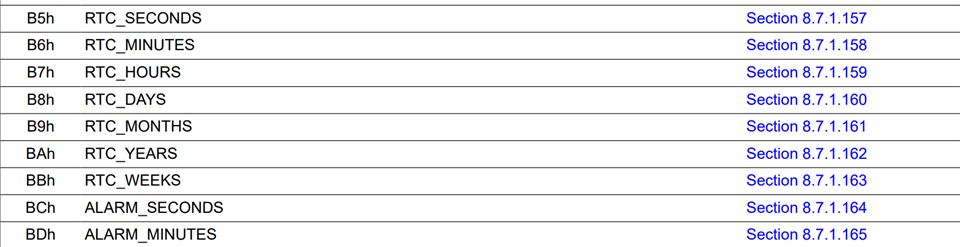
    please find the reading of the mentioned registers

    [2024-12-19 16:29:22] root@j7200-iwg52m:~# i2cget -f -y 0x0 0x48 0xB5
    [2024-12-19 16:30:02] 0x26
    [2024-12-19 16:30:02] root@j7200-iwg52m:~#
    [2024-12-19 16:30:03] root@j7200-iwg52m:~#
    [2024-12-19 16:30:03] root@j7200-iwg52m:~# i2cget -f -y 0x0 0x48 0xB6
    [2024-12-19 16:30:10] 0x54
    [2024-12-19 16:30:10] root@j7200-iwg52m:~# i2cget -f -y 0x0 0x48 0xB7
    [2024-12-19 16:30:12] 0x17
    [2024-12-19 16:30:12] root@j7200-iwg52m:~# i2cget -f -y 0x0 0x48 0xB8
    [2024-12-19 16:30:15] 0x28
    [2024-12-19 16:30:15] root@j7200-iwg52m:~# i2cget -f -y 0x0 0x48 0xB9
    [2024-12-19 16:30:18] 0x04
    [2024-12-19 16:30:18] root@j7200-iwg52m:~# i2cget -f -y 0x0 0x48 0xBA
    [2024-12-19 16:30:23] 0x22
    [2024-12-19 16:30:23] root@j7200-iwg52m:~# i2cget -f -y 0x0 0x48 0xBB
    [2024-12-19 16:30:25] 0x04
    [2024-12-19 16:30:25] root@j7200-iwg52m:~# i2cget -f -y 0x0 0x48 0xBC
    [2024-12-19 16:30:30] 0x10
    [2024-12-19 16:30:30] root@j7200-iwg52m:~# i2cget -f -y 0x0 0x48 0xBD
    [2024-12-19 16:30:34] 0x53
    [2024-12-19 16:30:34] root@j7200-iwg52m:~#
    [2024-12-19 16:30:35] root@j7200-iwg52m:~#
    [2024-12-19 16:30:35] root@j7200-iwg52m:~#
    [2024-12-19 16:30:54] root@j7200-iwg52m:~# date -R
    [2024-12-19 16:30:55] Thu, 28 Apr 2022 17:55:17 +0000
    [2024-12-19 16:30:55] root@j7200-iwg52m:~#
    [2024-12-19 16:30:55] root@j7200-iwg52m:~#
    [2024-12-19 16:30:56] root@j7200-iwg52m:~# date -s '2024-12-19 16:34:20'
    [2024-12-19 16:31:13] Thu Dec 19 16:34:20 UTC 2024[  431.176874] systemd-journald[169]: Oldest entry in /run/log/journal/2b4744385111483fbad3d2531f865c8d/system.journal is older than the configured file retenti.
    [2024-12-19 16:31:13]
    [2024-12-19 16:31:13] [  431.195692] systemd-journald[169]: /run/log/journal/2b4744385111483fbad3d2531f865c8d/system.journal: Journal header limits reached or header out-of-date, rotating.
    [2024-12-19 16:31:13] root@j7200-iwg52m:~#
    [2024-12-19 16:31:15] root@j7200-iwg52m:~#
    [2024-12-19 16:31:15] root@j7200-iwg52m:~#
    [2024-12-19 16:31:15] root@j7200-iwg52m:~# date -R
    [2024-12-19 16:31:17] Thu, 19 Dec 2024 16:34:24 +0000
    [2024-12-19 16:31:17] root@j7200-iwg52m:~#
    [2024-12-19 16:31:18] root@j7200-iwg52m:~#
    [2024-12-19 16:31:18] root@j7200-iwg52m:~# date -R
    [2024-12-19 16:31:19] Thu, 19 Dec 2024 16:34:26 +0000
    [2024-12-19 16:31:19] root@j7200-iwg52m:~#
    [2024-12-19 16:31:20] root@j7200-iwg52m:~#
    [2024-12-19 16:31:41] root@j7200-iwg52m:~#
    [2024-12-19 16:31:41] root@j7200-iwg52m:~# hwclock -w -f /dev/rtc0
    [2024-12-19 16:31:57] root@j7200-iwg52m:~#
    [2024-12-19 16:31:58] root@j7200-iwg52m:~#
    [2024-12-19 16:31:58] root@j7200-iwg52m:~#
    [2024-12-19 16:31:58] root@j7200-iwg52m:~#
    [2024-12-19 16:31:58] root@j7200-iwg52m:~# i2cget -f -y 0x0 0x48 0xB5
    [2024-12-19 16:32:06] 0x12
    [2024-12-19 16:32:06] root@j7200-iwg52m:~#
    [2024-12-19 16:32:12] root@j7200-iwg52m:~# i2cget -f -y 0x0 0x48 0xB6
    [2024-12-19 16:32:14] 0x35
    [2024-12-19 16:32:14] root@j7200-iwg52m:~#
    [2024-12-19 16:32:14] root@j7200-iwg52m:~# i2cget -f -y 0x0 0x48 0xB7
    [2024-12-19 16:32:19] 0x16
    [2024-12-19 16:32:19] root@j7200-iwg52m:~#
    [2024-12-19 16:32:20] root@j7200-iwg52m:~# i2cget -f -y 0x0 0x48 0xB8
    [2024-12-19 16:32:23] 0x19
    [2024-12-19 16:32:23] root@j7200-iwg52m:~# i2cget -f -y 0x0 0x48 0xB9
    [2024-12-19 16:32:25] 0x12
    [2024-12-19 16:32:25] root@j7200-iwg52m:~# i2cget -f -y 0x0 0x48 0xBA
    [2024-12-19 16:32:28] 0x24
    [2024-12-19 16:32:28] root@j7200-iwg52m:~# i2cget -f -y 0x0 0x48 0xBB
    [2024-12-19 16:32:29] 0x04
    [2024-12-19 16:32:29] root@j7200-iwg52m:~# i2cget -f -y 0x0 0x48 0xBC
    [2024-12-19 16:32:31] 0x10
    [2024-12-19 16:32:31] root@j7200-iwg52m:~# i2cget -f -y 0x0 0x48 0xBD
    [2024-12-19 16:32:34] 0x53
    [2024-12-19 16:32:34] root@j7200-iwg52m:~#


    Note : I am not connected the rtc coin cell,still date time is changing

    Regards,
    Madhusankar S P


  • HI keerthy,

    Is there any update on the above query ?

    Regards,
    Madhusankar S P

  • Hello,

    Please expect delayed response due to holiday season.

    I am not connected the rtc coin cell,still date time is changing

    Yes. When the SOC is powered up then the RTC will use the SOC voltage rails. When SOC is off coin cell battery will be used.

    - Keerthy

  • Hi Keerthy,

    Is there any driver change is required for the issue what am facing ?This is critical issue for me to go forward.

    Regards,
    Madhusankar S P

  • Hi,

    Before I loop in the PMIC expert. I am summarizing my understanding of the issue here:

    1. The RTC time update happens as expected when Linux boots up.
    2. Then you power off the SOC and only power up the RTC using coin cell battery.
    3. You still see that the time has incremented but wrong after you power up the SOC again.

    Is the above correct?

    - Keerthy

  • Hi Keerthy,


    1.Power on SoC
    2.Set time and date  (date -s "2024-12-16 10:00:00)
    3.power off the Soc
    4.Power on Soc
    5.checked the time with date -R (2024-12-16 10:01:00)

    the above 5 steps are perfectly fine,,the issue is if the SoC is power off for 30 minutes with Coin cell is connected time is not incrementing


    Regards,
    Madhusankar

  • Hello Madhusankar,

    I'm from the PMIC team, firstly thank you for providing a register dump, this helps quite a bit.

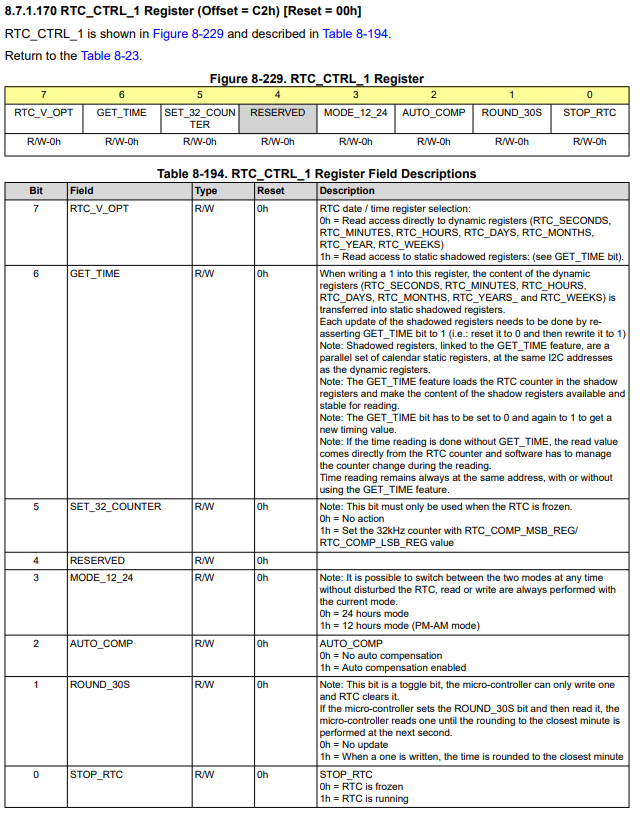
    For register 0xC2, I noticed with value 0x41, that the GET_TIME bit is set from the dump. From the register description below it looks like this may need to be reset with writing 0x0 to this field & then writing 0x1 to GET_TIME in order to have the most up to date.

    1.Power on SoC
    2.Set time and date  (date -s "2024-12-16 10:00:00)
    3.power off the Soc
    4.Power on Soc
    5.checked the time with date -R (2024-12-16 10:01:00)

    the above 5 steps are perfectly fine,,the issue is if the SoC is power off for 30 minutes with Coin cell is connected time is not incrementing

    Could you do the following again. I'm not familiar with the SDK's implementation of the driver, but we can see what's going on the I2C level and work from there:

    • Between steps 1 & 2: Perform an I2C get of registers 0xC2, 0xC3, 0xC4
    • Perform Step 5: After step 5, perform I2C set command to set GET_TIME = 0x0, perform I2C get of registers to see if new time is updated
    • If time has updated correctly after readback of registers 0xB5 to 0xBB, then somewhere GET_TIME is being set but not being reset hence when readback of the time not changing since the setting of GET_TIME

    Looking forward to command line output, in the meantime if you have additional questions, please do ask.

    BR,

    Nicholas McNamara